
1. Introduction
This manual provides detailed instructions for the safe and efficient operation, setup, and maintenance of your WEP 948D-I 110W High-Power Desoldering Station. Please read this manual thoroughly before using the device to ensure proper functionality and to prevent damage or injury.
The WEP 948D-I is designed for rapid and stable desoldering on multi-layer PCBs, offering features like a 110W desoldering gun, tiltable LCD display, 3 preset temperature channels, and automatic sleep/standby modes.
2. Safety Instructions
Always observe the following safety precautions to prevent electric shock, fire, or injury:
- Power Supply: This product is certified for 220-240V 50Hz with an EU Type F power plug. DO NOT connect this product to a 110V power outlet. Ensure the power source matches the device's requirements.
- ESD Safety: The station is designed with ESD (Electrostatic Discharge) safe features. However, always take additional ESD precautions when working with sensitive electronic components.
- Hot Surfaces: The desoldering gun tip and surrounding metal parts become extremely hot during operation. Avoid direct contact. Use the provided holder for the desoldering gun when not in use.
- Ventilation: Use the desoldering station in a well-ventilated area to avoid inhaling solder fumes.
- Eye Protection: Always wear safety glasses to protect your eyes from splashes of molten solder or debris.
- Flammable Materials: Keep flammable materials away from the working area.
- Children and Pets: Keep the device out of reach of children and pets.
- Maintenance: Disconnect the power cord before performing any maintenance or cleaning. Allow the unit to cool down completely.
3. Package Contents
Verify that all items listed below are included in your package:

Image 3.1: Overview of the WEP 948D-I Desoldering Station and its complete set of accessories.
- WEP 948D-I Desoldering Station Unit
- Detachable Desoldering Gun (110W)
- Desoldering Gun Holder (100% metallic)
- Desoldering Nozzles (4 pieces: 0.8mm, 1.0mm, 1.2mm, 2.0mm)
- Heat-resistant Silicone Pad (1 piece)
- Cleaning Pins Set
- Filtration Adsorbers (10 pieces)
- Ceramic Filters (5 pieces)
- Vacuum Receptacle Cover (1 piece)
- Solder Residue Storage Chamber (1 piece)
- Solder Residue Filter Springs (2 pieces)
- Retainers (2 pieces)
- Power Cord (EU Type F plug)

Image 3.2: Close-up view of the various accessories included with the WEP 948D-I desoldering station, such as nozzles, filters, cleaning tools, and the residue collection chamber.
4. Setup
- Unpacking: Carefully remove all components from the packaging. Retain the packaging for future storage or transport.
- Placement: Place the desoldering station on a stable, heat-resistant, and ESD-safe workbench. Ensure adequate clearance for ventilation around the unit.
- Connect Desoldering Gun: Connect the desoldering gun cable to the designated port on the front panel of the main unit. Ensure a secure connection.
- Position Holder: Place the metallic desoldering gun holder in a convenient location on your workbench. This holder is essential for safely resting the hot desoldering gun when not in active use.
- Power Connection: Connect the power cord to the back of the desoldering station and then plug it into a 220-240V 50Hz EU Type F power outlet. Do not connect to a 110V outlet.
5. Operating Instructions
5.1 Power On/Off
- To power on the unit, flip the main power switch located on the front panel to the "ON" position.
- To power off, flip the switch to the "OFF" position.
5.2 Temperature Adjustment and Preset Channels
The WEP 948D-I features a temperature range of 380°C to 480°C (716°F to 896°F) and three programmable preset channels.

Image 5.1: The control panel showing the 3 preset channel buttons (CH1, CH2, CH3) for quick temperature selection.
- Adjusting Temperature: Use the up/down arrow buttons on the control panel to manually set the desired temperature.
- Using Preset Channels:
- The station comes with default presets: CH1 (380°C), CH2 (400°C), CH3 (480°C).
- To select a preset, simply press the corresponding CH1, CH2, or CH3 button.
- To save a new temperature to a preset channel: Set the desired temperature manually, then press and hold the desired CH button (e.g., CH1) until the display confirms the setting is saved.
5.3 Display Features

Image 5.2: The tiltable LCD display of the WEP 948D-I, designed for optimal viewing angles.
- Tiltable LCD: The LCD display can be adjusted to different angles for improved visibility based on user height and working position.
- Temperature Units: The display can switch between Celsius (°C) and Fahrenheit (°F). Refer to the multi-function menu section for details on changing this setting.
5.4 Sleep Mode and Automatic Standby
These features help reduce oxidation of the desoldering tip, minimize wear on the heating element, and conserve energy.

Image 5.3: Visual representation of the sleep mode and automatic shutdown timers.
- Sleep Mode: When the desoldering gun is placed in its holder for a user-defined period (0-120 minutes), the station automatically enters sleep mode, reducing the tip temperature. Setting the sleep timer to "0" disables this feature.
- Automatic Standby: If the unit remains in sleep mode for more than 30 minutes without being reactivated, the power to the heating element is automatically cut off, and the unit enters standby mode to further prolong the heating element's lifespan.
5.5 How to Desolder
Follow these steps for effective desoldering:
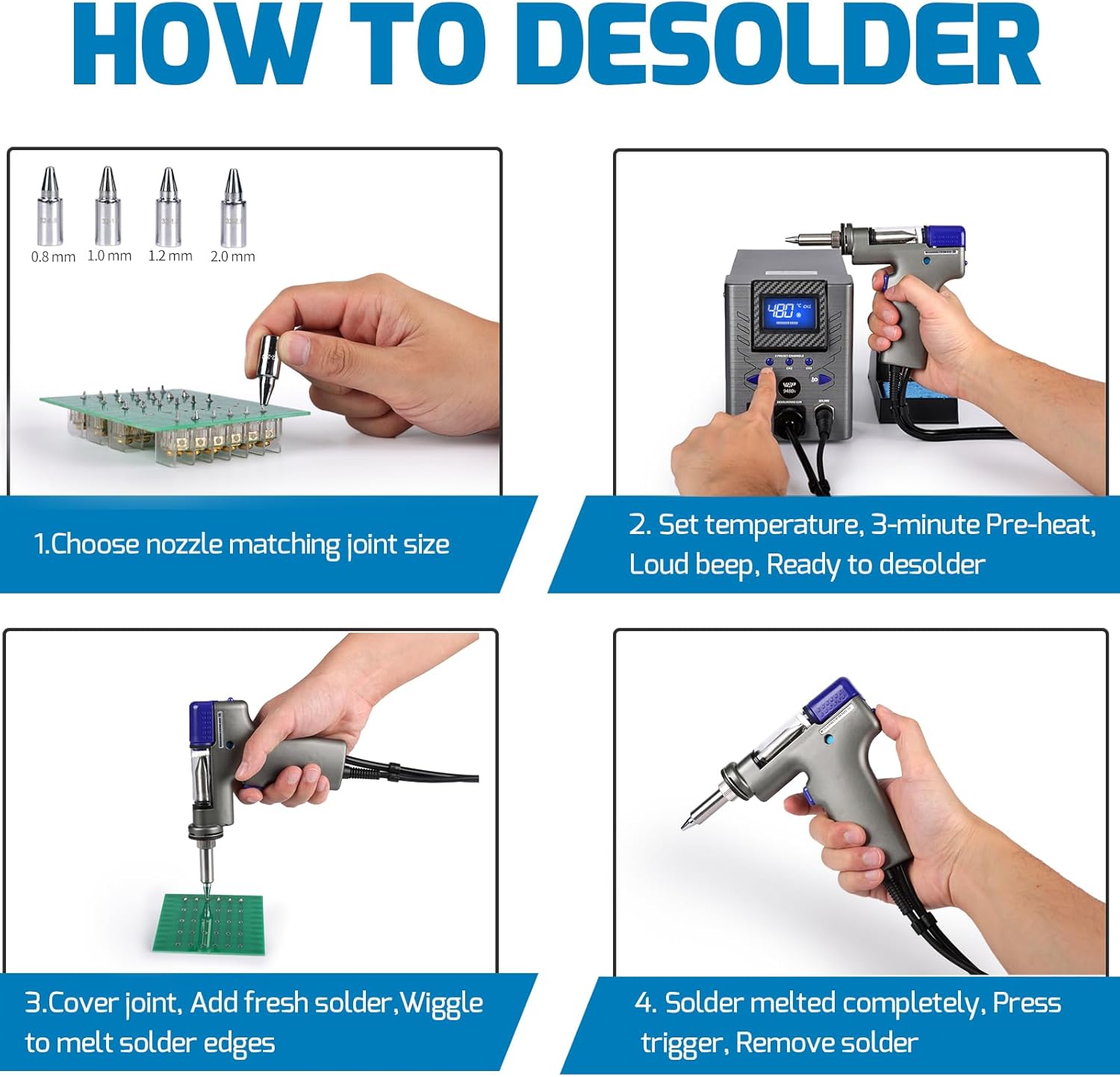
Image 5.4: A visual guide illustrating the four key steps for desoldering with the WEP 948D-I.
- Choose Nozzle: Select a desoldering nozzle that matches the size of the solder joint you intend to remove.
- Set Temperature & Preheat: Set the desired temperature (e.g., 380°C - 480°C). Allow approximately 3 minutes for the gun to preheat. A beep will indicate it's ready.
- Apply Heat & Fresh Solder: Place the nozzle over the solder joint. If the solder is difficult to melt, add a small amount of fresh solder to the joint. This helps improve heat transfer and flow. Gently wiggle the gun to ensure the solder melts completely.
- Remove Solder: Once the solder is fully molten, press the trigger on the desoldering gun to activate the vacuum pump and remove the solder.

Image 5.5: A user demonstrating the desoldering process on a circuit board using the WEP 948D-I desoldering gun.
The 110W high-power desoldering gun is designed for single-handed operation, making it efficient for multi-layer PCBs and component recovery. This contrasts with traditional methods that often require two hands and may leave more residue.

Image 5.6: Comparison highlighting the efficiency of the 110W desoldering gun for single-handed operation and clean results, versus the two-handed operation and potential residue of a traditional soldering iron and desoldering pump.
6. Maintenance
Regular maintenance ensures the longevity and optimal performance of your desoldering station.
- Cleaning the Desoldering Gun Tip: Use the provided cleaning pins to clear any solder blockages from the nozzle and internal passages of the desoldering gun. Perform this regularly, especially after heavy use.
- Emptying Solder Residue Chamber: The solder residue collection chamber should be emptied regularly to prevent buildup and maintain vacuum efficiency. Disconnect power and allow the unit to cool before opening and cleaning.
- Replacing Filters: Periodically inspect and replace the filtration adsorbents and ceramic filters as they become saturated with solder fumes and particles. This maintains air quality and vacuum performance.
- General Cleaning: Keep the main unit and desoldering gun clean from dust and debris using a soft, dry cloth. Do not use abrasive cleaners or solvents.
7. Troubleshooting
| Problem | Possible Cause | Solution |
|---|---|---|
| No power | Power cord not connected; Power switch off; Incorrect voltage. | Ensure power cord is securely plugged in. Turn power switch ON. Verify power outlet is 220-240V. |
| Desoldering gun not heating | Heating element failure; Loose connection; Unit in sleep/standby mode. | Check gun connection. Reactivate from sleep/standby by picking up the gun. If issue persists, contact support. |
| Weak vacuum suction | Clogged nozzle; Full solder residue chamber; Clogged filters. | Clean nozzle with cleaning pins. Empty solder residue chamber. Replace filtration adsorbents and ceramic filters. |
| Temperature display inaccurate | Sensor issue; Calibration needed. | Contact technical support for assistance. |
8. Specifications
| Feature | Detail |
|---|---|
| Model Number | WEP 948D-I |
| Power Input | 220-240V AC, 50Hz (EU Type F Plug) |
| Desoldering Gun Power | 110W |
| Temperature Range | 380°C - 480°C (716°F - 896°F) |
| Temperature Stability | ±2°C (static) |
| Display Type | Tiltable LCD Digital Display |
| Preset Channels | 3 (Programmable) |
| Sleep Mode Timer | 0-120 minutes (Adjustable) |
| Auto Standby Timer | 30 minutes (after entering sleep mode) |
| Dimensions (Unit) | Approx. 220mm (L) x 120mm (W) x 156mm (H) (8.7 x 4.7 x 6.1 inches) |
| Weight | Approx. 3.13 kg |
| ESD Safe | Yes |
9. Warranty and Support
This WEP product is covered by a one-year technical warranty for the EU. Our technical support team is available 24 hours a day to assist you with any questions or issues.
For technical assistance or warranty claims, please contact WEP customer support through the official channels provided at the point of purchase or on the WEP brand website.


