
FKU C17
FKU C17 Auto Face Tracking AI Gimbal Selfie Stick Tripod User Manual
Model: C17
Introduction
This manual provides detailed instructions for the safe and effective use of your FKU C17 Auto Face Tracking AI Gimbal Selfie Stick Tripod. Please read this manual thoroughly before operating the device and retain it for future reference.
Package Contents
- 1X C17 AI Gimbal Selfie Stick Tripod with Stand
- 1X Detachable Wireless Remote
- 1X Charging Cable
- 1X User Manual
Setup Instructions
1. Unfolding the Tripod and Extending the Stick
Gently unfold the four legs of the tripod base until they are fully extended and stable. Extend the selfie stick rod to your desired height. The maximum extension is 1.63 meters (64 inches).

Image: The FKU C17 Gimbal Selfie Stick Tripod extended to its full height, showcasing the stable quad-leg base and the phone holder at the top. This image illustrates the product's extended form and stability.
2. Attaching Your Device
Open the phone clip and securely place your smartphone or compatible device. Ensure the device is balanced within the clip. The gimbal supports 360° auto rotation for various shooting angles.

Image: A close-up of the FKU C17 gimbal head, showing the 1/4 inch universal interface for attaching accessories like cameras or fill lights, and diagrams illustrating 360-degree and 270-degree multi-angle adjustment for the phone holder.
Note: The device features a universal 1/4" interface, allowing compatibility with various accessories such as fill lights or action cameras.
3. Pairing the Bluetooth Remote
The detachable wireless remote control allows for hands-free operation. No app is required for connection.
- Locate the power switch on the side of the remote control.
- Slide the switch to the 'ON' position (left to turn on, right to turn off). The indicator light will flash.
- On your smartphone, enable Bluetooth and search for available devices.
- Select "FKU Remote" or a similar name from the list to pair. The indicator light will stop flashing once connected.

Image: The FKU C17 Gimbal Selfie Stick Tripod in use on a beach, with a smartphone mounted and the detachable wireless remote control shown separately. The remote has a range of up to 10 meters (33 feet).
Operating Instructions
1. Powering On/Off the Gimbal
Long press the power button on the gimbal to turn it on or off. Ensure the gimbal is in the unlocked state before powering on to avoid motor damage.
Image: A detailed view of the FKU C17 gimbal, highlighting the power button and gesture button. It also shows the adjustable gimbal lens angle for sitting and standing positions, and a warning to use the gimbal in the unlocked state.
2. AI Face Tracking
The C17 features advanced AI face-tracking technology. Once powered on, the gimbal will automatically detect and follow faces.
- To start tracking, make an "OK" hand gesture towards the camera.
- To pause tracking, show your open palm towards the camera.
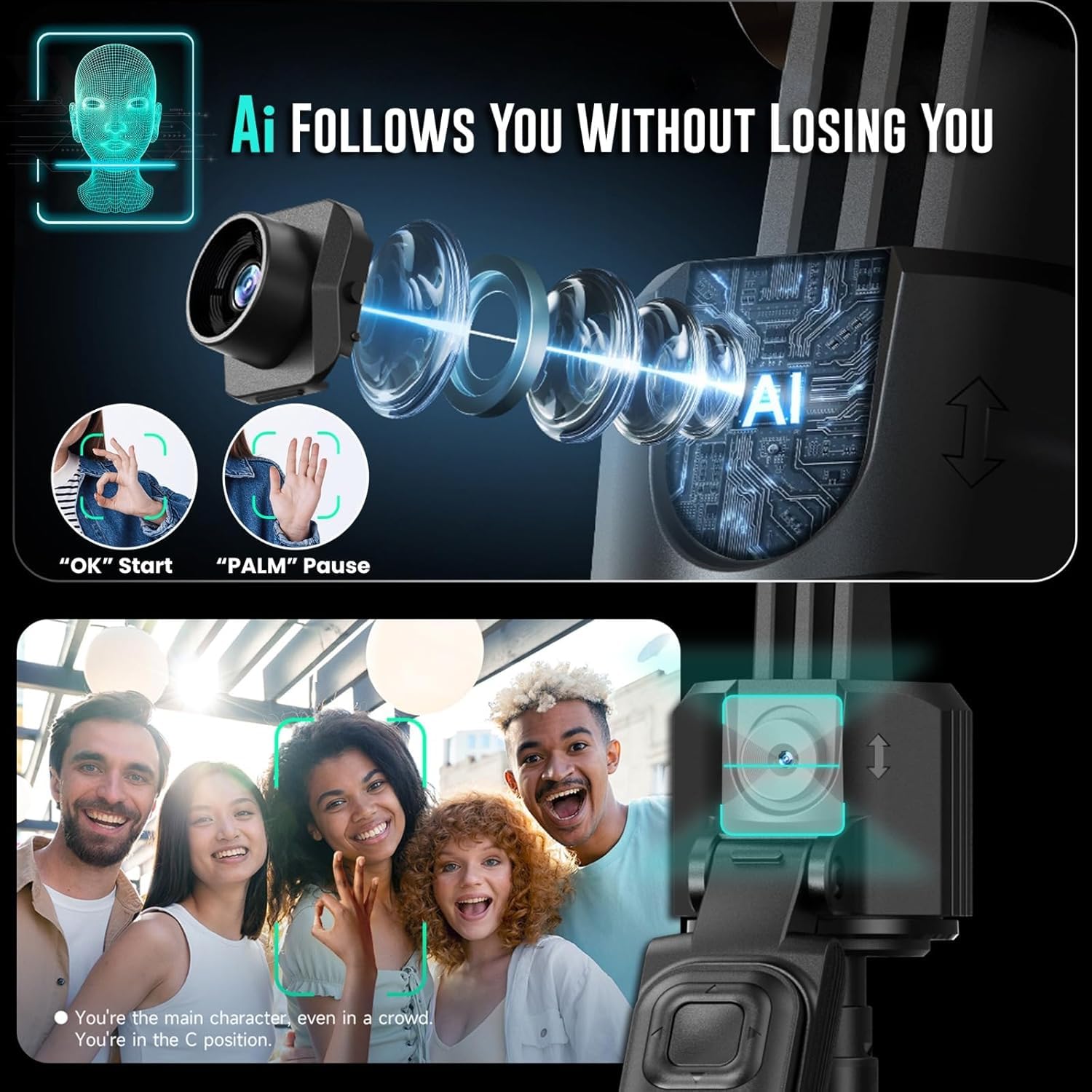
Image: An illustration demonstrating the AI face tracking capability of the FKU C17, showing how it follows a person's face. Insets show the "OK" gesture to start tracking and the "PALM" gesture to pause tracking.
3. Using the Detachable Remote Control
After pairing, the remote can be used to control your device.
- Camera Button: Press to take photos or start/stop video recording.
- Arrow Buttons: Control mouse direction (for scrolling short videos or navigating).
- Like Button: Press once to pause, double-click to like (functionality depends on the app).
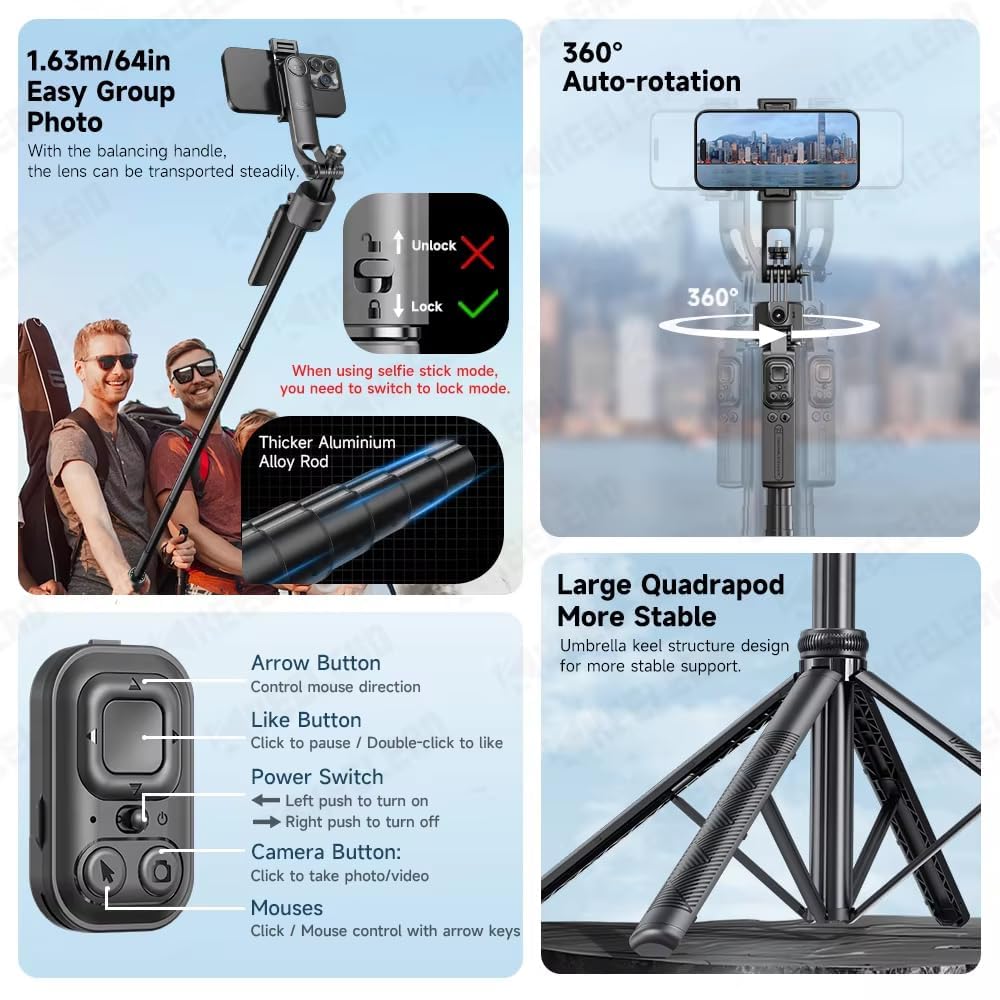
Image: A composite image showing various features of the FKU C17. It details the functions of the remote control buttons (Arrow, Like, Power Switch, Camera Button) and illustrates the 360-degree auto-rotation, the lock/unlock mechanism for the gimbal, and the stable quadrapod design.
4. Multi-Angle Adjustment and Rotation
The gimbal supports 360° auto rotation for capturing wide-angle views or immersive videos. The phone clip can also be detached and used as a standalone phone holder for hands-free viewing.
Image: A close-up of the FKU C17 gimbal head, showing the 1/4 inch universal interface for attaching accessories like cameras or fill lights, and diagrams illustrating 360-degree and 270-degree multi-angle adjustment for the phone holder.
Maintenance
- Cleaning: Wipe the device with a soft, dry cloth. Avoid using harsh chemicals or abrasive materials.
- Storage: Store the gimbal in a cool, dry place away from direct sunlight and extreme temperatures.
- Battery Care: Charge the device regularly, even if not in use, to maintain battery health. Avoid overcharging.
- Motor Protection: Always ensure the gimbal is in the unlocked position before powering it on to prevent damage to the motor.
Troubleshooting
| Problem | Possible Cause | Solution |
|---|---|---|
| Gimbal not powering on. | Low battery or power button not pressed correctly. | Charge the gimbal using the provided charging cable. Ensure the power button is long-pressed. |
| AI Face Tracking not working. | Incorrect gesture, poor lighting, or gimbal locked. | Ensure clear "OK" gesture to start and "PALM" to pause. Check lighting conditions. Verify gimbal is unlocked. |
| Bluetooth remote not connecting. | Remote off, low battery, or not in pairing mode. | Ensure remote is powered on. Charge remote if necessary. Re-enter pairing mode on remote and phone. |
| Gimbal motor making noise or not moving smoothly. | Gimbal is locked or overloaded. | Ensure the gimbal is in the unlocked state. Do not exceed the maximum weight recommendation of 500 grams. |
| Unstable tripod. | Legs not fully extended or uneven surface. | Ensure all four legs are fully extended and locked. Place on a flat, stable surface. Avoid use in strong winds. |
Technical Specifications
| Model Name | C17 Face Tracking Camera Selfie Stick |
| Brand | FKU |
| Colour | BLACK |
| Compatible Devices | Camera, Smartphone, Tablet |
| Product Dimensions (D x W x H) | 4D x 6W x 32H Centimeters |
| Item Weight | 666 Grams |
| Folded Size | 32 cm |
| Maximum Weight Recommendation | 500 Grams |
| Image Stabilization Type | Image Stabilization |
| Exposure Control Type | Automatic |
| Audio Recording | No |
Warranty Information
This FKU C17 Auto Face Tracking AI Gimbal Selfie Stick Tripod comes with a 30-day warranty from the date of purchase. This warranty covers manufacturing defects. Please retain your proof of purchase for any warranty claims.
Support and Contact
For technical support, troubleshooting assistance, or warranty inquiries, please contact the manufacturer:
Manufacturer: ARHAMCOM, BHANDUP MUMBAI
Please refer to your purchase documentation for specific contact details or visit the official FKU website for further assistance.
Ask a question about this manual
Ask about setup, troubleshooting, compatibility, parts, safety, or missing instructions. Manuals+ will review the question and use this page’s manual context to help answer it.