
MELONARE PM-2
MELONARE PM-2 Portable Wireless In Ear Monitor System Instruction Manual
Model: PM-2
1. Introduction
The MELONARE PM-2 is a portable wireless in-ear monitor system designed for musicians, performers, and content creators. It provides high-quality audio monitoring with features like OTG input, mono/stereo switching, and extended battery life, ensuring a seamless and reliable audio experience in various settings.

Figure 1: MELONARE PM-2 Portable Wireless In Ear Monitor System.
2. What's in the Box
Please verify that all the following components are included in your package:
- 1 x Wireless In-Ear Monitor Transmitter (TX)
- 2 x Wireless In-Ear Monitor Receiver (RX)
- 1 x Charging Case
- 1 x USB Charging Cable
- 1 x 6.35mm Adapter
- 1 x 3.5mm Audio Cable
- 1 x Type-C to Type-C OTG Cable
- 1 x User Manual

Figure 2: Package Contents of the PM-2 System.
3. Product Overview
3.1. Component Identification

Figure 3: Transmitter and Receiver Component Overview.
3.2. Key Features
- Extended Battery Life: Each transmitter and receiver unit provides up to 10 hours of continuous use. The included 2000mAh charging case offers two additional full recharges, extending the total runtime to 30 hours.
- OTG Audio Input Support: Connect the wireless IEM system to smartphones, tablets, and laptops using the included OTG cable for real-time monitoring without complex wiring.
- Crystal Clear Audio: Operates on the 2.4GHz band, delivering 24bit/48kHz HD audio with a 20Hz–20kHz frequency response and a 100dB signal-to-noise ratio for clear, distortion-free sound.
- One-to-Many Wireless Monitoring: A single transmitter can connect to multiple receivers, each with independent volume control. Supports up to 10 complete sets simultaneously within a 150 ft stable wireless range. Features fast auto-pairing.
- One-Touch Mono/Stereo Switching: Easily switch between mono for crisp vocals and stereo for immersive instrument separation.
- Compact & Portable Design: Features a compact belt clip for secure attachment to clothing or gear.

Figure 4: Battery Life Overview.

Figure 5: OTG Audio Input Connectivity.

Figure 6: Audio Quality Specifications.
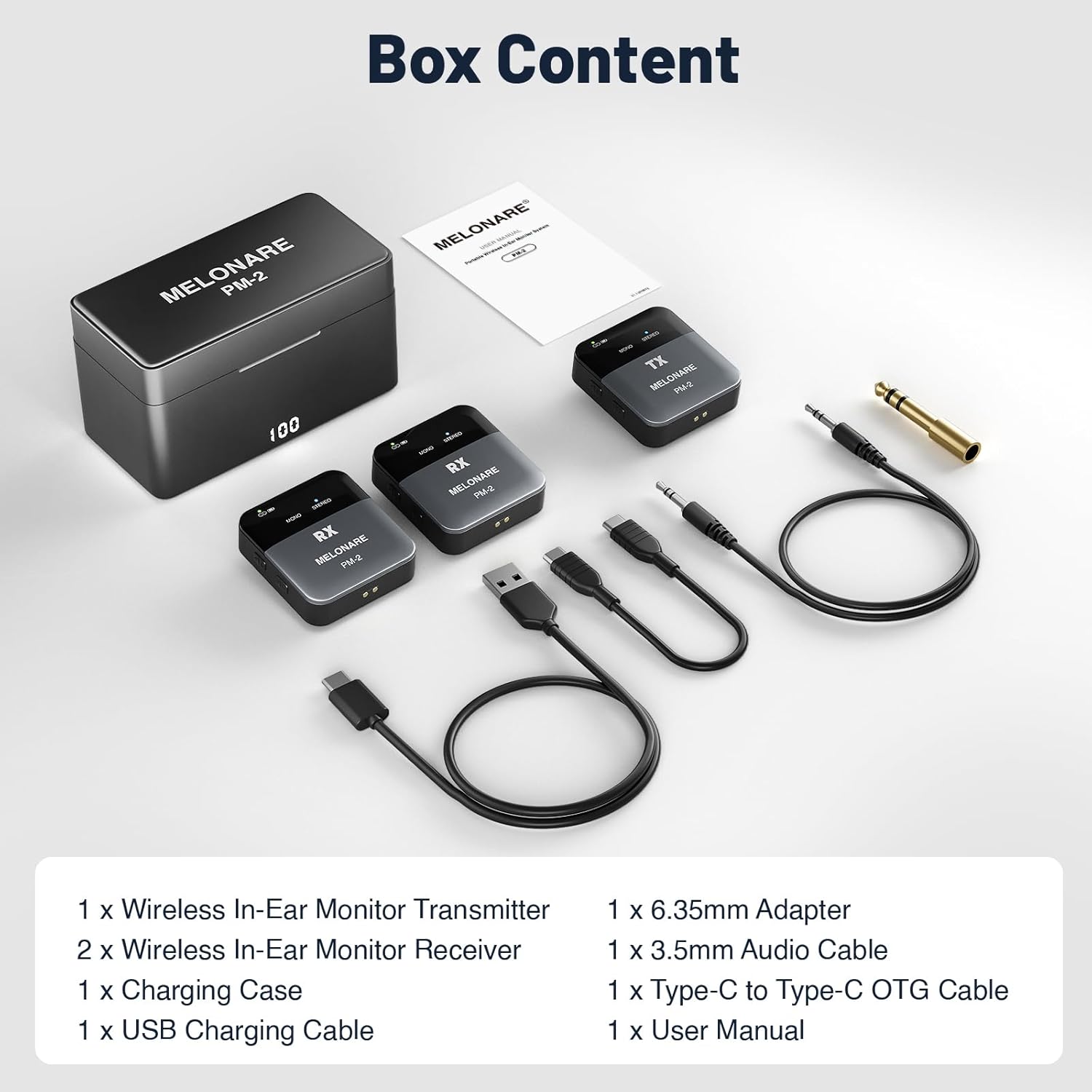
Figure 7: Wireless Range and Auto-Pairing.

Figure 8: Expandable Setup for Multiple Receivers.
4. Setup Instructions
4.1. Charging the Units
- Place the Transmitter (TX) and Receiver (RX) units into the charging case.
- Connect the USB Charging Cable to the charging case and a power source.
- The charging case's display will indicate the battery level. A full charge provides up to 30 hours of total runtime (10 hours per unit + 2 recharges from the case).
4.2. Connecting the Transmitter (TX)
Connect the TX unit to your audio source:
- For Smartphones/Tablets (with USB-C): Use the provided Type-C to Type-C OTG Cable.
- For Laptops/Mixers/Amplifiers (with 3.5mm or 6.35mm output): Use the 3.5mm Audio Cable. If your source has a 6.35mm output, attach the 6.35mm Adapter to the 3.5mm cable.
4.3. Connecting the Receiver (RX)
Connect your headphones or in-ear monitors to the RX unit's 3.5mm headphone jack.
4.4. Automatic Pairing
- Ensure both the TX and RX units are charged.
- Power on both the TX and RX units by pressing their respective power buttons.
- The units will automatically pair. The RF indicator lights (green) on both the TX and RX will turn solid when successfully paired.
5. Operating Instructions
5.1. Power On/Off
Press and hold the power button on each unit (TX and RX) to turn them on or off.
5.2. Volume Control
Use the '+' and '-' buttons on the side of each RX unit to adjust the monitoring volume independently.
5.3. Mono/Stereo Switching
Press the 'Mono/Stereo' button on the TX unit to toggle between mono and stereo audio modes. The corresponding indicator light will illuminate.
- Mono Mode: Ideal for monitoring vocals or a single instrument for clarity.
- Stereo Mode: Provides an immersive sound experience with left/right channel separation, suitable for full mixes.
5.4. Using Multiple Receivers
The PM-2 system supports one transmitter broadcasting to multiple receivers simultaneously. Simply power on additional RX units, and they will automatically pair with the active TX unit. Each RX unit maintains independent volume control.
6. Maintenance
- Keep the units and charging case clean using a soft, dry cloth.
- Avoid exposing the devices to extreme temperatures, moisture, or direct sunlight.
- Store the system in its charging case when not in use to protect it and keep it charged.
7. Troubleshooting
- No Sound:
- Ensure both TX and RX units are powered on and paired (solid green RF indicator).
- Check volume levels on both the audio source and the RX unit.
- Verify all cables are securely connected.
- Confirm the audio source is playing and its output is active.
- Interference/Dropouts:
- Ensure TX and RX units are within the 150 ft operating range.
- Minimize obstacles (walls, large metal objects) between the transmitter and receiver.
- Avoid operating near other 2.4GHz wireless devices that may cause interference.
- Pairing Issues:
- Power cycle both TX and RX units.
- Ensure units are close to each other during initial pairing.
- Short Battery Life:
- Ensure units are fully charged before use.
- Check the charging case's battery level.
8. Specifications
| Feature | Specification |
|---|---|
| Model Name | PM-2 |
| Brand | MELONARE |
| Connectivity Technology | Wireless |
| Wireless Communication Technology | UHF (2.4 GHz band) |
| Audio Quality | 24bit/48kHz HD Audio |
| Frequency Response | 20Hz–20kHz |
| Signal-to-Noise Ratio (SNR) | 100dB |
| Wireless Range | Up to 150 ft |
| Battery Life (per unit) | 10 Hours |
| Total Battery Life (with charging case) | Up to 30 Hours |
| Charging Interface | USB-C |
| Headphones Jack | 3.5 mm Jack |
| Material | Plastic |
| Item Weight | 9.9 ounces (0.28 Kilograms) |
| Compatible Devices | Amplifier, Mixer, Speaker, Wireless Microphone System, Smartphones, Tablets, Laptops |
9. Official Product Video
Video 1: Official overview of the MELONARE PM-2 Portable Wireless In-Ear Monitor System, demonstrating its features and use cases.
Related documentsPM-2


Ask a question about this manual
Ask about setup, troubleshooting, compatibility, parts, safety, or missing instructions. Manuals+ will review the question and use this page’s manual context to help answer it.