
1. Introduction
This manual provides detailed instructions for the safe and effective use of your Thermal Master P1 thermal camera. The P1 is a compact, high-resolution infrared camera designed for various inspection tasks, compatible with iPhone, Android, and PC devices. Please read this manual thoroughly before operating the device.
2. Product Overview
The Thermal Master P1 is a versatile thermal imaging device that connects to your smartphone or computer, transforming it into a powerful tool for temperature analysis. It features advanced imaging and measurement capabilities suitable for home, electrical, HVAC, and automotive inspections.
Key Features:
- High-Resolution Imaging: Equipped with a 160 x 120 Vox detector, enhanced to 320 x 240 infrared resolution using X³ IR Resolution technology and Razor X algorithm.
- Wide Temperature Range: Measures temperatures from -20 ℃ to 600 ℃ (-4°F to 1112°F).
- Accurate Measurement: Provides temperature accuracy of ± 2 ℃ or ± 2% of the measured value, with a thermal sensitivity (NETD) of 35mk@25℃ (0.04 °C).
- Broad Compatibility: Connects to iPhone 15/16, Android smartphones (version 7.0 or higher), and PCs via USB-C. An adapter is required for older iPhone models (14 or earlier).
- 15x Digital Zoom: Allows for detailed inspection of distant or small targets.
- Advanced Analysis: Supports multiple temperature measurement points (3 points, 3 lines, 3 rectangles, 3 circles) and automatic tracking of average, high, and low temperature points.
- Temperature Alarms: Configurable high and low-temperature alarms.
- Customizable Palettes: Offers 12 color palettes for diverse visualization needs.

Figure 2.1: Overview of the Thermal Master P1's core capabilities, including 320x240 X³ IR Resolution, -4°F to 1112°F temperature range, ±3.6°F accuracy, and 15x digital zoom, with support for iOS and Android.

Figure 2.2: The Thermal Master P1 is suitable for various applications, including detecting heat loss in homes, inspecting HVAC systems, checking pipes for leaks, and performing electrical inspections.
3. Setup
3.1 Device Compatibility
The P1 thermal camera is designed for universal compatibility via USB-C. It supports:
- Android Devices: Smartphones running Android 7.0 or higher with a USB-C port.
- iPhone Devices: iPhone 15/16 models with a USB-C port. For iPhone 14 and older models, a USB-C to Lightning adapter (not included) is required.
- PC: Connects to computers with a USB-C port for use with Thermal Master Windows software.
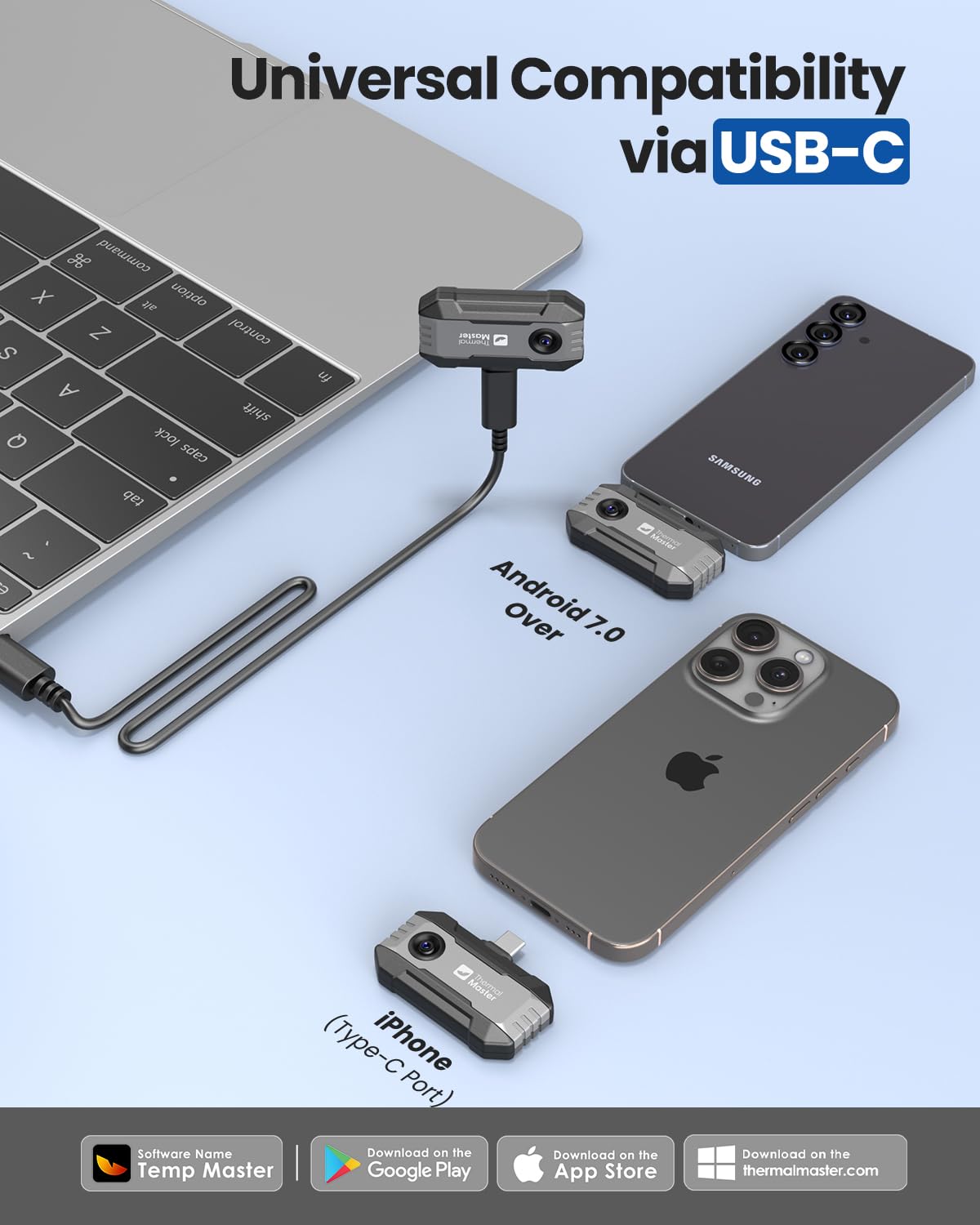
Figure 3.1: The Thermal Master P1 offers universal compatibility with Android devices (7.0 and above), iPhone (Type-C port), and laptops via USB-C connection.
3.2 App Installation
The companion application for the P1 is named Temp Master. When you connect the P1 to your smartphone for the first time, the app may prompt you to download it from the Google Play Store (for Android) or the App Store (for iPhone). Alternatively, you can search for "Temp Master" in your device's app store and install it manually.
3.3 Connecting the Device
- Ensure the Temp Master app is installed on your smartphone.
- Carefully plug the Thermal Master P1 into your smartphone's USB-C port. The device draws power directly from your phone.
- The Temp Master app should launch automatically. If not, open it manually.
- For hard-to-reach areas, utilize the included 50cm extension cable. This cable features an extended 2mm Type-C connector, allowing it to work even with thick phone cases.

Figure 3.2: The 50cm extension cable and extended 2mm Type-C connector provide flexibility for inspecting tight or hard-to-access spaces, even with a phone case on.
4. Operating Instructions
4.1 Basic Operation
Once the P1 is connected and the Temp Master app is running, the thermal image will be displayed on your screen. The app interface provides various tools for analysis and customization.
4.2 X³ IR Resolution
The P1 utilizes X³ IR Resolution technology to enhance the native 160x120 resolution to 320x240. This feature provides clearer and more detailed thermal images. You can typically toggle this enhancement on or off within the app settings to observe the difference.
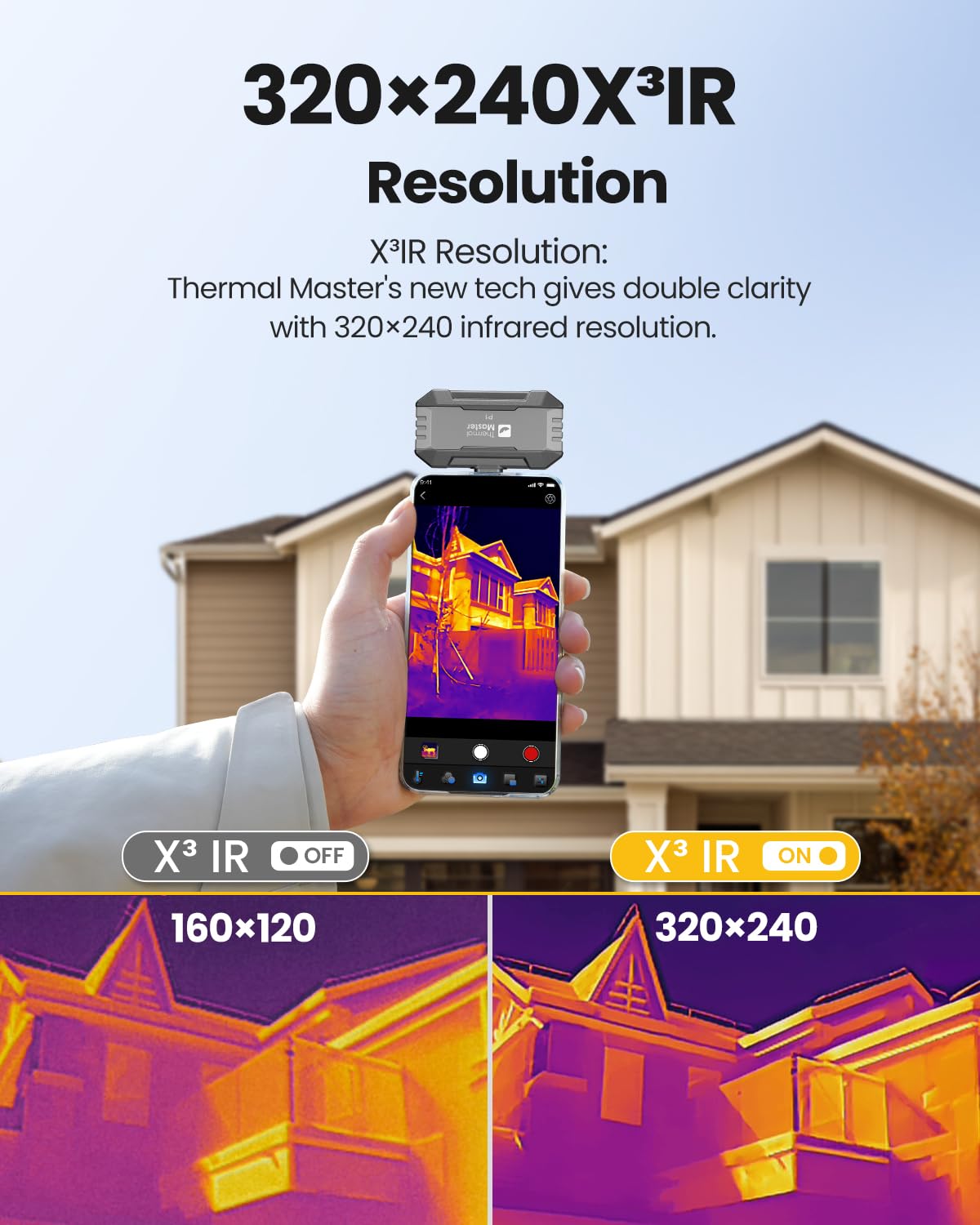
Figure 4.1: The X³ IR Resolution feature enhances the thermal image clarity from 160x120 to 320x240, providing more detailed visuals.
4.3 Temperature Measurement and Analysis
The Temp Master app offers comprehensive tools for temperature analysis:
- Measurement Points: Place up to 3 individual temperature points (P1, P2, P3) on the screen to monitor specific areas.
- Lines, Rectangles, Circles: Define up to 3 lines, rectangles, or circles to measure average, maximum, and minimum temperatures within those regions.
- Automatic Tracking: The app can automatically track the hottest and coldest spots within the field of view.
- Temperature Units: Easily switch between Celsius (°C) and Fahrenheit (°F) within the app settings.
- Emissivity Adjustment: Manually adjust the emissivity setting to ensure accurate temperature readings for different materials.

Figure 4.2: The Temp Master app provides tools for point, line, and area thermal analysis, as well as customizable high/low temperature alerts.

Figure 4.3: The app allows for isotherm visualization, changing temperature units between Celsius and Fahrenheit, and selecting from 12 different color palettes.
4.4 Digital Zoom
The P1 features a 15x digital zoom. To activate and adjust the zoom, use a two-finger pinch-to-zoom gesture on your smartphone screen. This allows for closer inspection of thermal anomalies.

Figure 4.4: Utilize the 15x digital zoom with a two-finger swipe gesture to magnify thermal images for detailed inspection.
4.5 Temperature Alarms
Set high and low-temperature thresholds within the Temp Master app. If the detected temperature exceeds or falls below these limits, an alarm will be triggered, alerting you to potential issues.
4.6 Image and Video Capture
Capture thermal images and videos directly through the Temp Master app. These can be saved to your device's gallery for later review and analysis.
4.7 Offline Image Reprocessing
The Temp Master app allows for post-processing of saved thermal images. You can adjust brightness, contrast, reflection, rotate images 360°, and change color palettes. This feature is useful for refining images and generating professional reports with added notes and problem descriptions.
5. Maintenance
- Keep the device clean and free from dust and debris. Use a soft, dry cloth for cleaning.
- Avoid exposing the device to extreme temperatures or direct sunlight for prolonged periods.
- Store the P1 in its protective case when not in use to prevent damage.
- Do not attempt to disassemble or repair the device yourself. Refer to qualified service personnel for any repairs.
6. Troubleshooting
Common Issues and Solutions:
- Device not recognized:
- Ensure the P1 is fully inserted into the USB-C port.
- Verify your smartphone's USB-C port is clean and free of obstructions.
- Check if the Temp Master app is installed and updated.
- Restart your smartphone and try reconnecting.
- App not launching automatically:
- Open the Temp Master app manually after connecting the P1.
- Check your phone's settings for USB connection preferences or app permissions.
- Inaccurate temperature readings:
- Ensure the emissivity setting in the app is correctly adjusted for the material being measured.
- Verify the device lens is clean.
- Allow the device to stabilize in the environment before taking critical measurements.
- Image quality issues:
- Ensure X³ IR Resolution is enabled in the app for enhanced clarity.
- Check for any obstructions or dirt on the thermal camera lens.
7. Specifications
| Detector | Vox 160 x 120 @ 12 µm |
| Infrared Resolution (Enhanced) | 320 x 240 (with X³ IR Resolution) |
| Temperature Measurement Range | -20 ℃ to 600 ℃ (-4°F to 1112°F) |
| Temperature Accuracy | ± 2 ℃ or ± 2 % of measured value |
| NETD (Thermal Sensitivity) | 35mk@25℃ (0.04 °C) |
| Frame Rate | 25 Hz |
| Digital Zoom | 15x |
| Palettes | 12 (e.g., White Hot, Black Hot, Iron Red, Hot Red) |
| App Name | Temp Master |
| Compatibility | Android 7.0+, iPhone 15/16 (USB-C), PC |
| Connectivity | USB-C |
| Package Dimensions | 12.5 x 10.4 x 5.4 cm |
| Weight | 110 grams |
| Model Number | P1 |
8. Warranty and Support
Specific warranty information for the Thermal Master P1 is not provided in this document. Please refer to the product packaging or the manufacturer's official website for detailed warranty terms and conditions. For technical support or service inquiries, contact Thermal Master customer service through their official channels.


