
Bikevee Bikevee Cycling GPS Computer & Bikevee Out Front Mount
User Manual
Bikevee Wireless Cycling GPS Computer
Model: Bikevee Cycling GPS Computer & Out Front Mount
1. Introduction
This manual provides detailed instructions for the Bikevee Wireless Cycling GPS Computer, a device designed to track and display various cycling data. It features a 2.4-inch LCD display with auto backlight, IPX7 waterproofing, and multi-satellite GPS tracking for accurate data collection.
1.1 Key Features
- Extended Battery Life: Equipped with a 650mAh rechargeable battery, providing up to 28 hours of continuous use.
- Precision GPS Tracking: Utilizes 5-satellite systems (GPS, BDS, GLONASS, Galileo, QZSS) for stable and accurate signal reception.
- Durable and Waterproof: IPX7 waterproof rating ensures resistance to rain and splashes.
- Clear Display: 2.4-inch LCD screen with automatic backlight for visibility in various lighting conditions.
- Comprehensive Data: Tracks speed (MPH/KM/H), distance, time, temperature, altitude, gradient, and more.
1.2 What's in the Box
Verify that all components are present in the package:
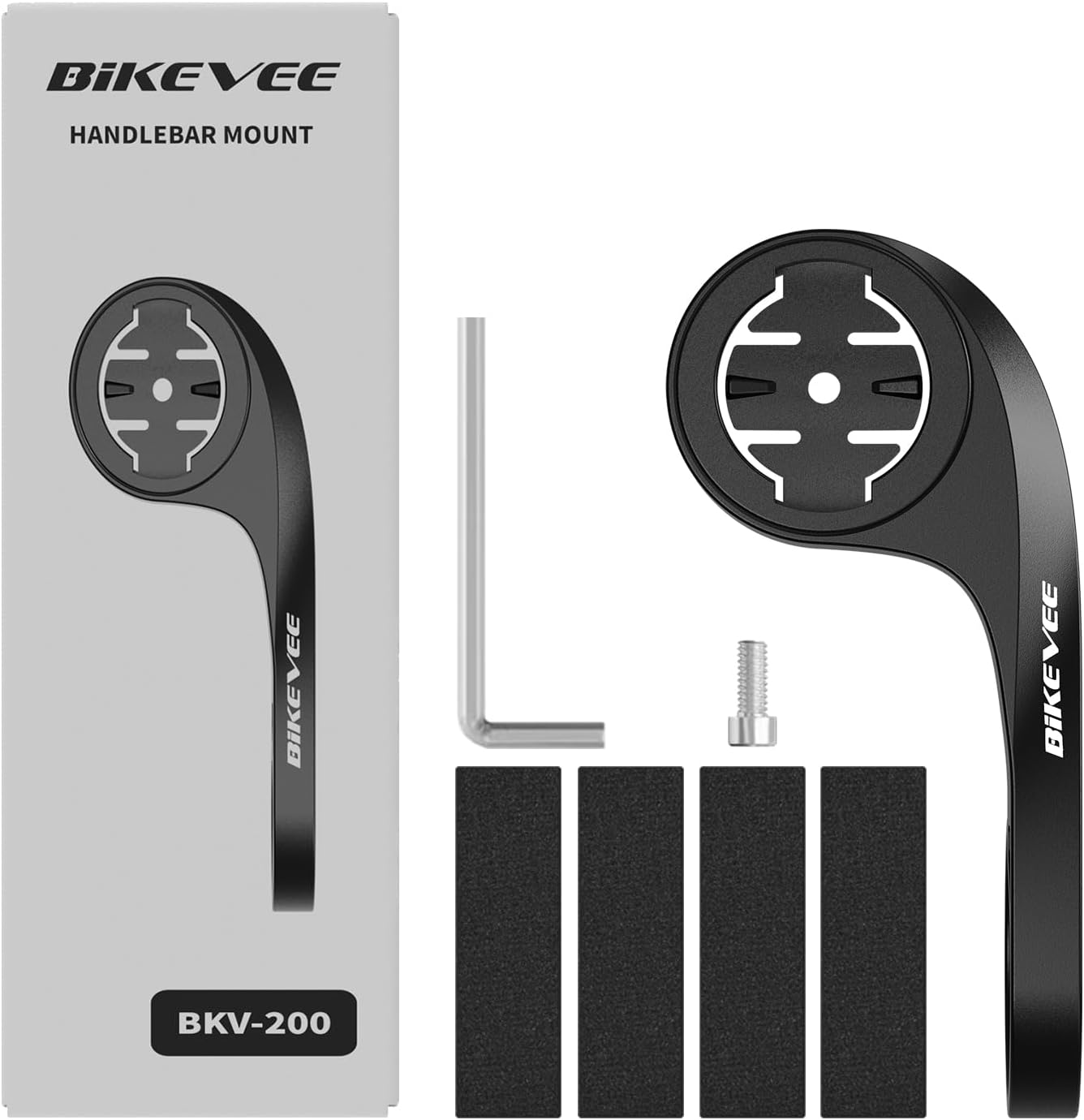
Figure 1.1: Package Contents. Includes Bike Computer, Charging Cable, Rubber Rings, Mount, Rubber Pad, and User Manual.
- Bikevee GPS Cycling Computer
- Standard Bike Mount
- Out Front Mount
- Rubber Pads
- Charging Cable (Type-C)
- Rubber Rings for Mount Installation
- User Manual
2. Setup and Installation
2.1 Charging the Device
Before first use, fully charge the Bikevee GPS Computer. Connect the provided Type-C charging cable to the device's charging port and a USB power source. The battery indicator on the screen will show charging status.
2.2 Mounting the Device
The Bikevee GPS Computer comes with both a standard bike mount and an out front mount. Choose the mount that best suits your preference and bicycle setup.
2.2.1 Standard Bike Mount Installation
- Place the rubber pad on your bicycle's handlebar or stem.
- Position the standard bike mount on top of the rubber pad.
- Secure the mount using the provided rubber rings, wrapping them around the handlebar/stem and hooking them onto the mount.
- Align the Bikevee GPS Computer with the mount's grooves and twist clockwise until it locks into place.
2.2.2 Out Front Mount Installation

Figure 2.1: Bikevee Out Front Mount.
- Place the rubber pad around your bicycle's handlebar where you intend to install the mount.
- Position the out front mount over the rubber pad.
- Use the provided Allen key to tighten the screw on the mount's clamp around the handlebar until it is secure.
- Align the Bikevee GPS Computer with the mount's grooves and twist clockwise until it locks into place.
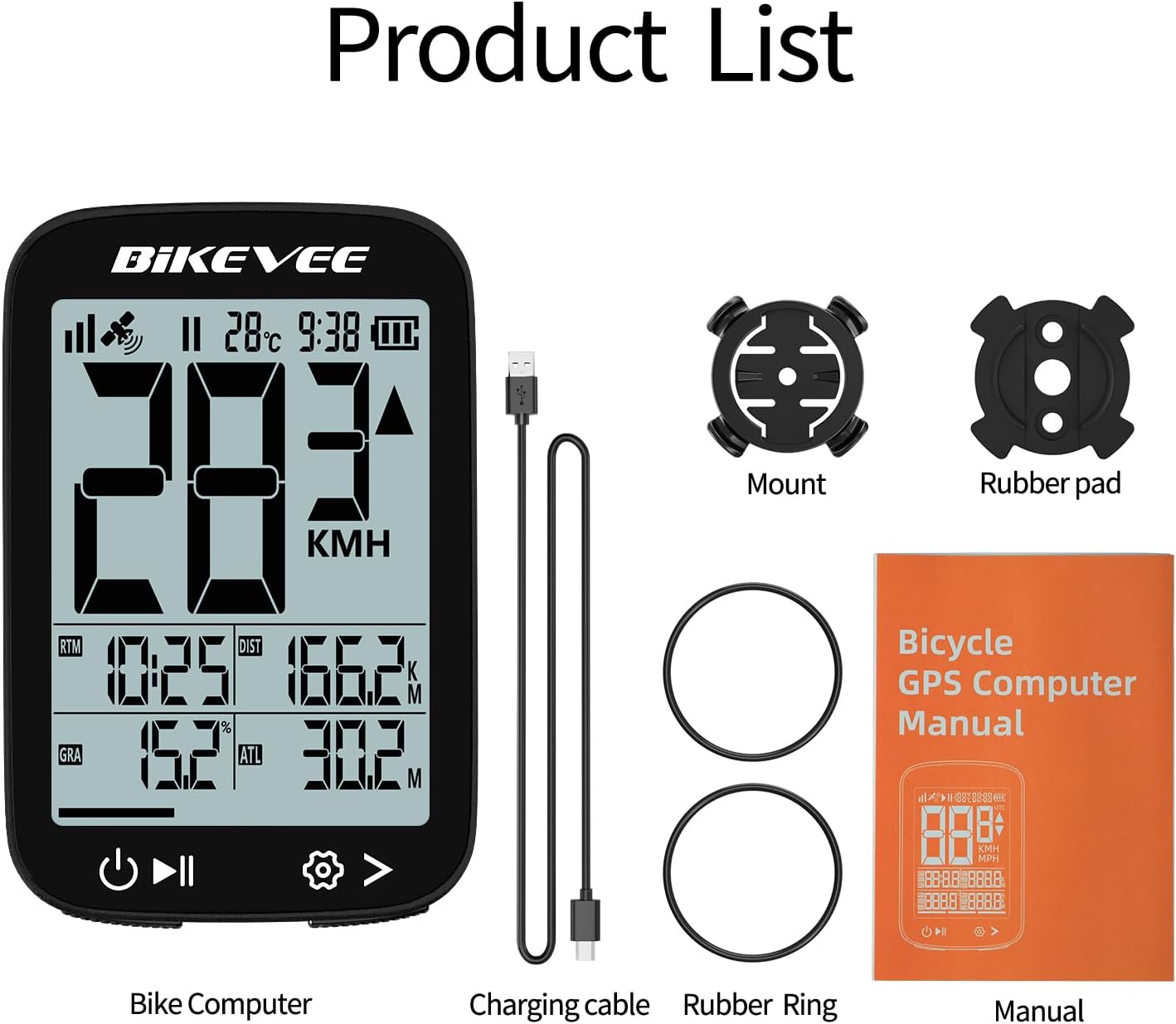
Figure 2.2: Handlebar Mount Components.
2.3 Initial Power On and Settings
- Power On: Press and hold the power button (usually located at the bottom left) until the screen illuminates.
- Unit Selection: Upon first power-on or after a reset, you may be prompted to select your preferred unit of measurement (MPH or KM/H). Use the navigation buttons to select and confirm.
- GPS Acquisition: Take the device outdoors to an open area to allow it to acquire GPS satellite signals. This may take a few moments. A stable GPS signal icon will appear once connected.
3. Operating Instructions
3.1 Basic Operation
- Power On/Off: Press and hold the left button to power on or off.
- Start/Pause/Stop Ride: Press the middle button to start recording a ride. Press again to pause. Press and hold to stop and save the ride data.
- Page Switching: Use the right button to cycle through different data display pages.
- Backlight: The device features an automatic backlight that adjusts based on ambient light conditions.
3.2 Data Display and Interpretation
The Bikevee GPS Computer displays up to 14 types of cycling data, providing comprehensive insights into your ride.
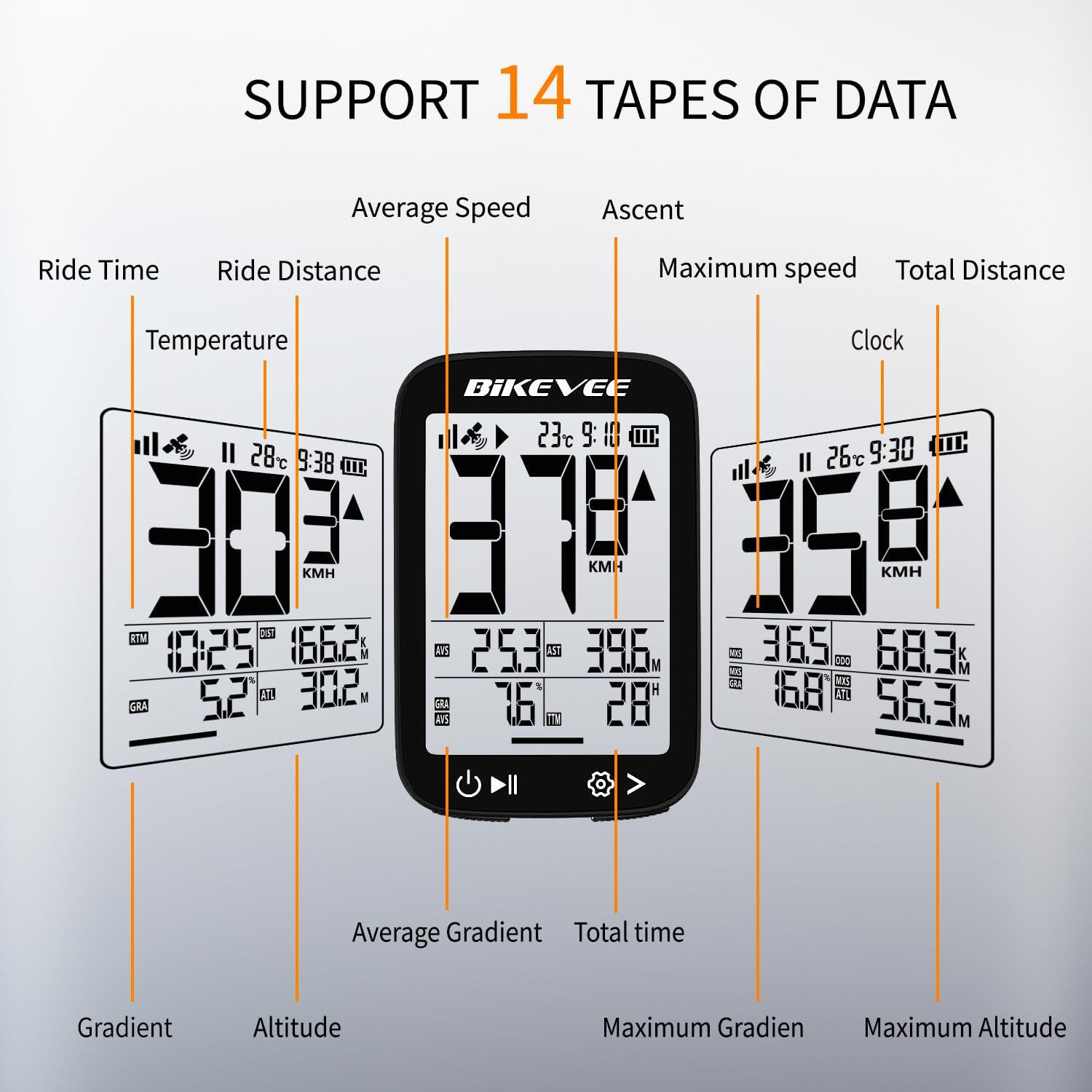
Figure 3.1: Supported Data Types Display.
- Current Speed: Displays your real-time speed (MPH or KM/H).
- Average Speed: The average speed for the current ride.
- Maximum Speed: The highest speed recorded during the current ride.
- Ride Time: Duration of the current active ride.
- Ride Distance: Distance covered during the current ride.
- Total Distance (Odometer): Cumulative distance recorded by the device.
- Temperature: Ambient temperature.
- Clock: Current time.
- Ascent: Total elevation gained during the ride.
- Gradient: Current incline or decline percentage.
- Altitude: Current elevation above sea level.

Figure 3.2: Display Icons and Their Meanings.
- Satellite Signal: Indicates GPS signal strength.
- IPX7: Confirms waterproof rating.
- Battery Level: Shows remaining battery charge.
- Automatic Backlight: Indicates auto backlight feature is active.
- Type-C: Denotes the charging port type.
- Speed Comparison: Arrow indicates if current speed is higher or lower than average speed.
4. Maintenance and Care
4.1 Cleaning the Device
To maintain optimal performance and appearance, clean the device regularly:
- Wipe the screen and body with a soft, damp cloth.
- Avoid using abrasive cleaners, solvents, or chemical sprays, as these can damage the device's surface or internal components.
- Ensure the charging port cover is securely closed to prevent dust and water ingress.
4.2 Water Resistance (IPX7)

Figure 4.1: IPX7 Waterproof Feature.
The Bikevee GPS Computer has an IPX7 waterproof rating, meaning it is protected against temporary immersion in water (up to 1 meter for 30 minutes). However, it is important to note:
- Do not immerse the device in water for a long time.
- Avoid high-pressure water jets.
- Ensure the charging port cover is sealed before exposure to water.
4.3 Battery Care and Storage
- Store the device in a cool, dry place when not in use.
- Avoid exposing the device to extreme temperatures (hot or cold) for prolonged periods.
- For long-term storage, charge the battery to approximately 50% to preserve battery health.
5. Troubleshooting
If you encounter issues with your Bikevee GPS Computer, refer to the following common problems and solutions:
| Problem | Possible Cause | Solution |
|---|---|---|
| Device does not power on. | Low battery. | Charge the device fully using the provided Type-C cable. |
| No GPS signal or inaccurate readings. | Obstructed view of sky; initial signal acquisition. | Move to an open outdoor area. Wait a few minutes for signal acquisition. Avoid dense forests or tunnels. |
| Display is dim or unreadable. | Auto backlight setting; low battery. | Ensure sufficient battery charge. The backlight adjusts automatically; try moving to a different lighting condition. |
| Device freezes or becomes unresponsive. | Software glitch. | Perform a soft reset by pressing and holding the power button for 10-15 seconds until the device restarts. |
6. Specifications
Detailed technical specifications for the Bikevee Wireless Cycling GPS Computer:

Figure 6.1: Device Dimensions and Weight.
- Model: Bikevee Cycling GPS Computer
- Display: 2.4-inch LCD, Automatic Backlight
- Battery: 650mAh Rechargeable Lithium-ion
- Battery Life: Up to 28 hours (continuous use)
- GPS Systems: GPS, BDS, GLONASS, Galileo, QZSS (5-satellite tracking)
- Waterproof Rating: IPX7
- Dimensions: Approximately 70mm (Height) x 45mm (Width) / 2.76in x 1.77in
- Weight: Approximately 50g / 0.11lb
- Charging Port: Type-C USB
- Data Types Supported: 14 types (e.g., Speed, Distance, Time, Temperature, Altitude, Gradient)
7. Warranty Information
The Bikevee Wireless Cycling GPS Computer is covered by a limited manufacturer's warranty. This warranty typically covers defects in materials and workmanship under normal use. Please retain your proof of purchase for warranty claims.
For specific warranty terms and conditions, including duration and coverage details, please refer to the warranty card included with your product or contact Bikevee customer support directly.
8. Customer Support
If you have any questions, require technical assistance, or need to report an issue with your Bikevee Wireless Cycling GPS Computer, please contact our customer support team.
- Online Support: Visit the official Bikevee website for FAQs, troubleshooting guides, and contact forms.
- Email Support: Refer to your product packaging or the official website for the customer support email address.
When contacting support, please be prepared to provide your product model number (Bikevee Cycling GPS Computer) and a detailed description of the issue.
Ask a question about this manual
Ask about setup, troubleshooting, compatibility, parts, safety, or missing instructions. Manuals+ will review the question and use this page’s manual context to help answer it.