
1. Introduction
This manual provides detailed instructions for the Fastrack Streetstyle 4 Quartz Analog-Digital Watch, model 38171PP01. It covers the watch's features, setup, operation, maintenance, and troubleshooting. Please read this manual thoroughly to ensure proper use and care of your timepiece.
The Fastrack Streetstyle 4 watch combines a sleek design with practical functionalities. It features a precise Quartz movement, a round dial with both analog and digital displays, a stopwatch, dual time display, an alarm, and an EL backlight for visibility in low light conditions.
2. Product Overview
Familiarize yourself with the components and controls of your Fastrack Streetstyle 4 watch.
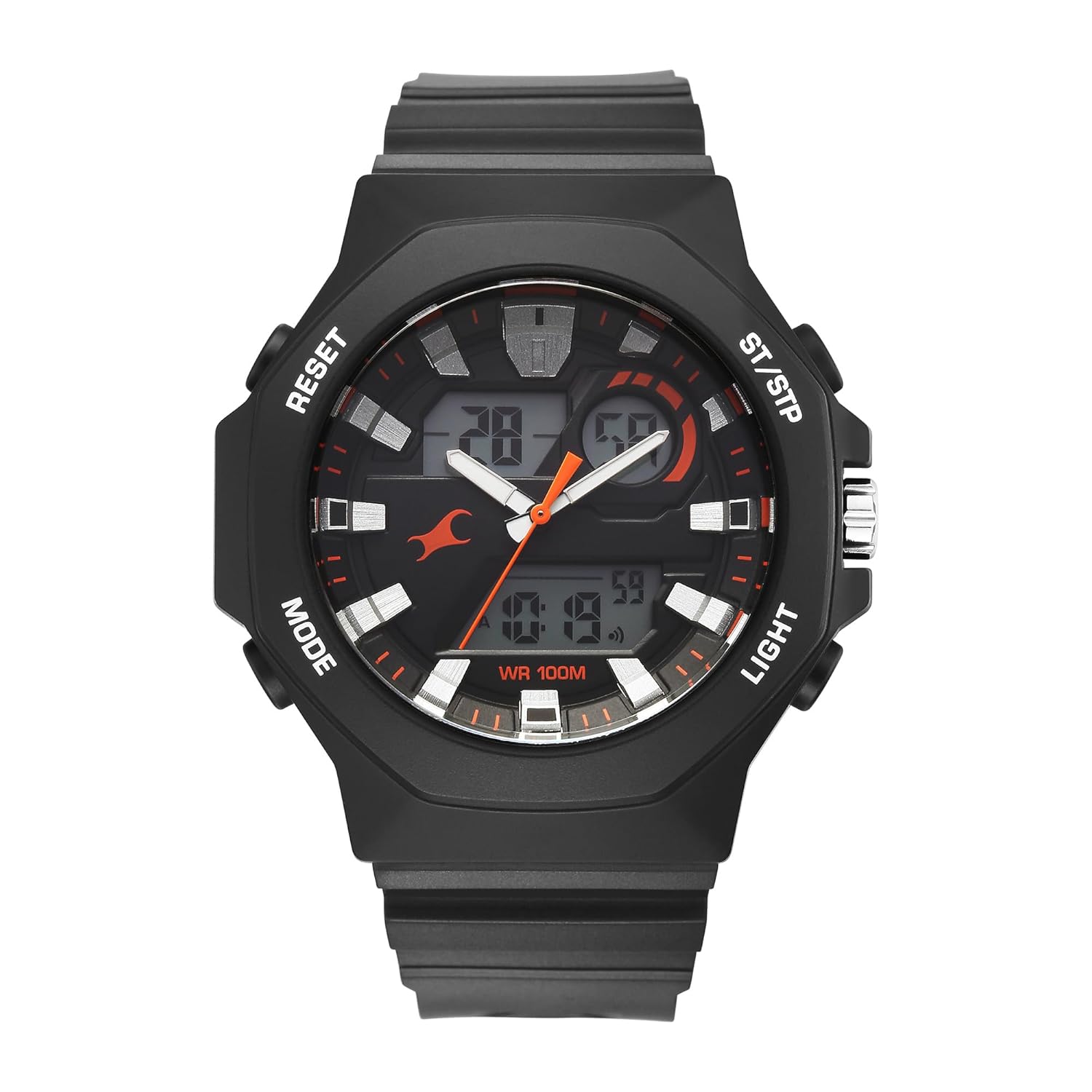
Figure 2.1: Front View of the Watch
This image displays the front of the Fastrack Streetstyle 4 watch, highlighting its black round dial, analog hands, and digital display windows. The watch features four buttons on its sides for various functions.

Figure 2.2: Side View with Control Buttons
A side view of the Fastrack Streetstyle 4 watch, illustrating the control buttons labeled 'MODE', 'RESET', 'ST/STP', and 'LIGHT' on the watch case. The crown for analog time adjustment is also visible.

Figure 2.3: Back View of the Watch
The back of the Fastrack Streetstyle 4 watch, featuring the stainless steel case back engraved with 'Fastrack', '100M WATER RESISTANT', and model number '38171PP01'.
Watch Components:
- Analog Display: Traditional hour and minute hands.
- Digital Display: Shows time, date, and other digital functions.
- Crown: Used for setting analog time.
- MODE Button: Cycles through digital display modes (Time, Alarm, Stopwatch, Dual Time).
- RESET Button: Used for resetting stopwatch, adjusting settings in various modes.
- ST/STP Button: Starts/stops stopwatch, adjusts settings in various modes.
- LIGHT Button: Activates the EL backlight for illumination.
3. Setup
3.1 Initial Time Setting (Analog)
- Pull the crown out to the first position.
- Rotate the crown to set the analog hour and minute hands to the correct time.
- Push the crown back in to its normal position to start the analog movement.
3.2 Initial Time Setting (Digital)
- Press the MODE button repeatedly until the digital time display starts flashing, indicating it is in setting mode.
- Use the RESET button to select the digit or setting you wish to adjust (e.g., hours, minutes, 12/24-hour format).
- Use the ST/STP button to increase the selected value.
- Once all settings are correct, press the MODE button again to exit the setting mode.
3.3 Battery
The watch comes with an Alkaline battery pre-installed. If the digital display fades or the watch stops functioning, the battery may need replacement. Battery replacement should be performed by a qualified watch technician.
4. Operating Instructions
4.1 Quartz Movement
This timepiece is equipped with a high-precision quartz movement, powered by a long-lasting battery. The quartz crystal oscillates at a consistent frequency to ensure exceptional timekeeping accuracy. It offers reliable performance with minimal maintenance.
4.2 Using the Stopwatch
- Press the MODE button until the stopwatch display appears.
- Press the ST/STP button to start the stopwatch.
- Press the ST/STP button again to pause the stopwatch.
- Press the RESET button to reset the stopwatch to zero.
4.3 Setting and Using the Alarm
- Press the MODE button until the alarm display appears.
- Press the RESET button to select the hour or minute setting.
- Use the ST/STP button to adjust the alarm time.
- Press the MODE button to confirm and exit.
- To activate/deactivate the alarm, press the ST/STP button while in alarm mode. An alarm icon will indicate activation.
4.4 Dual Time Function
The watch features a dual time function, allowing you to view a second time zone. To set the dual time:
- Press the MODE button until the dual time display appears.
- Press the RESET button to select the hour or minute setting.
- Use the ST/STP button to adjust the dual time.
- Press the MODE button to confirm and exit.
4.5 EL Backlight
Press the LIGHT button to illuminate the digital display for a few seconds, enhancing visibility in dark environments.
5. Maintenance
5.1 Water Resistance
This watch is water resistant up to 100 meters (10 ATM). It is suitable for everyday use and can withstand brief submersion under water. However, it is not recommended for swimming, bathing, or diving. Avoid operating buttons or the crown when the watch is wet or submerged to prevent water ingress.
5.2 Cleaning
To clean your watch, wipe it gently with a soft, dry cloth. For the strap, a slightly damp cloth can be used, followed by drying. Avoid using chemical cleaners or abrasive materials.
5.3 Crystal Care
The watch features a durable mineral crystal designed to protect against scratches. While robust, avoid direct impacts or abrasive contact to maintain its clarity.
6. Troubleshooting
6.1 Watch Not Running / Digital Display Faded
- Possible Cause: Low or depleted battery.
- Solution: The battery may need to be replaced. Contact a qualified watch technician for battery replacement.
6.2 Incorrect Time Display (Analog or Digital)
- Possible Cause: Time not set correctly or accidental adjustment.
- Solution: Refer to Section 3.1 and 3.2 for instructions on setting the analog and digital time.
6.3 Buttons Not Responding
- Possible Cause: Watch is wet, or a button is stuck.
- Solution: Ensure the watch is dry. If a button is stuck, gently try to free it. If the issue persists, contact customer support.
7. Specifications
| Feature | Specification |
|---|---|
| Brand | Fastrack |
| Model Number | 38171PP01 |
| Display Type | Analog-Digital |
| Movement | Quartz |
| Special Features | Dual Time, Waterproof, Glow In The Dark (EL Backlight) |
| Water Resistance | 100 Meters (10 ATM) |
| Battery Type | Alkaline |
| Product Dimensions | 14 x 10 x 7 cm |
| Item Weight | 250 g |
| Country of Origin | India |

Figure 7.1: Watch Dimensions Reference
This image provides a size reference for the Fastrack Streetstyle 4 watch, showing it next to a credit card. The watch case size is indicated as 41mm.
8. Warranty and Support
8.1 Warranty Information
Your Fastrack Streetstyle 4 watch comes with a One Year Guarantee from the date of purchase. This warranty covers manufacturing defects under normal use. Please retain your proof of purchase for warranty claims.
8.2 Manufacturer
The Fastrack Streetstyle 4 watch is manufactured by:
Titan Company LimitedSipcot Industrial Complex
Hosur, Tamil Nadu - 635126
India
For service or support inquiries, please refer to the contact information provided with your purchase documentation or visit the official Fastrack website.