
1. Introduction
This manual provides essential information for the safe and efficient operation of your Fanmusic DUNU Concept R CD Player. Please read it thoroughly before using the device and retain it for future reference.
2. What's in the Box
- CONCEPT R CD Player x 1
- USB Type-C charge cable x 1
- Storage bag x 1
- 6.35mm to 3.5mm adapter x 1
- User manual x 1
- Brand card x 1
3. Product Features
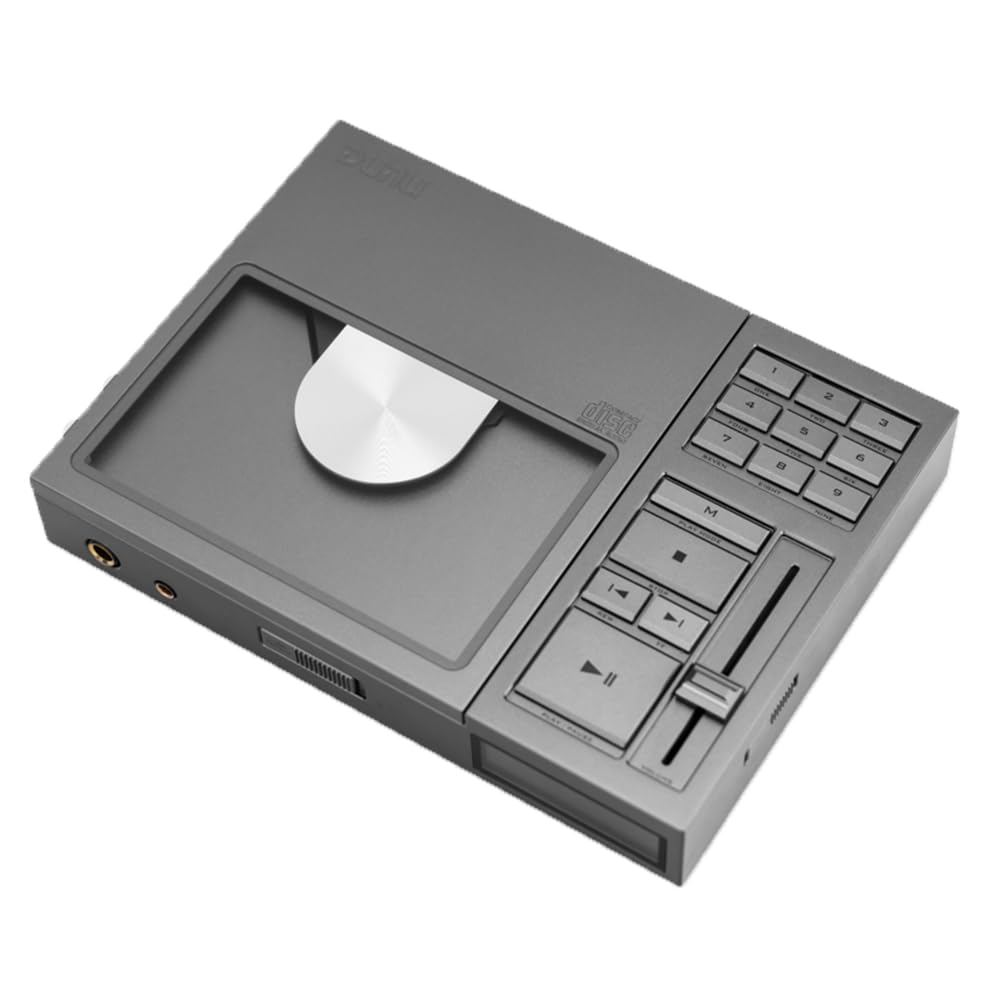
- CNC-carved aviation aluminum body with retro digital fader volume control.
- Classic operation layout with digital one-touch song selection.
- Reference-level tuning with Class A/Class AB amplification switch.
- Powerful 1.3W output.
- Fully discrete R2R decoding portable CD player.
- Features a 192 precision matched resistor array and fully differential four-channel balanced design.
- Complete input and output interfaces for use as a CD turntable, USB decoding headphone amplifier, etc.
4. Setup
4.1 Powering On/Off
To power on the device, locate the power button on the left side of the player and press it. To power off, press the button again.
4.2 Charging the Device
Connect the supplied USB Type-C charge cable to the USB/DC IN port on the back of the player and to a 5V/2A or 9V/2A power adapter (not included). A green light will illuminate to indicate charging. When fully charged, the green light will turn red.
4.3 Inserting a CD
- Open the top lid of the CD player.
- Carefully place a 12CM or 8CM CD/CD-R onto the spindle, ensuring it is seated correctly.
- Close the top lid. The player will begin loading the disc.

5. Operating
5.1 Basic Playback Controls
The front panel features intuitive controls for playback:
- Play/Pause (►▮): Press to start or pause playback.
- Stop (■): Press to stop playback.
- Previous Track (◀◀): Press to go to the beginning of the current track or the previous track.
- Next Track (►►): Press to skip to the next track.
5.2 Volume Control
Adjust the volume using the digital fader volume control located on the front panel. Slide the fader up to increase volume and down to decrease it. The LCD screen will display the current volume level.
5.3 Playback Modes
Use the 'M' (Mode) button to cycle through different playback modes, such as repeat single track, repeat all tracks, or shuffle playback.

6. Interfaces and Connections
The Fanmusic DUNU Concept R CD Player offers a variety of input and output options for versatile use:
- 3.5mm Headphone Output: Standard headphone jack for connecting most headphones.
- 4.4mm Balanced Headphone Output: For connecting balanced headphones, offering enhanced audio performance.
- Optical Digital Output: For connecting to external DACs or audio systems via an optical cable.
- USB Type-C (USB DAC): Functions as a USB DAC input, allowing the player to act as a high-quality external sound card for your computer or other devices.
- USB Type-C (USB/DC IN): Used for charging the device's internal battery.


7. Specifications
| Feature | Description |
|---|---|
| Decoding Architecture | Fully Differential Quad Balanced R-2R |
| Power Input | 5V/2A or 9V/2A |
| Battery | 3.8V 12000 mAh (31.58Wh) |
| CD Compatibility | 12CM & 8CM CD / CD-R |
| Net Weight | Approx. 1165 g (2.56 pounds) |
| Dimensions | Approx. 205 x 150 x 32 mm (8.07 x 5.9 x 1.25 inches) |
| Connectivity Technology | USB |
| Audio Specifications | Frequency Response: 20Hz-20kHz (±0.1dB, Fs=192kHz), 20Hz-50kHz (±0.5dB, Fs=192kHz) |
8. Maintenance
To ensure the longevity and optimal performance of your CD player, follow these maintenance guidelines:
- Keep the device clean by wiping it with a soft, dry cloth. Avoid using abrasive cleaners or solvents.
- Handle CDs by their edges to prevent fingerprints and scratches. Store CDs in their cases when not in use.
- Avoid exposing the player to extreme temperatures, humidity, or direct sunlight.
- Do not attempt to open the device or perform repairs yourself, as this will void the warranty.
9. Troubleshooting
If you encounter any issues with your Fanmusic DUNU Concept R CD Player, please refer to the following common solutions:
- No Power: Ensure the device is fully charged or connected to a power source. Check the power button on the left side of the player.
- CD Not Playing/Skipping: Verify that the CD is clean and free of scratches. Ensure the CD is correctly seated on the spindle. Try a different CD to rule out disc-specific issues.
- No Sound: Check headphone connections (3.5mm or 4.4mm) and ensure they are fully inserted. Adjust the volume fader. If using external audio equipment, verify all cable connections and settings.
- Charging Issue: Confirm the USB Type-C cable is securely connected to both the player and the power adapter. Ensure the power adapter meets the 5V/2A or 9V/2A requirement.
If the problem persists, please contact customer support for assistance.
10. Warranty and Support
Your Fanmusic DUNU Concept R CD Player comes with a manufacturer's warranty. Please refer to the included brand card or contact Fanmusic customer support for detailed warranty information and assistance. For technical support or service inquiries, please visit the official Fanmusic website or contact their authorized service centers.