
Deedlite ADL-US-SMR
Deedlite Olevra Smart Ring User Manual
Model: ADL-US-SMR-Sliver-8
1. Introduction
This manual provides instructions for the proper use and maintenance of your Deedlite Olevra Smart Ring. Please read this manual thoroughly before using the device to ensure optimal performance and longevity.
2. Package Contents
- Olevra Smart Ring
- Magnetic Charging Cable/Dock
- User Manual
3. Product Overview
3.1 Key Features
- Health Tracking: Monitors heart rate, blood oxygen, and blood pressure.
- Sleep Analysis: Tracks deep sleep, light sleep, and REM cycles.
- Activity Tracking: Records steps and supports multi-sport activities like running, cycling, and yoga.
- Waterproof Design: IP68 rated for water resistance, suitable for hand washing, showering, and swimming.
- Extended Battery Life: Up to 7 days on a single charge.
- Durable Construction: Features an all-titanium exterior.
- Magnetic Fast Charging: Fully charges in approximately 1 hour.
3.2 Components
The Olevra Smart Ring is designed for comfort and functionality. It features recessed biosensors on the inner surface for accurate data collection and an all-titanium exterior for durability.

Image: The Olevra Smart Ring shown next to its magnetic charging case.

Image: The Olevra Smart Ring worn on a finger, illustrating its all-titanium exterior, temperature sensing, and research-grade heart rate and SpO2 sensors.
4. Getting Started
4.1 Sizing
Accurate sizing is crucial for comfortable wear and precise data collection. Refer to the sizing guide below to determine your correct ring size.
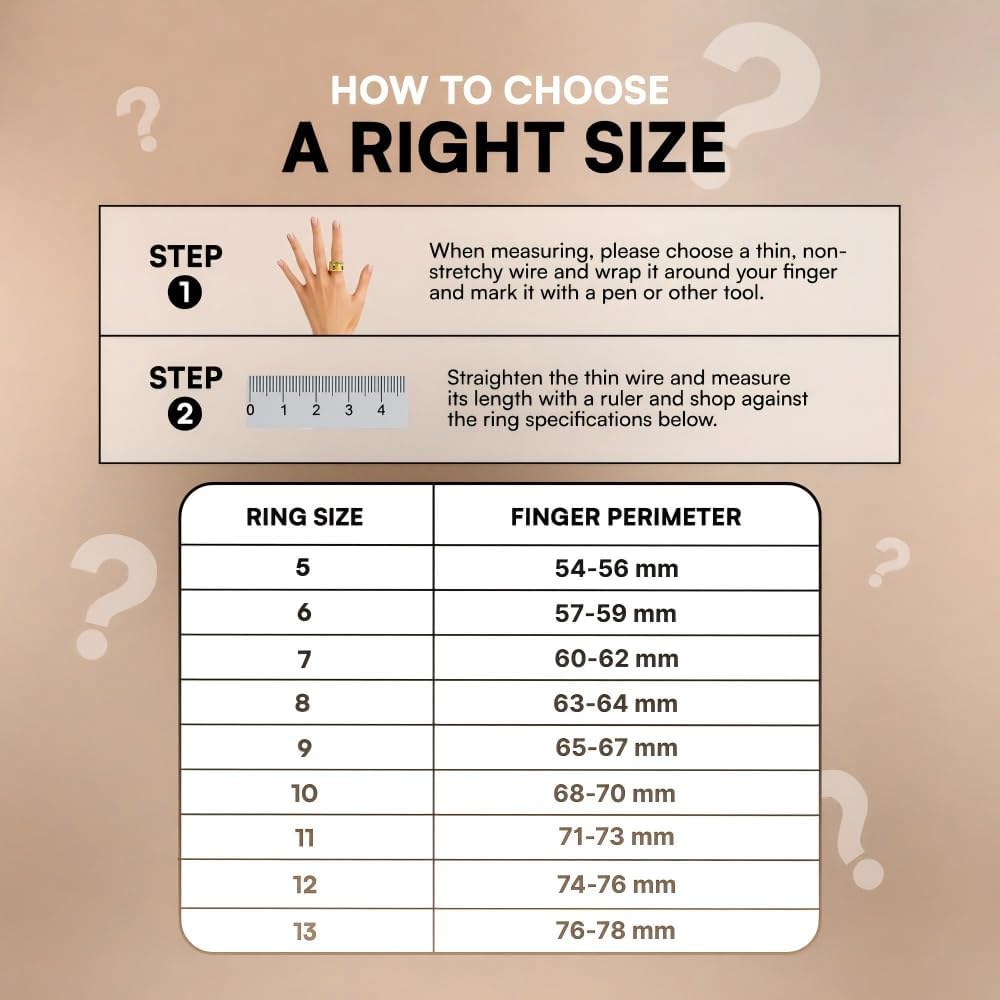
Image: A detailed guide on how to measure your finger perimeter using a thin, non-stretchy wire and a ruler, with a corresponding ring size chart (Sizes 5-13).
4.2 Charging the Ring
Before first use, fully charge your Olevra Smart Ring. Place the ring onto the magnetic charging dock. The ring will indicate charging status, typically with a light indicator. A full charge takes approximately 1 hour and provides up to 7 days of battery life.

Image: The Olevra Smart Ring connected to its magnetic fast charging cable.
4.3 App Installation and Pairing
- Download the OLEVRA app from your smartphone's app store (available for iPhone and Android).
- Open the app and follow the on-screen instructions to create an account or log in.
- Ensure your smartphone's Bluetooth is enabled.
- Within the OLEVRA app, search for and select your smart ring to initiate the pairing process.
- Confirm the pairing on both your phone and, if prompted, on the ring.
5. Operating the Smart Ring
Once paired, your Olevra Smart Ring automatically begins tracking various health and activity metrics. Data is synchronized with the OLEVRA app on your smartphone.

Image: An illustration highlighting the Olevra Smart Ring's tracking capabilities: Sleep, Steps, Heart Rate, Menstrual Cycle, and Stress.
5.1 Health Tracking
The ring's advanced 4.0 biosensors continuously monitor your heart rate, blood oxygen (SpO2), and blood pressure. These measurements are typically taken every 30 minutes and are accessible through the OLEVRA app.
5.2 Activity Tracking
The Olevra Smart Ring automatically detects and records data for various activities, including running, cycling, and yoga. It tracks your steps throughout the day. Review your activity summaries and progress in the OLEVRA app.
5.3 Sleep Monitoring
Wear the ring while sleeping for comprehensive sleep analysis. The ring records your sleep patterns, differentiating between deep sleep, light sleep, and REM cycles. The OLEVRA app provides insights to help improve your sleep quality.

Image: A collage showing the Olevra Smart Ring's accuracy via smart sensing, the OLEVRA app interface displaying health data, the comfortable design with recessed sensors, and icons for up to 8-day battery life and water resistance up to 100m.
6. Maintenance
6.1 Waterproofing
The Olevra Smart Ring has an IP68 waterproof rating, meaning it is resistant to dust and can withstand immersion in water up to 1.5 meters for 30 minutes. You can wear it while washing hands, showering, or swimming. However, prolonged exposure to hot water or chemicals should be avoided.
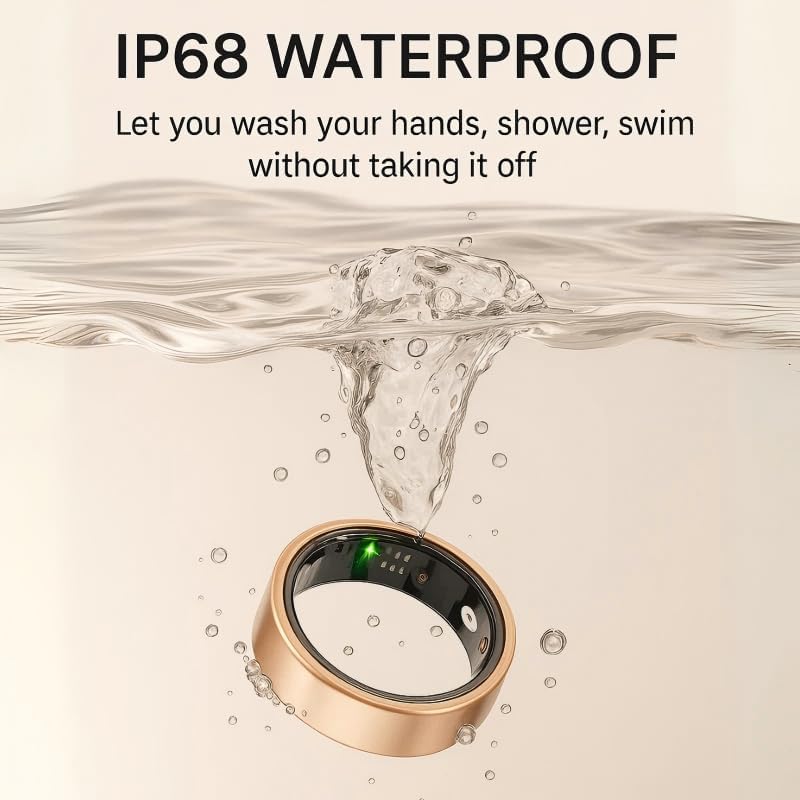
Image: The Olevra Smart Ring submerged in water, illustrating its IP68 waterproof capability.
6.2 Cleaning
To maintain optimal sensor performance and hygiene, regularly clean your smart ring. Use a soft, damp cloth to wipe the ring, especially the sensor area. Avoid using abrasive materials or harsh chemicals.
7. Troubleshooting
- Ring not connecting to app: Ensure Bluetooth is enabled on your phone, the ring is charged, and within range. Try restarting both the ring (if applicable) and your phone.
- Inaccurate readings (steps, heart rate): Verify the ring is worn correctly and snugly on your finger. Clean the sensors to remove any debris or oils. Ensure the app is updated to the latest version.
- Battery draining quickly: Ensure the ring is fully charged. Reduce background app usage on your phone if it's constantly syncing.
- Ring not charging: Check that the magnetic charging cable is properly connected to both the ring and a power source. Ensure the charging contacts on the ring and cable are clean.
8. Specifications
| Specification | Detail |
|---|---|
| Brand | Deedlite |
| Model Number | ADL-US-SMR-Sliver-8 |
| Material | Metal (Titanium) |
| Color | Silver |
| Compatible Devices | Smartphones (iPhone and Android) |
| Battery Life | Up to 168 hours (7 days) |
| Sensor Type | Optical |
| Water Resistance | IP68 |
| Item Weight | 3.52 ounces (0.1 Kilograms) |
| Size (Current Product) | 8 (Finger Perimeter 63-64mm) |
9. Safety Information
- Do not attempt to open or modify the smart ring. This may cause damage and void any warranty.
- Keep the device away from extreme temperatures and direct sunlight.
- This device is not a medical device and should not be used to diagnose, treat, cure, or prevent any disease. Consult a healthcare professional for medical advice.
- Keep out of reach of children.
10. Warranty and Support
For warranty information, technical support, or customer service inquiries, please contact Deedlite customer support through their official channels. Refer to your purchase documentation for specific warranty terms.
Ask a question about this manual
Ask about setup, troubleshooting, compatibility, parts, safety, or missing instructions. Manuals+ will review the question and use this page’s manual context to help answer it.