
Introduction
Thank you for choosing the Lamicall Electric Bicycle Pump. This compact and powerful air compressor is designed for convenient and efficient inflation of various items, including car tires, bicycle tires, motorcycle tires, and sports balls. Featuring an automatic stop function, a high-definition LED screen, and a built-in power bank, it offers a reliable and user-friendly experience.

Image: The Lamicall Electric Bicycle Pump, showing the main unit, inflation hose connected to a tire valve, USB-C charging cable, and various inflation adapters.
Package Contents
Please check the box to ensure all items are present:
- Lamicall Inflatable Pump x 1
- 30cm Inflation Hose x 1
- Type-C Charging Cable x 1
- Ball Needle x 1
- Presta Valve Adapter x 1
- Storage Bag x 1
Specifications
| Feature | Detail |
|---|---|
| Model Number | VHEP03 |
| Dimensions (L x W x H) | 16 x 4.6 x 6.8 cm |
| Weight | 452 grams |
| Max Pressure | 150 PSI |
| Air Flow Capacity | 19 liters per minute |
| Battery Capacity | 2 x 2000 mAh (Rechargeable) |
| Material | Metal, Plastic, Silicone |
| Hose Length | 30 cm |
| Display | HD LED Screen |
| Charging Port | Type-C |
| Power Bank Output | USB-A |
Setup
1. Charging the Device
Before first use, fully charge the pump. Connect the provided Type-C charging cable to the pump's Type-C port and the other end to a suitable USB power adapter (not included). The battery indicator on the LED screen will show charging status.
2. Attaching the Inflation Hose
Screw the 30cm threaded inflation hose securely onto the pump's air outlet. Ensure it is tightened to prevent air leakage during inflation.

Image: A detailed view of the pump's LCD screen displaying pressure and mode, alongside the inflation nozzle and needle accessories.
Operating Instructions
1. Power On/Off
- To power on: Press and hold the Power button (
 ) for 3 seconds.
 - To power off: Press and hold the Power button for 3 seconds. The device will also automatically shut off after a period of inactivity.
2. Mode Selection
Press the Mode button () to cycle through the 5 preset inflation modes:
- Car Mode
- Motorcycle Mode
- Bicycle Mode
- Ball Mode
- Custom Mode (Manual setting)

Image: The Lamicall pump illustrating its battery capacity and number of inflations for various items like motorcycles, bicycles, cars, and balls.
3. Pressure Unit Selection
Press the Unit button (U) to switch between 4 pressure units:
- PSI (Pounds per Square Inch)
- BAR
- KPA (Kilopascals)
- KG/CM² (Kilograms per Square Centimeter)
4. Setting Target Pressure
Use the '+' and '-' buttons to adjust the desired target pressure. The pump has a memory function, so your last setting will be remembered for convenience.
5. Inflation Process
- Connect the inflation hose to the item's valve. Use the appropriate adapter (ball needle, Presta valve) if necessary. The 360° swivel valve allows for easy connection from any angle.
- Once the target pressure is set, press the Start/Stop button (usually the power button or a dedicated play/pause icon) to begin inflation.
- The pump will automatically stop when the preset target pressure is reached. The high-precision sensor ensures an error margin of only ±0.1 PSI.
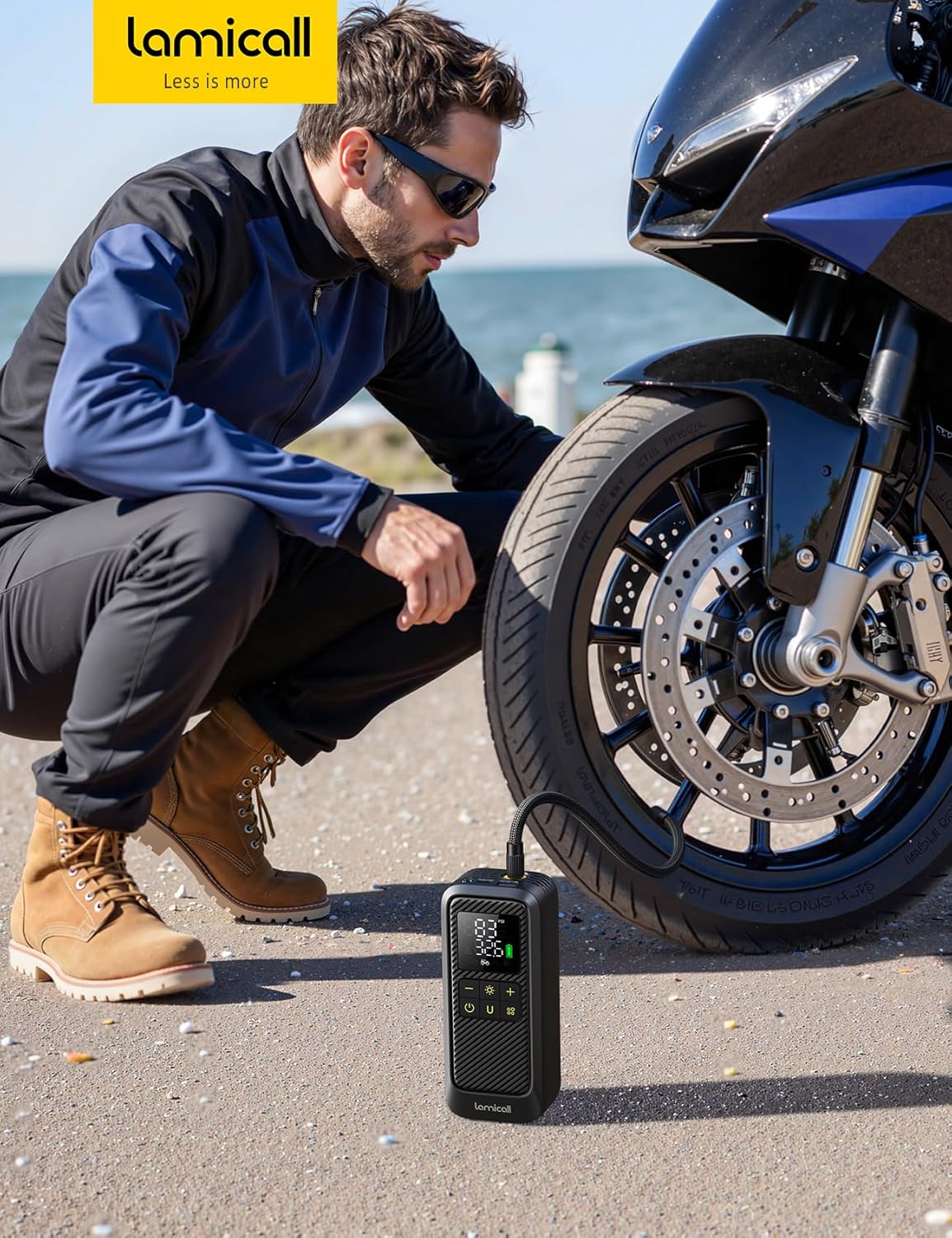
Image: A person crouching to inflate a motorcycle tire using the Lamicall Electric Bicycle Pump, demonstrating its portability and ease of use.
6. Using the LED Light
The pump includes an emergency LED light with three modes:
- Torch Mode: For general illumination.
- Strobe Mode: For signaling or attracting attention.
- SOS Mode: For emergency signaling.
Press the Light button (sun icon) to cycle through these modes.

Image: The Lamicall pump's emergency flashlight feature, showing its beam illuminating a dark surface, with icons for lighting, SOS, and flashing modes.
7. Using as a Power Bank
The pump is equipped with a USB-A output port, allowing it to function as a portable power bank. You can use it to charge smartphones, tablets, and other electronic devices on the go.
Safety Precautions
- Burn Hazard: The inflation hose and its connection to the pump can become very hot during and immediately after use. Do not touch them until they have cooled down to avoid burns.
- Intended Use: This portable air compressor is designed for inflating vehicle tires (cars, motorcycles, bicycles) and sports balls. It is not intended for inflating large equipment such as inflatable boats, swimming pools, or heavy-duty vehicle tires.
- Keep out of reach of children.
- Do not expose the pump to rain or moisture.
- Do not disassemble or attempt to repair the device yourself. Contact customer support if issues arise.
Maintenance
- Cleaning: Wipe the pump with a soft, dry cloth. Do not use harsh chemicals or abrasive cleaners.
- Storage: Store the pump in a cool, dry place, away from direct sunlight and extreme temperatures. Use the provided storage bag for protection.
- Battery Care: For optimal battery life, charge the pump regularly, even if not in frequent use. Avoid fully discharging the battery for extended periods.
Troubleshooting
If you encounter any issues with your Lamicall Electric Bicycle Pump, please consider the following common solutions:
- Pump not turning on: Ensure the battery is charged. If not, connect it to a power source using the Type-C cable.
- Slow inflation or no inflation: Check that the inflation hose is securely connected to both the pump and the item's valve. Ensure the correct adapter is used and that the valve is not obstructed. Verify the target pressure is set correctly.
- Inaccurate pressure reading: Ensure the hose is properly connected and there are no leaks. The pump's sensor is highly accurate, but external factors or improper connection can affect readings.
- Overheating: If the pump feels excessively hot, allow it to cool down before continuing use. Prolonged operation, especially at high pressures, can cause heat buildup.
If the problem persists, please contact Lamicall customer support for assistance.
Warranty and Support
Lamicall products come with a standard manufacturer's warranty. For detailed warranty information, product support, or to report any issues, please visit the official Lamicall website or contact their customer service directly. Please have your model number (VHEP03) and purchase details ready when contacting support.
For more information, visit the Lamicall Store on Amazon.
