YOLOPARK AMK PRO Series Megatron (Revenge of the Fallen) Action Figure Instruction Manual
Model: AMKPM2MG-E
1. Introduction
This manual provides detailed instructions for the assembly, operation, and maintenance of your YOLOPARK AMK PRO Series Megatron action figure from Transformers: Revenge of the Fallen. This highly articulated model kit features a diecast inner skeleton and detailed outer armor, designed for display and posing.
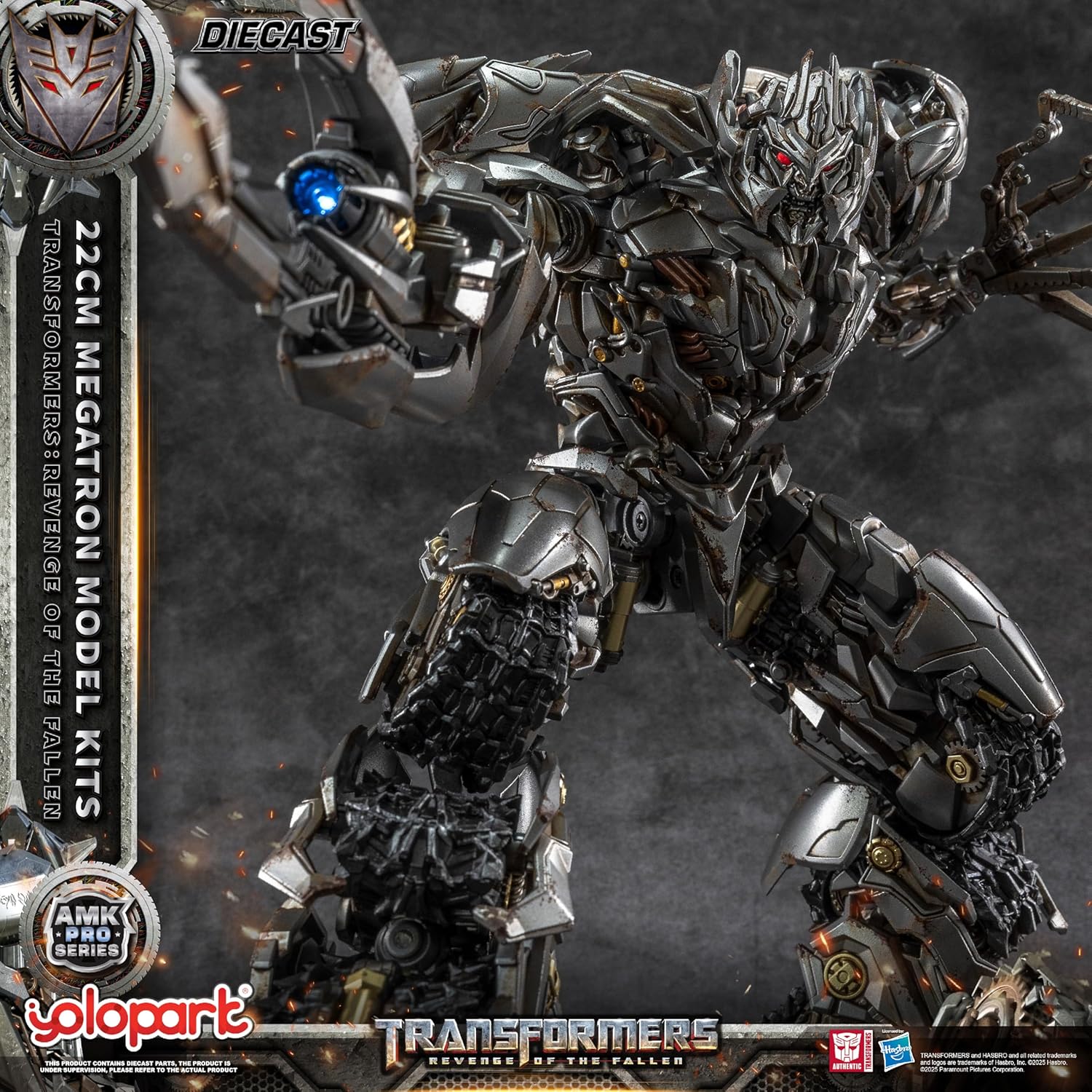
Image 1.1: YOLOPARK AMK PRO Series Megatron Action Figure
2. Safety Information
WARNING: Not for children under 15 years old. This product contains small parts which may pose a choking hazard.
Handle all components with care. Avoid excessive force during assembly or posing to prevent damage to the figure.
3. Package Contents
Verify that all items are present in your package:
- 1 × Megatron figure (pre-assembled components)
- 1 Pair × Movable hands
- 1 × Fusion Cannon with built-in LEDs
- 1 × Exclusive Energon base & stand

Image 3.1: Megatron figure with included accessories and display base.

Image 3.2: Overview of the product packaging and contents.
4. Assembly Instructions
The Megatron figure is a pre-assembled model kit, meaning core components are already built. Final assembly involves attaching these components and accessories. Refer to the official assembly tutorial video for visual guidance.
Video 4.1: Official YOLOPARK AMK PRO Series M2 Megatron Model Kit Assembly Tutorial. This video demonstrates the step-by-step process for assembling the figure's body, arms, legs, weapons, and display platform.
4.1. Body Assembly
The main body of Megatron is largely pre-assembled. This step involves securing the head and torso armor pieces. Ensure all connections are firm.
4.2. Arm Assembly
Attach the movable hands to the pre-assembled arm units. The video tutorial (approx. 0:57 for right arm, 1:11 for left arm) provides detailed visual steps for connecting the arm segments and hands.
4.3. Leg Assembly
The leg units are also largely pre-assembled. Follow the video tutorial (approx. 1:27) for attaching the foot components and ensuring proper articulation. This process is identical for both legs.
4.4. Weapons Assembly (Fusion Cannon)
Assemble the Fusion Cannon by connecting its various parts. The video tutorial (approx. 1:58) shows how to integrate the LED component into the cannon. Ensure the LED is correctly positioned for illumination.
4.5. Platform Assembly
Assemble the exclusive Energon base and stand. The stand is designed to enhance stability and allow for angle adjustments. The video tutorial (approx. 2:11) demonstrates how to set up the display platform.
4.6. Final Assembly
Once individual components are ready, attach the assembled arms and legs to the main body. Refer to the video (approx. 1:52) for connecting these major sections. Ensure all joints are securely fitted while maintaining articulation.

Image 4.1: Exploded view of Megatron's components, highlighting the pre-assembled design.
5. Operation
5.1. Articulation
The Megatron figure features approximately 80 movable joints, allowing for a wide range of dynamic poses. Carefully manipulate the joints to achieve desired positions. The design prevents interference during posing, and the linkage between the back and feet enables dynamic movement. Both legs can perform front kicking/curling 90 degrees, and the body can turn 360 degrees.

Image 5.1: Articulation points and range of motion.
5.2. LED Features
Both the eyes and the Fusion Cannon are equipped with magnetic-controlled LED lights, offering three different lighting modes. Batteries are required for this feature and are not included in the package. Please refer to the assembly video for battery installation in the Fusion Cannon.
6. Maintenance
- Cleaning: Use a soft, dry cloth to gently wipe the figure. Avoid abrasive cleaners or solvents, as these may damage the paint finish.
- Storage: Store the figure away from direct sunlight, extreme temperatures, and high humidity to prevent material degradation and color fading.
- Joint Care: If joints become stiff, gently work them back and forth. Avoid forcing movement. If parts become loose, minor adjustments or a small amount of hobby-grade adhesive may be used, but exercise caution.
7. Troubleshooting
- Loose Parts: Some smaller armor panels or joint covers may occasionally become loose during posing. Reattach them carefully. If a part consistently detaches, a small amount of non-permanent adhesive (e.g., clear hobby glue) can be applied to the connection point.
- LED Lights Not Working: Ensure batteries are correctly installed in the Fusion Cannon and that they are fresh. Check for proper contact.
- Stiff Joints: Apply gentle, consistent pressure to articulate stiff joints. Do not force movement, as this can cause breakage.
8. Specifications
| Feature | Detail |
|---|---|
| Product Dimensions | 5.31 x 2.17 x 8.66 inches (13.5 x 5.5 x 22 cm) |
| Item Weight | 3.23 pounds (1.46 kg) |
| Model Number | AMKPM2MG-E |
| Recommended Age | 15 years and up |
| Material | Diecast (inner skeleton), POM, Plastic |
| Articulation | Approx. 80 movable joints |
| Special Features | Magnetic-controlled LED eyes and Fusion Cannon (3 modes) |
9. Warranty and Support
Information regarding product warranty and customer support was not provided in the source data. Please refer to the official YOLOPARK website or contact your retailer for details on warranty coverage and support options.


