
Upbooz VC009
Upbooz Handheld Cordless Vacuum Cleaner
Model: VC009 - Instruction Manual
1. Safety Instructions
Please read all safety instructions carefully before using the Upbooz Handheld Cordless Vacuum Cleaner. Retain this manual for future reference.
- Do not use the vacuum cleaner in wet conditions or to vacuum liquids.
- Keep hair, loose clothing, fingers, and all body parts away from openings and moving parts.
- Do not pick up flammable or combustible materials, such as gasoline, or use in areas where they may be present.
- Do not pick up anything that is burning or smoking, such as cigarettes, matches, or hot ashes.
- Ensure the dustbin and filters are correctly installed before operation.
- Use only the charging cable provided by the manufacturer.
- Do not operate the vacuum cleaner if it has been dropped, damaged, left outdoors, or dropped into water.
- This appliance is not intended for use by persons (including children) with reduced physical, sensory or mental capabilities, or lack of experience and knowledge, unless they have been given supervision or instruction concerning use of the appliance by a person responsible for their safety.
2. Package Contents
Verify that all items listed below are included in your package:
- Upbooz Handheld Vacuum Cleaner
- Brush Nozzle
- Crevice Nozzle
- Extended Hose
- USB Type-C Charging Cable
- Metal Filter (Pre-installed)
- HEPA Filter (2 included)
- User Manual

Image: Upbooz Handheld Vacuum Cleaner with various attachments and charging cable.
3. Product Overview
Familiarize yourself with the components of your Upbooz Handheld Vacuum Cleaner:

Image: Exploded view of the vacuum cleaner showing the dust bin, filters, motor, power switch, and charging port.
- Power Switch: Turns the vacuum on and off.
- Dust Bin: Collects dust and debris. Transparent for easy monitoring.
- Metal Filter: Primary filter for larger particles.
- HEPA Filter: Secondary filter for fine dust, capturing 99.99% of particles.
- Charging Port: USB Type-C port for recharging the battery.
- Air Outlet: Exhausts filtered air.
4. Setup
Before first use, ensure the vacuum is fully charged and assembled correctly.
- Attach Nozzle: Select the appropriate nozzle (Brush, Crevice, or Extended Hose) for your cleaning task. Align the nozzle with the vacuum's suction inlet and push firmly until it clicks into place.
- Check Filters: Ensure the metal filter and HEPA filter are correctly seated inside the dust bin.
5. Charging
The vacuum cleaner is equipped with a rechargeable lithium-ion battery. Charge the device fully before its first use.
- Connect the provided USB Type-C charging cable to the charging port on the vacuum cleaner.
- Plug the other end of the USB cable into a compatible USB power source (e.g., wall adapter, car charger, power bank, laptop).
- The charging indicator lights will illuminate during charging. Once fully charged, the lights will change or turn off depending on the model.
- A full charge typically takes 3.5-4 hours and provides approximately 20-30 minutes of running time.

Image: The handheld vacuum connected to a wall charger via a USB-C cable, with charging indicators illuminated.
6. Operating Instructions
Your Upbooz Handheld Vacuum Cleaner is designed for efficient cleaning in various environments.
- Power On/Off: Press the power switch to turn the vacuum cleaner on. Press it again to turn it off.
- Using Nozzles:
- Brush Nozzle: Ideal for cleaning cushion surfaces, carpeted areas, air conditioning vents, and other delicate surfaces.
- Crevice Nozzle: Suitable for reaching into narrow spaces such as car seats, sofa gaps, cabinet corners, and drawers.
- Extended Hose: Use with other nozzles to clean hard-to-reach areas under sofas, beds, or high corners.
- Cleaning Performance: The vacuum provides 7500Pa of powerful suction, effectively picking up dust, debris, pet hair, and food residue. Its low noise level (below 75dB) ensures a quiet cleaning experience.

Image: A person using the handheld vacuum with a crevice tool to clean between couch cushions.
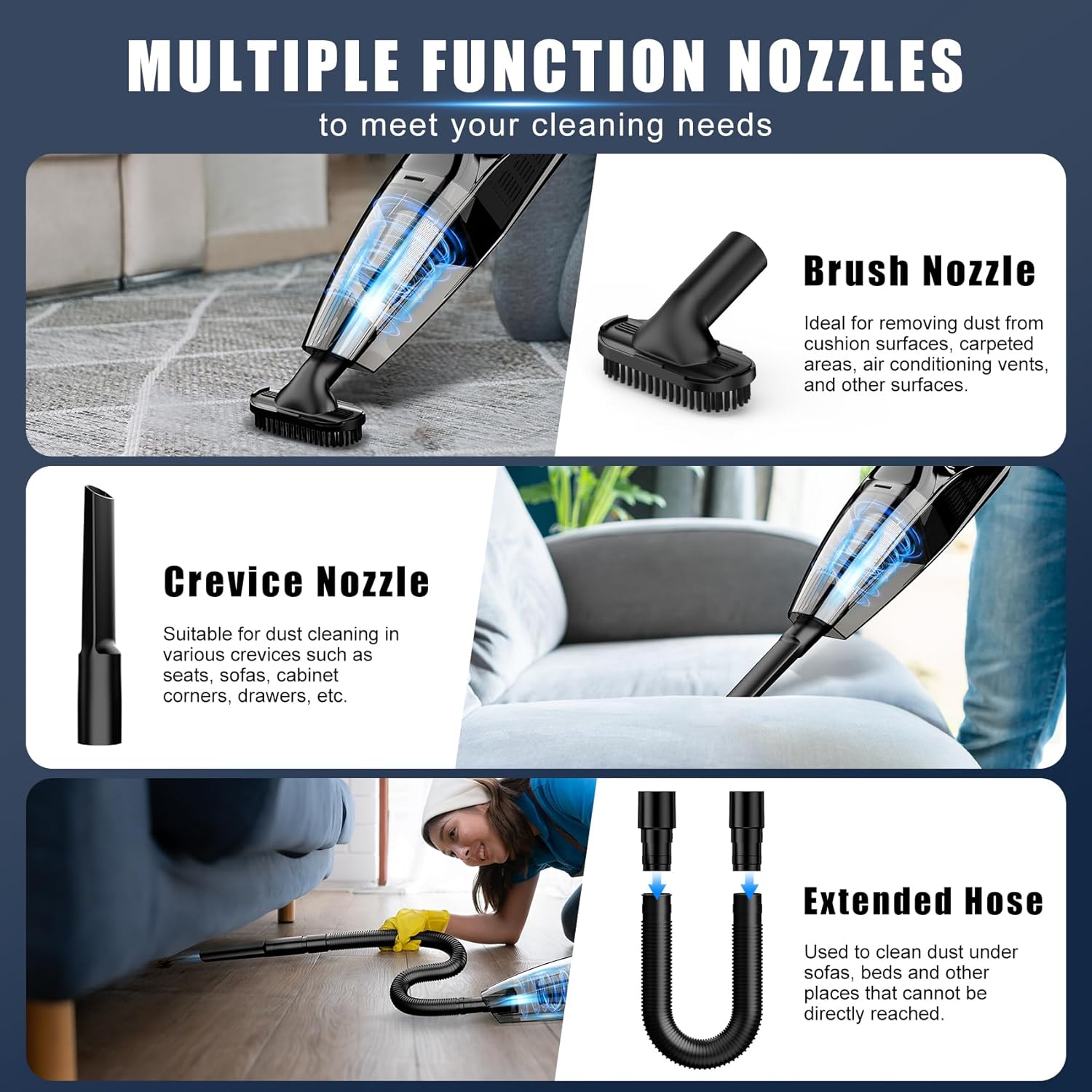
Image: A person using the handheld vacuum with a brush attachment to clean a car seat.

Image: A person using the handheld vacuum to clean dust from a laptop keyboard.
Video: A detailed review demonstrating the Upbooz Handheld Vacuum Cleaner's features and performance in various cleaning scenarios.
7. Maintenance
Regular maintenance ensures optimal performance and extends the lifespan of your vacuum cleaner.
- Emptying the Dust Bin:
- Press the dust bin release button to detach the dust bin from the main unit.
- Empty the collected debris into a trash can. The transparent design allows you to see when it needs emptying.
- Cleaning Filters:
- Separate the metal filter and HEPA filter from the dust bin.
- Rinse both filters under running water until clean.
- Allow the filters to air dry completely before reassembling. Do not expose the main unit (fuselage) to water.
- Ensure filters are completely dry before placing them back into the vacuum to prevent damage and maintain suction power.

Image: Visual guide demonstrating how to open the dust bin, remove filters, empty debris, and clean the filters with water.
8. Troubleshooting
If you encounter issues with your Upbooz Handheld Vacuum Cleaner, refer to the following common solutions:
| Problem | Possible Cause | Solution |
|---|---|---|
| Vacuum does not turn on | Battery is depleted | Charge the vacuum cleaner fully. |
| Low suction power | Dust bin is full | Empty the dust bin. |
| Low suction power | Filters are clogged | Clean or replace the metal and HEPA filters. Ensure they are dry before reinstallation. |
| Low suction power | Nozzle or hose is blocked | Remove any blockages from the nozzle or extended hose. |
| Short operating time | Battery not fully charged | Ensure the vacuum is fully charged (3.5-4 hours). |
9. Specifications
| Feature | Detail |
|---|---|
| Brand | Upbooz |
| Model Name | VC009 |
| Suction Power | 7500Pa |
| Filter Type | HEPA Filter, Metal Filter |
| Battery Life | 20-30 minutes |
| Charging Time | 3.5-4 hours |
| Capacity | 670ml (Dustbin) / 12 ounces |
| Noise Level | <75dB |
| Item Weight | 1 pounds |
| Power Source | Battery Powered |
| Special Features | Lightweight, Low Noise, Cordless, Portable |
10. Warranty and Customer Support
Upbooz is committed to providing quality products and excellent customer service.
If you have any questions or problems regarding your Upbooz rechargeable handheld vacuum cleaner, please contact our dedicated customer service team. We are available to assist with any questions or concerns, ensuring your peace of mind.
Please refer to your purchase documentation for specific warranty details.
Ask a question about this manual
Ask about setup, troubleshooting, compatibility, parts, safety, or missing instructions. Manuals+ will review the question and use this page’s manual context to help answer it.