
Introduction
Thank you for choosing the WLIVE Modern TV Stand. This manual provides detailed instructions for assembly, operation, maintenance, and troubleshooting to ensure safe and optimal use of your new entertainment center. Please read this manual thoroughly before beginning assembly or use.

Image: The WLIVE Modern TV Stand, black finish, supporting a large television in a contemporary living room environment.
Safety Information
Please observe the following safety precautions:
- Ensure all parts are present and undamaged before assembly. Do not use damaged parts.
- Assemble the unit on a soft, clean surface to prevent scratches.
- Do not overtighten screws during assembly to avoid damaging the material.
- This TV stand is designed to support up to 110 pounds. Do not exceed this weight limit.
- Always place the heaviest items on the lowest shelves to prevent tipping.
- Use the included anti-tip base for added stability, especially if children or pets are present.
- Keep small parts away from children during assembly.
Specifications
| Feature | Detail |
|---|---|
| Brand | WLIVE |
| Model Number | ADSG084BL |
| Color | Black (also available in White) |
| Material Type | Engineered Wood (CARB-certified high-quality particleboard) |
| Dimensions (L x W x H) | 67.72'' x 12.99'' x 25.28'' (67.7 x 13 x 25.3 inches) |
| Item Weight | 82.24 Pounds |
| Total Board Capacity | Up to 110 Pounds |
| Number of Shelves | 7 (5 open storage shelves, 2 large storage cabinets) |
| Adjustable Shelves | 3 adjustable/removable positions within central divider |
| LED Lights | RGB LED Entertainment Lighting (20 single colors, 4 flashing modes, 5 brightness levels) |
| Assembly Required | Yes (estimated 1 hour for 2 people) |
| Waterproof Surface | Yes |

Image: Detailed product size diagram with dimensions and weight capacities for various sections of the TV stand.
Setup and Assembly
Assembly of the WLIVE Modern TV Stand typically requires two people and takes approximately one hour. All necessary parts and tools are included and labeled for your convenience. Please follow the instructions carefully.
Assembly Steps Overview:
- Unpack and Identify Parts: Carefully unpack all components and lay them out on a soft, clean surface. Refer to the included parts list to identify each piece and hardware.
- Assemble Base Structure: Begin by connecting the main base panels using the provided fasteners.
- Install Shelves and Dividers: Insert the fixed and adjustable shelves into their designated slots. The central divider has 3 adjustable/removable positions for customization.
- Attach Cabinet Doors: Secure the cabinet doors using the hinges. Ensure they open and close smoothly.
- Mount Top Panel: Place and secure the top panel onto the assembled structure.
- Install LED Lights: Carefully attach the RGB LED light strip to the designated area, usually along the underside of the top tier or within the open compartments. Connect the power supply.
- Secure Anti-Tip Base: For enhanced safety, attach the widened anti-tip base to the wall according to the instructions.
Assembly Video Guide:
Video: Official WLIVE TV Stand Installation Guide. This video provides a visual walkthrough of the assembly process for the TV stand, demonstrating each step from unpacking to final setup.
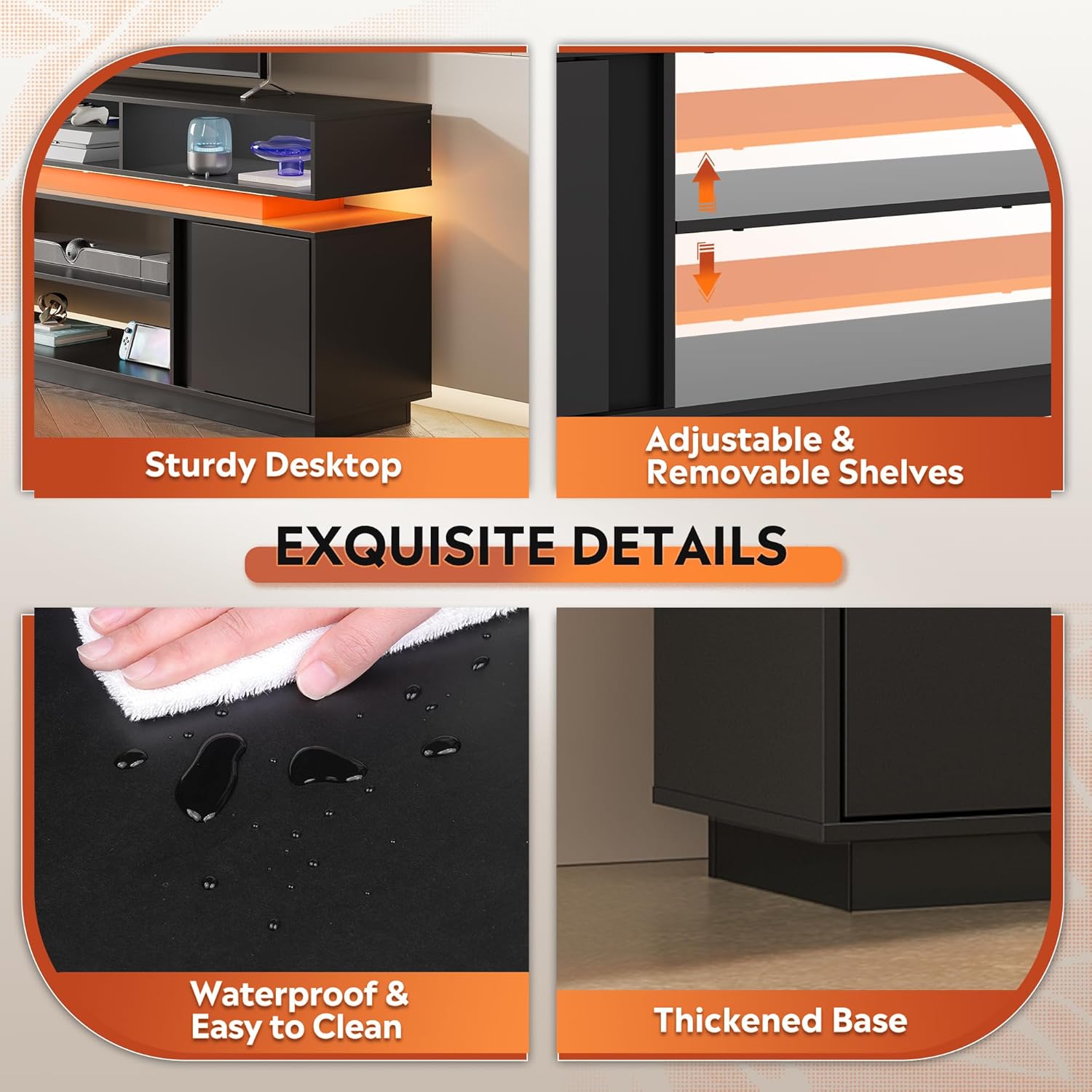
Image: Detailed views highlighting the waterproof surface, thickened base for stability, and the adjustable/removable shelves for customized storage.
Operating Instructions
LED Lighting System:
The WLIVE Modern TV Stand features integrated RGB LED lighting. To operate the LED lights:
- Power On/Off: Connect the LED light power adapter to a wall outlet. Use the included remote control or a compatible app (if applicable) to turn the lights on or off.
- Color Selection: Choose from 20 single colors, including warm white and cool blue, using the remote or app.
- Flashing Modes: Select from 4 color flashing modes, such as gradient and blinking, to create different ambiance.
- Brightness Adjustment: Adjust the light intensity with 5 levels of brightness to suit your preference.

Image: The TV stand illuminated by its RGB LED lights, demonstrating the range of colors and brightness levels, with a remote control shown for operation.
Storage Features:
The TV stand offers ample storage solutions:
- Open Storage Shelves: Utilize the 5 open shelves for media devices, gaming consoles, soundbars, or decorative items.
- Storage Cabinets: The 2 large storage cabinets provide concealed storage for items you wish to keep out of sight.
- Adjustable Shelves: The central divider features shelves with 3 adjustable/removable positions, allowing you to customize the space to fit various item sizes.

Image: A view of the TV stand showcasing its storage capabilities, with media players, game consoles, and other items neatly organized in its open shelves and behind its cabinet doors.
Maintenance and Care
To maintain the appearance and longevity of your WLIVE Modern TV Stand, follow these care instructions:
- Cleaning: Wipe the surface with a damp cloth. Avoid using harsh chemicals or abrasive cleaners, which can damage the finish.
- Spills: The surface is waterproof. In case of spills, wipe them immediately with a dry cloth to prevent any potential damage.
- Dusting: Regularly dust the unit with a soft, dry cloth.
- Avoid Direct Sunlight: Prolonged exposure to direct sunlight may cause fading or discoloration.
- Weight Distribution: Ensure weight is evenly distributed across the shelves and top surface to prevent stress on the structure.
Troubleshooting
If you encounter any issues with your WLIVE Modern TV Stand, please refer to the following common solutions:
| Problem | Possible Cause / Solution |
|---|---|
| Unit is wobbly after assembly. | Ensure all screws and fasteners are tightened securely. Check that the unit is placed on a level surface. Re-check assembly steps, especially for the base and connections. |
| LED lights are not working. | Verify that the power adapter is securely plugged into both the LED strip and a working wall outlet. Check the remote control battery. Ensure the LED strip is correctly connected. |
| Cabinet doors do not close properly. | Check the hinge alignment and ensure they are securely fastened. Adjust hinges if necessary. Ensure no items inside the cabinet are obstructing the door. |
| Missing parts or damaged components. | Do not proceed with assembly. Contact WLIVE customer support immediately for assistance and replacement parts. |
If the problem persists or is not listed above, please contact WLIVE customer support for further assistance.
Warranty Information
Specific warranty details for the WLIVE Modern TV Stand are not provided in this document. For information regarding product warranty, please refer to the documentation included with your purchase or contact WLIVE customer support directly. Keep your proof of purchase for any warranty claims.
Customer Support
For any questions, concerns, or assistance with your WLIVE Modern TV Stand, please contact WLIVE customer support. You can typically find contact information on the WLIVE official website or through the retailer where you purchased the product.
When contacting support, please have your model number (ADSG084BL) and purchase details readily available.


