
1. Introduction
The BLUETTI Elite 30 V2 is a lightweight and portable power station designed to provide reliable power for various scenarios, including outdoor camping, road trips, and home emergencies. It features a 600W AC inverter, a 288Wh LiFePO4 battery, and multiple output ports to keep your devices charged and running.
What's in the Box:
- BLUETTI Elite 30 V2 Portable Power Station
- AC Charging Cable
- Car Charging Cable
- User Manual
2. Safety Information
Please read and understand all safety instructions before operating the BLUETTI Elite 30 V2. Failure to follow these instructions may result in electric shock, fire, or serious injury.
- Do not disassemble, repair, or modify the unit.
- Keep the unit away from water, heat sources, and direct sunlight.
- Use the unit in a well-ventilated area.
- Avoid extreme temperatures. Store the unit between -10°C and 45°C (14°F and 113°F).
- Keep out of reach of children and pets.
- Ensure all connections are secure before use.
3. Product Overview
The BLUETTI Elite 30 V2 is designed for ease of use with a clear display and a variety of ports.

Figure 3.1: Front view of the BLUETTI Elite 30 V2 Portable Power Station.
Ports and Features:
- AC Output: 1x 600W AC outlet (230V)
- USB-C Output: 1x 140W USB-C port, 1x 100W USB-C port
- USB-A Output: 2x USB-A ports
- DC Output: 2x 12V DC5521 ports, 1x 12V Car Cigarette Lighter Socket
- Display: LCD screen showing battery percentage, input/output wattage, and remaining usage time.

Figure 3.2: Detailed view of the BLUETTI Elite 30 V2 ports and controls.
4. Setup
Before first use, it is recommended to fully charge your BLUETTI Elite 30 V2.
Initial Charging:
- Connect the provided AC charging cable to the power station's AC input port.
- Plug the other end of the AC charging cable into a standard wall outlet.
- The LCD display will show the charging status. The unit will fully charge from 0% to 100% in approximately 70 minutes.
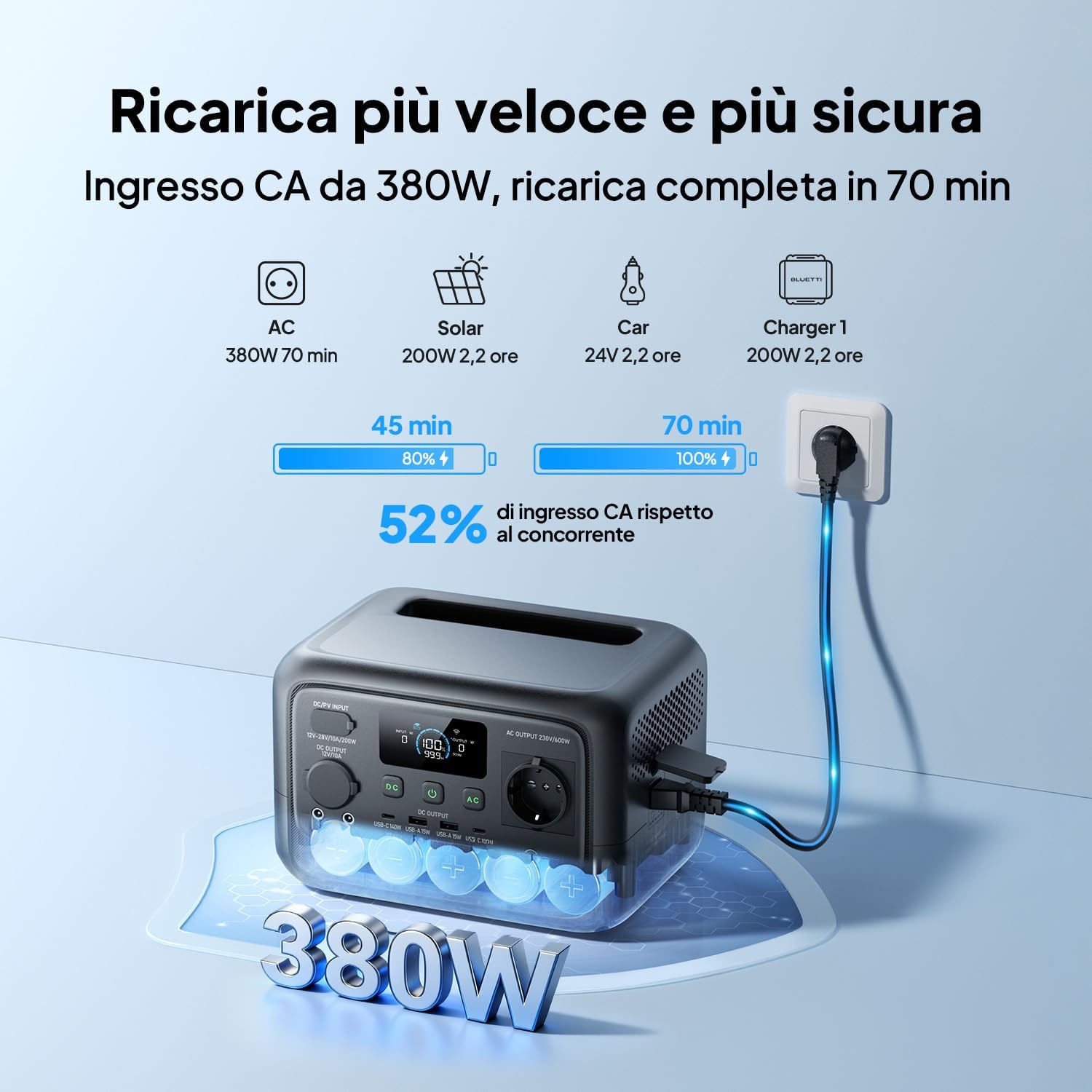
Figure 4.1: The power station connected to an AC outlet for charging.
5. Operating Instructions
Charging the Power Station:
The Elite 30 V2 supports multiple charging methods:
- AC Charging: Connect to a wall outlet using the AC charging cable. Full charge in 70 minutes.
- Solar Charging: Connect compatible solar panels (not included) to the DC input port. An additional solar charging cable may be required for 100W or 200W solar panels.
- Car Charging: Connect to your vehicle's 12V cigarette lighter socket using the car charging cable.
Discharging (Powering Devices):
To power your devices, simply plug them into the appropriate output port (AC, USB-A, USB-C, or DC). Ensure the power station is turned on.
- The 600W AC output can power most small appliances. For devices requiring higher power, the unit supports a 1500W Power Lifting mode for certain resistive loads like kettles and toasters.
- The 140W and 100W USB-C ports are ideal for fast charging laptops, tablets, and smartphones.

Figure 5.1: The power station demonstrating its 600W nominal and 1500W peak power capabilities.
Uninterruptible Power Supply (UPS) Function:
The Elite 30 V2 features a reliable UPS function. In the event of a power outage, it can seamlessly switch to battery power in just 10 milliseconds, ensuring continuous operation for connected devices.

Figure 5.2: The power station providing backup power to a desktop computer.
6. Maintenance
Proper maintenance ensures the longevity and optimal performance of your BLUETTI Elite 30 V2.
- Cleaning: Use a dry, soft cloth to clean the exterior of the unit. Do not use harsh chemicals or abrasive materials.
- Storage: If storing for an extended period, charge the unit to 50-80% every 3-6 months to maintain battery health. Store in a cool, dry place away from direct sunlight and extreme temperatures.
- Ventilation: Ensure the ventilation openings are not blocked during use to prevent overheating.
7. Troubleshooting
If you encounter issues with your BLUETTI Elite 30 V2, refer to the following common troubleshooting steps:
- Unit not turning on: Ensure the battery is charged. Press and hold the power button for a few seconds.
- No output from ports: Check if the specific output port (AC, USB, DC) is enabled on the unit. Ensure the device you are trying to power is within the power station's output limits.
- Slow charging: Verify that the charging cable is properly connected and that the power source is adequate. For solar charging, ensure panels are in direct sunlight and correctly oriented.
- Overload warning: If an overload warning appears, disconnect some devices to reduce the load. The unit may automatically shut down to protect itself.
For persistent issues, please contact BLUETTI customer support.
8. Specifications
| Feature | Specification |
|---|---|
| Brand | BLUETTI |
| Model Number | BLUETTI Elite 30 V2 |
| Battery Type | LiFePO4 (Lithium Iron Phosphate) |
| Battery Capacity | 288Wh |
| AC Output Voltage | 230V (AC) |
| AC Output Power | 600W (Rated) |
| Peak Power | 1500W |
| Number of Outlets | 9 (including AC, USB-A, USB-C, DC, Car) |
| Recharge Time (AC) | 70 Minutes (0-100%) |
| Weight | 4.3 kg |
| Dimensions (L x W x H) | 25 x 17.8 x 17 cm |
| Plug Type | Type E / F - 2 pin (EU Hybrid) |

Figure 8.1: Dimensions of the BLUETTI Elite 30 V2 Portable Power Station.
9. Warranty and Support
Warranty:
The BLUETTI Elite 30 V2 comes with a 2-year product warranty from the date of purchase. Please retain your proof of purchase for warranty claims.
Customer Support:
For technical assistance, warranty service, or any questions regarding your BLUETTI Elite 30 V2, please visit the official BLUETTI website or contact their customer service department. Contact information can typically be found on the BLUETTI website or in the packaging materials.


