
1. Product Overview
The Mibro GS Explorer S Adventure GPS Watch is a robust and versatile smartwatch designed for outdoor enthusiasts. It features an aviation-grade titanium body, a vibrant AMOLED display, and advanced GPS capabilities for navigation and tracking.
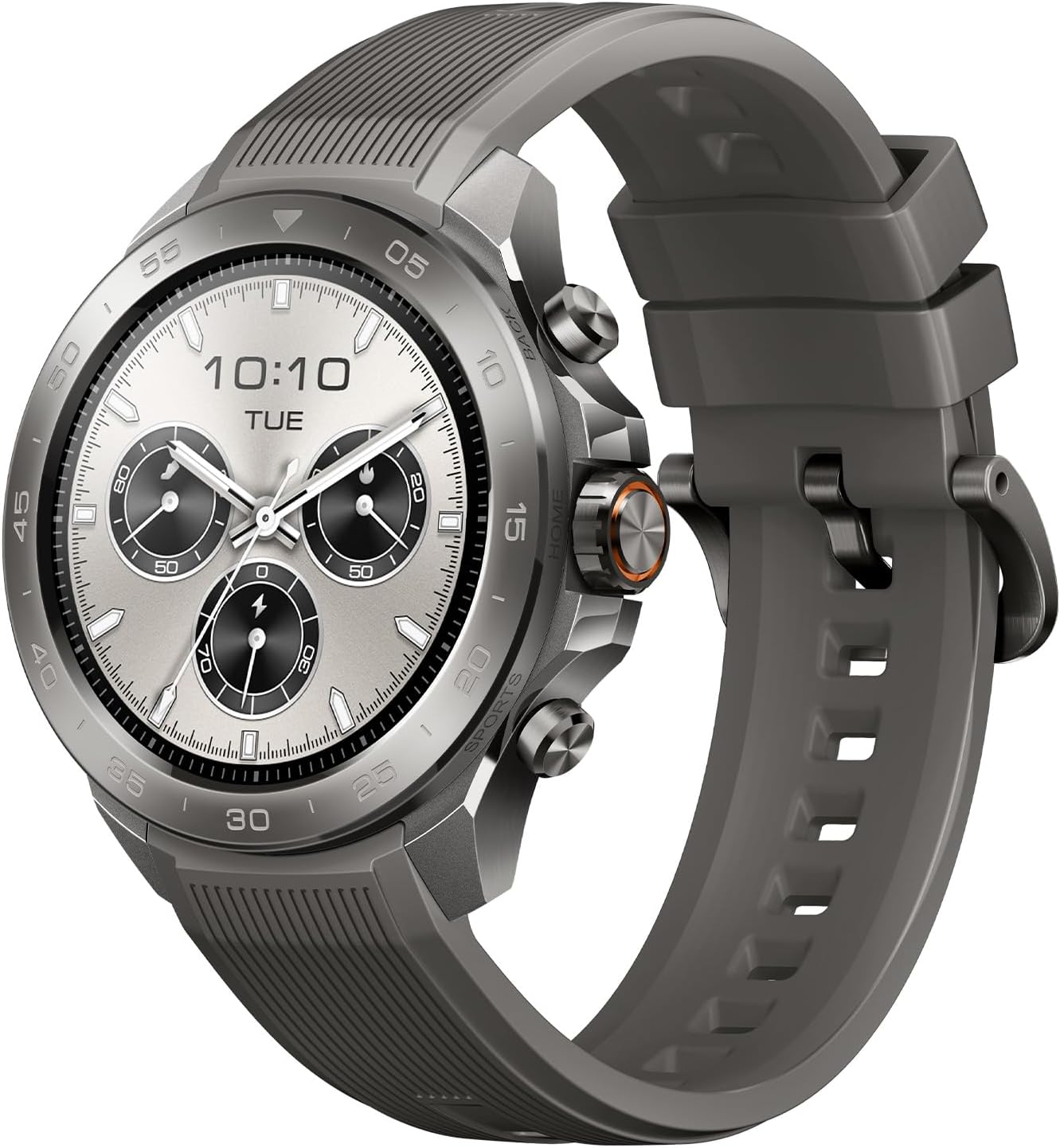
Image: The Mibro GS Explorer S Adventure GPS Watch, showcasing its design and display.
Key Features:
- Aviation-Grade Titanium Body: Crafted from aerospace-grade titanium alloy for durability and lightweight design.
- Military-Grade Durability: Passed 17 MIL-STD-810H tests, operating in temperatures from -30°C to 70°C.
- 10ATM Water Resistance: Suitable for swimming and freediving up to 98 feet.
- Professional Freediving Mode: Tracks ascent/descent rates and current depth with visual and vibration alerts.
- Advanced GPS Accuracy: 5-satellite dual-frequency positioning for reliable outdoor navigation, including waypoint and track return functions.
- Long Battery Life: Up to 20 days in daily mode, 25 hours in GPS mode.
- 1.32" AMOLED Display: High-brightness (1500 nit), 466x466 resolution, protected by Corning Gorilla Touch Glass.
- 150+ Sport Modes: Comprehensive tracking for various activities.
What's in the Box:
- Mibro GS Explorer S Adventure GPS Watch
- Magnetic Charging Cable
- User Manual
- Watch Band (additional band may be included)

Image: Diagram showing the watch, charging cable, user manual, and watch band included in the package.
2. Setup Guide
2.1 Charging the Watch
Before initial use, fully charge your Mibro GS Explorer S watch. Connect the magnetic charging cable to the charging contacts on the back of the watch and plug the USB end into a power adapter (not included) or a computer's USB port. A full charge typically takes approximately 2 hours.

Image: The Mibro GS Explorer S watch connected to its magnetic charging cable, displaying charging status.
2.2 App Installation and Pairing
To unlock the full potential of your Mibro GS Explorer S, download and install the official Mibrofit app on your smartphone.
- Turn on Phone's Bluetooth: Ensure Bluetooth is enabled on your smartphone.
- Download Mibrofit App: Search for "Mibrofit" in the Apple App Store (for iOS) or Google Play Store (for Android) and install the app.
- Open App and Pair: Open the Mibrofit app, create an account or log in, and follow the on-screen instructions to find and pair with your GS Explorer S smartwatch.
- Enable Notifications: Grant necessary permissions within the app, especially for notifications, to receive alerts on your watch.

Image: A visual guide illustrating the four steps to connect the smartwatch: enable Bluetooth, download the app, open and pair, and enable notifications.
3. Operating Instructions
3.1 Basic Navigation
The Mibro GS Explorer S features a responsive touchscreen and easy-control buttons for intuitive operation. Swipe across the screen to navigate menus and access different functions. Use the physical buttons for quick access to specific modes or to confirm selections.
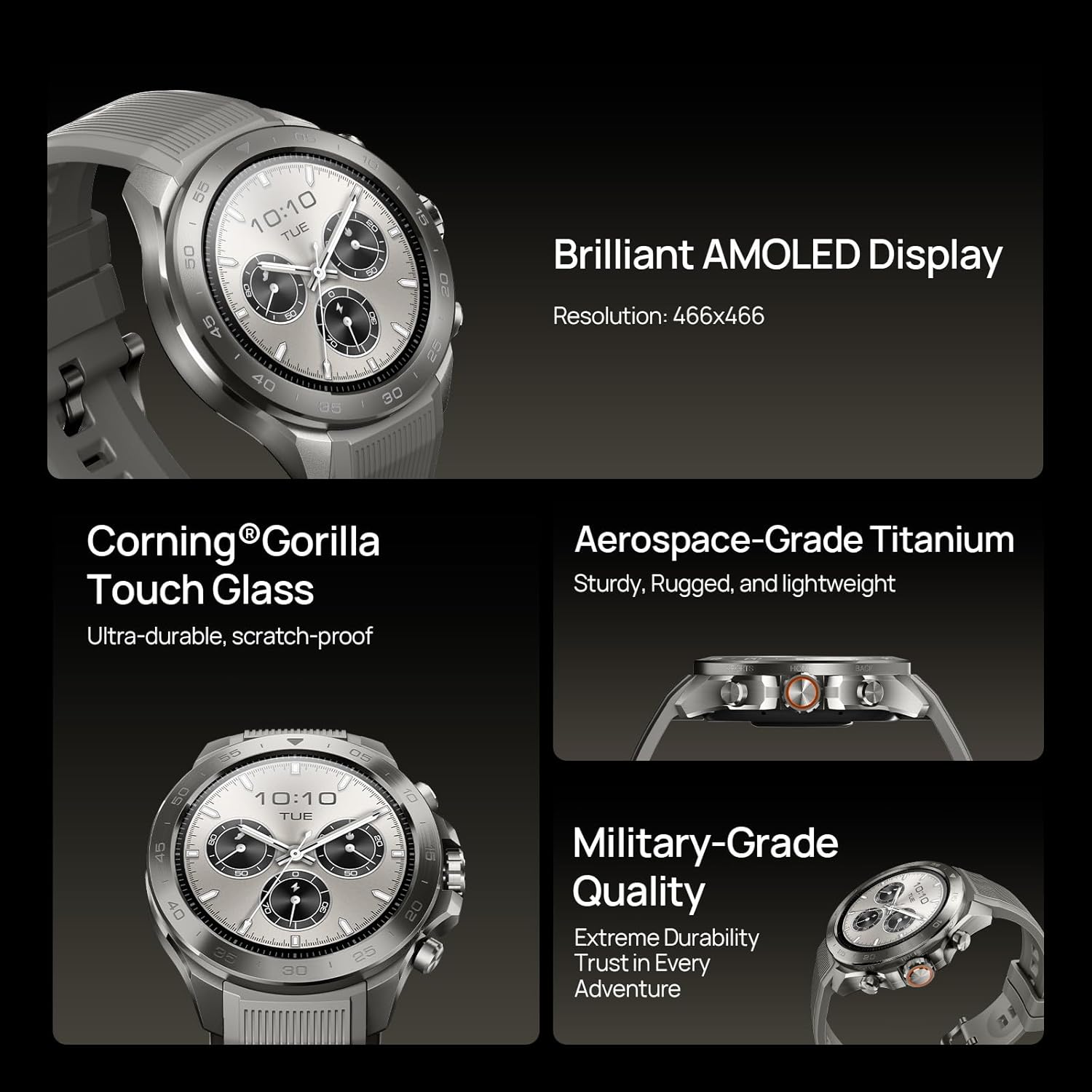
Image: Close-up of the Mibro GS Explorer S display, highlighting its AMOLED screen, Corning Gorilla Touch Glass, aerospace-grade titanium, and military-grade quality.
3.2 Sport Modes
The watch supports over 150 sport modes. To start a workout, navigate to the 'Sport Modes' section on your watch, select your desired activity, and press the start button. The watch will begin tracking relevant metrics such as heart rate, distance, pace, and calories burned.

Image: A collage showing various sports activities like climbing, hiking, trail running, and cycling, with the watch displaying a menu of sport modes.
3.3 GPS and Navigation
Utilize the 5-satellite dual-frequency positioning system for accurate outdoor navigation. The watch supports waypoint navigation and track return functions, allowing you to mark important locations and retrace your steps even without network coverage.
- Waypoint Navigation: Mark specific points of interest during your journey.
- Track Return: Follow your recorded path back to your starting point.
- Breadcrumb Trail: View your real-time path on the watch display or paired app.
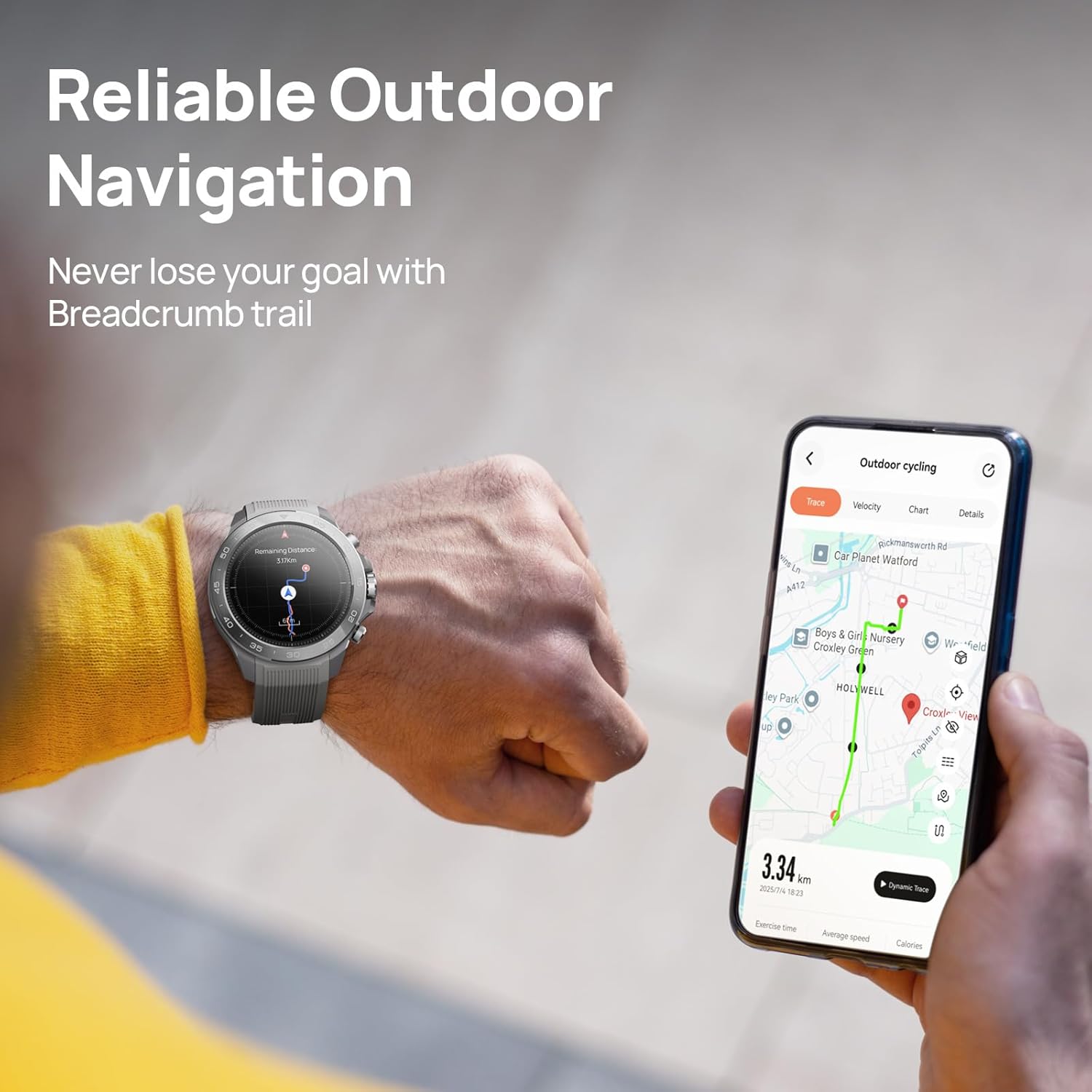
Image: A person wearing the Mibro GS Explorer S watch, which displays a navigation map, while holding a smartphone showing a detailed route.

Image: A cyclist using the Mibro GS Explorer S for navigation, with the watch displaying route options and a map.
3.4 Health Monitoring
The watch continuously monitors various health metrics:
- Heart Rate: Real-time heart rate tracking during activities and throughout the day.
- VO2 MAX: Estimates your maximum oxygen uptake during exercise.
- Sleep Tracking: Records sleep patterns, including sleep stages and duration, providing a sleep score.

Image: A runner in an outdoor setting, with graphics displaying heart rate, speed, pace, step number, and VO2 MAX data from the watch.

Image: A person sleeping, with two watches displaying sleep scores and sleep duration data.
3.5 Outdoor Tools and Weather Forecast
Access a suite of outdoor tools directly from your watch, including a barometer, altimeter, and compass. Receive real-time weather forecasts and severe weather alerts to stay informed during your adventures.
- Barometer: Monitors atmospheric pressure changes.
- Altimeter: Provides current altitude readings.
- Compass: Helps with direction finding.
- Weather Forecast: Displays air pressure, temperature, wind direction, humidity, and precipitation.

Image: A hiker in a snowy mountain environment, with the watch displaying weather forecast data and a menu of outdoor tools like SpO2, barometer, and flashlight.
3.6 Freediving Mode
The 10ATM water resistance and dedicated freediving mode make this watch suitable for underwater activities. The watch tracks key metrics and provides alerts for safety.
- Tracks ascent and descent rates.
- Monitors current depth.
- Provides visual and vibration alerts when preset depth or time limits are reached.

Image: A diver underwater, with the Mibro GS Explorer S watch on their wrist, highlighting features like easy-control buttons, flashlight, long battery life, and smart notifications.
3.7 Bluetooth Calls and Notifications
Once paired with your smartphone, the Mibro GS Explorer S allows you to receive Bluetooth calls and view text communications and app notifications directly on your wrist.

Image: A person wearing the watch, with various social media and communication app icons floating around the watch face, symbolizing Bluetooth communication.
4. Maintenance
4.1 Cleaning and Care
- Regularly wipe the watch screen and strap with a soft, damp cloth to remove dirt and sweat.
- Avoid using harsh chemicals or abrasive materials, as these can damage the watch's finish or screen.
- Ensure the charging contacts are clean and dry before charging to prevent corrosion.
4.2 Water Resistance
The Mibro GS Explorer S is 10ATM water-resistant, meaning it can withstand pressures equivalent to a depth of 100 meters. It is suitable for swimming, showering, and freediving up to 98 feet. However, avoid using the watch in hot water, saunas, or steam rooms, as extreme temperature changes can compromise the seals.
4.3 Battery Information
The watch contains a lithium battery. Do not throw it into fire or leave it in a high-temperature environment. Dispose of the battery according to local regulations. The watch is designed to operate in temperatures from -30°C to 70°C. Avoid exposing it to temperatures outside this range.
5. Troubleshooting
5.1 Watch Not Turning On
- Ensure the watch is fully charged. Connect it to the charging cable and allow it to charge for at least 30 minutes before attempting to power it on.
- Press and hold the power button (usually the top right button) for several seconds.
5.2 Pairing Issues with Smartphone
- Make sure Bluetooth is enabled on your smartphone and the watch.
- Ensure the Mibrofit app is updated to the latest version.
- Restart both your watch and smartphone.
- If the watch was previously paired with another device, unpair it from that device first.
- Try resetting the watch to factory settings (refer to the watch's settings menu for this option).
5.3 Inaccurate GPS Readings
- Ensure you are in an open outdoor area with a clear view of the sky for optimal GPS signal reception.
- Wait for the watch to acquire a stable GPS signal before starting your activity. This may take a few moments.
- Update the watch's firmware through the Mibrofit app, as updates often include GPS performance improvements.
5.4 Short Battery Life
- Reduce screen brightness and screen-on time.
- Disable continuous heart rate monitoring or set it to a less frequent interval if not needed.
- Limit the number of notifications received on the watch.
- Ensure no background apps are running unnecessarily on the watch.
- Frequent use of GPS-intensive activities will consume battery faster.
6. Specifications
| Feature | Detail |
|---|---|
| Model Number | GS Explorer S Ti |
| Dimensions | 9.84 x 0.86 x 0.51 inches |
| Weight | 2.68 ounces |
| Display | 1.32 Inches AMOLED, 466x466 Resolution, 1500 nit brightness |
| Display Protection | Corning Gorilla Touch Glass |
| Case Material | Aviation-Grade Titanium Alloy |
| Water Resistance | 10ATM (up to 98 feet for freediving) |
| Battery Type | 1 AAAA battery (included) |
| Battery Life (Daily Mode) | Up to 20 days |
| Battery Life (GPS Mode) | Approximately 25 hours |
| Connectivity | Bluetooth |
| Operating System | Watch OS 8 |
| Memory Storage Capacity | 2 GB |
| Operating Temperature | -30°C to 70°C |
| Military Standard | MIL-STD-810H |

Image: Technical drawing showing the dimensions of the Mibro GS Explorer S watch and its adjustable silicone bands.
7. Warranty and Support
7.1 Manufacturer's Warranty
The Mibro GS Explorer S Adventure GPS Watch comes with a 1-Year Manufacturer's Warranty. Please retain your proof of purchase for warranty claims. The warranty covers defects in materials and workmanship under normal use.
7.2 Customer Support
For technical assistance, troubleshooting, or warranty inquiries, please contact Mibro customer support:
- Web Support: mibrofit.com
- Email Support: service@mibrofit.com
- Manufacturer: Mibro
- FCC ID: 2BAYW-XPAW023-TI

Image: Side view of the product packaging, displaying model number, Bluetooth version, power specifications, manufacturer details, web support, email support, and FCC ID.


