1. Introduction
The occiam AI Translation Earbuds D72 are designed to facilitate real-time communication across language barriers, offering advanced translation capabilities alongside high-quality audio playback. These earbuds feature a unique glowing earhook for enhanced visibility during nighttime activities and an open-ear design for comfort and situational awareness. This manual provides detailed instructions for the proper use and maintenance of your device.

Image 1.1: occiam AI Translation Earbuds D72 with their charging case.
2. What's in the Box
Please verify that all items are present in the packaging:
- Wireless Earbuds (Left and Right)
- Charging Case
- USB-C Cable
- User Manual (Basic Functions)
- AI Translation Manual (with embedded Authorization QR Code)
Note: The QR code in the AI Translation Manual is essential for binding the earbuds to the translation application. Please protect this code.
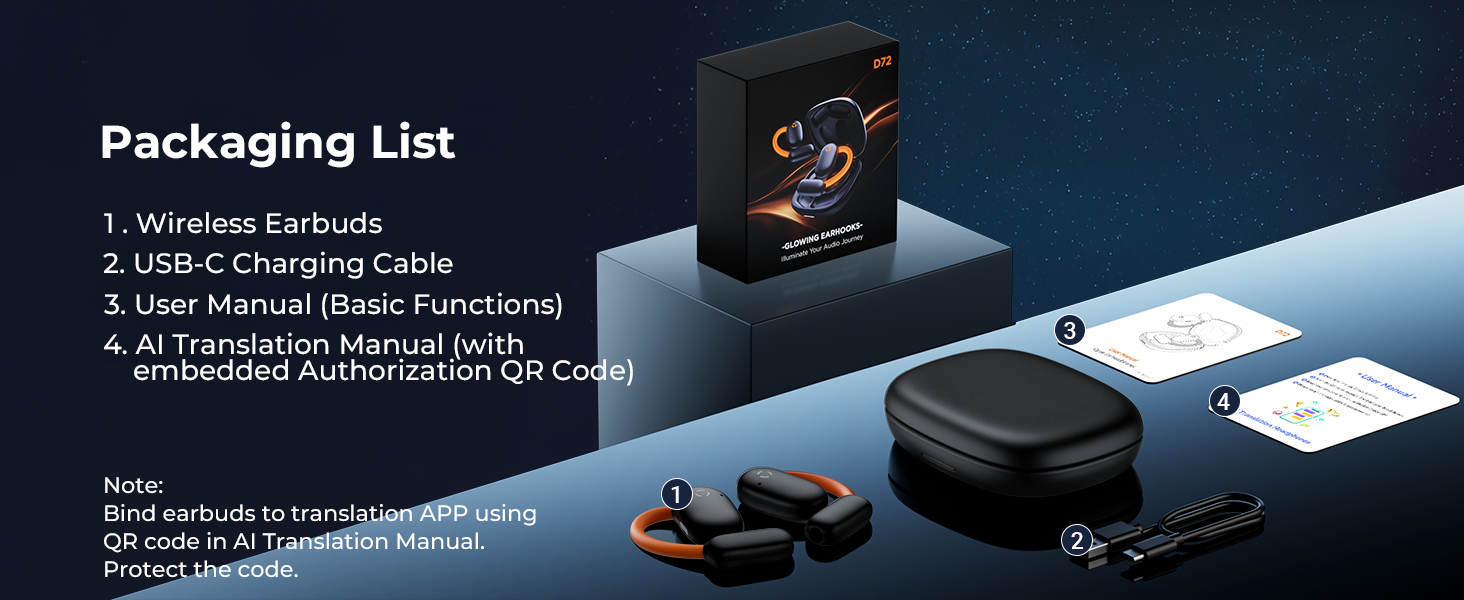
Image 2.1: Illustration of the items included in the product packaging.
3. Setup
3.1 Initial Charging
Before first use, fully charge the earbuds and the charging case. Connect the provided USB-C cable to the charging port on the case and a compatible USB power source. The LED indicators on the charging case will show the charging status.
3.2 Bluetooth Pairing
- Ensure the earbuds are in the charging case and the case has power.
- Open the charging case lid. The earbuds will automatically enter pairing mode.
- On your mobile device, navigate to Bluetooth settings and search for available devices.
- Select "occiam D72" (or similar name) from the list to connect. A voice prompt will confirm successful pairing.
3.3 App Download and Connection
To utilize the translation features, download the dedicated application. Scan the QR code provided in the AI Translation Manual to download the app on your iOS or Android device. Follow the in-app instructions to bind your earbuds using the authorization QR code.

Image 3.1: Visual guide for downloading the companion application for real-time translation.
4. Operating Instructions
4.1 Basic Controls (Touch Sensitive)
The earbuds feature touch controls for managing audio playback and calls:
- Play/Pause: Single tap on either earbud.
- Next Track: Double tap on the right earbud.
- Previous Track: Double tap on the left earbud.
- Answer/End Call: Single tap on either earbud.
- Reject Call: Long press on either earbud.
- Activate Voice Assistant: Triple tap on either earbud.
- Volume Control: Adjust via your connected device.
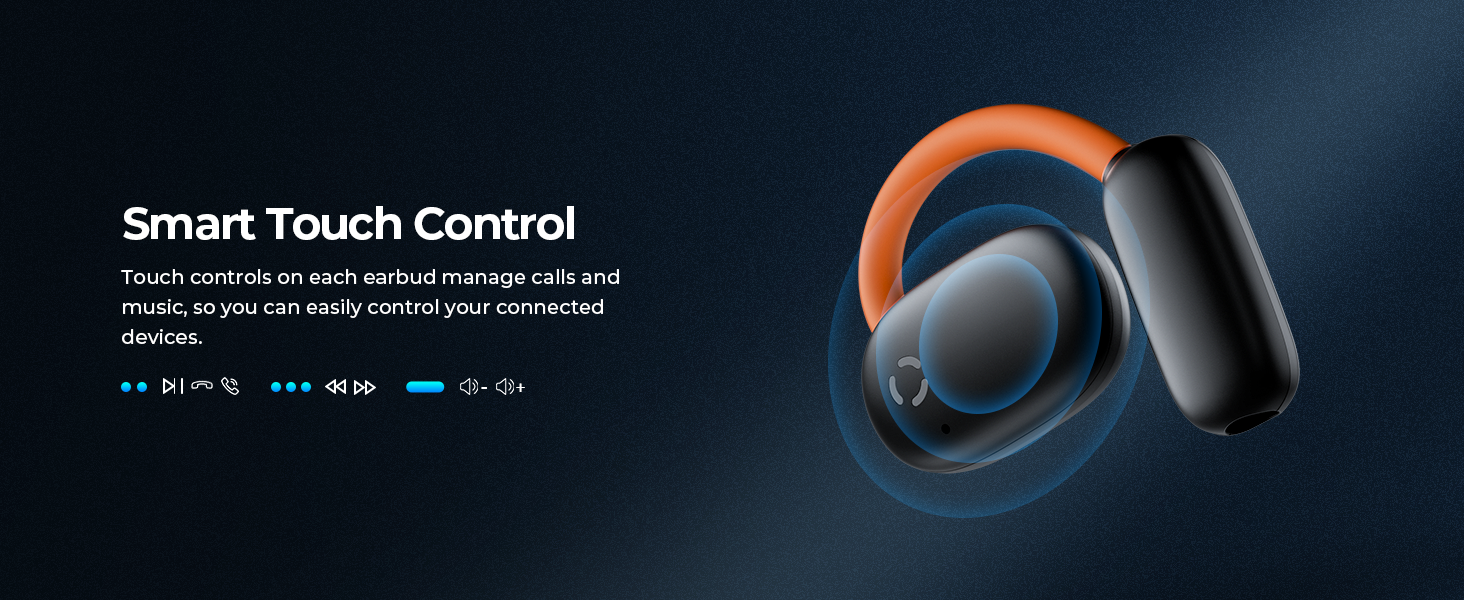
Image 4.1: Overview of the touch control functions on the earbuds.
4.2 Translation Modes
The earbuds support various translation modes via the companion application, covering 164 languages (75 languages, 89 accents) with up to 98% accuracy and a response time as fast as 0.5 seconds.
- Free Talk Mode: Both individuals wear an earbud and speak naturally. The app automatically detects and translates speech into the desired language, displaying it as sentences.
- Headphone + Phone Mode: One person wears an earbud, and the other speaks into the mobile phone. This mode is suitable for quick interactions with strangers or in situations where only one earbud is available.
- Translation Machine Mode: Provides two-way translation for 163 languages online.
- Voice Note Mode: For fast and accurate real-time translation of spoken notes, suitable for business, learning, and meetings.
- Photo Translation: Capture text from images for efficient and convenient translation.
- AI Dialogue Mode: Interact with an AI to ask questions and receive timely answers.
- Audio and Video Translation Mode: Break down language barriers by translating audio and video content.

Image 4.2: Illustration of the diverse real-time translation functionalities.
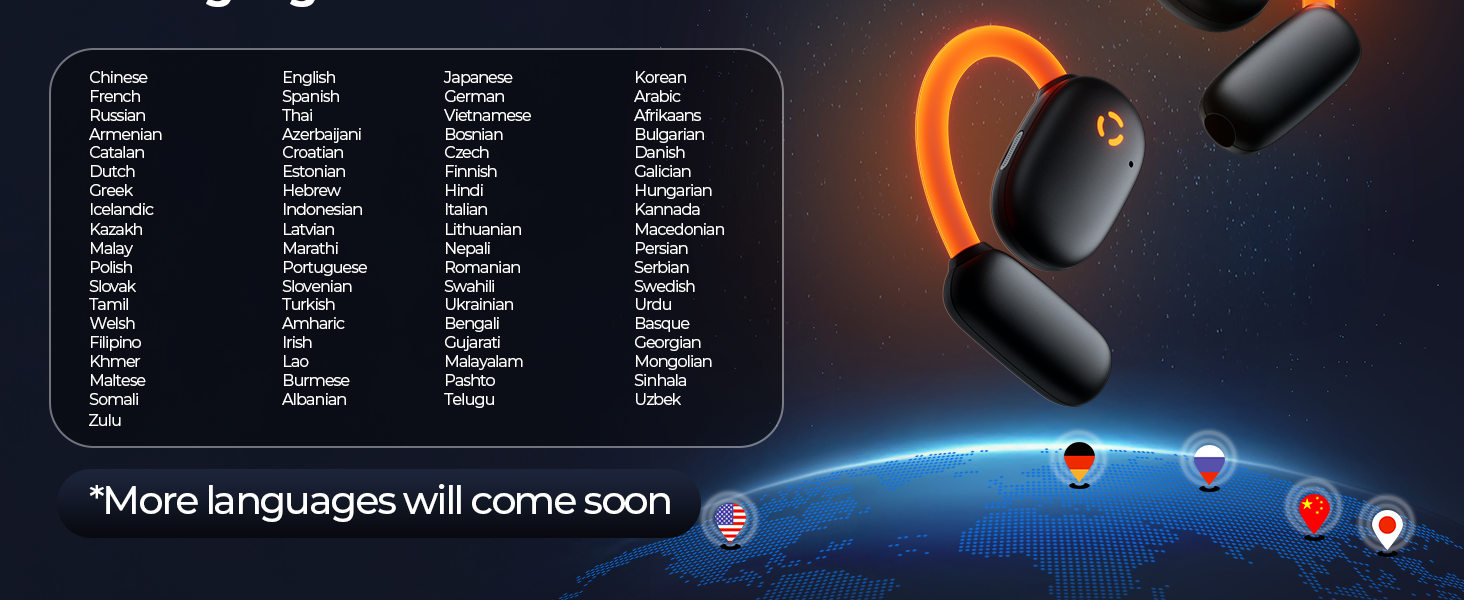
Image 4.3: Supported languages and accents for translation.
4.3 Glowing Earhook Control
The earbuds feature an activated glowing earhook for safety during nighttime activities. To turn the earhook light off, tap either earbud 5 times. Repeat the action to turn the light back on.

Image 4.4: The glowing earhook feature enhances visibility during low-light conditions.
5. Charging and Battery Life
The occiam D72 earbuds offer extended battery life for prolonged use:
- Single Charge Playtime: Up to 8 hours of continuous use.
- Total Playtime with Charging Case: Up to 80 hours.
- Charging: Use the provided USB-C cable. The charging case LEDs indicate battery level (each LED represents 25% charge).
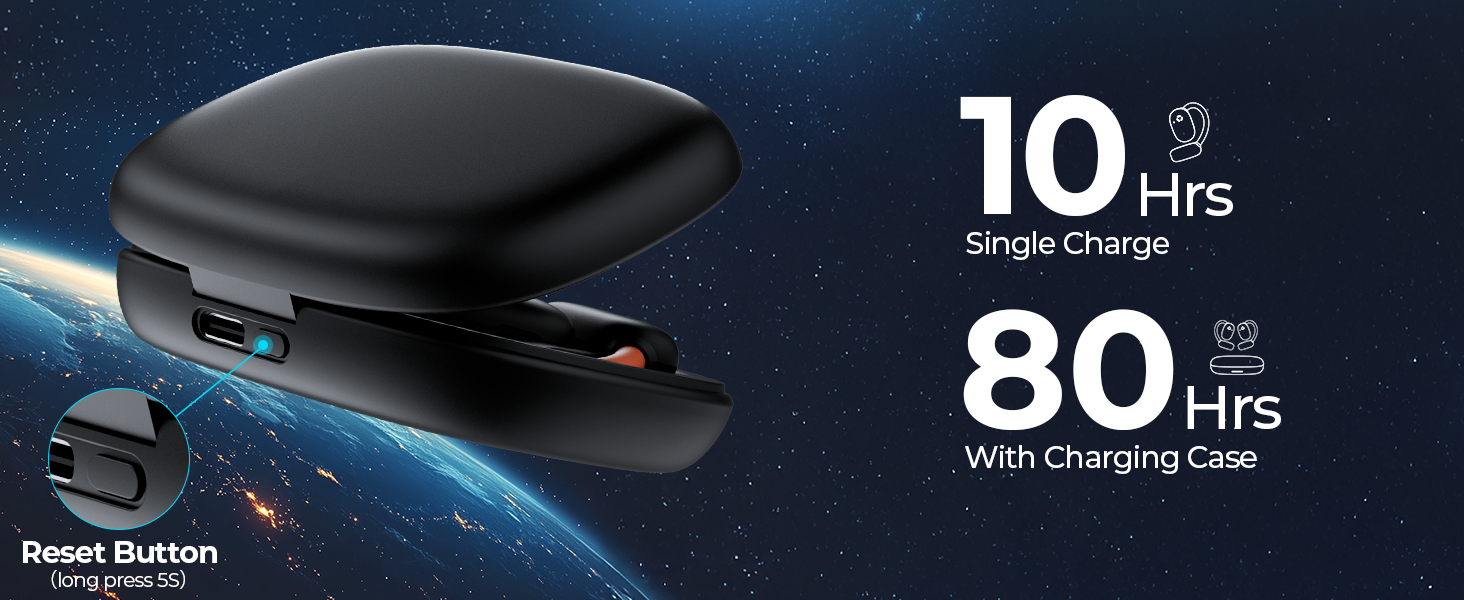
Image 5.1: Battery life and charging capabilities of the earbuds and case.
6. Comfort and Fit
The occiam D72 earbuds feature an open-ear design that rests comfortably on your ears without entering the ear canal. This design allows for natural ambient sound awareness, which is beneficial for outdoor activities. The soft silicone earhooks ensure a secure fit, preventing the earbuds from falling out during movement, making them suitable for sports and daily use.

Image 6.1: The open-ear design provides a comfortable and secure fit.
7. Maintenance
7.1 Cleaning
- Regularly wipe the earbuds and charging case with a soft, dry, lint-free cloth.
- Do not use abrasive cleaners, alcohol, or chemical solvents.
- Keep charging contacts clean and free of debris.
7.2 Storage
When not in use, store the earbuds in their charging case to protect them from dust and damage. Store the device in a cool, dry place away from extreme temperatures and direct sunlight.
8. Troubleshooting
| Problem | Possible Cause | Solution |
|---|---|---|
| Earbuds not pairing | Low battery; Out of range; Not in pairing mode; Bluetooth interference. | Charge earbuds; Ensure device is within 10m; Open case lid to activate pairing; Turn off other Bluetooth devices. |
| No sound/Low volume | Volume too low on device; Earbuds not properly connected; Dirty speaker mesh. | Increase device volume; Reconnect earbuds; Gently clean speaker mesh. |
| Translation not working | No internet connection; App not open/connected; Incorrect language settings; Microphone blocked. | Ensure stable internet; Open and connect app; Verify language settings; Ensure microphone is clear. |
| Glowing earhook not responding | Incorrect tap sequence; Low battery. | Tap 5 times on either earbud; Charge earbuds. |
8.1 Resetting the Earbuds
If you experience persistent issues, you can reset the earbuds. Locate the reset button on the charging case (often a small button or pinhole). Long press this button for approximately 5 seconds until the indicator lights behave as described in the basic user manual (refer to the physical manual included in the box for exact behavior).
9. Specifications
- Model: D72
- Product Dimensions: 3.35 x 2.6 x 0.87 inches
- Item Weight: 2.68 ounces
- Batteries: 3 Lithium Polymer batteries (included)
- Translation Languages: 164 (75 languages, 89 accents)
- Translation Accuracy: Up to 98%
- Response Time: As fast as 0.5 seconds
- Single Earbud Playtime: Up to 8 hours
- Total Playtime (with charging case): Up to 80 hours
- Connectivity: Bluetooth
- Charging Port: USB-C
- Manufacturer: occiam
10. Warranty and Support
For warranty information and customer support, please refer to the warranty card included in your product packaging or visit the official occiam website. You may also contact occiam customer service directly for assistance with product inquiries, troubleshooting, or replacement parts.
occiam Official Store: Visit the occiam Store on Amazon


