
Product Overview
The Vehipa 2.4 Gallon Smart Fish Tank is a multi-functional aquarium kit designed for ease of use and optimal fish health. It features a self-circulating 3-in-1 pump for filtration, oxygenation, and circulation, an adjustable 7-color lighting system, a smart aromatherapy humidifier with three modes, and a real-time temperature display. Constructed with 4mm ultra-high-definition glass and a thickened non-slip base, it offers a clear viewing experience and durability. The tank lid includes convenient feeding ports.
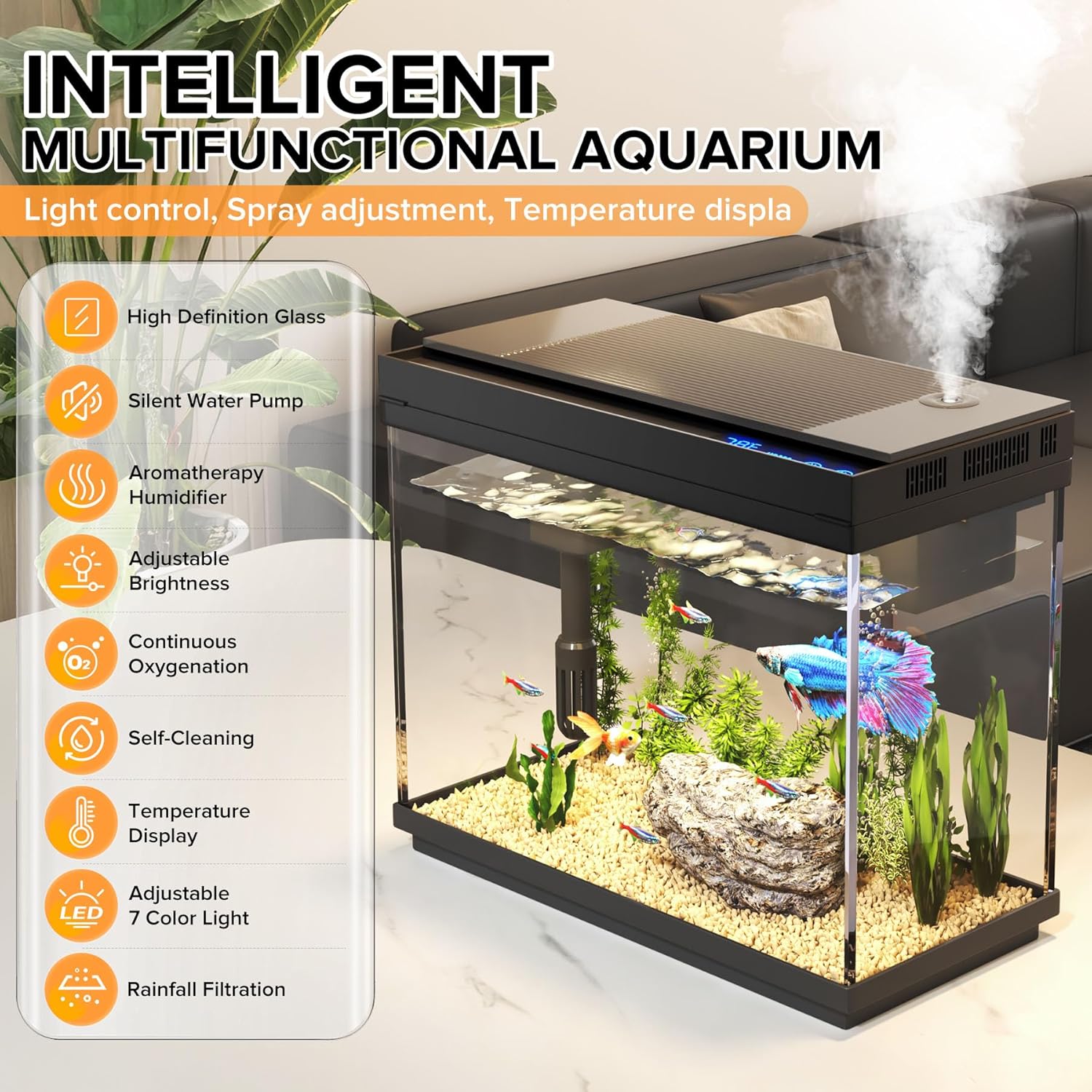
Image: The Vehipa 2.4 Gallon Smart Fish Tank showcasing its intelligent multi-functional design, including high-definition glass, silent water pump, aromatherapy humidifier, adjustable brightness, continuous oxygenation, self-cleaning, temperature display, 7-color light, and rainfall filtration.
What's in the Box
- Fish Tank with Light
- Plastic Plant Decoration (x3)
- Water Pump Accessories
- Built-in Humidifier
- Filter Sponge
- Oxygen Tube
- USB Adapter (x2)
- User Manual

Image: A visual representation of all items included in the Vehipa 2.4 Gallon Smart Fish Tank kit, such as the tank, decorative plants, water pump, filter sponge, oxygen tube, USB adapters, and user manual.
Setup Instructions
1. Unpacking and Placement
Carefully unpack all components. Place the aquarium on a stable, level surface that can support its weight when filled with water. Ensure it is away from direct sunlight and heat sources.
2. Filter System Assembly
Assemble the 3-in-1 pump and connect it to the water outlet and oxygen tube. Place the filter sponge, quartz balls, and ceramic rings into their designated compartments within the filter system. Ensure the pump is fully submerged in water before plugging it in to prevent burnout.
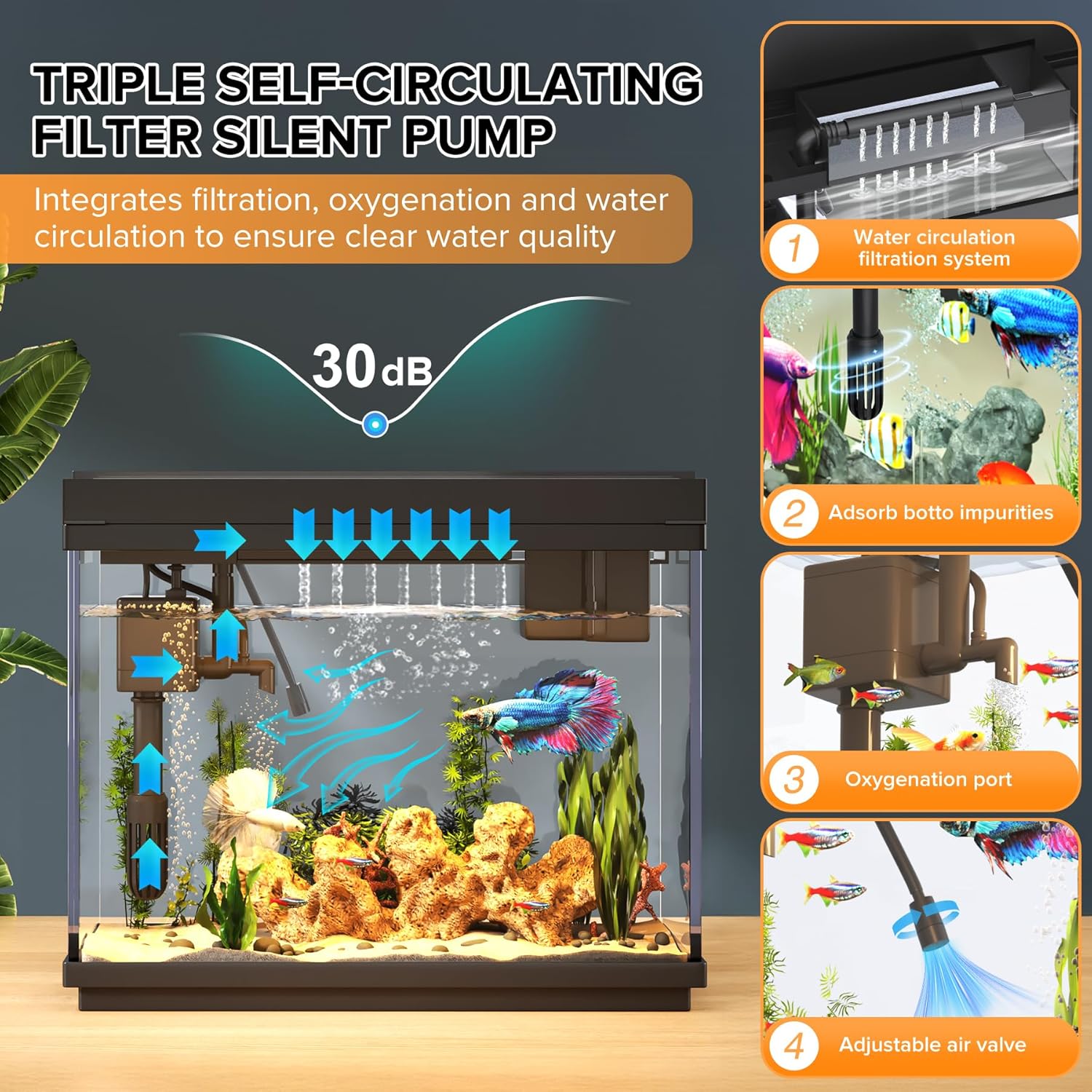
Image: A detailed diagram illustrating the components and assembly steps for the triple self-circulating filter silent pump, including water circulation, impurity adsorption, oxygenation port, and adjustable air valve.
3. Water Preparation and Filling
Clean the aquarium and all accessories thoroughly to remove any manufacturing residues. Fill the tank with dechlorinated water up to the minimum water level line. Ensure the oxygen tube and valve are placed outside the tank and kept dry for proper oxygenation.
4. Decorative Elements
Arrange the included plastic plant decorations and any other desired gravel or ornaments in the tank to create an appealing environment for your fish.

Image: The Vehipa 2.4 Gallon Smart Fish Tank from a side view, highlighting its ultra HD viewing experience, dimensions, and thoughtful details like the flip-up and detachable lid for easy cleaning and feeding ports.
5. Fish Acclimation
Once the tank is fully cycled and water conditions are stable, float the sealed bag containing your fish in the aquarium for about 20 minutes to allow temperature acclimation. Then, open the bag and gently release the fish into the aquarium.
Video: An official seller video demonstrating the features of the Vehipa Smart Fish Tank, including its digital display and 3-in-1 pump system, providing a visual guide to its functionality.
Operating Instructions
1. Lighting Control
The tank features an adjustable 7-color lighting system. Press the 'Lamp' button to cycle through the different colors. Long press the 'Lamp' button to adjust brightness. You can also set a 0-23 hour timed lighting cycle by pressing and holding the 'Humidifier' button to enter the setting function, then using the 'Lamp' button to select the desired time, and confirming with the 'Humidifier' button.

Image: The smart touch light panel on the tank lid, illustrating the 7-color auto cycle and how to long press to adjust brightness.
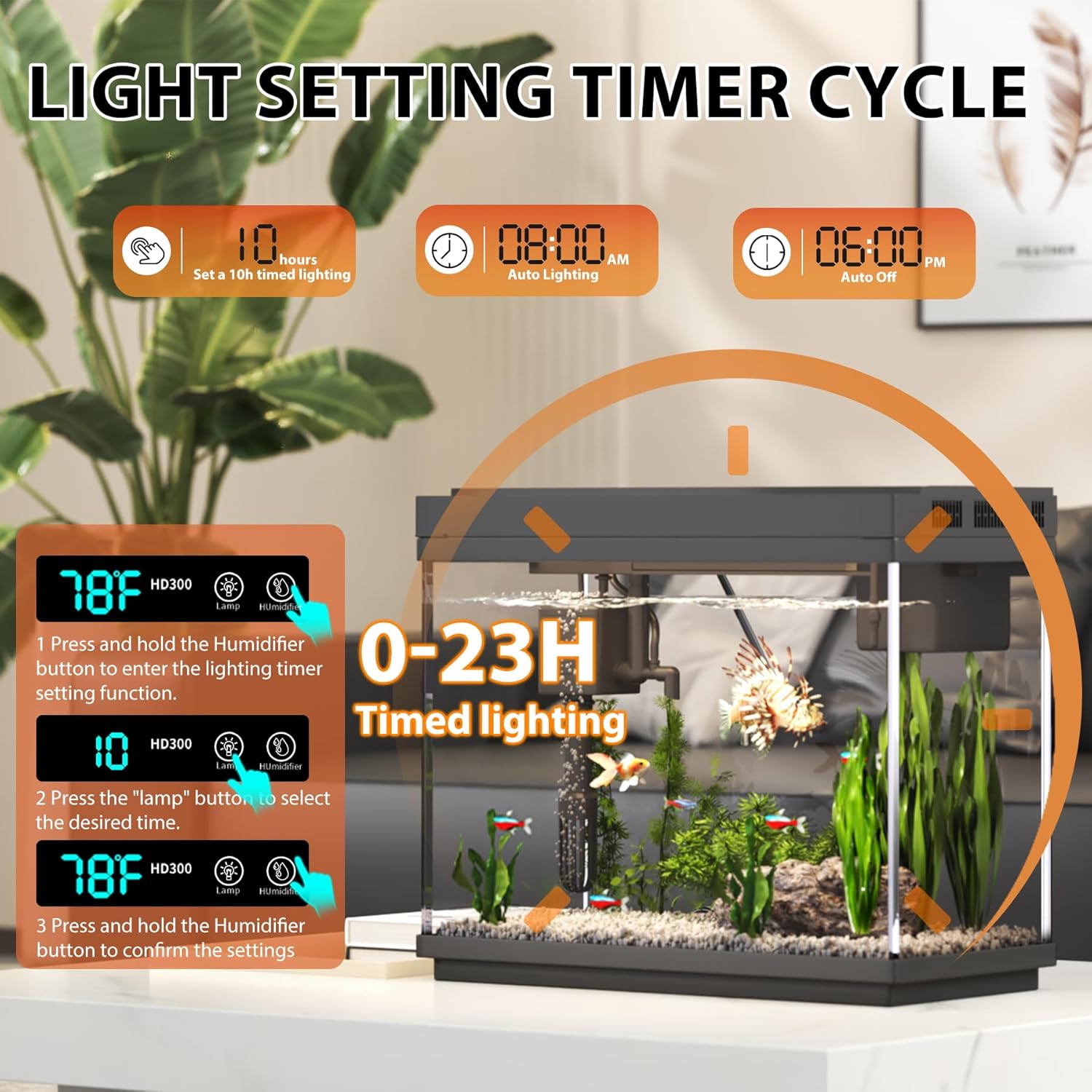
Image: A visual guide to setting the light timer cycle, showing options for 10-hour timed lighting, auto lighting at 8:00 AM, and auto off at 6:00 PM, with instructions for setting a 0-23 hour timer.
2. Smart Humidifier Operation
The built-in aromatherapy humidifier offers three adjustable spray modes (2-second interval, 1-second interval, continuous spray). Press the 'Humidifier' button to cycle through these modes. Use distilled water in the humidifier reservoir.

Image: The intelligent display screen on the tank lid, showing the temperature (78°F), model (HD300), and icons for lamp and humidifier, along with visual examples of the three adjustable spray modes.
3. Temperature Display
The integrated digital display provides a real-time readout of the water temperature, ensuring a safe and comfortable environment for your fish.
4. Feeding
Utilize the feeding port on the tank lid for convenient and mess-free feeding. This design also helps prevent fish from jumping out of the water.
Maintenance
1. Filter Maintenance
Regularly clean or replace the filter sponge, quartz balls, and ceramic rings to ensure optimal filtration and clear water. The 3-in-1 pump system is designed for easy access to filter media.
2. Water Changes
Perform partial water changes (e.g., one-third of the tank volume) every 1-2 weeks to maintain water quality and remove accumulated waste. Ensure new water is temperature-matched and dechlorinated.
3. General Cleaning
Gently wipe the exterior of the tank with a soft, damp cloth to remove stains. Avoid using abrasive cleaners or materials that could scratch the glass.
Troubleshooting
- Pump not working: Ensure the 3-in-1 pump is fully submerged in water before plugging it in.
- No oxygen bubbles: Verify that the oxygen tube and valve are placed outside the tank and kept dry to ensure proper air intake.
- Cloudy water: Perform regular filter maintenance and water changes. Ensure proper water cycling.
- Glass product issues: Due to the nature of glass products, issues may arise during transportation or use. If any problems occur, please contact customer service immediately for technical guidance.
Specifications
| Brand Name | Vehipa |
| Model Name | Fish Tank Aquarium |
| Item Model Number | HD300 |
| Tank Volume | 2.4 Gallons |
| Product Dimensions (L x W x H) | 11.81"L x 5.83"W x 9.53"H |
| Item Weight | 8.18 pounds (3.72 Kilograms) |
| Material | Glass |
| Color | Black |
| Special Feature | Transparent |
| Included Components | Decorative plants, Reusable filter sponge, 3-in-1 water pump, Clear user instructions |
Warranty and Support
Vehipa is committed to customer satisfaction. For any technical guidance, product support, or warranty inquiries, please contact Vehipa customer service directly. Refer to the contact information provided in your purchase documentation for assistance.