
1. Introduction
The KINGBOLEN ECT300 is a handheld intelligent electrical system circuit tester designed for comprehensive automotive diagnostics. It integrates multiple functions including digital multimeter, digital oscilloscope, automotive circuit testing, and component activation. This manual provides essential information for safe and effective operation of your device.
2. Key Features
- 4-in-1 Functionality: Combines Digital Multimeter, Digital Oscilloscope, Automotive Circuit Test, and Component Activation.
- Wide Voltage Range: Supports testing of all 0-80V vehicle electrical systems.
- User-Friendly Display: Features a 2.4-inch high-resolution color screen for clear display of test results.
- Enhanced Visibility: Equipped with LED lights and a buzzer for improved usability in various environments.
- Extended Reach: Includes a 16FT cable for convenient access around vehicles.
- Multi-Language Support: Supports 12 languages including English, German, Italian, Portuguese, French, and Japanese.

Figure 2.1: Overview of the ECT300's 4-in-1 capabilities and features.
3. Safety Information
The ECT300 is designed with multiple protection measures to ensure safe operation and prevent damage to the device and vehicle components.
- Overcurrent Protection: Responds in milliseconds to prevent damage from short circuits or excessive current.
- Overheat Protection: Activates if the test circuit temperature reaches a high level, requiring the device to cool down before further use.
- Reverse Protection: A diode conducts in the forward direction and cuts off in reverse, protecting the circuit from incorrect power supply connections.
- Short Circuit Protection: An internal circuit breaker system automatically trips for protection if the current is overloaded.

Figure 3.1: Comprehensive safety measures integrated into the ECT300.
4. Setup and Getting Started
To begin using your KINGBOLEN ECT300, follow these simple steps:
- Connect Power: Attach the red alligator clip to the positive terminal of the vehicle's battery and the black alligator clip to the negative terminal. Alternatively, use the cigarette lighter adapter for power.
- Power On: The device will automatically power on once connected to a 0-80V power source.
- Attach Probe Tip: Securely attach the desired probe tip to the device.

Figure 4.1: Connecting the ECT300 to a vehicle battery.

Figure 4.2: Quick setup guide for the ECT300.
5. Operating Modes
The ECT300 offers two primary operating modes accessible via its 2.4-inch high-resolution color screen.
5.1 Multimeter + Oscilloscope Mode
This mode allows for detailed electrical measurements and signal monitoring.
- Multimeter Functions: Voltage Test, Resistance Test, Diode Test, Open Circuit/Break Circuit Test (ON/OFF Test), Positive-Negative Pole Test (P-N Test), Frequency Test. Displays maximum voltage, minimum voltage, frequency, and duty cycle.
- Oscilloscope Functions: Camshaft signal Monitor, Crankshaft signal Monitor, Injector signal Monitor, Throttle signal Monitor, CAN Polarity Test.
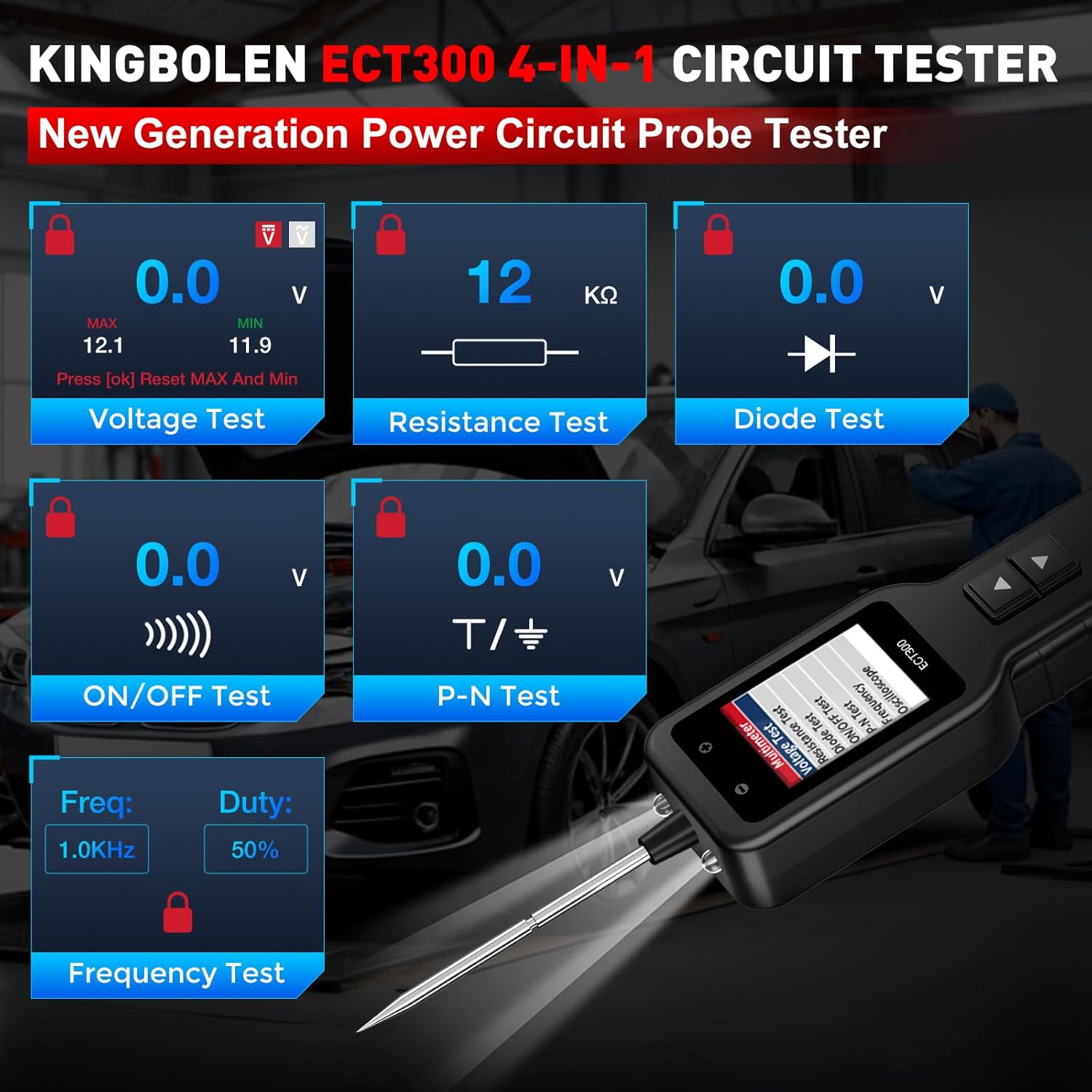
Figure 5.1: Multimeter mode interface displaying various test results.

Figure 5.2: Oscilloscope module for signal monitoring.
5.2 Component Activation
This function allows you to activate components directly to test their operational status.
- Testable Components: Lights, Motors, Wipers, Radiator Fans, Relays, Fuel Injectors, and other onboard electrical equipment.

Figure 5.3: Examples of component activation tests.
5.3 Official Product Videos (Demonstrating Similar Functionality)
How to identify positive, negative and open circuits?
This video demonstrates how to identify positive, negative, and open circuits using a circuit tester, showcasing principles applicable to the ECT300.
Check Motor Circuit
A demonstration of checking a motor circuit, illustrating the component activation capabilities of similar automotive circuit testers.
6. Maintenance
Keep the device clean and dry. Regularly check cables and connections for wear or damage. Software updates are available to ensure optimal performance.
- Software Upgrades: Free software upgrades are available. Connect the device to a computer via USB-C to update the software.
7. Troubleshooting
If you encounter issues with your ECT300, ensure all connections are secure and the power source is stable. Refer to the relevant operating mode sections for specific testing procedures. If problems persist, contact customer support.
8. Specifications
| Feature | Specification |
|---|---|
| Product Dimensions | 24.26 x 6.48 x 4.32 cm; 340 g |
| Operating Voltage | 6-32 Volts (DC) |
| Maximum Operating Voltage | 32 Volts (DC) |
| Measurement Type | Voltmeter |
| Upper Temperature Rating | 122 Degrees Fahrenheit |
| Cable Length | 16 FT |
| Color | Black and Red |
| Item Model Number | KBLN03-ECT300 |
9. Warranty and Support
KINGBOLEN offers comprehensive support for your ECT300 device.
- Warranty: 1-year repair warranty.
- Returns: 30-day unconditional return policy.
- Technical Support: 24/7 technical support is available.

Figure 9.1: KINGBOLEN customer support and warranty details.


