
1. Product Overview
The AstroAI L10 Mini Portable Tire Inflator is a compact and efficient air compressor designed for various inflation needs, including car tires, motorcycles, bicycles, and sports balls. It features a digital pressure gauge, auto-shutoff function, and an integrated LED light for convenience and safety.

Image: The AstroAI L10 Mini Tire Inflator highlighting its fast inflation capabilities, inflating a car tire from 30PSI to 36PSI in 70 seconds.
Key Features:
- Fast Inflation: Inflates standard car tires (195/65 R15) from 30PSI to 36PSI in approximately 70 seconds.
- 360° Rotatable Hose: Flexible hose design for easy connection to tire valves at various angles.
- Palm-Sized Design: Compact and lightweight (less than 1 pound) for easy portability and storage.
- 5 Preset Modes: Dedicated modes for cars, motorcycles, bicycles, basketballs, and a customizable option (3-150 PSI).
- Auto Shutoff: Automatically stops inflation once the preset pressure is reached, preventing over-inflation.
- 3-Mode LED Flashlight: Includes Flashlight, Strobe, and SOS modes for visibility and emergencies.
2. Package Contents
Before using your AstroAI L10 Mini Tire Inflator, please ensure all items are present:

Image: The AstroAI L10 Mini Tire Inflator with its various accessories, including different nozzles and a charging cable.
- AstroAI L10 Mini Tire Inflator
- Air Hose with 360° Rotatable Connector
- USB-C Charging Cable
- Ball Needle Adapter
- Presta Valve Adapter
- Swim Ring Nozzle Adapter
- Storage Pouch
- User Manual
3. Setup and Charging
Charging the Device:
The device comes with a built-in rechargeable Lithium-Ion battery. Before first use, fully charge the inflator using the provided USB-C cable.
- Connect the USB-C charging cable to the charging port on the inflator.
- Connect the other end of the cable to a compatible USB power source (e.g., wall adapter, car charger, power bank).
- The battery indicator on the display will blink during charging.
- Once fully charged, the battery indicator will show a solid light.
Video: An overview of the AstroAI Tire Inflator Portable Air Compressor, demonstrating its features and ease of use, including charging.

Image: The AstroAI L10 Mini display showing the battery indicator during charging, with a blinking light for charging and a solid light for fully charged.
4. Operating Instructions
Basic Operation:

Image: A visual guide demonstrating the 3-step intuitive operation: power on, select preset/pressure, and start inflation.
- Power On: Hold the power button for 1.5 seconds to turn on the device. The digital display will illuminate.
- Connect Hose: Attach the air hose to the tire valve. The 360° rotatable hose connector allows for easy installation at any angle.
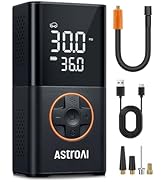
Image: The AstroAI L10 Mini with its 360° rotatable hose, illustrating how it can be adjusted for easy connection to tire valves.
- Select Mode & Set Pressure: Press the mode button to cycle through the 5 preset modes (Car, Motorcycle, Bike, Ball, Custom). Use the '+' and '-' buttons to adjust the target pressure. The device supports pressure settings from 3-150 PSI.
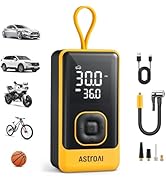
Image: The AstroAI L10 Mini displaying its 5 preset inflation modes for various items like cars, motorcycles, bikes, and balls, along with a custom setting.
- Start Inflation: Press the power button again to begin inflation. The device will automatically stop once the preset pressure is reached.

Image: A person leaning against a car while the AstroAI L10 Mini inflates a tire, illustrating the auto-shutoff feature that prevents over-inflation.
- Power Off: Hold the power button for 1.5 seconds to turn off the device. It will also automatically power off after a period of inactivity.
Using the LED Flashlight:
The AstroAI L10 Mini includes a versatile LED flashlight with three modes:

Image: The AstroAI L10 Mini showcasing its 3-in-1 emergency LED flashlight, with modes for general illumination, strobe, and SOS signaling.
- Press the flashlight button once for constant illumination (Flashlight mode).
- Press again for a flashing light (Strobe mode).
- Press a third time for an SOS signal (SOS mode).
- Press a fourth time to turn off the flashlight.
5. Maintenance and Storage
- Keep the device clean and free from dust and debris. Use a soft, dry cloth for cleaning.
- Store the inflator and its accessories in the provided storage pouch to prevent damage.
- Avoid exposing the device to extreme temperatures, direct sunlight, or moisture.
- Charge the device periodically (e.g., every 3-6 months) even if not in use, to maintain battery health.
6. Troubleshooting
| Problem | Possible Cause | Solution |
|---|---|---|
| Device does not turn on. | Low battery or device is off. | Charge the device fully. Ensure the power button is held for 1.5 seconds. |
| Inflator not inflating. | Hose not properly connected, target pressure not set, or device not started. | Ensure the hose is securely attached. Set the desired pressure. Press the power button to start inflation. |
| Device stops prematurely. | Target pressure reached or low battery. | Check the set pressure. If the tire is not fully inflated, check battery level and recharge if necessary. |
| Inaccurate pressure reading. | Loose connection or sensor issue. | Ensure the hose is tightly connected to the valve. If issues persist, contact customer support. |
7. Specifications
| Feature | Detail |
|---|---|
| Brand | AstroAI |
| Model Name | L10 Mini |
| Voltage | 7.4 Volts (DC) |
| Power Source | Battery Powered (1 Lithium Ion battery included) |
| Noise Level | 85 Decibels |
| Product Dimensions | 2.6"L x 1.8"W x 3.9"H |
| Item Weight | 1.14 pounds |
| Max Pressure | 150 PSI |
8. Warranty and Support
The AstroAI L10 Mini Tire Inflator comes with a 2-Year Manufacturer Warranty.
For product support, troubleshooting, or warranty claims, please visit the official AstroAI store or contact their customer service directly.
Official AstroAI Store: AstroAI Store on Amazon


