
Introduction
This manual provides detailed instructions for the operation and maintenance of your KJDEYT TYT MD-UV390 DMR Digital Walkie Talkie. The MD-UV390 is a 5W output, IP67 waterproof and dustproof radio designed for reliable communication in various environments. It supports both digital and analog modes, offering clear voice communications and advanced features.
Key Features
- IP67 Waterproof and Dustproof: Ensures durability in challenging conditions.
- DMR Digital and Analog Modes: Operates in both modes, facilitating migration from analog to digital systems.
- 5W Output Power: Provides strong signal transmission.
- VHF/UHF Dual Band: Supports a wide range of frequencies.
- 3000 Channels: Ample capacity for various communication needs.
- Clearer Voice Communications: Enhanced audio quality in digital mode.
- Advanced Calling Features: Supports private call, group call, and all call in digital mode.
- Encryption Function: For secure communications.
- CTCSS/DCS and DTMF: Built-in for enhanced control and signaling.
- Remote Kill/Stun/Activate: Security features for managing lost or stolen radios.
- Compatible with Mototrbo Tier I & II: Ensures interoperability with existing systems.
Package Contents
Upon opening the package, verify that all items listed below are present and in good condition:
- 1 x MD-UV390 DMR Radio
- 1 x Common Antenna
- 1 x Battery (Li-ion, 2000mAh)
- 1 x Belt Clip
- 1 x Desktop Charger
- 1 x Adapter
- 1 x Programming Cable
- 1 x User Manual
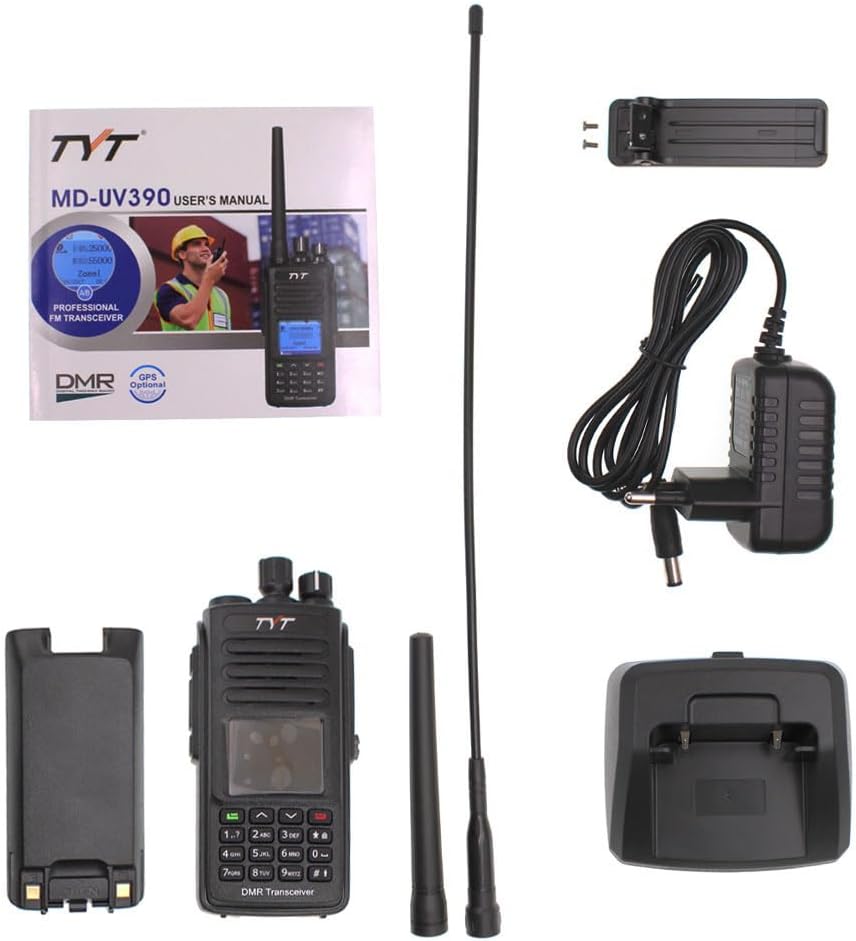
Image: All components included in the TYT MD-UV390 package.
Setup
1. Battery Installation
- Align the battery pack with the grooves on the back of the radio.
- Slide the battery pack upwards until it clicks into place.
- To remove, press the battery release latch and slide the battery downwards.
2. Antenna Attachment
- Screw the common antenna clockwise into the antenna connector on top of the radio until it is finger-tight. Do not overtighten.
3. Charging the Battery
- Connect the adapter to the desktop charger.
- Plug the adapter into a power outlet.
- Place the radio with the battery installed, or just the battery, into the charging slot of the desktop charger.
- The charger indicator light will show the charging status (e.g., red for charging, green for fully charged).
4. Programming the Radio
The MD-UV390 requires programming for full functionality, including setting up channels, frequencies, and digital features. A programming cable is included for this purpose.
- Install the programming cable driver on your computer. Ensure the driver matches your operating system version.
- Download the official programming software for the MD-UV390.
- Connect the programming cable to your computer's USB port and to the radio's programming port.
- Launch the programming software and follow the on-screen instructions to read from and write to the radio.
A programming guide is available for detailed steps: MD-UV380/MD-UV390 Programming Guide.

Image: Important notice regarding firmware: This version does not require flashing and cannot be flashed with GD77 firmware.
Operating Instructions
1. Power On/Off and Volume Control
- Power On: Rotate the Power/Volume knob clockwise until a click is heard and the display illuminates.
- Power Off: Rotate the Power/Volume knob counter-clockwise until a click is heard and the display turns off.
- Volume Adjustment: Rotate the Power/Volume knob to increase (clockwise) or decrease (counter-clockwise) the audio output.
2. Channel Selection
Use the Channel Selector knob (typically the top knob) or the up/down arrow keys on the keypad to navigate through programmed channels.
3. Transmitting and Receiving
- Receiving: When a signal is received on the current channel, the radio will automatically output audio.
- Transmitting: Press and hold the Push-To-Talk (PTT) button on the side of the radio. Speak clearly into the microphone. Release the PTT button to stop transmitting and return to receive mode.
4. Digital and Analog Mode Operation
The MD-UV390 operates in both digital (DMR) and analog modes. The mode is typically set per channel during programming. The radio will automatically detect and operate in the correct mode for the selected channel.
5. Advanced Digital Features
- Private Call: Direct communication with a specific radio ID.
- Group Call: Communication with a predefined group of radio IDs.
- All Call: Broadcast communication to all radios within range on the current channel.
- Text Messages: Send and receive text messages in digital mode (requires programming).
- Encryption: Activate encryption for secure voice communications (requires programming).
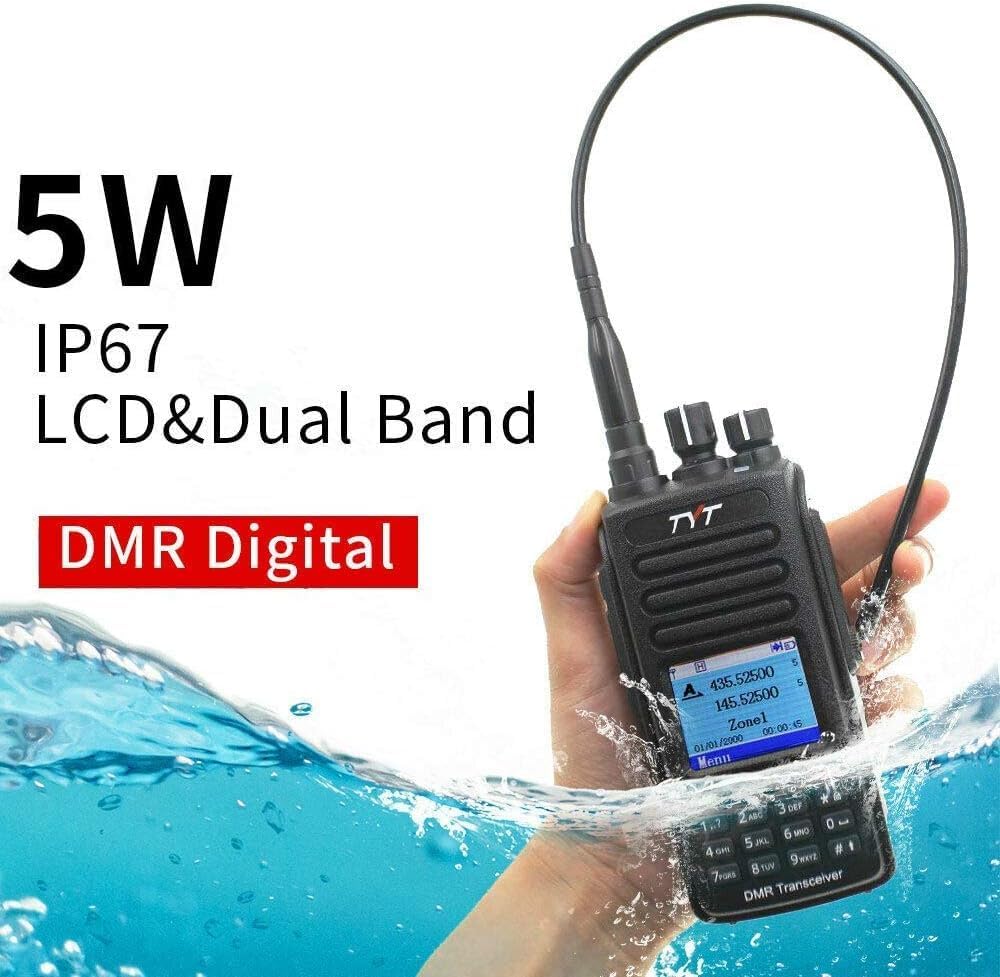
Image: The MD-UV390 radio demonstrating its IP67 waterproof capability.

Image: The MD-UV390 features 5W high power output and high gain antennas for improved voice quality and range.
Maintenance
1. Cleaning the Radio
- Use a soft, damp cloth to wipe the radio's surface.
- Do not use harsh chemicals, solvents, or abrasive cleaners.
- Ensure the accessory jack cover is securely closed to maintain IP67 rating when cleaning or in wet environments.
2. Battery Care
- Charge the battery fully before initial use.
- Avoid overcharging or completely discharging the battery, as this can reduce its lifespan.
- Store the battery in a cool, dry place when not in use for extended periods.
3. Environmental Considerations
- While the radio is IP67 rated for water and dust resistance, avoid prolonged submersion or exposure to extreme conditions.
- Ensure all port covers are sealed tightly to maintain the IP67 rating.
Troubleshooting
| Problem | Possible Cause | Solution |
|---|---|---|
| Radio does not power on. | Battery is not installed correctly or is discharged. | Ensure battery is properly installed. Charge the battery fully. |
| Cannot transmit or receive. | Incorrect channel selected, antenna not attached, or out of range. | Verify channel settings. Ensure antenna is securely attached. Move closer to other radios. |
| Poor audio quality. | Low battery, weak signal, or incorrect squelch settings. | Charge battery. Adjust squelch level. Ensure clear line of sight. |
| Unable to program the radio. | Incorrect programming cable driver, software version, or radio settings. | Install the correct driver for your OS. Use the official programming software. Ensure the radio is in programming mode if required. Refer to the programming guide. |
| Radio displays "Power-on protection". | This indicates a security feature has been activated. | Contact your system administrator or refer to advanced programming documentation to deactivate this feature if unintended. |
Specifications
| Parameter | Value |
|---|---|
| Model Number | MD-UV390 |
| Channels | 3000 |
| Frequency Stability | ±1ppm |
| Operating Temperature | -30°C to +60°C |
| Operating Voltage | 7.4V DC |
| Battery Type | Li-ion |
| Battery Capacity | 2000mAh |
| Antenna Impedance | 50Ω |
| Output Power | 5W/1W |
| Water Resistance Level | IP67 (Waterproof/Dustproof) |
| Item Weight | 1.72 pounds |
| Package Dimensions | 9.72 x 7.4 x 3.5 inches |
| FCC ID | POD-MDUV390 |
Warranty Information
The KJDEYT TYT MD-UV390 radio typically comes with a 1-year limited warranty from the date of purchase. This warranty covers manufacturing defects under normal use. It does not cover damage caused by misuse, accidents, unauthorized modifications, or improper maintenance. Please retain your proof of purchase for warranty claims.
Support
For further assistance, technical support, or warranty inquiries, please contact your retailer or the manufacturer directly. Ensure you have your product model number (MD-UV390) and proof of purchase available when seeking support.
For programming assistance, refer to the official programming guide: MD-UV380/MD-UV390 Programming Guide.