
Introduction
This manual provides detailed instructions for the assembly, operation, and maintenance of your ODK 61-inch L-Shaped Desk. Designed for versatility and functionality, this desk features ample storage, an integrated charging station, and a reversible design to suit various home office or gaming setups. Please read this manual thoroughly before beginning assembly or use to ensure proper setup and longevity of your product.
Safety Information
Always assemble the desk according to the provided instructions. Ensure the desk is properly anchored to the floor to prevent tipping, especially when using heavy equipment like printers or monitors. Be cautious when moving the desk, as it is heavy and could cause injury if not handled carefully.
Setup and Assembly
The ODK L-Shaped Desk is designed for hassle-free assembly with pre-labeled components and an intuitive instruction manual. We recommend two people for assembly to ensure ease and safety. Please take out all parts from the package and check that they are included and in good condition before starting.
Assembly Video Guide
This video provides a step-by-step visual guide for assembling your ODK 61-inch L-Shaped Desk, demonstrating how to connect components and ensure proper setup.
Product Overview Video
Watch this video for a comprehensive overview of the ODK 61-inch L-Shaped Desk, highlighting its key features, design, and functionality in various settings.
Features
Enhanced Storage & Organization
The L-shaped workstation optimizes workspace efficiency with four roomy drawers and two reinforced metal hooks. Its expansive surface accommodates printers, scanners, or dual monitors while maintaining a clutter-free environment.

Image showing the desk with various items, including open drawers for storage.

Detailed view of the four fabric drawers, highlighting their capacity for organization.

Image illustrating the convenient headphone hook for keeping your accessories tidy.
Integrated Built-in Charging Station
Equipped with three AC outlets and two USB ports, this desk delivers seamless power management for laptops, consoles, and devices. Safely eliminate cable chaos during work or at play while keeping electronics within effortless reach.

Image showing the integrated power strip with AC outlets and USB ports for convenient charging.
Reversible Design & PC Case Shelf
The reversible corner configuration allows the desk to be set up with the storage unit on either the left or right side. It also includes a dedicated elevated PC case shelf, safeguarding your tower from dust and floor moisture.

Diagram demonstrating how the L-shaped desk can be configured for both left and right-hand setups.

Image highlighting the elevated shelf designed to hold a PC tower, keeping it off the floor.
Durable Materials & Sturdy Construction
Built with stable engineered wood panels and a reinforced steel frame, this workstation desk resists daily wear. Adjustable leveling feet ensure wobble-free stability on uneven floors.
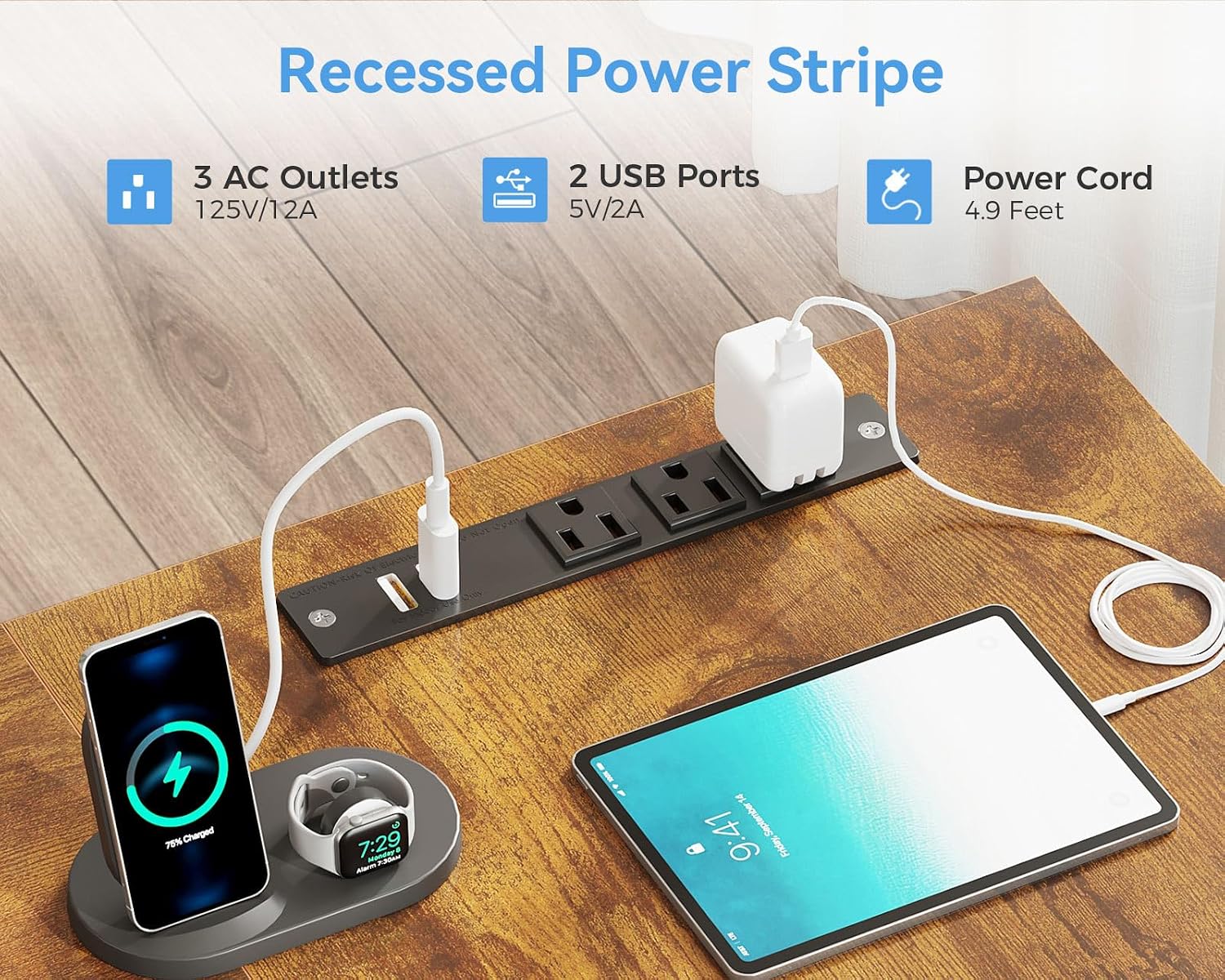
Image showing the adjustable leveling feet for stability on various floor surfaces.
Operation
Using the Drawers
The four fabric drawers provide convenient storage for documents, supplies, and personal items. Simply pull the handles to open and push to close. Ensure items are placed evenly to prevent drawers from sticking.
Utilizing the Charging Station
Plug your devices into the three AC outlets or two USB ports located on the desk surface. The power cord extends 4.9 feet, allowing for flexible placement. Always ensure the power strip is connected to a functional wall outlet.
Reversing the Desk Configuration
The desk can be assembled with the drawer unit on either the left or right side. Refer to the assembly instructions in the 'Setup and Assembly' section for detailed steps on how to configure the desk to your preferred orientation.
Maintenance
To maintain the appearance and longevity of your ODK L-Shaped Desk, wipe surfaces with a dry cloth regularly. Avoid using harsh chemicals or abrasive cleaners, as these may damage the finish. Promptly clean any spills to prevent staining.
Troubleshooting
- Wobbly Desk: Check that all screws are securely tightened. Adjust the leveling feet at the bottom of the desk legs to ensure stability on uneven floors.
- Drawers Not Sliding Smoothly: Ensure the fabric drawers are correctly inserted into their rails and are not overloaded. Verify that the drawer rails are properly installed and free from obstructions.
- Power Outlets Not Working: Confirm that the desk's power cord is fully plugged into a functional wall outlet. Check for any tripped circuit breakers. If issues persist, contact customer support.
- Missing or Damaged Parts: If you received a desk with missing or damaged components, please contact ODK customer support immediately for assistance.
Specifications
| Brand | ODK |
| Model Number | B02021501007 |
| Product Dimensions | 43.3"D x 61"W x 29.9"H |
| Color | Vintage Brown |
| Style | Modern |
| Base Material | Engineered Wood |
| Finish Type | Powder Coated |
| Special Features | Built-In USB Outlet, Reversible, Rust Resistant, Scratch Resistant |
| Recommended Uses | Gaming, Studying, Working, Writing |
| Item Weight | 42.4 Pounds |
| Number of Drawers | 4 |
Warranty and Support
This ODK L-Shaped Desk comes with a Limited Warranty. For specific details regarding warranty coverage, please refer to the product packaging or contact ODK customer support.
If you encounter any problems such as damage or missing pieces, or require assistance with assembly or operation, please contact our professional after-sales service team. We are committed to resolving your issues within 24 hours.
Customer Support Contact: Please visit the ODK Store on Amazon or refer to your purchase documentation for contact information.


