
Introduction
This manual provides essential information for the safe and effective use of your Jardhom S159 GPS Drone Battery. Please read this manual thoroughly before using the product to ensure optimal performance and longevity.
Product Overview
The Jardhom S159 GPS Drone Battery is a high-capacity 7.4V 2200mAh Lithium Polymer replacement battery designed specifically for the S159 GPS drone. It provides extended flight time and reliable power for your aerial adventures.

Image showing two Jardhom S159 GPS Drone Batteries, ready for use.
Key Features
- Perfect Match for Your S159 Drone: Engineered specifically for S159 GPS drones, ensuring flawless integration and uninterrupted performance.
- Extended Aerial Adventures: High-capacity 7.4V 2200mAh battery delivers 20+ minutes of continuous flight per charge, offering significantly longer operation compared to standard batteries.
- Safety and Reliability Certified: RoHS & CE compliance certified, featuring premium lithium polymer cells, impact-resistant ABS casing, built-in overcharge/discharge protection, and stable voltage output.
- Smart Charging Technology: Complete a full recharge in approximately 120 minutes using the included USB cable. The intelligent IC chip prevents overcharging.
- Value-Packed Kit: Includes two 2200mAh LiPo Batteries, easy to install and use, ideal for backup power during outdoor adventures or professional drone use.
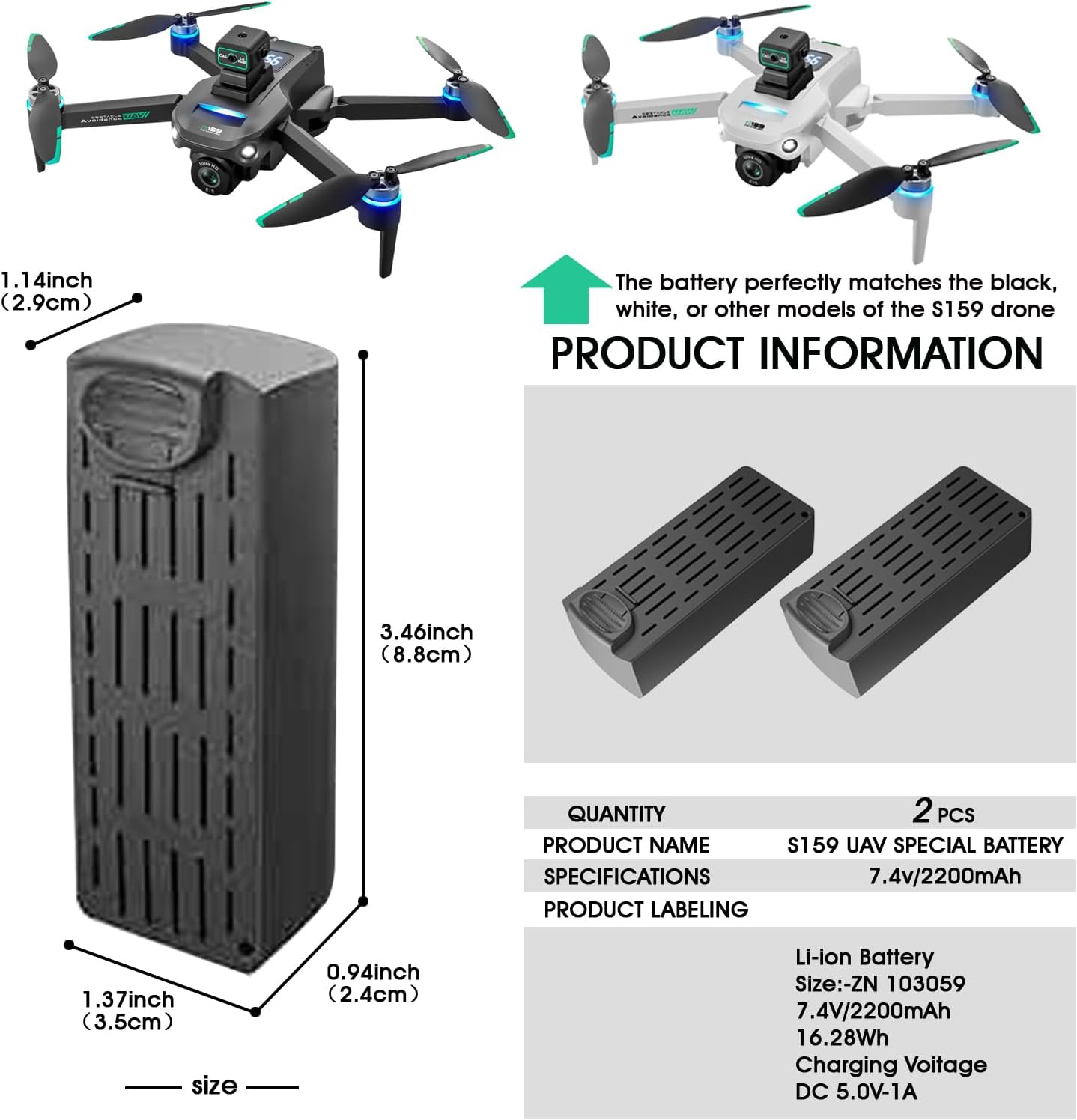
Detailed view of the S159 battery with its dimensions (length: 3.46 inches / 8.8 cm, width: 1.37 inches / 3.5 cm, height: 0.94 inches / 2.4 cm).

Illustration of the S159 battery installed in a drone, demonstrating real-time battery display on the drone's interface, showing 85% charge.

Close-up of a single S159 battery, highlighting its 7.4V large capacity and key specifications like Li-ion type, size, voltage, capacity, and charging voltage (DC 5.0V-1A).
Setup
Battery Installation
- Ensure your S159 drone is powered off before attempting battery installation or removal.
- Locate the battery compartment on your S159 drone. Refer to your drone's specific user manual for the exact location and opening mechanism.
- Carefully insert the Jardhom S159 battery into the compartment, ensuring the connectors align correctly.
- Gently push the battery until it clicks securely into place. Do not force the battery.
- Close the battery compartment cover.
Initial Charging
For best performance and to prolong battery life, fully charge the battery before its first use.
- Connect the provided USB charging cable to the battery's charging port.
- Connect the other end of the USB cable to a compatible USB power source (e.g., a computer USB port, a USB wall adapter with DC 5.0V-1A output).
- The charging indicator on the battery or charger (if applicable) will typically show the charging status. Refer to your drone's manual or charger's instructions for specific indicator behavior.
- A full recharge takes approximately 120 minutes. Do not leave the battery unattended while charging.
- Once fully charged, disconnect the battery from the charging cable.
Operating Guidelines
Flight Duration
The 7.4V 2200mAh capacity of this battery is designed to provide over 20 minutes of continuous flight time for your S159 GPS drone under optimal conditions. Actual flight time may vary based on factors such as:
- Wind conditions
- Drone payload (e.g., camera accessories)
- Flight maneuvers (e.g., aggressive flying consumes more power)
- Temperature
Optimal Performance Tips
- Always ensure the battery is fully charged before each flight session.
- Avoid completely draining the battery during flight. It is recommended to land the drone when the battery level reaches approximately 20-30% to prevent over-discharge.
- Monitor the real-time battery display on your drone's controller or app during flight.
- Allow the battery to cool down to ambient temperature before recharging after a flight.
Maintenance
Battery Care and Storage
- Charging: Use only the specified charging cable and a compatible power source. Avoid using damaged chargers or cables.
- Temperature: Operate and store the battery within the recommended temperature range of -10°C to 40°C (14°F to 104°F). Extreme temperatures can degrade battery performance and lifespan.
- Storage: If storing the battery for an extended period (more than a week), it is recommended to discharge it to approximately 50-60% of its capacity. Store in a cool, dry place away from direct sunlight and flammable materials.
- Physical Damage: Avoid dropping, puncturing, or exposing the battery to water. If the battery appears swollen, damaged, or leaks, discontinue use immediately and dispose of it properly.
- Cleaning: Clean the battery contacts periodically with a dry, clean cloth to ensure good electrical connection.
Troubleshooting
Common Issues and Solutions
| Problem | Possible Cause | Solution |
|---|---|---|
| Battery not charging | Loose connection, faulty cable/charger, power source issue. | Ensure all connections are secure. Try a different USB port or power adapter. Inspect the charging cable for damage. |
| Short flight time | Battery not fully charged, aged battery, extreme flight conditions, heavy drone payload. | Ensure battery is fully charged. Consider replacing older batteries. Reduce drone payload if possible. Fly in calm conditions. |
| Battery not fitting drone | Incorrect battery model, improper insertion. | Verify you have the correct S159 battery model. Ensure correct orientation and gentle insertion into the compartment. |
| Battery feels hot during use/charging | Normal operation (slight warmth), overcharging, internal short, damage. | Slight warmth is normal. If excessively hot, disconnect immediately. Do not use a swollen or damaged battery. Contact support if concerns persist. |
Technical Specifications
| Specification | Value |
|---|---|
| Battery Type | Lithium Polymer (LiPo) |
| Voltage | 7.4V |
| Capacity | 2200mAh |
| Energy | 16.28Wh |
| Charging Time | Approximately 120 minutes |
| Charging Voltage | DC 5.0V-1A |
| Operating Temperature | -10°C to 40°C (14°F to 104°F) |
| Dimensions | 88 × 35 × 24 mm (3.46 × 1.37 × 0.94 inches) |
| Model Number | S159 |
| Manufacturer | Shantou Yile Technology Co., Ltd. |
| Date First Available | August 4, 2025 |
Warranty and Support
Warranty Information
This product is covered by a standard manufacturer's warranty against defects in materials and workmanship. Please retain your proof of purchase for warranty claims. For specific warranty terms and conditions, refer to the documentation provided with your original drone purchase or contact Jardhom customer support.
Customer Support
If you encounter any issues or have questions regarding your Jardhom S159 GPS Drone Battery, please contact our customer support team for assistance. You can find more information and contact details on the official Jardhom store page: