
Introduction
Thank you for choosing the Intellitronix WL6002 Analog Gauge Cluster for your 1964-1966 Chevy Truck. This manual provides detailed instructions for the proper installation, operation, and maintenance of your new gauge cluster. Please read this manual thoroughly before beginning installation to ensure correct setup and optimal performance.
This gauge cluster is designed as a direct replacement for your factory unit, requiring no modifications to your vehicle's dashboard. It features modern LED backlighting for enhanced visibility and includes all necessary sending units for accurate readings.
Product Overview
The Intellitronix WL6002 is a precision-engineered analog gauge cluster specifically designed for 1964-1966 Chevy Trucks. It features a stylish faceplate that maintains a period-correct aesthetic while incorporating modern technology. The cluster includes a speedometer, water temperature gauge, and oil pressure gauge, all illuminated by bright LED backlighting for clear visibility day and night.
Constructed from high-quality materials such as acrylic, copper, and fiberglass, this unit is built for durability and long-term reliability under various driving conditions.
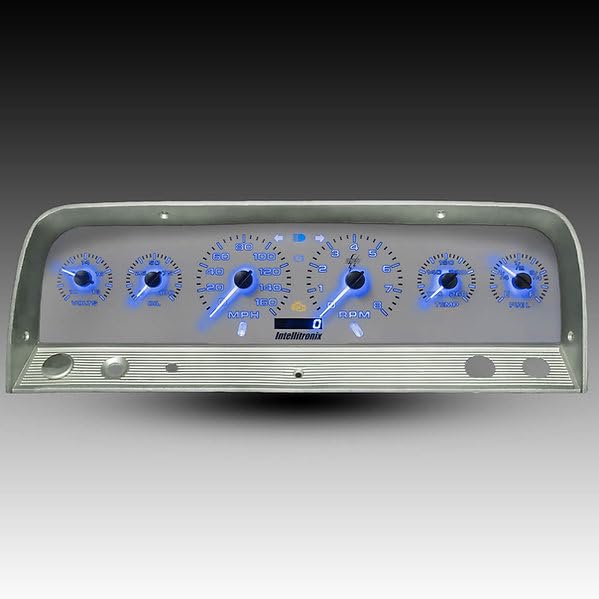
Image: The Intellitronix WL6002 analog gauge cluster with a blue LED backlight, designed for 1964-1966 Chevy Trucks.
What's Included
Your Intellitronix WL6002 package includes the following components:
- Intellitronix WL6002 Analog Gauge Cluster (Blue LED Backlight)
- Speedometer Sending Unit
- Water Temperature Sending Unit
- Oil Pressure Sending Unit
- Necessary wiring and connectors for installation
Note: The dashboard bezel is NOT included with this product. You will reuse your existing bezel or acquire a compatible replacement.

Image: Various sending units and wiring harnesses included with the Intellitronix WL6002 gauge cluster, essential for accurate readings.
Setup and Installation
Installation of the Intellitronix WL6002 gauge cluster requires basic automotive electrical and mechanical knowledge. If you are not comfortable performing this installation yourself, it is recommended to seek assistance from a qualified automotive technician.
Safety Precautions:
- Disconnect the vehicle's battery before starting any electrical work.
- Ensure the vehicle is parked on a level surface with the parking brake engaged.
- Wear appropriate personal protective equipment (e.g., safety glasses, gloves).
Installation Steps:
- Remove Existing Gauge Cluster: Carefully remove the original gauge cluster from your 1964-1966 Chevy Truck dashboard. This typically involves removing screws, disconnecting wiring harnesses, and detaching any mechanical speedometer cables or sensor lines.
- Install Sending Units: Replace your vehicle's existing speedometer, water temperature, and oil pressure sending units with the new units provided in the Intellitronix kit. Refer to your vehicle's service manual for specific locations and procedures for these components. Ensure all connections are secure and leak-free.
- Wire the New Cluster: Connect the wiring harness from the Intellitronix cluster to your vehicle's electrical system. Follow the included wiring diagram (not provided in this general manual, refer to product-specific documentation) for connections such as power, ground, illumination, and signal inputs from the new sending units.
- Mount the New Cluster: Carefully insert the Intellitronix WL6002 gauge cluster into the dashboard opening. Secure it using the original mounting points and hardware. Ensure the cluster sits flush and is properly aligned.
- Reconnect Battery: Once all connections are made and secured, reconnect the vehicle's battery.
- Test Functionality: Turn the ignition to the 'ON' position (without starting the engine) to check for proper illumination and initial gauge responses. Start the engine and observe the gauges for correct operation (speedometer, water temperature, oil pressure).
Operating Instructions
The Intellitronix WL6002 gauge cluster provides clear, analog readings for essential vehicle parameters. The LED backlighting ensures optimal visibility in all lighting conditions.
- Speedometer: Displays vehicle speed in miles per hour (MPH). Ensure the speedometer sending unit is correctly calibrated for accurate readings.
- Water Temperature Gauge: Monitors engine coolant temperature. Normal operating temperatures vary by vehicle; consult your vehicle's manual for expected ranges. Overheating can indicate a problem.
- Oil Pressure Gauge: Indicates engine oil pressure. Low oil pressure can signal a critical engine issue. Refer to your vehicle's manual for normal operating pressure ranges.
- LED Backlighting: The gauges are continuously backlit by bright LEDs, providing a modern and clear display. The intensity of the backlighting is typically controlled by your vehicle's dimmer switch.
Maintenance
The Intellitronix WL6002 gauge cluster requires minimal maintenance to ensure its longevity and appearance.
- Cleaning: To clean the faceplate, use a soft, damp cloth. Avoid abrasive cleaners or solvents, as these can damage the acrylic surface.
- Inspection: Periodically check the wiring connections behind the dashboard to ensure they remain secure.
- Environmental Care: While durable, avoid exposing the cluster to extreme temperatures or direct sunlight for prolonged periods when the vehicle is not in use, as this can affect material integrity over time.
Troubleshooting
If you encounter issues with your Intellitronix WL6002 gauge cluster, refer to the following common troubleshooting steps:
| Problem | Possible Cause | Solution |
|---|---|---|
| Gauges not illuminating | No power to the cluster; faulty wiring; dimmer switch setting. | Check power and ground connections. Verify vehicle's dimmer switch is not set to minimum. Inspect wiring for breaks or loose connections. |
| Speedometer not reading or inaccurate | Speedometer sending unit not connected or faulty; incorrect calibration. | Ensure speedometer sending unit is properly installed and wired. Check for any specific calibration procedures for the unit (refer to product-specific documentation). |
| Water Temperature or Oil Pressure gauge not reading | Sending unit not connected or faulty; wiring issue. | Verify the respective sending unit is correctly installed and wired. Check for secure connections and continuity in the signal wire. |
| Intermittent gauge readings | Loose electrical connections; poor ground. | Inspect all wiring connections for tightness. Ensure a solid ground connection for the cluster and sending units. |
If these steps do not resolve the issue, please contact Intellitronix customer support for further assistance.
Specifications
- Brand: Intellitronix
- Model Number: WL6002
- Compatibility: 1964-1966 Chevy Truck
- Material: Acrylic, Copper, Fiberglass
- Item Dimensions (L x W x H): 20 x 8 x 4 inches
- Item Weight: 5 pounds
- Backlighting: LED (Blue)
- Included Sensors: Speedometer, Water Temperature, Oil Pressure Sending Units
Warranty Information
Specific warranty details for the Intellitronix WL6002 gauge cluster are provided by the manufacturer. Please refer to the warranty card included with your product or visit the official Intellitronix website for the most current warranty terms and conditions.
Support
For technical assistance, installation questions, or warranty claims, please contact Intellitronix customer support directly. You can typically find contact information on the manufacturer's website or through the seller, Intellitronix Corp.
When contacting support, please have your product model number (WL6002) and purchase information readily available.