
1. Introduction
This manual provides essential information for the proper installation, operation, and maintenance of your NHJLFKSA DRCH-R5 Air Conditioning Remote Control Board. Please read this manual thoroughly before attempting any installation or operation to ensure safe and efficient use of the product. This control board is designed to facilitate the remote control functions of compatible air conditioning units.
2. Safety Information
- Electrical Hazard: Always disconnect power to the air conditioning unit before installing, servicing, or removing the control board. Failure to do so can result in electric shock, injury, or death.
- Professional Installation Recommended: Installation should be performed by a qualified technician familiar with HVAC systems and electrical wiring.
- Handle with Care: Electronic components are sensitive. Avoid static discharge and physical damage to the board.
- Environmental Conditions: Do not expose the control board to moisture, extreme temperatures, or corrosive environments.
- Chemicals: This product contains no high-concern chemicals.
3. Package Contents
Verify that all items are present in the package:
- 1 x NHJLFKSA DRCH-R5 Air Conditioning Remote Control Board
4. Product Overview
The DRCH-R5 is a replacement or upgrade control board designed for specific air conditioning units to enable or restore remote control functionality. It integrates with the existing HVAC system to receive signals from a compatible remote control and translate them into commands for the air conditioner.
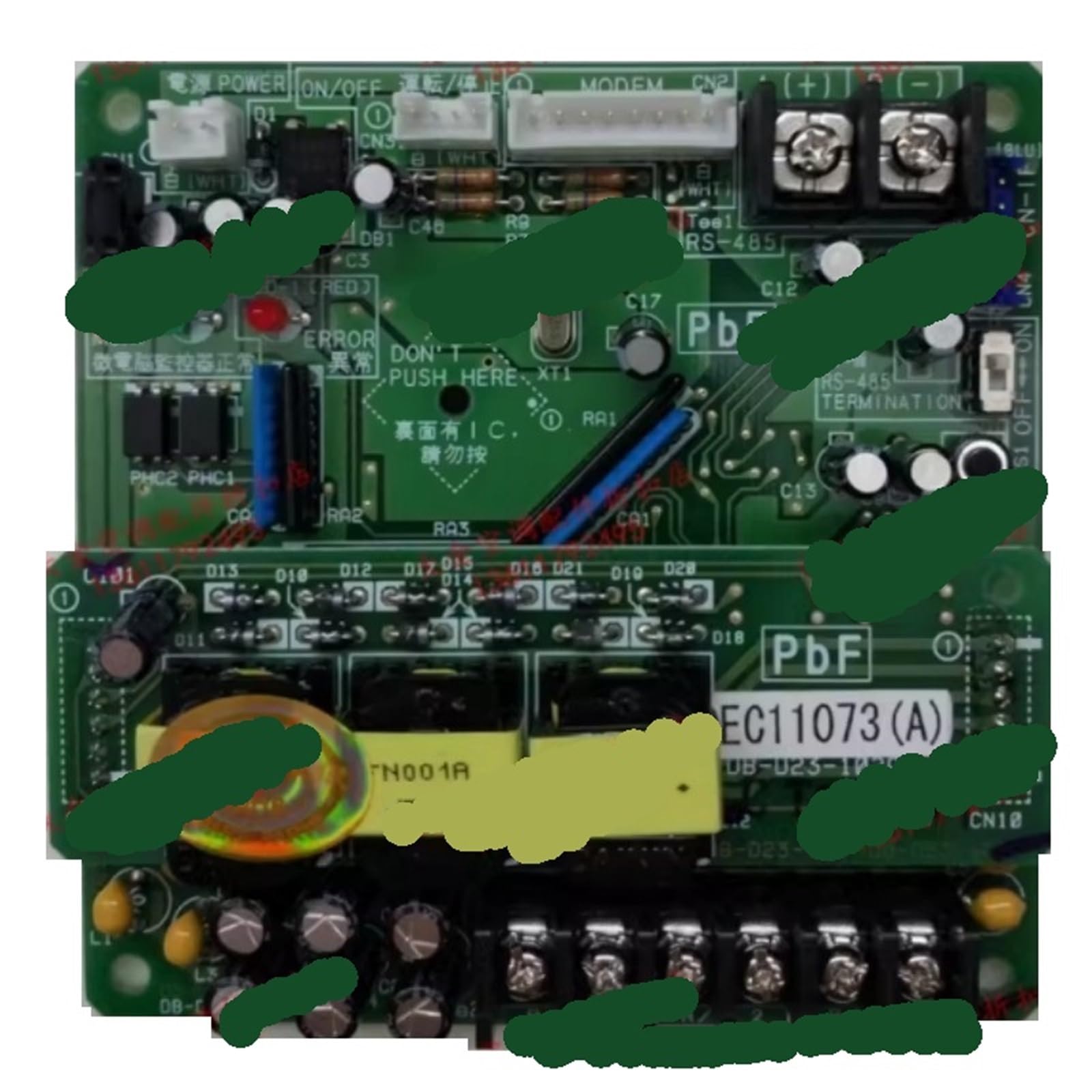
Image showing the NHJLFKSA DRCH-R5 air conditioning remote control board, highlighting its various components and connectors.
5. Setup and Installation
Important: Ensure the air conditioning unit's power supply is completely disconnected before proceeding with installation.
- Power Disconnection: Locate the circuit breaker or fuse box that supplies power to your air conditioning unit and turn it OFF. Verify that the power is off using a voltage tester.
- Access the Existing Control Board: Carefully open the air conditioning unit's housing to access the area where the control board is located. Refer to your air conditioner's service manual for specific instructions on accessing internal components.
- Remove Old Board (if applicable): If replacing an existing board, carefully disconnect all wiring harnesses and mounting screws. Note the orientation and connection points for each wire. Taking photos can be helpful.
- Install New Board: Position the NHJLFKSA DRCH-R5 control board in the designated slot. Secure it with appropriate mounting screws.
- Connect Wiring: Reconnect all wiring harnesses to the corresponding ports on the new DRCH-R5 board. Ensure all connections are secure and correctly seated. Double-check against any photos taken or the air conditioner's wiring diagram.
- Close Unit: Carefully close and secure the air conditioning unit's housing.
- Restore Power: Turn the power supply back ON at the circuit breaker or fuse box.
- Test Functionality: Use your air conditioner's remote control to test all functions (e.g., power on/off, temperature adjustment, mode changes).
6. Operating Instructions
The NHJLFKSA DRCH-R5 control board itself does not have user-operable controls. Its function is to receive and process signals from your air conditioner's remote control. Once installed, the air conditioning unit should respond to commands from its compatible remote control as designed by the air conditioner manufacturer.
- Ensure the remote control has fresh batteries.
- Point the remote control towards the air conditioning unit's receiver.
- Refer to your air conditioner's user manual for specific instructions on how to operate its remote control and functions.
7. Maintenance
The DRCH-R5 control board requires minimal maintenance. To ensure longevity and proper function:
- Keep Dry: Ensure the area around the control board remains dry and free from moisture.
- Cleanliness: Periodically, with power disconnected, gently clean any dust accumulation on the board using a soft brush or compressed air. Do not use liquid cleaners.
- Inspection: During routine HVAC maintenance, visually inspect the board for any signs of damage, corrosion, or loose connections.
8. Troubleshooting
If your air conditioning unit is not responding to the remote control after installing the DRCH-R5 board, consider the following:
- No Power to AC Unit: Check the circuit breaker and ensure the air conditioner is receiving power.
- Remote Control Issues:
- Verify the remote control has fresh batteries.
- Ensure there are no obstructions between the remote and the air conditioner's receiver.
- Confirm the remote control is compatible with your air conditioning unit.
- Incorrect Wiring: Disconnect power and re-check all wiring connections to the DRCH-R5 board. Ensure they are secure and correctly matched according to the air conditioner's wiring diagram.
- Damaged Board: If all other troubleshooting steps fail, the control board may be faulty. Contact a qualified technician for further diagnosis.
9. Specifications
| Feature | Detail |
|---|---|
| Manufacturer | NHJLFKSA |
| Part Number | NHJLFKSA |
| Item Model Number | DRCH-R5 |
| Item Weight | 1.76 ounces |
| Product Dimensions | 0.39 x 0.39 x 0.39 inches |
| Size | One Size |
| Color | One Color |
| Item Package Quantity | 1 |
| Batteries Required? | No |
| ASIN | B0FKZ8V5LG |
| Date First Available | August 2, 2025 |
10. Warranty and Support
Warranty: The manufacturer states that there is no warranty description provided for this product.
Customer Support: For technical assistance or further inquiries regarding the NHJLFKSA DRCH-R5 Air Conditioning Remote Control Board, please contact the manufacturer or your point of purchase.