
1. Introduction
This manual provides detailed instructions for the installation, operation, and configuration of the VOTOL EM50SP 7255S Brushless DC Motor Controller. This intelligent controller is designed for electric motorcycles and scooters, offering efficient and reliable motor control. Please read this manual thoroughly before installation and use to ensure proper function and safety.
2. Safety Information
WARNING: Improper installation or use can lead to serious injury or damage to the product and vehicle. Always follow safety guidelines.
- Ensure the power supply is disconnected before performing any installation or wiring.
- Verify all connections are secure and correctly polarized to prevent short circuits.
- Do not expose the controller to water or extreme temperatures.
- Only use the controller with compatible motors and power sources as specified.
- Seek professional assistance if you are unsure about any installation steps.
3. Package Contents
Please check the package for the following items:
- VOTOL EM50SP 7255S Controller
- Matching Wiring Harness
- USB Debugging Data Cable

4. Specifications
| Brand | VOTOL |
| Model | EM50SP 7255S |
| Voltage Range | 48V to 84V (Universal) |
| Maximum Release Current | 60A |
| Phase Line Current | 180A |
| Adaptive Motor Power | 400W to 2000W |
| Package Dimensions | 7.87 x 4.72 x 3.94 inches |
| Item Weight | 4.4 pounds |
| Included Components | EM50 controller, matching wiring, USB debugging data cable |
5. Product Overview
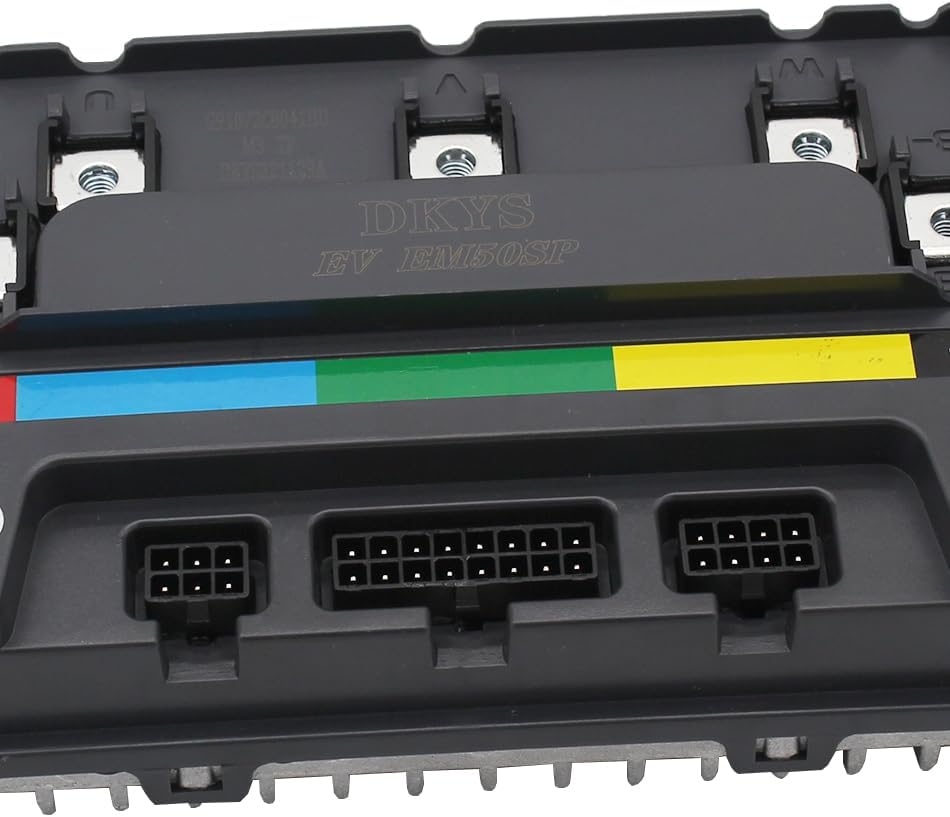
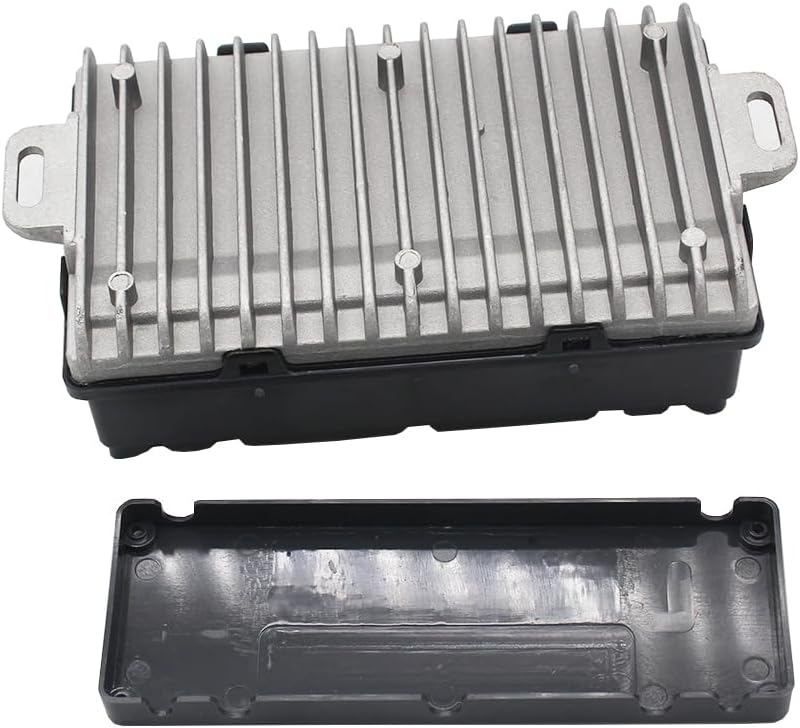
The VOTOL EM50SP 7255S controller features a robust design with integrated heat dissipation and multiple connection ports for various functions. It supports weak magnetic technology for enhanced power and speed.


6. Installation and Setup
6.1 Mounting the Controller
Select a secure, dry location on your electric vehicle for mounting the controller. Ensure adequate airflow around the heat sink for optimal cooling. Use appropriate fasteners to firmly attach the controller, minimizing vibration.
6.2 Wiring Connections
Carefully connect the wiring harness to the controller and your vehicle's components. Refer to the specific wiring diagram provided with your vehicle or consult a qualified technician. The controller supports the following default functions:
- Hall Plug: Connects to the motor's Hall sensors for rotor position feedback.
- Reverse: Activates reverse motion.
- Low Brake 0V: Low-level brake signal input (0V active).
- Throttle (0-5V): Connects to the throttle input, typically a 0-5V signal.
- High Brake 12V: High-level brake signal input (12V active).
- Ignition: Power on/off control for the controller.
- One-line/Hall Meter Wire: For speedometer or other display functions.
- Program Port: Used for connecting the USB debugging data cable for software configuration.
- Three Speed: Allows selection between different speed modes.
- Sport Model: Activates a performance-oriented mode.
- Parking: Engages a parking brake or mode.
- Anti-Theft: Connects to an anti-theft system.
- Regen Charge: Enables regenerative braking for battery charging.
- Flux Weaken Current: Advanced motor control feature for extended speed range.
Always double-check all connections before applying power to prevent damage.
7. Operating Instructions
7.1 Basic Operation
- Power On: Turn the ignition key or switch to the 'ON' position. The controller will initialize.
- Throttle Control: Gently apply the throttle to accelerate. The 0-5V throttle input allows for precise speed control.
- Braking: Use the vehicle's brake levers. The controller supports both low-level (0V) and high-level (12V) brake inputs. Regenerative braking may engage if configured.
- Reverse: Activate the reverse function as per your vehicle's controls.
- Speed Modes: Utilize the three-speed switch to select desired speed profiles (e.g., low, medium, high).
7.2 Advanced Configuration (Software Debugging)
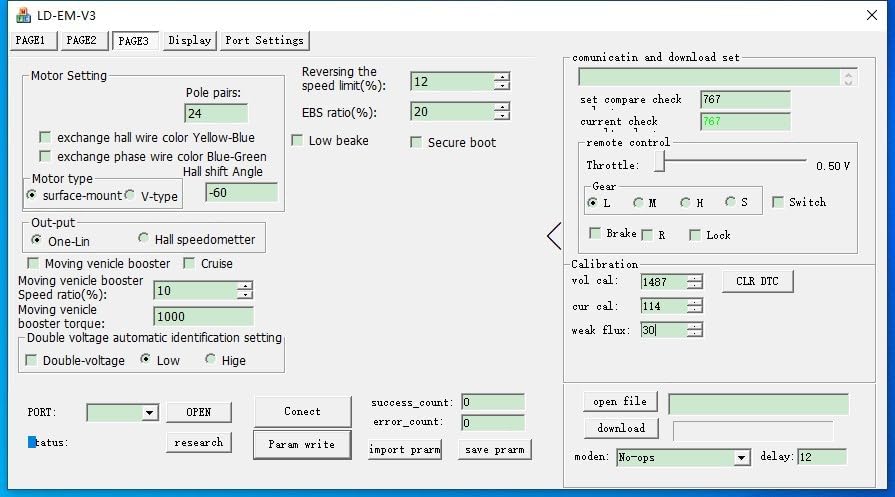
The VOTOL EM50SP 7255S controller can be configured and fine-tuned using dedicated software via the USB debugging data cable. This allows adjustment of various parameters to match your motor and riding preferences.


To access these settings:
- Connect the USB debugging data cable to the controller's program port and your computer.
- Install the appropriate LD-EM-V3 software (or equivalent) on your computer.
- Launch the software and establish a connection with the controller.
- Adjust parameters such as battery voltage, undervoltage protection, current limits, throttle response, motor pole pairs, and flux weakening settings as needed.
- Save the changes to the controller after configuration.
8. Maintenance
- Cleaning: Keep the controller clean and free from dust and debris. Use a dry, soft cloth for cleaning. Do not use liquids or solvents.
- Inspection: Periodically check all wiring connections for tightness and signs of wear or damage.
- Environment: Ensure the controller is not exposed to excessive moisture, direct sunlight, or extreme temperatures, which can degrade performance and lifespan.
9. Troubleshooting
| Problem | Possible Cause | Solution |
|---|---|---|
| Motor does not respond | No power, loose connections, faulty throttle, motor or Hall sensor issue. | Check battery connection and charge. Verify all wiring, especially ignition, throttle, and motor phase/Hall sensor wires. Test throttle function. |
| Controller overheats | Insufficient airflow, excessive load, short circuit. | Ensure proper ventilation. Reduce load. Inspect for short circuits in motor or wiring. |
| Erratic motor behavior | Incorrect Hall sensor connection, motor parameter mismatch in software. | Verify Hall sensor wiring. Reconfigure motor settings using the debugging software. |
10. Warranty and Support
For warranty information, technical support, or service inquiries, please contact the seller or manufacturer directly. Keep your purchase receipt as proof of purchase.
