
1. Introduction
Thank you for choosing FEETMOR Heated Glove Liners, model Fh04. These thin, flexible, and rechargeable glove liners are designed to provide warmth and comfort in cold conditions, featuring touchscreen compatibility and an anti-slip grip. This manual provides essential information for the safe and effective use, setup, operation, and maintenance of your heated glove liners.
2. Safety Information
- Read all instructions before use.
- Do not use if the gloves or batteries appear damaged.
- Keep batteries away from water and extreme temperatures.
- Do not puncture, open, or disassemble the battery pack.
- Use only the provided charger and charging cable.
- If you experience discomfort or excessive heat, immediately turn off the gloves.
- Consult a physician before use if you have a medical condition, especially circulatory issues or nerve damage.
3. Package Contents
Verify that all items are present in your package:
- 1 Pair of FEETMOR Heated Glove Liners
- 2 x 2200mAh Li-Polymer Rechargeable Batteries
- 1 x 20W PD Power Adapter
- 1 x USB-C Charging Cable
- 1 x User Manual
- 1 x Gift Box Bag

Image: Contents of the FEETMOR Heated Glove Liners package, showing the gloves, two batteries, a power adapter, and a charging cable.
4. Setup
4.1 Charging the Batteries
- Connect the USB-C charging cable to the 20W PD power adapter.
- Plug the adapter into a standard wall outlet.
- Connect the USB-C end of the cable to each 7.4V 16.28Wh battery.
- Allow approximately 3-4 hours for a full charge. The indicator light on the battery will change when fully charged (refer to battery instructions for specific indicator behavior).
4.2 Connecting Batteries to Gloves
- Locate the zippered pocket on the cuff of each glove.
- Open the zipper and pull out the power cord.
- Remove the protective cap from the power cord connector.
- Connect the power cord from the glove to the charged battery.
- Carefully place the connected battery into the zippered pocket and close the zipper securely.
Video: This video demonstrates how to connect the battery to the glove and activate the heating function. It shows the process of plugging the battery into the glove's internal cable and securing it in the pocket, followed by pressing the power button to cycle through heat settings.
5. Operation
5.1 Power On/Off and Temperature Control
- To Power On: Press and hold the power button on the back of the glove for approximately 3 seconds. The button will illuminate, indicating the gloves are on.
- To Adjust Temperature: Short press the power button to cycle through the three heat settings:
- Red Light: High-end heat setting.
- White Light: Medium heat setting.
- Blue Light: Low heat setting.
- To Power Off: Press and hold the power button for approximately 3 seconds until the light turns off.
The heating elements are designed to warm the entire hand and fingertips evenly. The gloves warm up in under 30 seconds.
5.2 Touchscreen Functionality
The thumb and index finger of each glove are equipped with touch sensors, allowing you to operate touchscreen devices such as smartphones, tablets, and car displays without removing your gloves.
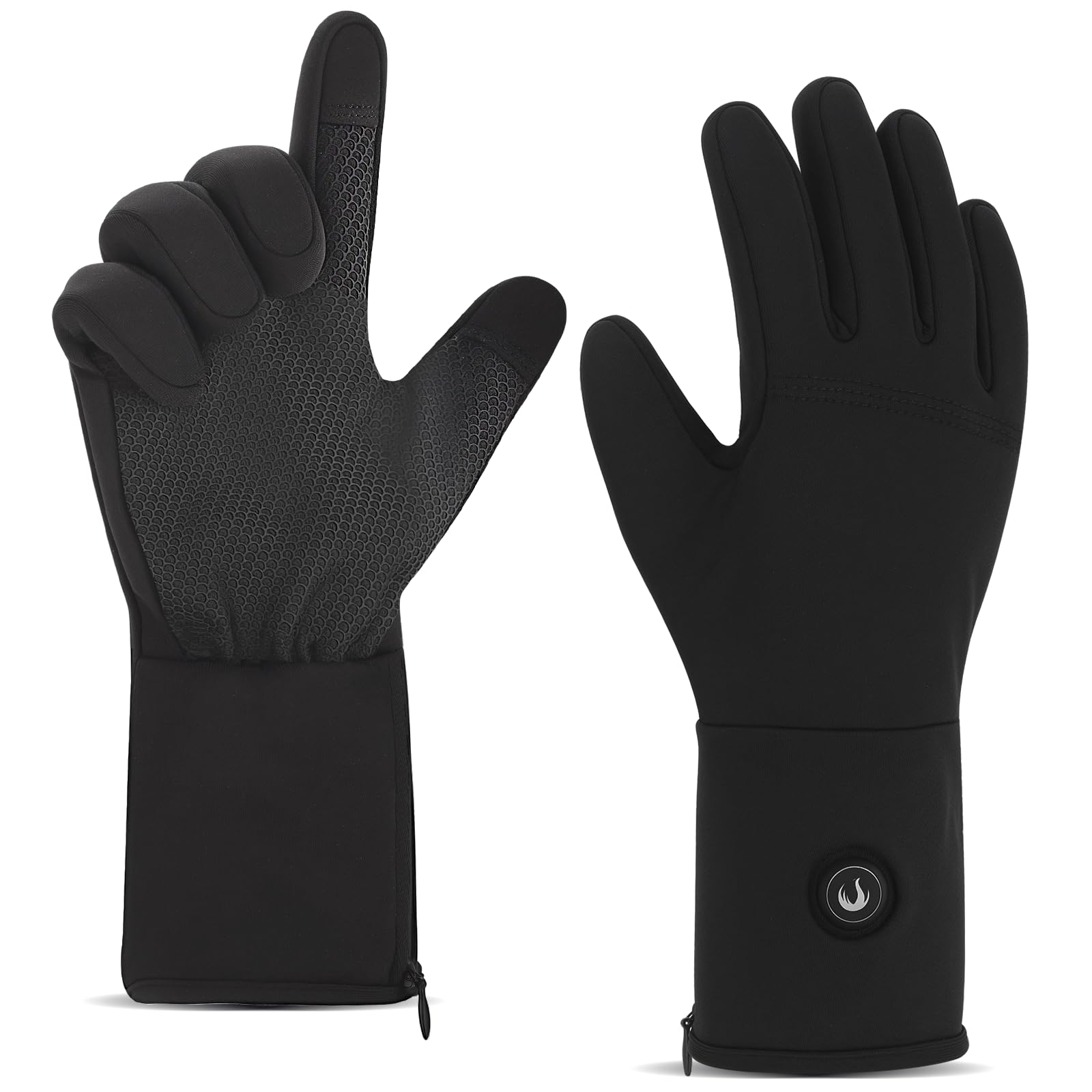
Image: A person wearing FEETMOR heated glove liners uses their index finger to interact with a smartphone touchscreen, demonstrating the glove's touch-sensitive function. Other devices like a car touch screen and tablet are also shown as compatible.
5.3 Anti-Slip Grip Design
The palm areas of the glove liners feature embedded silicone particles, providing enhanced abrasion resistance and a secure grip. This design is beneficial for activities requiring firm handling, such as driving, cycling, or holding ski poles.

Image: A close-up view of the palm of a FEETMOR heated glove liner, highlighting the textured anti-skid silicone pattern designed for improved grip.
5.4 Usage Recommendations
These ultra-thin glove liners are suitable for various activities in cold conditions, including driving, typing, walking, photography, and light outdoor use. For extremely cold weather, it is recommended to wear them as a liner under thicker gloves for additional insulation.

Image: A person wearing FEETMOR heated glove liners is shown typing on a laptop, illustrating the flexibility and touchscreen compatibility for indoor or light outdoor tasks.

Image: A person wearing FEETMOR heated glove liners is shown driving a car, highlighting their suitability for maintaining warmth and grip while operating a vehicle.
6. Maintenance
6.1 Cleaning Instructions
- Always remove batteries before cleaning.
- The glove liners are machine washable. Place them in a laundry bag to protect them during washing.
- Alternatively, hand wash the gloves in cold water with mild detergent.
- Do not bleach, iron, or dry clean.
- Air dry thoroughly before reconnecting batteries or storing.
6.2 Storage
Store the glove liners and batteries in a cool, dry place when not in use. Ensure batteries are partially charged (around 50%) before long-term storage to prolong their lifespan.
7. Troubleshooting
- Gloves not heating:
- Ensure batteries are fully charged.
- Verify that the battery is correctly connected to the glove's power cord.
- Confirm the power button has been pressed and held for 3 seconds to turn on.
- Uneven heating or cold fingertips:
- The heating elements are primarily located on the dorsal surface of the hands and fingers. While designed for even warmth, external factors like wind or extreme cold can affect perceived heat distribution.
- Consider wearing thicker outer gloves for additional insulation in very cold conditions.
- Short battery life:
- Battery life varies significantly with the selected heat setting. Higher settings consume more power.
- Ensure batteries are fully charged before each use.
- Battery performance can decrease in extremely cold environments.
- Discomfort from battery placement:
- The batteries are designed to fit into the cuff pockets. If discomfort occurs, adjust the battery position within the pocket.
8. Specifications
| Feature | Detail |
|---|---|
| Brand Name | FEETMOR |
| Model Name | Fh04 |
| Material | Polyester, Lycra, Velvet, Elastane |
| Color | Black |
| Battery Type | 7.4V 16.28Wh Li-Polymer Rechargeable |
| Charger | 20W PD Adapter (USB-C) |
| Heating Zones | Full hand and fingertips (dorsal surface) |
| Temperature Settings | 3 levels (High, Medium, Low) |
| Special Features | Touchscreen compatible, Anti-slip grip |
| Suggested Users | Unisex-adult |
| Item Package Dimensions | 11.73 x 4.17 x 2.24 inches |
| Package Weight | 0.55 Kilograms |
8.1 Sizing Chart
To ensure the best fit, please refer to the sizing chart below. If your measurement falls between sizes, it is recommended to choose the larger size.

Image: A sizing chart for FEETMOR heated glove liners, displaying hand circumference measurements in inches and centimeters for sizes XS, S, M, L, and XL, along with an illustration of how to measure your hand.
9. Warranty and Support
FEETMOR products are designed for quality and durability. For warranty information, technical support, or any questions regarding your heated glove liners, please contact FEETMOR customer service through the retailer where the product was purchased or visit the official FEETMOR website. Please retain your proof of purchase for warranty claims.