
1. Introduction
Thank you for choosing LEMEGA Core X1 Active Bookshelf Speakers. These powerful 40W RMS stereo speakers feature a 4-inch woofer and a 1.25-inch tweeter, delivering rich and clear audio. With versatile connectivity options including Bluetooth, USB, HDMI ARC, Optical, AUX, and RCA inputs, the Core X1 speakers are designed to enhance your audio experience across various devices. This manual provides essential information for setup, operation, and maintenance to ensure optimal performance.
2. What's in the Box
Please check the package contents to ensure all items are present:
- LEMEGA Core X1 Active Bookshelf Speakers (1 Pair)
- Remote Control
- Power Adapter
- RCA Cable
- HDMI Cable
- Optical Cable
- User Manual (this document)

3. Setup
Follow these steps to set up your LEMEGA Core X1 speakers:
- Speaker Placement: Place the active speaker (with controls and inputs) and the passive speaker on a stable surface, ideally at ear level and equidistant from your listening position for optimal stereo imaging.
- Connect Speakers: Connect the active speaker to the passive speaker using the provided speaker cable. Ensure correct polarity (red to red, black to black).
- Power Connection: Connect the power adapter to the active speaker's DC IN port and then plug it into a wall outlet.
- Select Audio Input: Choose your desired audio input method:
- HDMI ARC: Connect an HDMI cable from your TV's HDMI ARC port to the speaker's HDMI ARC port.
- Optical: Connect an optical cable from your audio source to the speaker's OPTICAL IN port.
- AUX: Connect a 3.5mm AUX cable from your device's audio output to the speaker's AUX IN port.
- RCA: Connect an RCA cable from your audio source (e.g., turntable, CD player) to the speaker's RCA L/R IN ports.
- USB: Insert a USB drive with MP3 files into the USB port for direct playback.


4. Operating Instructions
The Core X1 speakers offer intuitive controls for a seamless audio experience.
4.1 Power On/Off and Input Selection
- Press the Power button on the active speaker or remote control to turn the speakers on or off.
- Use the 'Mode' button on the active speaker or remote to cycle through available inputs (Bluetooth, HDMI ARC, Optical, AUX, RCA, USB). The front LED display will indicate the current input mode.
4.2 Volume, Bass, and Treble Control
- Volume: Adjust the master volume using the dedicated knob on the active speaker or the Volume +/- buttons on the remote control.
- Bass & Treble: The active speaker features dedicated knobs for adjusting bass and treble levels. These can also be adjusted via the remote control for fine-tuning your audio. The LED display shows current settings.
4.3 Bluetooth Streaming
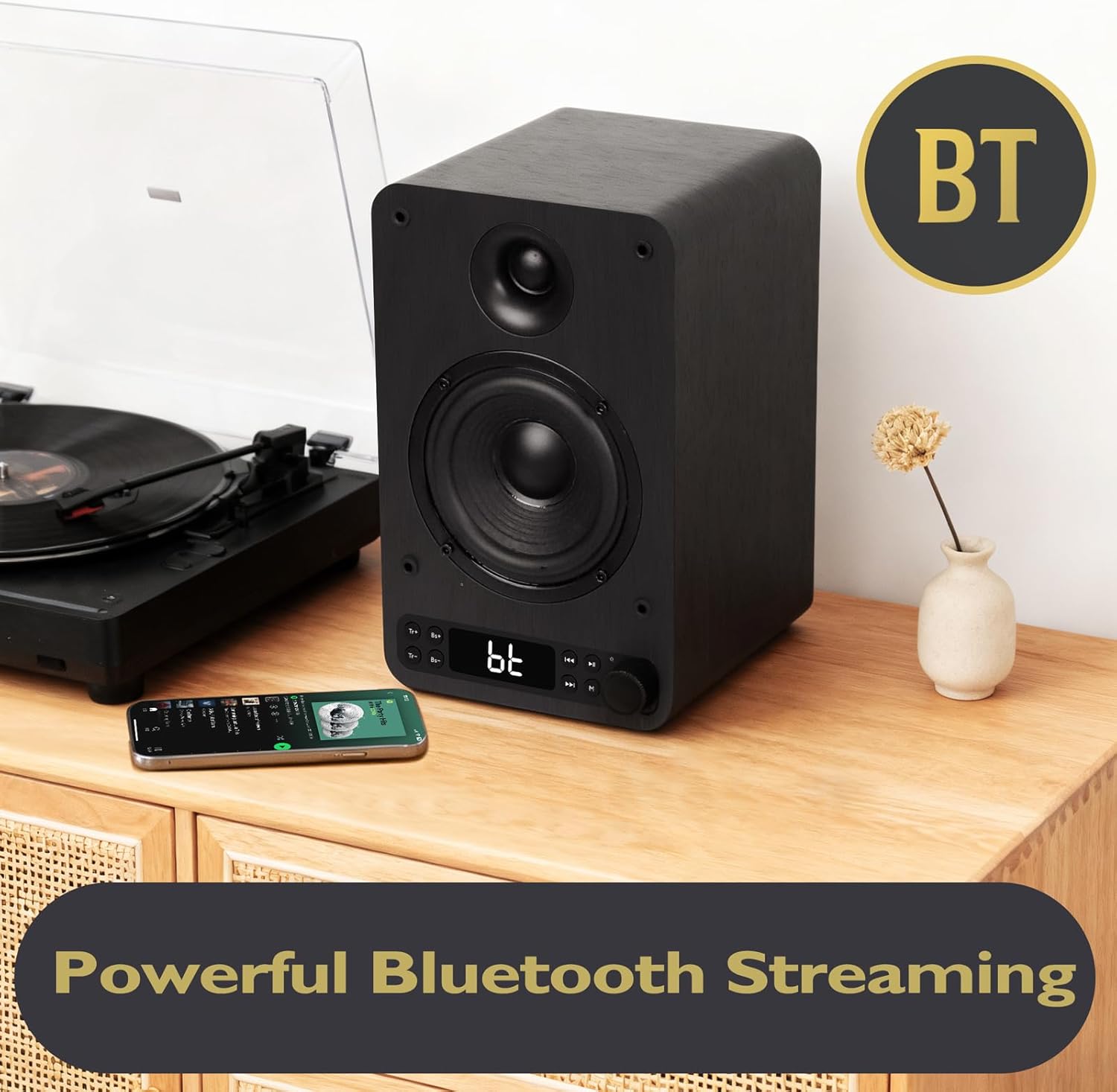
- Select Bluetooth mode using the 'Mode' button. The LED display will show 'BT'.
- On your Bluetooth-enabled device (phone, tablet, etc.), search for 'LEMEGA Core X1' in the Bluetooth settings and pair.
- Once paired, you can wirelessly stream music from your device.
4.4 USB Playback
- Insert a USB flash drive containing MP3 audio files into the USB port on the active speaker.
- Select USB mode using the 'Mode' button. The speakers will automatically begin playing audio from the USB drive.
- Use the remote control to navigate tracks (Next/Previous) and control playback (Play/Pause).
5. Maintenance
To ensure the longevity and optimal performance of your LEMEGA Core X1 speakers, follow these maintenance guidelines:
- Cleaning: Use a soft, dry cloth to wipe the speaker surfaces. Avoid using abrasive cleaners, waxes, or solvents as they may damage the finish.
- Ventilation: Ensure adequate ventilation around the speakers. Do not block any ventilation openings.
- Environment: Keep the speakers away from direct sunlight, heat sources, and excessive moisture. Avoid placing them in dusty environments.
- Handling: Handle the speakers with care. Avoid dropping them or subjecting them to strong impacts.
6. Troubleshooting
If you encounter any issues with your LEMEGA Core X1 speakers, please refer to the following common troubleshooting steps:
| Problem | Possible Cause | Solution |
|---|---|---|
| No Sound | Power not connected; incorrect input selected; volume too low; cables loose. | Check power connection; select correct input mode; increase volume; ensure all audio cables are securely connected. |
| Bluetooth Pairing Failure | Speakers not in pairing mode; device too far; interference. | Ensure speakers are in Bluetooth mode ('BT' displayed); move device closer to speakers; try re-pairing. |
| Distorted Audio | Volume too high; poor audio source quality; loose connections. | Reduce volume on speakers and source device; test with a different audio source; check all cable connections. |
| Remote Control Not Working | Batteries depleted; obstruction between remote and speaker. | Replace remote control batteries; ensure clear line of sight to the active speaker. |
If the issue persists after trying these steps, please contact LEMEGA customer support for further assistance.
7. Specifications
Detailed technical specifications for the LEMEGA Core X1 Active Bookshelf Speakers:
| Feature | Detail |
|---|---|
| Brand | LEMEGA |
| Model Name | Core X1 |
| Speaker Type | Woofer and Tweeter (Bookshelf) |
| Speaker Maximum Output Power | 40 Watts RMS |
| Woofer Diameter | 4 Inches |
| Tweeter Size | 1.25 Inches |
| Connectivity Technology | Auxiliary, Bluetooth (v5.3), HDMI ARC, Optical, USB |
| Audio Output Mode | Stereo (2.0 Surround Sound Channel Configuration) |
| Frequency Response | 80.18 Hz |
| Product Dimensions | 6.25"D x 5.75"W x 9.1"H |
| Item Weight | 9.61 pounds |
| Control Method | Remote, On-speaker Knobs |
| Special Feature | LED Display, USB Port, Bass & Treble Control |
8. Warranty and Support
The LEMEGA Core X1 Active Bookshelf Speakers come with a Limited Warranty. For specific details regarding the warranty period and coverage, please refer to the warranty card included in your product packaging or visit the official LEMEGA website.
For technical support, troubleshooting assistance, or any inquiries regarding your product, please contact LEMEGA customer support through the following channels:
- Email: Refer to your user manual or product packaging for the support email address.
- Website: Visit the official LEMEGA website for FAQs, support resources, and contact forms.
Please have your product model number (Core X1) and purchase details ready when contacting support.
