
Introduction
This manual provides comprehensive instructions for the safe and efficient use of your CJ TECH Bobcat Rechargeable Neck Light. Designed for hands-free illumination, this versatile LED light is suitable for various tasks including reading, crafts, and work in low-light conditions. Please read this manual thoroughly before operating the device.
Product Features
- Flexible Neck Design: Ergonomically designed to comfortably rest around your neck, providing stable, hands-free lighting.
- Adjustable Light Modes: Features three distinct light modes (Strong, Weak, Off) to suit different lighting needs.
- High Brightness: Each light head delivers 120 lumens, totaling 240 lumens for ample illumination.
- Rechargeable Battery: Equipped with two 500mAh batteries, offering up to 3 hours of continuous use on a single charge.
- Type-C Charging: Conveniently recharges via a Type-C port in approximately 1.5 hours.
- Dual Use Functionality: The individual flashlights are removable and feature a magnetic base, allowing for use as a neck light or as separate handheld/mounted work lights.
- 90° Articulation: Each light head can be adjusted up to 90 degrees for precise light direction.
- Durable Construction: Made from robust ABS and PS materials for long-lasting performance.
- Lightweight and Portable: Compact design makes it ideal for travel, tool kits, or bedside use.
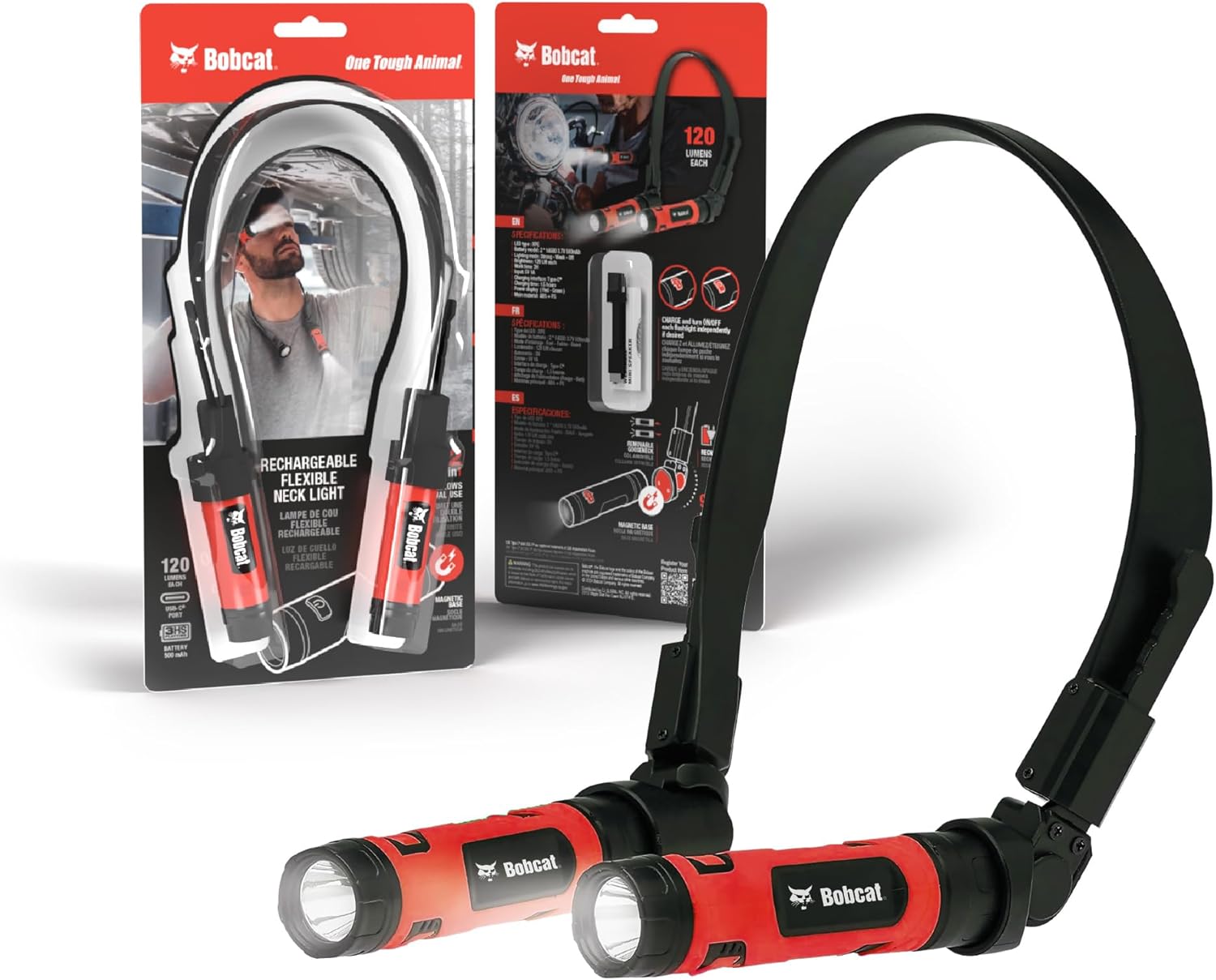
Image: The CJ TECH Bobcat Rechargeable Neck Light in use, demonstrating its hands-free operation and adjustable light heads.
Package Contents
- 1 x CJ TECH Bobcat Rechargeable Neck Light (Model: 71376-BO)
- 1 x Type-C Charging Cable
- 1 x User Manual
Setup
1. Initial Charging
- Locate the Type-C charging port on each flashlight unit.
- Connect the provided Type-C charging cable to the port on each flashlight.
- Plug the other end of the charging cable into a compatible 5V 1A USB power adapter (not included).
- The power display indicator will show red during charging and turn green when fully charged.
- A full charge takes approximately 1.5 hours. Ensure both flashlight units are fully charged before first use.

Image: Detail of the Type-C charging port on one of the flashlight units, with a charging cable connected.
2. Assembling the Neck Light
The two flashlight units are designed to attach magnetically to the flexible neck strap. Ensure the magnetic ends of the flashlights align with the corresponding points on the neck strap for a secure connection.

Image: Illustration of the magnetic attachment and 90-degree articulation feature of the flashlight units on the neck strap.
Operating Instructions
1. Wearing the Neck Light
Place the flexible neck light around your neck. Adjust the position of the light heads to direct illumination precisely where needed. The flexible arms allow for easy positioning.
2. Adjusting Light Modes
Each flashlight unit has an independent power button. Press the button on either flashlight to cycle through the three light modes:
- First Press: Strong light mode (120 lumens).
- Second Press: Weak light mode.
- Third Press: Off.
You can operate both lights simultaneously or independently, depending on your task.

Image: A user adjusting the light direction of the neck light while working, highlighting its flexibility.
3. Using as Handheld or Mounted Flashlights
The flashlight units can be easily detached from the neck strap due to their magnetic bases. Once detached, they can be used as individual handheld flashlights or mounted onto metal surfaces for stationary lighting.

Image: A detached flashlight unit demonstrating its magnetic base adhering to a metal surface, providing versatile lighting options.
Maintenance
- Cleaning: Wipe the device with a soft, dry cloth. Do not use abrasive cleaners or immerse in water.
- Storage: Store the neck light in a cool, dry place away from direct sunlight when not in use.
- Battery Care: To prolong battery life, charge the device regularly, even if not in frequent use. Avoid fully depleting the battery before recharging.
Troubleshooting
| Problem | Possible Cause | Solution |
|---|---|---|
| Light does not turn on. | Battery is depleted. | Charge the device using the provided Type-C cable. |
| Light is dim. | Low battery or incorrect mode. | Recharge the device. Press the power button to cycle to the strong light mode. |
| Flashlight units detach easily. | Improper attachment or strong vibration. | Ensure the magnetic bases are fully seated on the neck strap. Avoid excessive force or sudden movements. |
Specifications
| Model Number | 71376-BO |
| LED Type | XPE |
| Brightness | 120 Lumens per head (240 Lumens total) |
| Light Modes | Strong, Weak, Off |
| Battery Capacity | 2 x 14500 3.7V 500mAh Lithium-Ion |
| Charging Interface | Type-C |
| Charging Time | Approx. 1.5 hours |
| Work Time | Up to 3 hours |
| Material | ABS + PS |
| Product Dimensions | 6.7"D x 1"W x 13.2"H |
| Item Weight | 0.7 Pounds (11.2 ounces) |
| Water Resistance | Not Water Resistant |
Warranty and Support
For warranty information or technical support, please refer to the contact details provided on the product packaging or visit the official CJ TECH website. Keep your purchase receipt as proof of purchase for any warranty claims.
Product Video Overview
Video: An overview of the Bobcat Rechargeable Neck Light, demonstrating its features and various uses for reading, crafts, and work. This video is provided by Global Wholesale US.