
1. Important Safety Instructions
Please read this manual thoroughly before use and retain it for future reference. Always follow basic safety precautions when using electrical appliances to reduce the risk of fire, electric shock, and injury.
- Do not place the humidifier on wet surfaces or near heat sources.
- Use only clean, purified, or distilled water to prevent mineral buildup and ensure optimal performance.
- Keep out of reach of children and pets.
- Unplug the humidifier before cleaning or refilling.
2. Product Diagram
Familiarize yourself with the components of your DREO HM409S Humidifier.

Image: The DREO HM409S humidifier shown next to a smartphone displaying its control app. The humidifier features a translucent top section that glows with an RGB light, a digital display showing humidity, and touch controls.
- Mist Outlet: Where the cool mist is released.
- Water Tank: 3L capacity for water.
- Control Panel/Display: Digital screen and touch buttons for operation.
- Base: Contains the ultrasonic atomizer and electronics.
- Power Cord: For connecting to an electrical outlet.
3. Setup and Initial Use
3.1 Unpacking
- Carefully remove all packaging materials.
- Inspect the humidifier for any damage. Do not use if damaged.
- Place the humidifier on a firm, flat, water-resistant surface at least 6 inches (15 cm) away from walls and appliances.
3.2 Filling the Water Tank

Image: A hand pouring water directly into the top opening of the DREO HM409S humidifier, demonstrating its top-fill design.
- Ensure the humidifier is unplugged.
- Remove the top cover.
- Pour clean, purified, or distilled water directly into the water tank up to the MAX fill line. Avoid overfilling.
- Replace the top cover securely.
3.3 Power On
- Plug the power cord into a 120V AC electrical outlet.
- Press the Power button on the control panel to turn on the humidifier.
3.4 App Connection (Optional)
For smart features and remote control, download the DREO app from your smartphone's app store. Follow the in-app instructions to connect your humidifier to your Wi-Fi network. The humidifier is compatible with Alexa and Google Home for voice control.

Image: The DREO HM409S humidifier with a smartphone displaying its smart control interface, alongside logos for DREO, Alexa, and Hey Google, indicating smart home compatibility.
4. Operating Instructions
4.1 Mist Output Adjustment
Press the Mist Level button to cycle through different mist output settings (Low, Medium, High). The current setting will be displayed on the screen.
4.2 Automatic Humidity Control
The humidifier features a built-in humidistat. Press the Auto Mode button to activate. The humidifier will automatically adjust mist output to maintain your desired humidity level (e.g., 45-55% for optimal comfort).
4.3 RGB Night Light and Sleep Routine Trainer
The humidifier offers over 1500 customizable RGB light options. Use the Light button on the unit or the DREO app to select colors, brightness, and special modes.
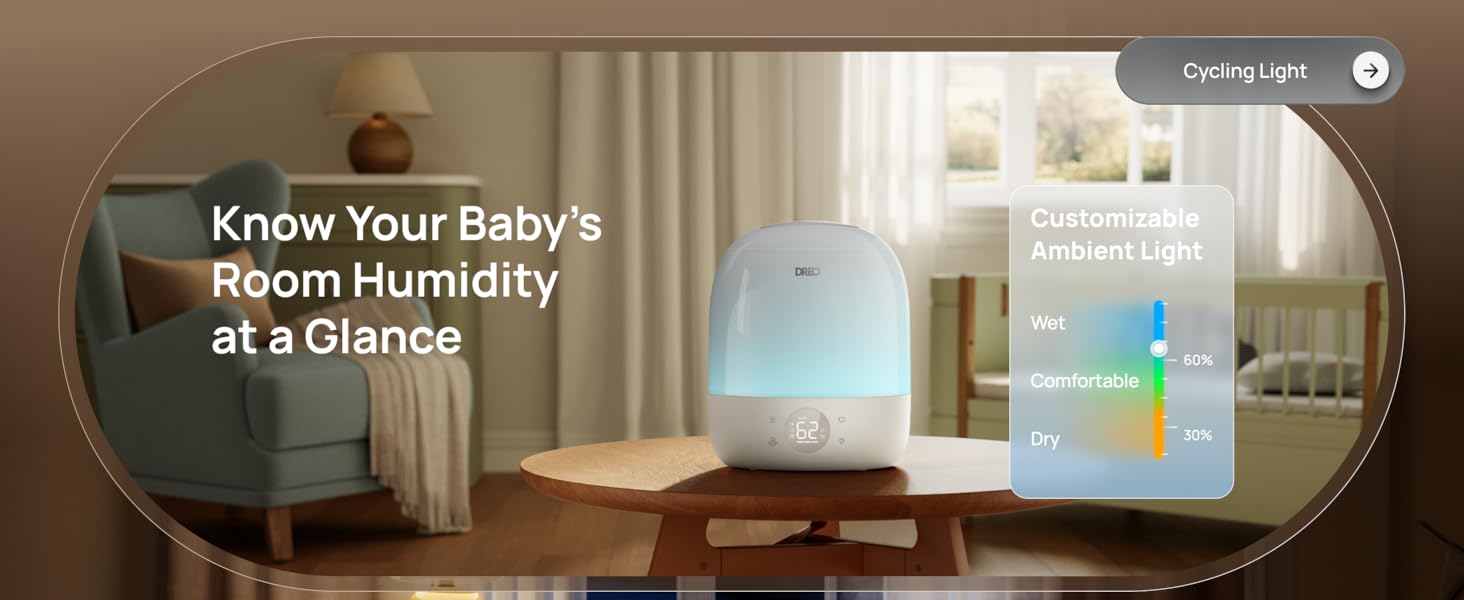
Image: The DREO HM409S humidifier with a smartphone displaying the customizable RGB lighting interface within the DREO app, showing a color wheel and various light modes.
- Sleep Routine Trainer: This feature uses light cues to guide sleep habits. The light dims at night to promote rest and brightens in the morning for waking.
- Breathing Light: A gentle pulsing light for relaxation.
- Cycling Light: Cycles through various colors.
- Humidity Indicator Light: Changes color to indicate current humidity levels (e.g., blue for wet, green for comfortable, orange for dry).
4.4 Timer Function
Set the humidifier to operate for a specific duration using the Timer button or the DREO app. The timer can be set for up to 24 hours.
4.5 Aroma Diffuser
Add a few drops of essential oil to the designated aroma pad in the base of the humidifier for a personalized atmosphere. Do not add essential oils directly into the water tank.
4.6 Tiltable Nozzle
The mist nozzle can be tilted up to 30 degrees to direct the mist flow as needed.
5. Maintenance
Regular cleaning and maintenance are essential for optimal performance and longevity of your humidifier.
5.1 Cleaning the Humidifier
- Always unplug the humidifier before cleaning.
- Remove the top cover and empty any remaining water from the tank and base.
- Wipe the inside of the water tank and base with a soft cloth. For mineral buildup, use a solution of white vinegar and water (1:1 ratio) and let it soak for 15-20 minutes before scrubbing gently with the provided cleaning brush.
- Rinse all components thoroughly with clean water and dry completely before reassembly.
5.2 Cartridge Replacement (Optional)
The DREO HM409S supports optional demineralization and clean mist cartridges to reduce limescale and maintain mist purity. The DREO app will provide reminders when it's time to replace cartridges (typically every 600 hours of use).

Image: The DREO HM409S humidifier with a smartphone displaying a filter life indicator and reminder for cartridge replacement.
6. Troubleshooting
If you encounter any issues with your humidifier, please refer to the following common problems and solutions:
| Problem | Possible Cause | Solution |
|---|---|---|
| No mist or low mist output | Low water level; Mineral buildup; Mist outlet blocked. | Refill water tank; Clean the humidifier, especially the atomizer; Ensure mist outlet is clear. |
| Unpleasant odor | Stagnant water; Dirty water tank. | Empty and clean the water tank regularly; Use fresh water daily. |
| Humidifier not connecting to app | Incorrect Wi-Fi password; Router too far; 5GHz Wi-Fi network. | Ensure correct password; Move humidifier closer to router; Ensure you are connecting to a 2.4GHz Wi-Fi network. |
| Excessive noise | Unit not on a flat surface; Water level too low. | Place on a stable, flat surface; Refill water tank. |
If the problem persists, please contact DREO Customer Support.
7. Specifications
- Brand: Dreo
- Model Name: DR-HHM009S
- Operation Mode: Ultrasonic
- Water Tank Capacity: 3 Liters
- Max Coverage Area: 300 Square Feet
- Max Runtime: Up to 30 hours
- Noise Level: 28dB (Whisper-Quiet)
- Voltage: 120 Volts
- Wattage: 29 Watts
- Special Features: Adjustable Humidity Control, Aroma Diffuser, Auto Shut Off, Digital Display, Humidistat, RGB Night Light, Sleep Routine Trainer, Smart App Control (Wi-Fi), Alexa/Google Home Compatible, Top-Fill Design, 30° Tiltable Nozzle, BPA-Free Materials.
- Included Components: 1 × Dreo 3L Humidifier, 1 × Quick Start Guide, Cleaning Brush, User Manual.
8. Warranty and Support
DREO products are manufactured with high-quality materials and craftsmanship. For warranty information and customer support, please refer to the official DREO website or the warranty card included with your product.
For further assistance, you may also refer to the official user manual PDF: DREO HM409S User Manual (PDF)
DREO is committed to providing excellent customer service. If you experience any issues, please contact their support team for prompt assistance.


