
Odyssey Toys Galaxy Seeker (ODY-1956)
Odyssey Toys Galaxy Seeker FPV Drone User Manual
Model: Galaxy Seeker (ODY-1956)
Introduction
This manual provides essential instructions for the safe operation, setup, and maintenance of your Odyssey Toys Galaxy Seeker FPV Drone. Designed for users aged 12 and above, this drone features a 1080P HD camera, brushless motors, and optical flow hover technology for stable flight. Please read this manual thoroughly before operating the drone to ensure a safe and enjoyable experience.
Key features include:
- 1080P HD Camera: Captures high-definition aerial photos and videos, providing a first-person view (FPV) experience.
- Stable Flight: Advanced optical flow hover technology and a downward-facing camera ensure precise hovering and improved stability.
- Brushless Motors: Four low-noise brushless motors offer efficient performance, reduced heat, and extended motor lifespan.
- Smart Controls: App connectivity provides real-time FPV view and camera feed for enhanced flight control.
- Extended Flight Time: Rechargeable battery provides up to 15 minutes of flight per charge.
- Foldable Design: Convenient for transport and storage.
Package Contents
Verify that all items listed below are included in your package:
- Galaxy Seeker Drone
- Remote Control
- Rechargeable Drone Battery
- User Manual (this document)
- Phone Holder (for remote control)
Note: 2 AAA batteries for the remote control are included as per product specifications.
Safety Guidelines
Adherence to these safety guidelines is crucial for preventing injury and damage:
- Age Requirement: This product is intended for users aged 12 and above.
- Flight Environment: Operate the drone in open, clear areas, away from people, animals, buildings, and power lines. Avoid flying in strong winds or adverse weather conditions.
- Line of Sight: Always maintain visual line of sight with the drone during flight.
- Battery Safety: Use only the provided battery and charging cable. Do not overcharge or puncture batteries. Discontinue use if batteries show signs of damage or swelling.
- Propeller Safety: Keep fingers, hair, and loose clothing away from rotating propellers. Do not attempt to catch the drone while propellers are spinning.
- Water Exposure: Avoid exposing the drone to water or moisture.
- Legal Compliance: Be aware of and comply with local regulations regarding drone operation.
Product Overview
Familiarize yourself with the main components of your Galaxy Seeker FPV Drone.
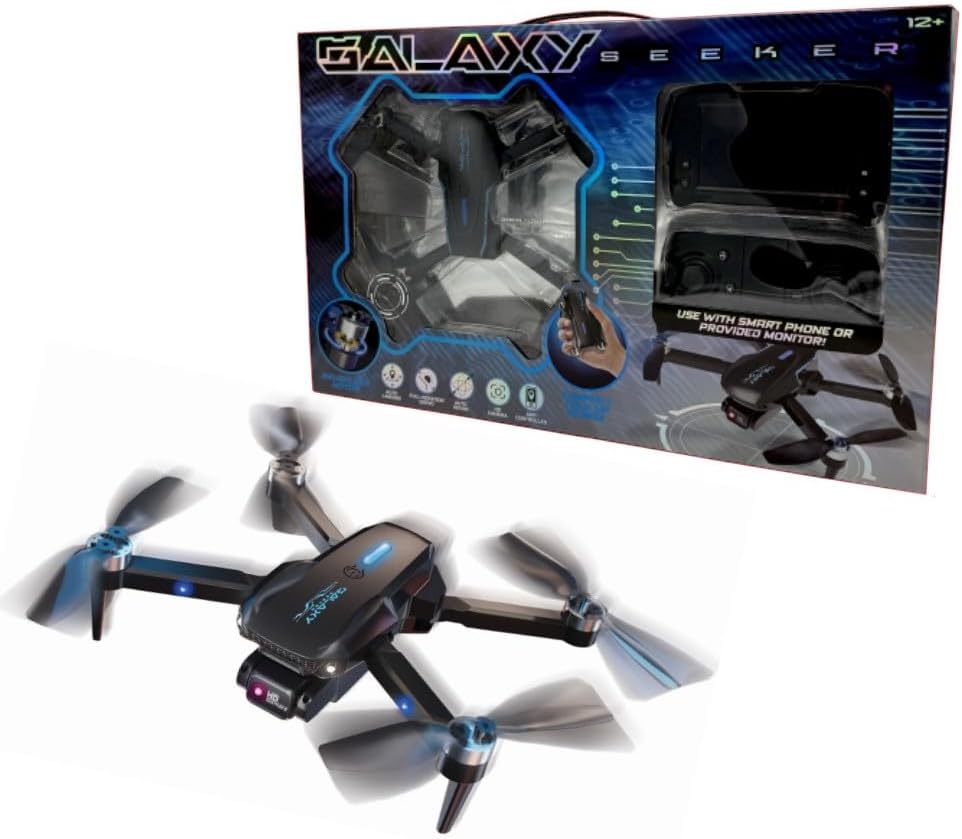
Image: The Odyssey Toys Galaxy Seeker FPV Drone displayed with its retail packaging. The drone is black with illuminated blue accents on the propellers and body. The packaging highlights the "Galaxy Seeker" branding and indicates compatibility with smartphones or a provided monitor.
Drone Components:
- HD Camera: Front-facing, adjustable 1080P camera for photo and video capture.
- Brushless Motors: Located at the base of each propeller arm.
- Propellers: Four main rotors for lift and propulsion.
- Optical Flow Sensor: Downward-facing camera for stable hovering.
- Battery Compartment: Located on the underside of the drone.
- Power Button: To turn the drone on/off.
- LED Indicator Lights: Provide status information.
Remote Control Components:
- Control Sticks: Left stick for throttle/yaw, right stick for pitch/roll.
- Function Buttons: For features like one-key take-off/landing, headless mode, speed control, photo/video.
- Phone Holder: Attaches to the remote for FPV viewing via smartphone.
- Power Button/Indicator: To turn the remote on/off and show status.
Setup
1. Charging the Drone Battery
- Remove the drone battery from its compartment.
- Connect the battery to the provided USB charging cable.
- Plug the USB cable into a 5V/1A USB power adapter (not included) or a computer USB port.
- The indicator light on the charging cable will show charging status (e.g., red for charging, green for fully charged).
- Charging typically takes approximately 90-120 minutes for a full charge, providing up to 15 minutes of flight time.
2. Installing Drone Battery
- Ensure the drone is powered off.
- Carefully insert the fully charged battery into the battery compartment on the drone's underside, ensuring it clicks securely into place.
3. Installing Remote Control Batteries
- Open the battery compartment on the back of the remote control.
- Insert 2 AAA batteries (included) according to the polarity markings (+/-).
- Close the battery compartment securely.
4. Propeller Installation/Check
The drone typically comes with propellers pre-installed. If replacement is needed:
- Identify propellers marked 'A' and 'B'.
- Match each propeller to its corresponding motor shaft (usually marked 'A' or 'B' on the drone arm).
- Press down firmly to secure the propeller onto the motor shaft. Ensure they are correctly oriented and not loose.
5. App Installation (for FPV and Smart Controls)
- Scan the QR code found in the quick start guide or on the drone packaging, or search for the "Galaxy Seeker FPV" app in your device's app store (iOS/Android).
- Download and install the application.
- Attach your smartphone to the phone holder on the remote control.
Operating Instructions
1. Power On and Pairing
- Place the drone on a flat, level surface.
- Press and hold the power button on the drone until the LED lights illuminate.
- Turn on the remote control. The remote's indicator light will flash.
- Push the left control stick (throttle) fully up, then fully down. The remote will beep, and the drone's lights will become solid, indicating successful pairing.
2. Gyro Calibration
- After pairing, place the drone on a flat surface.
- Push both control sticks down and to the right simultaneously for a few seconds.
- The drone's lights will flash rapidly and then become solid, indicating successful calibration. This ensures stable flight.
3. Connecting to the App (FPV)
- Ensure the drone is powered on and paired with the remote.
- On your smartphone, go to Wi-Fi settings and connect to the drone's Wi-Fi network (usually named "Galaxy Seeker_XXXXXX").
- Open the "Galaxy Seeker FPV" app. You should see a live video feed from the drone's camera.
4. Basic Flight Controls
- Take-off: Press the one-key take-off button on the remote, or push both control sticks outwards and downwards to start propellers, then slowly push the left stick up.
- Landing: Press the one-key landing button, or slowly pull the left stick down until the drone lands.
- Ascend/Descend: Push the left control stick up to ascend, pull down to descend.
- Forward/Backward: Push the right control stick up for forward, down for backward.
- Left/Right Sideways Flight (Strafe): Push the right control stick left for left strafe, right for right strafe.
- Turn Left/Right (Yaw): Push the left control stick left to turn left, right to turn right.
5. Camera Operation
- Take Photo: Press the photo button on the remote or in the app.
- Record Video: Press the video button on the remote or in the app to start/stop recording.
- Adjust Camera Angle: The camera angle can be manually adjusted before flight.
- Media Storage: Photos and videos are typically saved to your connected smartphone when using the app.
Maintenance
1. Cleaning
- Gently wipe the drone's body with a soft, dry cloth after each flight to remove dust and debris.
- Ensure no foreign objects are lodged in the motors or propellers.
2. Storage
- Store the drone in a cool, dry place, away from direct sunlight and extreme temperatures.
- Remove batteries from both the drone and remote control if storing for extended periods.
- Utilize the foldable design for compact storage.
3. Battery Care
- Do not fully discharge the drone battery. Recharge it before it is completely depleted.
- If storing for a long time, charge the battery to approximately 50-60% capacity.
- Never leave charging batteries unattended.
Troubleshooting
| Problem | Possible Cause | Solution |
|---|---|---|
| Drone does not power on. | Battery is not charged or not installed correctly. | Charge the drone battery fully. Ensure the battery is securely inserted. |
| Remote control does not respond. | Remote control batteries are low or incorrectly installed. Not paired with drone. | Replace AAA batteries. Check polarity. Re-pair the remote with the drone. |
| Drone drifts during flight. | Gyroscope not calibrated. Uneven surface at take-off. | Perform gyroscope calibration on a flat surface. Ensure take-off from a level area. |
| No FPV video feed in app. | Not connected to drone's Wi-Fi. App not open or crashed. | Connect your smartphone to the drone's Wi-Fi network. Restart the app. |
| Short flight time. | Battery not fully charged. Old or damaged battery. | Ensure battery is fully charged. Consider replacing the battery if it's old or damaged. |
Specifications
| Brand | Odyssey Toys |
| Model Name | Galaxy Seeker |
| Model Number | ODY-1956 |
| Video Capture Resolution | 1080p HD |
| Effective Still Resolution | 40 MP |
| Flight Time | Up to 15 minutes |
| Motors | Brushless |
| Stabilization Technology | Optical Flow Hover |
| Connectivity | Mobile App, Wi-Fi |
| Material | Metal, Plastic |
| Product Dimensions | 12"L x 10"W x 3"H |
| Item Weight | 1.86 Pounds |
| Remote Control Batteries | 2 AAA batteries (included) |
| Recommended Age | 12+ |
Warranty and Support
Odyssey Toys products are manufactured to high-quality standards. For warranty information, technical support, or replacement parts, please contact Odyssey Toys customer service. Refer to the product packaging or the official Odyssey Toys website for the most current contact details.
Please retain your proof of purchase for warranty claims.
Ask a question about this manual
Ask about setup, troubleshooting, compatibility, parts, safety, or missing instructions. Manuals+ will review the question and use this page’s manual context to help answer it.