
1. Introduction
Thank you for choosing the COTOE G7 Bluetooth Headset. This manual provides detailed instructions for setting up, operating, and maintaining your headset. Please read this manual carefully before use to ensure optimal performance and longevity of your device.
The COTOE G7 is a wireless Bluetooth headset designed for clear communication and audio playback. It features an LED digital display for battery status, extended standby time, and Active Noise Cancellation (ANC) for an enhanced audio experience.
2. Package Contents
Please check the package for the following items:
- COTOE G7 Bluetooth Headset (Gray)
- Charging Case
- USB Charging Cable
- Ear Tips (various sizes)
- User Manual
3. Product Overview
Familiarize yourself with the components of your COTOE G7 Bluetooth Headset.
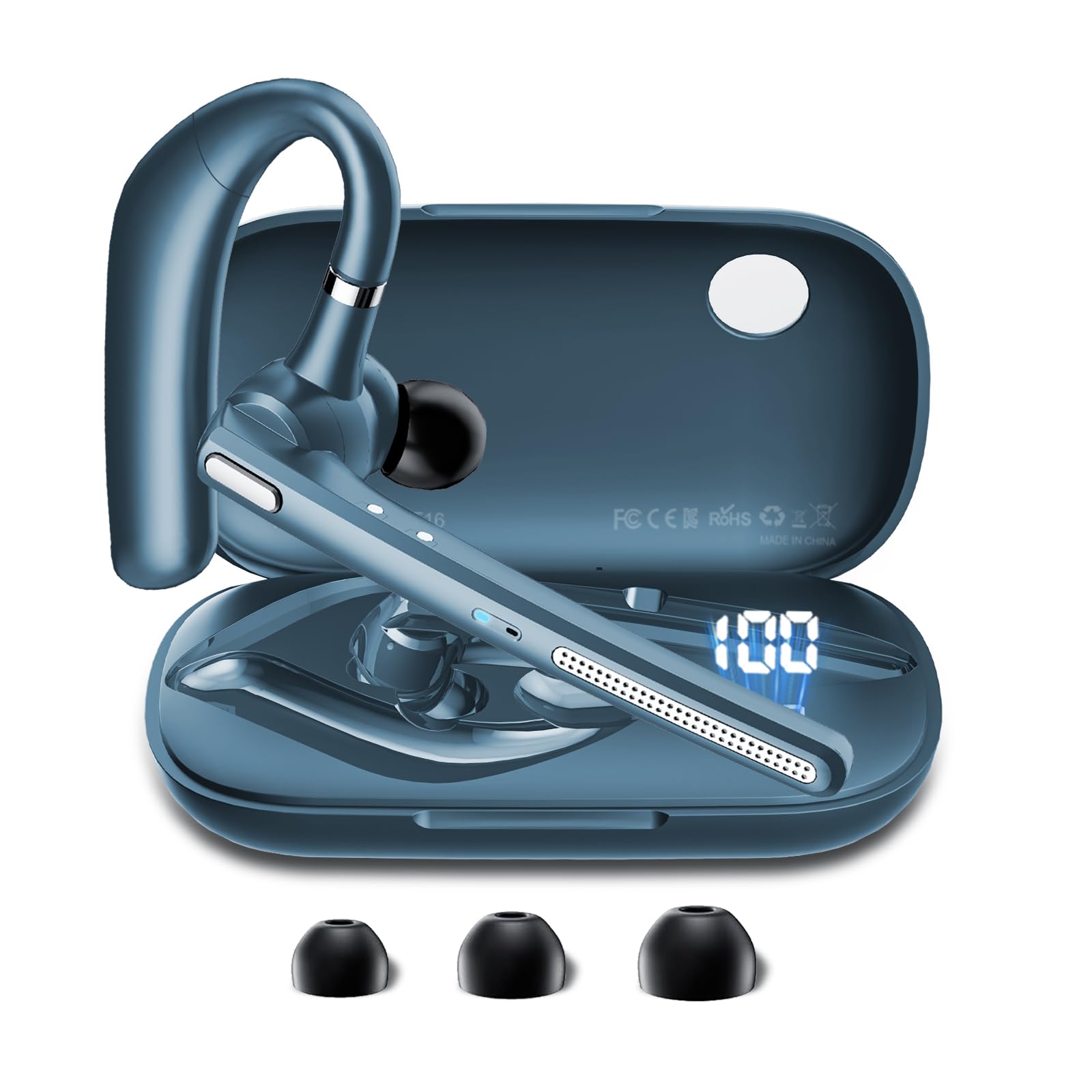
Image: The COTOE G7 Bluetooth Headset (gray) shown with its charging case. The headset features an ergonomic in-ear design, and the charging case is compact.
Key Components:
- Earpiece: The main unit worn in the ear, containing the speaker, microphone, and control buttons.
- Charging Case: Used to store and charge the headset. Features an LED digital display.
- LED Digital Display: Located on the charging case, indicates the charging status of the headset and the power level of the case.
4. Setup
4.1 Charging the Headset and Case
- Connect the USB charging cable to the charging port on the case and to a power source (e.g., USB wall adapter, computer USB port).
- The LED digital display on the charging case will show the current battery level and charging status.
- Place the headset into the charging case. Ensure proper alignment for charging. The headset's indicator light will show charging status.
- A full charge typically takes approximately 1-2 hours for the headset and 2-3 hours for the charging case.
Note: The headset offers up to 12 hours of music playback and the charging case provides 120 hours of standby time.
4.2 Pairing with a Bluetooth Device
- Ensure the headset is charged.
- Take the headset out of the charging case. It will automatically enter pairing mode, indicated by a flashing LED light (usually blue and red).
- On your mobile phone or other Bluetooth-enabled device, go to the Bluetooth settings.
- Search for available devices. You should see "COTOE G7" in the list.
- Select "COTOE G7" to connect. Once connected, the headset's LED light will stop flashing and may turn solid blue or turn off.
- If prompted for a password, enter "0000" (four zeros).
- The headset will automatically reconnect to the last paired device when powered on and within range.
5. Operating Instructions
5.1 Power On/Off
- Power On: Take the headset out of the charging case, or press and hold the Multi-function Button for approximately 3 seconds.
- Power Off: Place the headset back into the charging case, or press and hold the Multi-function Button for approximately 5 seconds.
5.2 Call Management
- Answer Call: Press the Multi-function Button once.
- End Call: Press the Multi-function Button once during a call.
- Reject Call: Press and hold the Multi-function Button for approximately 2 seconds.
- Redial Last Number: Double-press the Multi-function Button.
5.3 Music Playback
- Play/Pause: Press the Multi-function Button once.
- Next Track: Press and hold the Volume Up button.
- Previous Track: Press and hold the Volume Down button.
5.4 Volume Control
- Increase Volume: Press the Volume Up button.
- Decrease Volume: Press the Volume Down button.
5.5 Active Noise Cancellation (ANC)
The COTOE G7 features Active Noise Cancellation to reduce ambient noise. To activate or deactivate ANC, locate the dedicated ANC button (if present) or refer to the specific button combination in your quick start guide. Typically, a long press on a designated button toggles ANC.
6. Maintenance
- Cleaning: Use a soft, dry, lint-free cloth to clean the headset and charging case. Do not use harsh chemicals or abrasive materials.
- Storage: Store the headset in its charging case when not in use to protect it from dust and damage. Avoid extreme temperatures.
- Battery Care: To prolong battery life, avoid fully discharging the headset frequently. Charge it regularly, even if not used for extended periods.
- Water Resistance: The headset is not waterproof. Avoid exposure to liquids and moisture.
7. Troubleshooting
| Problem | Solution |
|---|---|
| Headset does not power on. | Ensure the headset is charged. Place it in the charging case to confirm charging. |
| Cannot pair with device. | Make sure Bluetooth is enabled on your device. Ensure the headset is in pairing mode. Try restarting both the headset and your device. Clear previous Bluetooth connections on your device. |
| No sound or low volume. | Check the volume levels on both the headset and your connected device. Ensure the headset is properly connected. Try playing different audio sources. |
| Intermittent connection. | Ensure the headset is within the effective range of your Bluetooth device (typically 10 meters/33 feet). Avoid obstacles between the headset and device. |
8. Specifications
- Brand: COTOE
- Model: G7
- Color: Gray
- Ear Placement: In Ear
- Form Factor: In Ear
- Noise Control: Active Noise Cancellation
- Standby Time: Up to 120 hours (with charging case)
- Music Playback Time: Up to 12 hours (with charging case)
9. Warranty and Support
The COTOE G7 Bluetooth Headset comes with a standard manufacturer's warranty. Please refer to the warranty card included in your package for specific terms and conditions.
For technical support, troubleshooting assistance, or warranty claims, please contact COTOE customer service through the retailer where you purchased the product or visit the official COTOE website for contact information.