
1. Introduction
Welcome to your Krysenix PG3 Wireless Gaming Headset. This manual provides detailed instructions for setting up, operating, and maintaining your headset to ensure an optimal gaming experience.
Key Features
- Immersive 7.1 Surround Sound with 50mm Drivers
- Ultra-low Latency 2.4 GHz Wireless and Bluetooth 5.4 Connectivity
- Up to 48 Hours of Battery Life
- Detachable Omnidirectional Microphone with Environmental Noise Cancellation (ENC)
- Ergonomic Design for Extended Comfort
- Dynamic RGB LED Lighting
Package Contents
- Krysenix PG3 Wireless Gaming Headset
- Detachable Microphone
- 2.4 GHz USB Wireless Dongle
- USB-C Charging Cable
- User Manual
2. Setup
2.1 Initial Charging
Before first use, fully charge your headset. Connect the provided USB-C charging cable to the headset's USB-C port and the other end to a USB power source (e.g., computer USB port, wall adapter). A full charge takes approximately 3 hours. The LED indicator will show charging status.

Image: Headset highlighting 48-hour battery life and 3-hour USB-C charging time.
2.2 Attaching the Microphone
Gently insert the detachable microphone into the 3.5mm microphone jack located on the left earcup until it is securely in place. The microphone arm is flexible and can be adjusted up to 120 degrees for optimal positioning.
2.3 2.4 GHz Wireless Connection (for PS5, PS4, PC, Mac)
- Insert the 2.4 GHz USB wireless dongle into an available USB port on your gaming console (PS5, PS4) or computer (PC, Mac).
- Power on the headset by pressing and holding the Power button for 3 seconds.
- The headset will automatically connect to the dongle. A voice prompt will confirm the connection.
- On your device, ensure the Krysenix PG3 headset is selected as the default audio input and output device in your system settings.

Image: Diagram illustrating the 2.4 GHz wireless technology for ultra-low latency connection.
2.4 Bluetooth 5.4 Connection (for Mobile, Tablet, Switch, Mac)
- Power on the headset by pressing and holding the Power button for 3 seconds.
- Press and hold the Bluetooth mode button (often integrated with the power button or a dedicated button) for 2 seconds until the headset enters pairing mode. The LED indicator will flash blue.
- On your mobile device, tablet, or Nintendo Switch, go to Bluetooth settings and select "Krysenix PG3" from the list of available devices.
- A voice prompt will confirm successful pairing.
Important Compatibility Notes:
- Bluetooth mode is not compatible with PS4 or PS5.
- The microphone is not available when connected via Bluetooth to Nintendo Switch.
- This headset is not compatible with Xbox consoles in any mode.

Image: Detailed compatibility table showing device support for Dongle, Bluetooth, and Wired modes.
3. Operating Instructions
The Krysenix PG3 headset features intuitive controls located on the earcups for easy access during gameplay or media consumption.
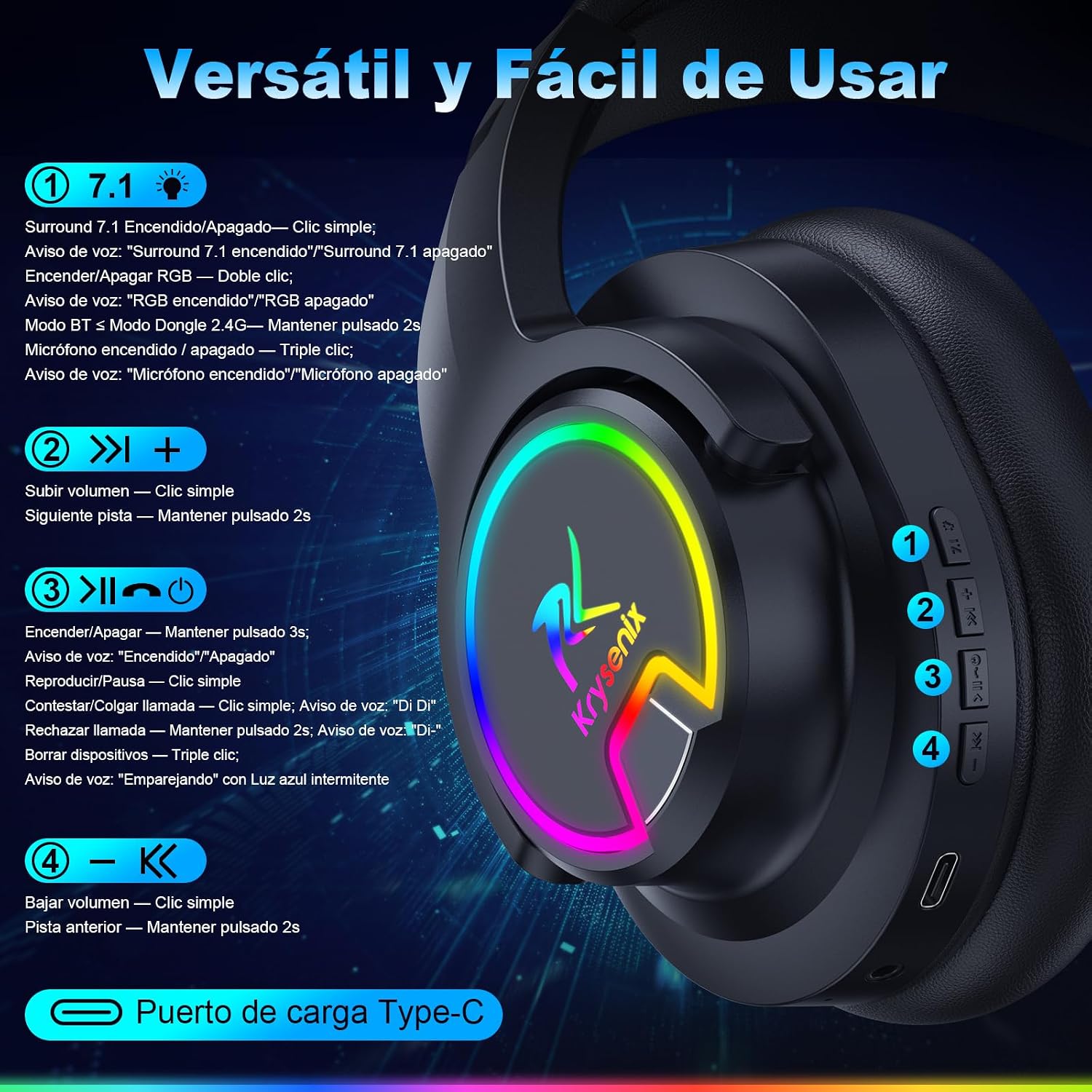
Image: Detailed diagram of headset controls and their functions.
3.1 Power On/Off
- Power On: Press and hold the Power button for 3 seconds. Voice prompt: "Power On".
- Power Off: Press and hold the Power button for 3 seconds. Voice prompt: "Power Off".
3.2 Volume Control
- Volume Up: Single click the "+" button.
- Volume Down: Single click the "-" button.
3.3 Media Playback
- Play/Pause: Single click the Play/Pause button.
- Next Track: Press and hold the "+" button for 2 seconds.
- Previous Track: Press and hold the "-" button for 2 seconds.
3.4 7.1 Surround Sound
- Toggle 7.1 Surround: Single click the "7.1" button. Voice prompt: "Surround 7.1 enabled" / "Surround 7.1 disabled".
3.5 RGB Lighting
- Toggle RGB: Double click the "RGB" button. Voice prompt: "RGB enabled" / "RGB disabled".
3.6 Microphone Control
- Mute/Unmute Microphone: Triple click the Microphone button. Voice prompt: "Microphone on" / "Microphone off".
3.7 Call Handling (Bluetooth Mode Only)
- Answer/End Call: Single click the Play/Pause button. Voice prompt: "DI DI".
- Reject Call: Press and hold the Play/Pause button for 2 seconds. Voice prompt: "DI-".
3.8 Clear Paired Devices (Bluetooth Mode Only)
- Clear Devices: Triple click the Play/Pause button. The blue LED will flash intermittently during the pairing process.
4. Maintenance
Proper maintenance ensures the longevity and performance of your Krysenix PG3 headset.
4.1 Cleaning
- Use a soft, dry, lint-free cloth to clean the headset.
- Do not use abrasive cleaners, solvents, or strong chemicals, as these can damage the finish or internal components.
- For earcups, gently wipe with a slightly damp cloth if necessary, then dry thoroughly.
4.2 Storage
- Store the headset in a cool, dry place away from direct sunlight and extreme temperatures.
- Avoid placing heavy objects on the headset to prevent damage.
4.3 Battery Care
- To prolong battery life, avoid fully discharging the headset frequently.
- Charge the headset regularly, even if not in use for extended periods (e.g., once every 1-2 months).
- Do not attempt to replace the battery yourself. Contact support if battery issues arise.
5. Troubleshooting
If you encounter issues with your Krysenix PG3 headset, refer to the following common solutions.
5.1 No Sound or Low Volume
- Check Volume Levels: Ensure the volume on both the headset and your connected device is turned up.
- Verify Connection: Confirm the 2.4 GHz USB dongle is properly inserted or Bluetooth is successfully paired.
- Device Audio Settings: Ensure the Krysenix PG3 headset is selected as the default audio output device in your computer or console's sound settings.
- Recharge Battery: A low battery can affect sound performance. Recharge the headset.
5.2 Microphone Not Working
- Secure Microphone: Ensure the detachable microphone is fully inserted into its port.
- Check Mute Status: Triple click the Microphone button to ensure it is not muted.
- Device Input Settings: Verify the Krysenix PG3 microphone is selected as the input device in your computer or console's sound settings.
- Compatibility: Remember the microphone is not available when connected via Bluetooth to Nintendo Switch.
5.3 Connection Issues
- Range: Move closer to your device to ensure you are within the wireless range (up to 15 meters for 2.4 GHz, 12 meters for Bluetooth).
- Interference: Avoid strong electromagnetic interference from other wireless devices.
- Restart: Power off and then on both the headset and your connected device.
- Re-pair Bluetooth: If using Bluetooth, clear previously paired devices and attempt to re-pair.
5.4 LED Lights Not Functioning
- Toggle RGB: Double click the RGB button to ensure the lighting is enabled.
- Battery Level: Ensure the headset has sufficient battery charge.
6. Specifications
| Feature | Detail |
|---|---|
| Model | PG3 |
| Connectivity | 2.4 GHz Wireless, Bluetooth 5.4 |
| Driver Size | 50 mm |
| Frequency Range | 20 Hz - 20,000 Hz |
| Battery Capacity | 1000 mAh |
| Battery Life | Up to 48 hours (without LED), 35 hours (with LED) |
| Charging Time | Approx. 3 hours (USB-C) |
| Microphone | Detachable, Omnidirectional with ENC |
| Surround Sound | Virtual 7.1 Surround Sound |
| Latency | Less than 20 ms (2.4 GHz mode) |
| Wireless Range | Up to 15 meters (2.4 GHz), up to 12 meters (Bluetooth) |
| Controls | On-earcup buttons |
| Material | Plastic |
| Dimensions | 14.5 x 9.3 x 14.5 cm |
| Weight | 410 g |
| Compatibility | PS5, PS4, PC, Mac, Nintendo Switch (audio only via Bluetooth), Mobile, Tablets |
| Incompatible with | Xbox consoles |
7. Warranty and Support
7.1 Product Warranty
The Krysenix PG3 Wireless Gaming Headset is covered by a 365-day limited warranty from the date of purchase. This warranty covers manufacturing defects and workmanship under normal use. It does not cover damage caused by misuse, accidents, unauthorized modifications, or normal wear and tear.
7.2 Customer Support
For technical assistance, troubleshooting, or warranty claims, please contact Krysenix customer support through the retailer's platform where you purchased the product. Please have your purchase receipt and product model number (PG3) ready when contacting support.
