
1. Introduction
This manual provides detailed instructions for the installation, operation, and maintenance of your FORGING MOUNT Full Motion Corner TV Wall Mount, Model HY9499-B. This mount is designed to securely hold televisions ranging from 32 to 75 inches, with a maximum weight capacity of 110 lbs (50 kg). It offers extensive flexibility, including corner installation, long extension, swivel, tilt, and landscape to portrait rotation, to optimize your viewing experience.
2. Important Safety Information
Please read all instructions carefully before installation. If you do not understand these instructions or have doubts about the safety of the installation, please contact a qualified installer. Improper installation may cause product damage or serious injury.
- Weight Capacity: Do not exceed the maximum weight capacity of 110 lbs (50 kg). This mount is intended for use only with the maximum weights indicated. Use with products heavier than the maximum weights indicated may result in instability causing possible injury.
- TV Size: This mount is designed for TVs between 32 and 75 inches.
- Wall Type: This mount is designed for installation on solid concrete walls, wood studs, or brick walls. DO NOT install on drywall alone.
- Tools: Ensure you have all necessary tools and hardware before beginning installation.
- Assistance: For larger TVs, it is recommended to have two people for installation to prevent injury or damage.
- Children and Pets: Keep out of reach of children and pets during installation and ensure the TV is securely mounted to prevent accidents.
Video Description: This video demonstrates a load test of the FORGING MOUNT TV wall mount, showing it securely holding a 110 lbs (50 kg) weight. This test highlights the robust construction and safety of the mount when installed correctly.
3. Package Contents
Verify that all components are present and undamaged before installation. If any parts are missing or damaged, please contact customer support.
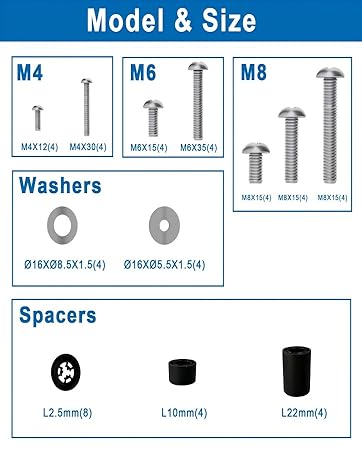
Image Description: An illustration detailing all components included in the package, such as the wall plate, TV plate, articulating arms, various M4, M6, M8 screws of different lengths, washers, and spacers. It also shows a spirit level and cable ties.
Hardware Included:
- Wall Plate Assembly
- TV Plate Assembly
- Articulating Arms
- Various TV Screws (M4x12, M4x30, M6x15, M6x35, M8x15, M8x45)
- Washers (Ø16xØ8.5x1.5, Ø16xØ5.5x1.5)
- Spacers (L2.5mm, L10mm, L22mm)
- Lag Bolts for wall mounting
- Concrete Anchors (if applicable)
- Spirit Level
- Cable Ties
- Instruction Manual
- Drilling Template
Image Description: A detailed view of the different screw sizes (M4, M6, M8), washers, and spacers provided to ensure compatibility with various TV models.
4. Specifications
| Mounting Type | Wall Mount |
| Movement Type | Articulating, Rotate |
| Brand | FORGING MOUNT |
| Material | Alloy Steel |
| Color | Black |
| Compatible Devices | Monitor, Television |
| Maximum Tilt Angle | 15 degrees |
| Model Number | HY9499-B |
| Item Weight | 6.45 kg (14.22 lbs) |
| Maximum Supported Screen Size | 75 inches |
| Minimum Supported Screen Size | 32 inches |
| Maximum Load Capacity | 110 lbs (50 kg) |
| Extension from Wall | Up to 33 inches |
| Retraction to Wall | 2.5 inches |
| Swivel Range | +/- 90 degrees |
| Tilt Range | -10 to +5 degrees |
| Post-Installation Leveling | +/- 3 degrees |

Image Description: A technical diagram illustrating the precise dimensions of the TV wall mount, including the 32.95-inch maximum extension, wall plate measurements (12.59" x 3.74"), and TV plate measurements (17.16" x 25.07").
5. Compatibility
TV Size and Weight:
This mount is compatible with most flat-panel and curved TVs from 32 to 75 inches, weighing up to 110 lbs (50 kg).

Image Description: A visual representation of the mount's wide compatibility, showing it supports TVs from 32 to 75 inches and up to 110 lbs. It also highlights compatible wall types: solid concrete, wood studs, and brick walls, with a warning not to install on drywall alone.
VESA Patterns:
The mount supports VESA mounting patterns from 100x100mm to 600x400mm. Please check the back of your TV for its VESA pattern before installation.
- Minimum VESA: 100x100mm
- Maximum VESA: 600x400mm

Image Description: This image displays several common VESA patterns, demonstrating the mount's compatibility with a wide range of TV models. It shows how to measure the VESA pattern on the back of a TV.
Wall Types:
The mount is suitable for installation on:
- Wood Studs
- Solid Concrete Walls
- Brick Walls
Warning: Do not install this mount on drywall alone. Always ensure you are mounting into a structural support.

Image Description: This image visually clarifies the three types of walls suitable for mounting: wood studs, concrete walls, and brick walls. A warning symbol emphasizes that the mount should not be installed on drywall without proper structural support.
6. Setup and Installation
Follow these steps carefully for a secure installation. It is highly recommended to watch the installation tutorial video before beginning.
Video Description: A step-by-step installation tutorial video for the FORGING MOUNT TV wall mount, guiding users through the entire setup process from unboxing to final TV mounting.
Pre-Installation Checks:
- Verify your TV's weight and VESA pattern are within the mount's specifications.
- Identify your wall type (wood stud, concrete, or brick) and ensure it can support the weight of the mount and your TV.
- Gather all necessary tools (e.g., drill, stud finder, level, screwdriver).
Installation Steps:
- Attach the TV Plate:
Secure the TV plate assembly to the back of your TV using the appropriate screws, washers, and spacers. Ensure the plate is centered and firmly attached. - Install the Wall Plate:
Using the provided drilling template, mark the desired location on your wall. Drill pilot holes and securely fasten the wall plate assembly to the wall using the lag bolts (and concrete anchors if installing on concrete/brick). Use the included spirit level to ensure the wall plate is perfectly horizontal. - Hang the TV to Wall Plate:
Carefully lift your TV (with the TV plate attached) and hook it onto the wall plate assembly. Secure the TV to the wall plate using the safety screws or locking mechanism. - Level Adjustment:
After hanging, you can make minor level adjustments (up to +/- 3 degrees) to ensure your TV is perfectly straight.
Image Description: A visual guide to the three primary installation steps: 1) Attaching the TV plate to the television, 2) Installing the wall plate to the wall, and 3) Safely hanging the TV onto the installed wall plate.
7. Operating Instructions
Your FORGING MOUNT TV wall mount offers a range of adjustments to achieve the optimal viewing angle.
Video Description: This video showcases the full motion capabilities of the FORGING MOUNT TV wall mount, including its corner mounting feature, long extension, swivel, and tilt adjustments.
Extension and Retraction:
Gently pull or push the TV to extend it up to 33 inches from the wall or retract it to a minimum of 2.5 inches for a flush appearance. The articulating arms allow smooth movement.
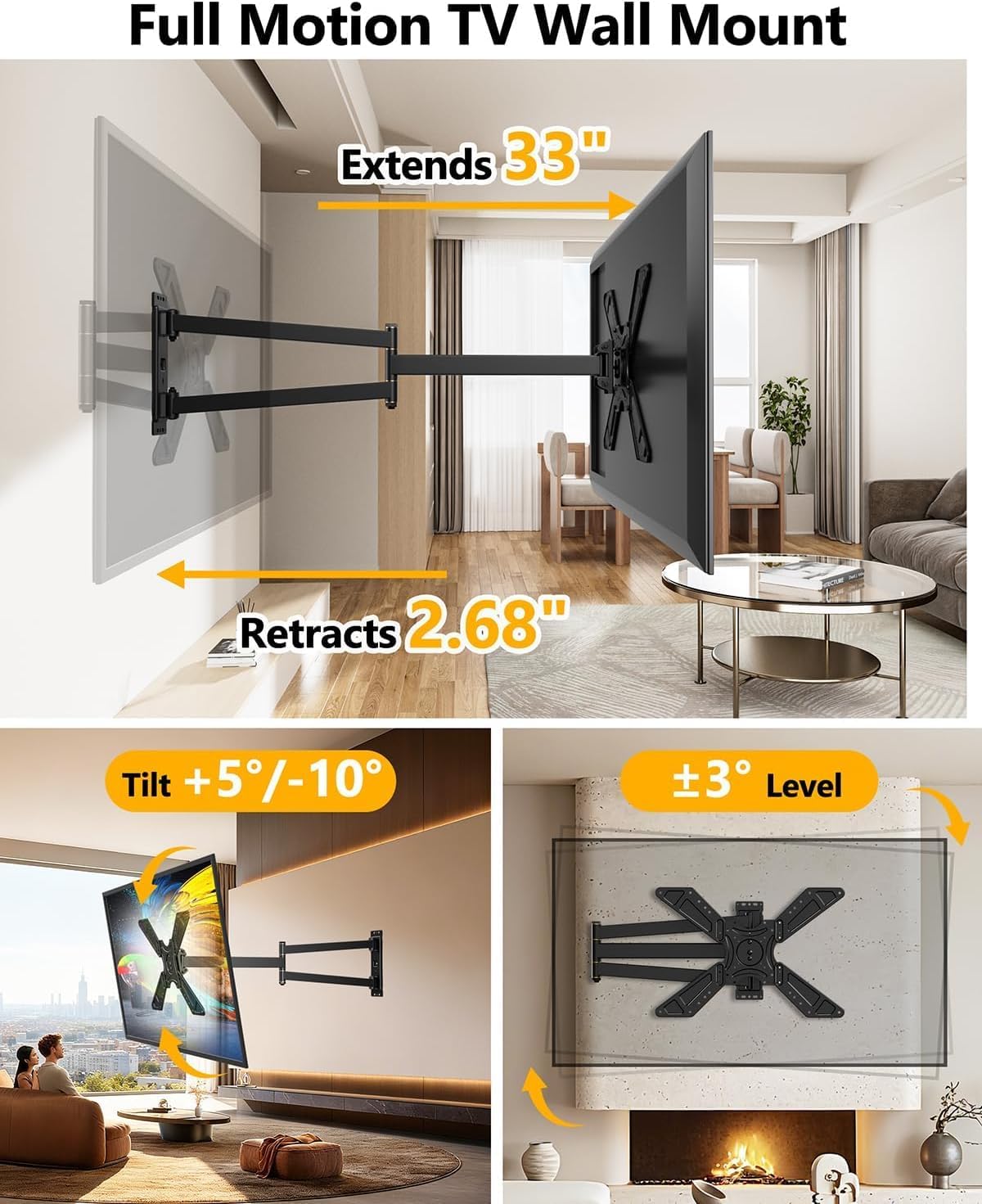
Image Description: This image illustrates the mount's full motion capabilities, showing the TV extending up to 33 inches from the wall and retracting to 2.68 inches. It also highlights the tilt range (-10° to +5°) and the +/-3° level adjustment.
Swivel Adjustment:
The mount allows for a +/- 90-degree swivel, enabling you to turn your TV left or right to face different areas of the room. Apply gentle, even pressure to move the TV to your desired angle.

Image Description: This image demonstrates the swivel functionality of the mount, allowing the TV to be rotated +/- 90 degrees for flexible viewing from various indoor and outdoor positions.
Tilt Adjustment:
Adjust the tilt angle from -10 degrees (downward) to +5 degrees (upward) to reduce glare and achieve a comfortable viewing position. Loosen the tilt knobs, adjust the angle, and then tighten the knobs to secure the position.
Landscape to Portrait Rotation:
This unique feature allows you to rotate your TV 90 degrees from a standard horizontal (landscape) orientation to a vertical (portrait) orientation. This is ideal for specific content viewing or digital signage applications. Ensure the TV is fully extended and clear of any obstructions before rotating.

Image Description: This image highlights the mount's ability to rotate the TV from landscape to portrait orientation, providing a versatile viewing experience, especially useful for vertical content.
Corner Installation:
The long extension arm and full motion capabilities make this mount ideal for corner installations, maximizing space and providing optimal viewing angles in rooms where main wall areas are limited.

Image Description: A visual example of the TV mount installed in a room corner, showcasing its effectiveness as a space-saving solution while maintaining full adjustability.
8. Maintenance
Regular maintenance ensures the longevity and safe operation of your TV wall mount.
- Periodic Checks: Periodically check that all screws and connections are tight and secure. Over time, vibrations or frequent adjustments may cause fasteners to loosen.
- Cleaning: Clean the mount with a soft, dry cloth. Avoid using abrasive cleaners or solvents, as they may damage the finish.
- Lubrication: The articulating joints are designed for smooth movement. If you notice any stiffness, a small amount of silicone-based lubricant can be applied to the pivot points.
- Weight Limit: Never exceed the specified weight limit of 110 lbs (50 kg).
9. Troubleshooting
If you encounter any issues with your TV wall mount, refer to the following common problems and solutions:
| Problem | Possible Cause | Solution |
|---|---|---|
| TV is not level after installation. | Minor misalignment during installation. | Use the post-installation leveling feature (up to +/- 3 degrees) to adjust the TV. Refer to the installation instructions for details. |
| Mount feels unstable or wobbly. | Loose fasteners or incorrect wall installation. | Ensure all lag bolts securing the wall plate to the wall are tightened. Verify that the TV is securely attached to the TV plate and the TV plate to the wall plate. Re-check wall type compatibility. |
| Difficulty moving the articulating arms or adjusting swivel/tilt. | Joints may be stiff or require lubrication. | Apply gentle, even pressure. If persistent, a small amount of silicone-based lubricant can be applied to the moving joints. Ensure no cables are obstructing movement. |
| TV 'creeps' or slowly shifts position in portrait mode. | Friction in the rotation mechanism may not be sufficient for the TV's weight. | Ensure all adjustment points are tightened after setting the desired orientation. If the issue persists, contact customer support. |
10. Warranty Information
The FORGING MOUNT Full Motion Corner TV Wall Mount (Model HY9499-B) comes with a 2-Year Warranty from the date of purchase. This warranty covers defects in materials and workmanship under normal use. It does not cover damage caused by improper installation, misuse, accidents, modifications, or unauthorized repairs.
Please retain your proof of purchase for warranty claims.
11. Customer Support
If you have any questions, require assistance with installation, or need to make a warranty claim, please contact FORGING MOUNT customer support. Refer to the contact information provided with your product packaging or visit the official FORGING MOUNT website for support details.


