
1. Introduction
This manual provides essential instructions for the safe operation, setup, and maintenance of your JIKEFUN S156 RC Drone. Please read this manual thoroughly before operating the drone to ensure proper function and to prevent damage or injury. The S156 drone features a 4.5-inch screen display remote control, UHD dual cameras, brushless motors, optical flow hovering, and a 360° propeller guard for enhanced flight stability and safety.
2. Package Contents
Verify that all items listed below are present in your package. If any components are missing or damaged, please contact customer support.
- S156 RC Drone (Orange)
- Remote Control with 4.5-inch Screen Display
- Rechargeable Drone Battery (Lithium Polymer)
- USB Charging Cable
- Spare Propellers (2 pairs)
- Propeller Guard (pre-installed)
- User Manual
- Storage Case
- Micro SD Card and USB Card Reader
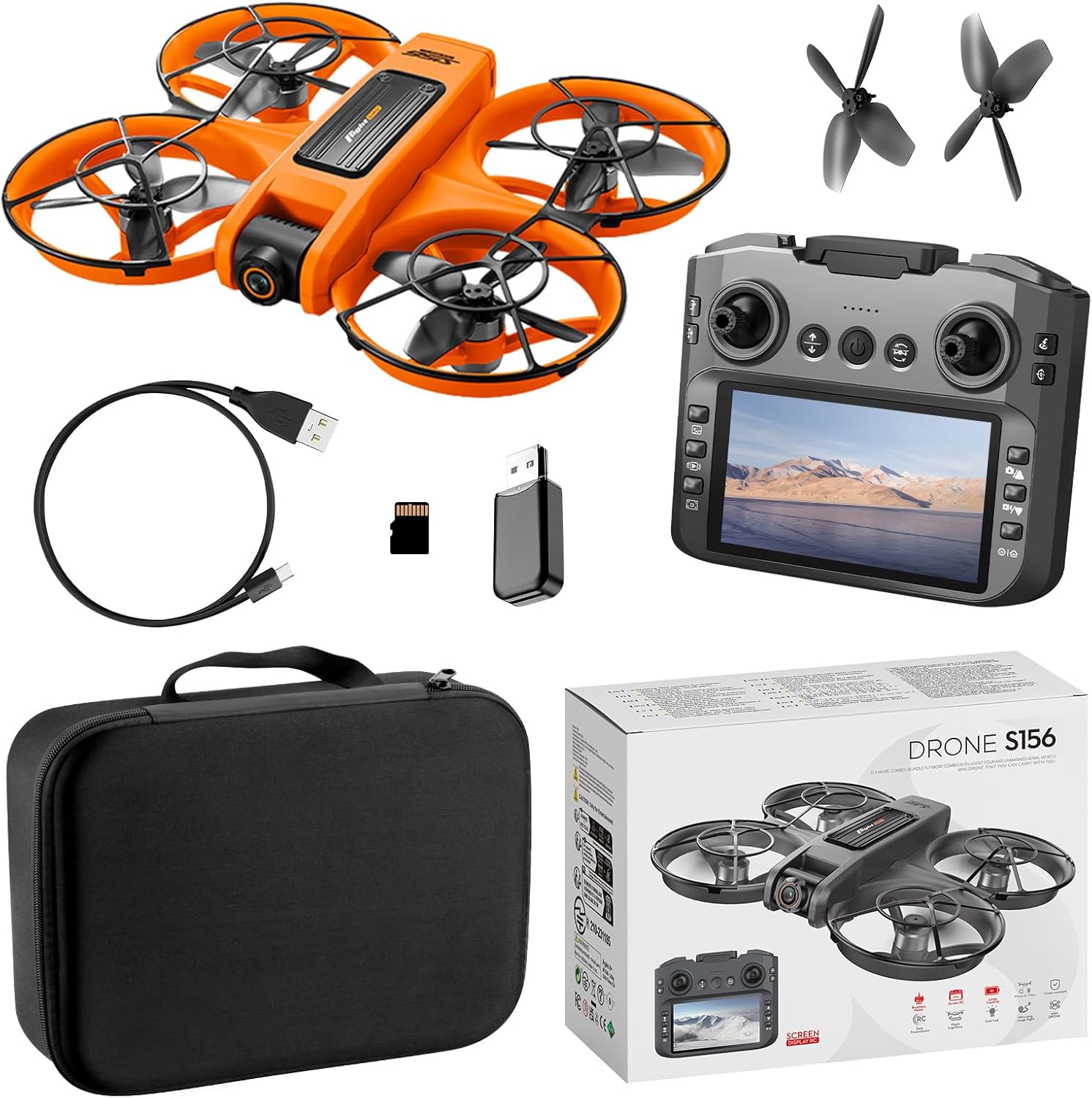
Figure 2.1: Contents of the S156 RC Drone package. This image displays the orange S156 drone, the remote control with an integrated screen, a USB charging cable, a micro SD card with a USB reader, two pairs of spare propellers, and a black storage case, alongside the product box.

Figure 2.2: The S156 drone shown with its removable battery and spare propellers. The drone is orange with black propeller guards. The battery is also orange.
3. Setup
3.1 Charging the Drone Battery
- Connect the USB charging cable to the drone battery.
- Plug the other end of the USB cable into a 5V/1A USB power adapter (not included).
- The charging indicator light on the battery will show its status (refer to battery instructions for specific light patterns).
- Charging typically takes 60-90 minutes. Disconnect once fully charged.
3.2 Installing the Drone Battery
- Ensure the drone is powered off.
- Insert the fully charged battery into the battery compartment on the drone, ensuring it clicks securely into place.
3.3 Remote Control Setup
- Install 3x AA batteries (not included) into the remote control's battery compartment, observing correct polarity.
- Power on the remote control by pressing the power button.
3.4 Propeller Installation/Replacement
The S156 drone comes with pre-installed propeller guards. If propellers need replacement, ensure you use the correct type (A or B) as indicated on the propeller and motor arm.
- Carefully remove the old propeller by gently pulling it upwards.
- Align the new propeller with the motor shaft and press down firmly until it is secure.
4. Operating Instructions
4.1 Pairing the Drone and Remote Control
- Place the drone on a flat, level surface.
- Power on the drone. The drone's indicator lights will flash.
- Power on the remote control.
- Push the left joystick (throttle) up to its maximum position, then pull it down to its minimum position. The drone's lights will stop flashing and remain solid, indicating successful pairing.
- Important Note: When using multiple drones simultaneously, power on and pair each drone and remote control separately to avoid frequency interference.
4.2 Pre-Flight Checklist
- Ensure drone and remote control batteries are fully charged.
- Check that propellers are securely attached and undamaged.
- Verify the drone is placed on a flat, level surface for calibration.
- Ensure sufficient clear space for flight, away from obstacles, people, and animals.
4.3 Basic Flight Controls

Figure 4.1: Detailed guide to the S156 remote control functions. This image labels the various buttons and joysticks, including Velocity, Throttle stick, Emergency stop, Headless Mode, One-click return, View photos, Check out the video, Screen switch, 12.5cm LCD screen, Lens adjustments, Steering sticks, Back off, Calibration, 360° Rolling, Select up/Photo, Select Down/Record, and Play/Main interface.
- One-Key Takeoff/Landing: After pairing, press the One-Key Takeoff/Landing button (refer to Figure 4.1) to automatically launch the drone to a stable hovering height or to land it gently.
- Throttle Stick (Left Joystick):
- Push up: Ascend
- Pull down: Descend
- Push left/right: Rotate left/right
- Directional Stick (Right Joystick):
- Push up: Fly forward
- Pull down: Fly backward
- Push left: Fly left (sideways)
- Push right: Fly right (sideways)
- Headless Mode: Press the Headless Mode button to activate. In this mode, the drone's orientation is relative to the pilot, regardless of the drone's front direction. Press again to exit.
- 3-Speed Adjustment: Use the speed adjustment button to cycle through low, medium, and high-speed modes.
4.4 Advanced Features

Figure 4.2: The S156 drone and its remote control, highlighting the 4.5-inch screen display. The screen shows a live feed from the drone's camera, and text overlays indicate features like optical flow hovering, brushless power, and 360° protection.
- Optical Flow Hovering: The drone utilizes optical flow sensors for stable hovering, especially useful in indoor environments or areas with clear ground patterns.
- UHD Dual Camera: The drone is equipped with two cameras. The front lens can be adjusted 90° via the remote control for varied viewing angles. Use the dedicated buttons on the remote (Figure 4.1) to take photos or record videos.
- 50X Zoom: Utilize the digital zoom function through the remote control interface or connected app to magnify your view.
- Gesture Control: Perform specific hand gestures in front of the drone's camera to trigger photo or video recording (refer to the app manual for specific gestures).
- Trajectory Flight: Draw a flight path on the connected app's screen, and the drone will automatically follow the designated route.
- Night LED: The drone features built-in LED lights for improved visibility during low-light conditions or night flights.
- Intelligent Obstacle Avoidance: The drone is equipped with sensors to detect and avoid obstacles, enhancing flight safety.
4.5 App Connectivity (Wi-Fi)
For advanced features like real-time video transmission, gesture control, and trajectory flight, download the dedicated JIKEFUN drone app (check QR code in packaging or app store). Connect your smartphone to the drone's Wi-Fi network (SSID usually starts with 'S156' or 'Drone_XXXX').
5. Maintenance
5.1 Cleaning
- Use a soft, dry cloth to clean the drone's body and camera lenses.
- Avoid using liquids or solvents that could damage electronic components.
5.2 Propeller Care
- Regularly inspect propellers for cracks, bends, or damage. Replace immediately if any damage is found.
- Ensure propellers are free from debris (grass, hair, etc.) before each flight.
5.3 Battery Storage
- Store batteries in a cool, dry place, away from direct sunlight and extreme temperatures.
- For long-term storage, charge batteries to approximately 50% capacity.
6. Troubleshooting
- Drone does not respond to remote control:
- Ensure both drone and remote control are powered on.
- Re-pair the drone and remote control (Section 4.1).
- Check remote control batteries.
- Drone is unstable during flight:
- Ensure the drone was placed on a flat, level surface during pairing/calibration.
- Check for damaged or bent propellers and replace if necessary.
- Calibrate the gyroscope (refer to remote control guide, Figure 4.1, for calibration button).
- No image from camera/Wi-Fi connection issues:
- Ensure the drone's Wi-Fi is enabled and your phone is connected to the correct network.
- Restart both the drone and your smartphone.
- Ensure the app has necessary permissions on your smartphone.
- Short flight time:
- Ensure the drone battery is fully charged before each flight.
- Battery performance may degrade over time; consider replacing old batteries.
7. Specifications
| Feature | Detail |
|---|---|
| Model Name | S156 |
| Brand | JIKEFUN |
| Color | Orange |
| Material | Plastic (Aviation PA/PC material fuselage) |
| Item Weight | 127 Grams (approx. 4.5 ounces) |
| Product Dimensions (L x W x H) | 22.5cm x 19cm x 5cm (approx. 8.86" x 7.48" x 1.97") |
| Connectivity Technology | Wi-Fi (5G WIFI Transmission) |
| Camera | UHD Dual Camera (ESC adjustable front lens) |
| Motor Type | Brushless Motor |
| Battery Type | Lithium Polymer (1 Nonstandard Battery included) |
| Special Features | Optical Flow Hovering, 360° Propeller Guard, 6-Axis Gyro, Headless Mode, One-Key Takeoff/Landing, 3-Speed Adjustable, 50X Zoom, Gesture Control, Trajectory Flight, Night LED, Intelligent Obstacle Avoidance |
| UPC | 797457704499 |

Figure 7.1: Dimensions of the S156 RC Drone. The image shows the drone with measurements of 22.5cm in length, 19cm in width, and 5cm in height.
8. Safety Guidelines
- Always operate the drone in open areas, away from people, animals, buildings, and power lines.
- Do not fly in strong winds or adverse weather conditions.
- Maintain a safe distance from the drone during operation.
- Never attempt to catch a flying drone with your hands.
- Keep fingers and loose clothing away from rotating propellers.
- Supervise children during drone operation.
- Do not modify the drone or its components.
- Follow all local regulations and laws regarding drone operation.
9. Warranty and Support
The JIKEFUN S156 RC Drone comes with a standard manufacturer's warranty. For specific warranty details, please refer to the warranty card included in your package or contact JIKEFUN customer support directly. If you encounter any issues or require assistance, please reach out to the manufacturer via their official website or the contact information provided in your product packaging.