
Introduction
The VANPO 1/2-Inch Digital Torque Wrench provides precise torque control for various mechanical applications. This manual outlines the proper setup, operation, maintenance, and troubleshooting to ensure optimal performance and longevity of your tool.
Key Features:
- Precise Accuracy: Delivers reliable torque control with ±2% accuracy, reducing over-tightening and fastener damage.
- Clear Torque Feedback: Features a large backlit LCD display, audible alerts, LED indicators, and vibration feedback for clear confirmation when preset torque is reached.
- Durable & Bidirectional: Built for repeated use in automotive environments, supporting both clockwise and counterclockwise operation.
- Easy & Efficient Operation: Supports Peak and Track modes, with preset torque values, and a tool-free, quick-access battery compartment.
- Wide Application: Suitable for vehicle maintenance, home repair, workshop projects, and industrial machinery.
Setup
1. Battery Installation
The torque wrench requires two AA batteries (included). To install:
- Unscrew the battery cap at the end of the handle.
- Insert two AA batteries, ensuring correct polarity (negative side down, positive side up).
- Replace the battery cap and tighten securely.
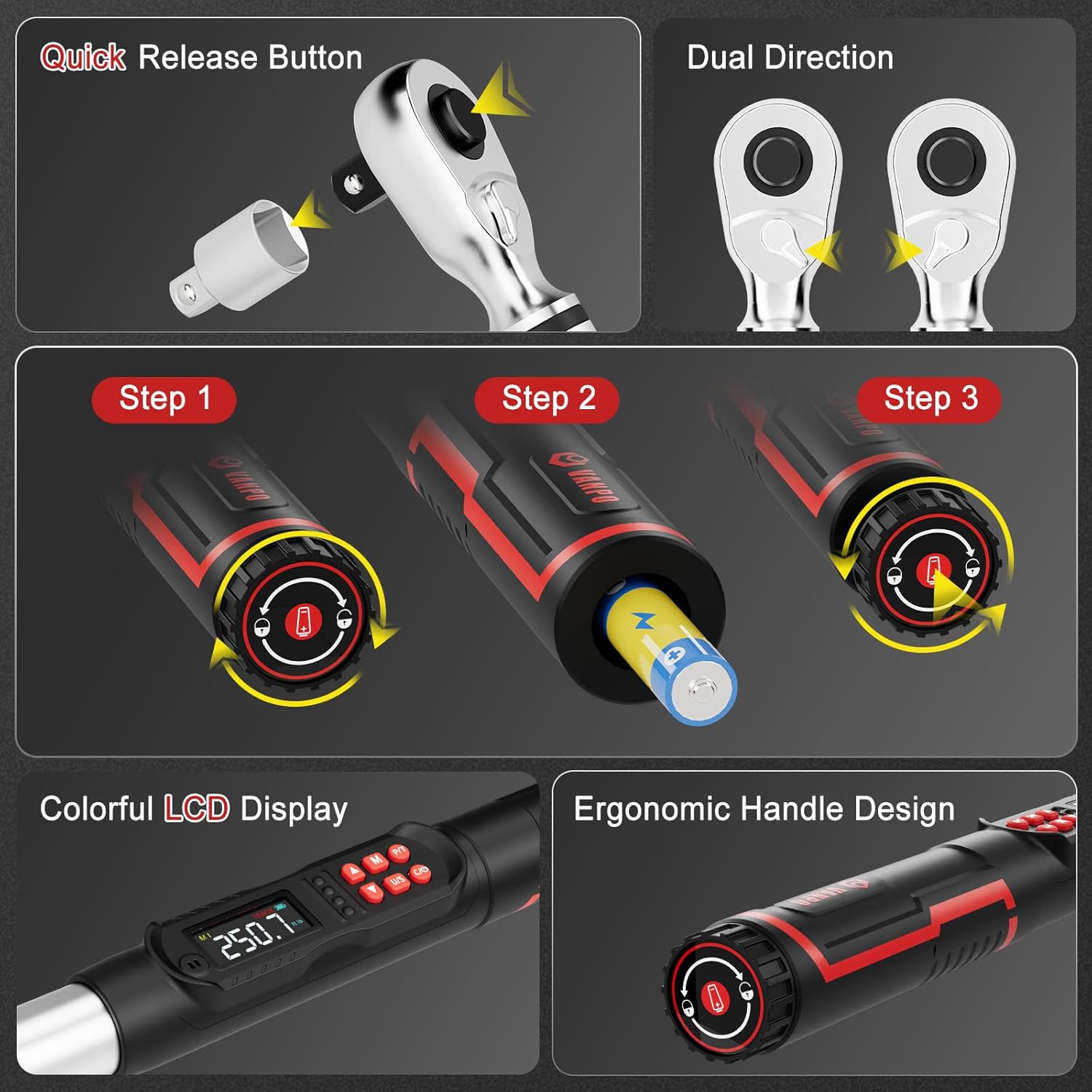
Figure 1: Battery installation and ergonomic handle design.
2. Attaching Accessories
The wrench comes with a 125mm extension bar and a 1/2" to 3/8" adapter.
- To attach an extension or adapter, press the quick-release button on the ratchet head and insert the accessory.
- Ensure the accessory is securely locked in place before use.
Figure 2: Quick-release button for attaching sockets and accessories.
Operating Instructions
1. Power On/Off and Unit Selection
- Press the ON/OFF button to power on the wrench.
- Press the U/S button to cycle through measurement units: ft-lb, in-lb, Nm, kg-cm.

Figure 3: LCD display showing selectable measurement units.
2. Setting Target Torque Value
- Use the Up and Down arrow buttons to adjust the target torque value.
- The LCD will display the current setting.
3. Operating Modes (Peak & Track)
Press the P/T button to switch between Peak and Track modes.
- Track Mode: Displays real-time torque values as force is applied.
- Peak Mode: Captures and displays the maximum torque value achieved during the tightening process.

Figure 4: Explanation of Track Mode and Peak Mode.
4. Applying Torque
Apply force to the wrench. As you approach the preset torque value, the wrench will provide triple feedback:
- Audible Alert: A buzzer will sound.
- LED Indicators: Lights on the handle will illuminate (green for 85-90% of target, red for 100%).
- Vibration Feedback: The handle will vibrate.

Figure 5: Triple feedback system for reaching target torque.
5. Memory Function
The wrench can store multiple preset torque values. Use the M button to access and save memory settings.
6. Screen Lock Function
Long press the M button for 3 seconds to lock the screen and buttons, preventing accidental changes during operation. Long press M again to unlock.
Maintenance
- Cleaning: Wipe the wrench with a clean, dry cloth after each use. Do not use abrasive cleaners or solvents.
- Storage: Store the torque wrench in its protective case in a dry, cool place away from direct sunlight and extreme temperatures.
- Battery Replacement: Replace batteries when the low battery indicator appears on the LCD.
- Calibration: For optimal accuracy, it is recommended to have the torque wrench calibrated periodically by a certified service center.
Troubleshooting
| Problem | Possible Cause | Solution |
|---|---|---|
| Wrench does not power on. | Dead or incorrectly installed batteries. | Check battery polarity or replace with new AA batteries. |
| Inaccurate torque readings. | Wrench needs calibration or improper usage. | Ensure proper technique. Consider professional recalibration. |
| No audible/vibration feedback. | Feedback settings disabled or malfunction. | Check user manual for enabling feedback. Contact support if issue persists. |
Specifications
| Feature | Detail |
|---|---|
| Model Number | VP18-340-01 |
| Drive Size | 1/2-Inch |
| Torque Range | 12.5–250.8 ft-lb / 17–340 Nm |
| Accuracy | ±2% |
| Measurement Units | ft-lb, in-lb, Nm, kg-cm |
| Feedback | Audible, LED, Vibration |
| Operation Modes | Peak, Track |
| Power Source | 2 AA Batteries (included) |
| Material | 40 CR, Chrome Molybdenum Steel, Chrome Vanadium Steel |
| Item Weight | 5.29 pounds |
| Included Components | 1* digital torque wrench, 1*1/2 to 3/8" Adapter, 1*1/2'' 125mm Extension Bar |
Warranty & Support
This VANPO Digital Torque Wrench is backed by a 36-month manufacturer warranty. For warranty claims, technical support, or service inquiries, please refer to the contact information provided with your product packaging or visit the official VANPO website.
A Certificate of Calibration Report is included with your product, detailing the device's accuracy at the time of manufacture.
Product Videos
Key Features Overview
Video: An overview of the key features and functionalities of the VANPO Digital Torque Wrench.
Detailed Features Demonstration
Video: A demonstration of the various features of the VANPO Digital Torque Wrench, including display and controls.