
1. Product Overview
The TONGOU TOVTH-216WTTDA-DE is a smart DIN rail mounted digital temperature and humidity controller. It features an NTC temperature sensor, dry contact outputs, and 2-channel control, allowing for remote monitoring and management via the TUYA/Smart Life mobile application. This device is designed for precise environmental control in various applications.
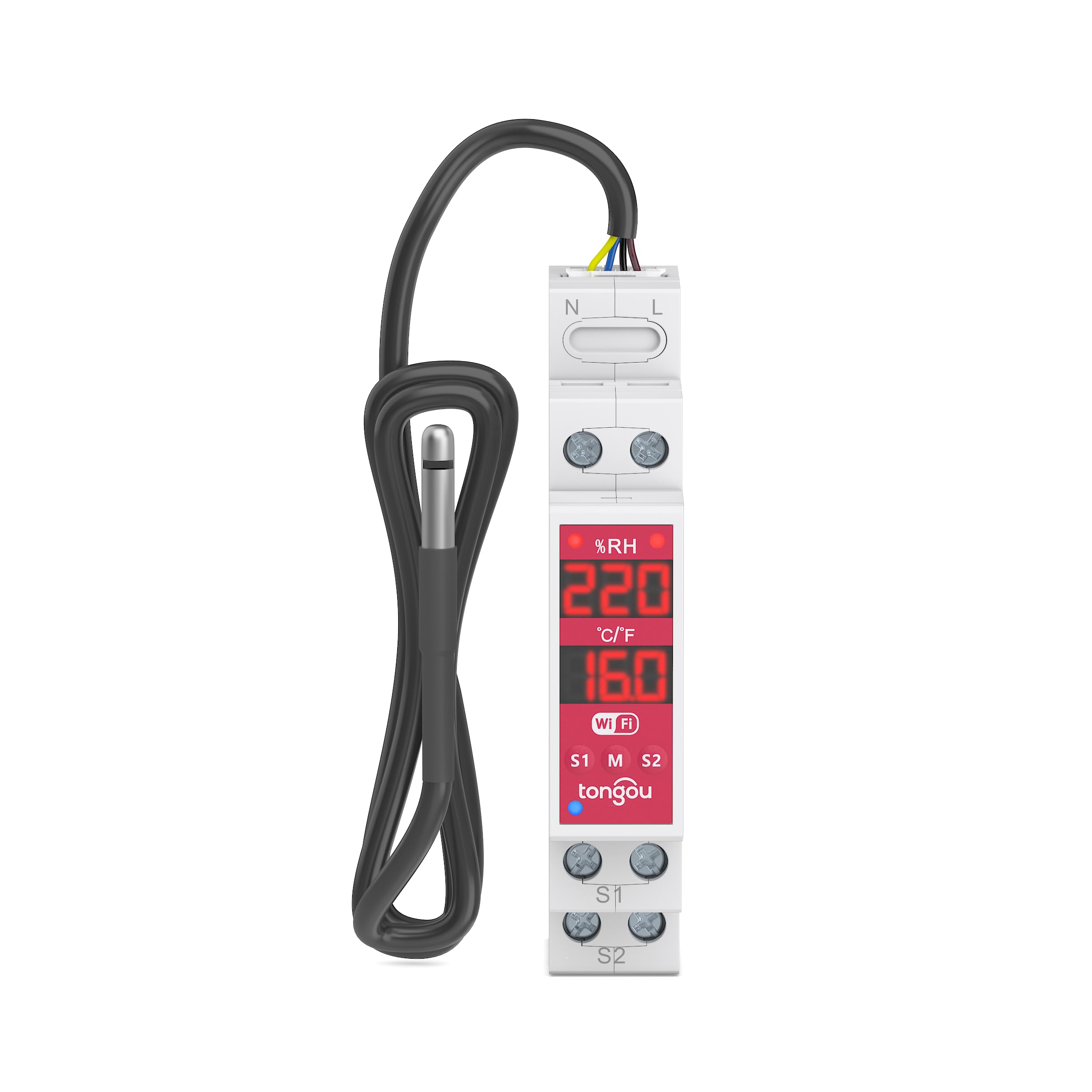
Figure 1.1: TONGOU DIN Rail Digital Temperature Thermostat with NTC probe.
Key Features:
- Digital display for real-time temperature and humidity.
- DIN rail mounting for easy installation in electrical panels.
- NTC temperature sensor for accurate measurements.
- Dry contact 2-channel smart switch.
- Remote control and monitoring via TUYA/Smart Life APP.
- Manual and automatic operating modes.
- Configurable alarms for high/low temperature and humidity.
- Timer functions for scheduled operations.
2. Safety Information
Please read all safety warnings and instructions carefully before installation and operation. Failure to follow these instructions may result in electric shock, fire, or serious injury.
- Electrical Hazard: Installation and wiring must be performed by a qualified electrician in accordance with local electrical codes and regulations.
- Power Disconnection: Always disconnect power to the circuit breaker before installing or servicing the device.
- Voltage Compatibility: Ensure the power supply voltage (230V AC) matches the device's requirements.
- Load Capacity: Do not exceed the maximum load capacity for the dry contacts (AC: 16A 100-240VAC, DC: 10A 5-30VDC).
- Environmental Conditions: Do not expose the device to excessive moisture, dust, or extreme temperatures outside its operating range.
- Probe Handling: Handle the NTC sensor probe carefully to avoid damage.
3. Package Contents
Verify that all items are present in the package:
- 1 x TONGOU TOVTH-216WTTDA-DE Digital Temperature Thermostat
- 1 x NTC Temperature Sensor Probe (1 meter)
- 1 x User Manual (in local language, refer to this digital version for English)
4. Setup and Installation
4.1 Mounting
The device is designed for DIN rail mounting. Ensure sufficient space in your electrical panel for proper ventilation and access.

Figure 4.1: Device dimensions for installation. Height: 82mm (3.23in), Width: 50mm (1.97in), Depth: 18mm (0.7in).
4.2 Wiring Diagram
Connect the device according to the appropriate wiring diagram for your application (DC or AC load). Note: S1/S2 do not provide output voltage. An external power supply is required for the load.

Figure 4.2: Electrical wiring diagram for DC and AC loads. L and N represent Live and Neutral inputs. S1 and S2 are dry contact outputs for connecting external loads.
4.3 Sensor Connection
Connect the NTC temperature sensor probe to the designated terminals on the device. Ensure a secure connection. The probe cable length is 1 meter.
5. Operating Instructions
5.1 Initial Power-Up
After correct wiring, restore power to the circuit. The digital display on the device will light up, showing current temperature and humidity readings.
5.2 TUYA/Smart Life APP Connection
- Download the 'TUYA Smart' or 'Smart Life' app from your mobile device's app store.
- Register or log in to your account.
- Ensure your mobile device is connected to a 2.4GHz Wi-Fi network.
- Follow the in-app instructions to add a new device. The device will typically enter pairing mode automatically or by a specific button press (refer to the device's physical buttons if available).
- Once connected, the device will appear in your app, allowing remote control and monitoring.

Figure 5.1: Remote control and monitoring via TUYA/Smart Life APP, showing current temperature and humidity.
5.3 Operating Modes: Manual/Automatic
The device supports both manual and automatic control modes for its two channels (S1/S2). These can be configured independently via the mobile application.
- Manual Mode: Allows direct ON/OFF control of each channel.
- Automatic Mode: Configures S1/S2 to activate/deactivate based on set temperature or humidity thresholds.

Figure 5.2: App interface showing manual and automatic mode settings for independent control of S1 and S2.
5.4 Alarm Functions
Set up high and low temperature/humidity alarms to receive notifications on your mobile device if thresholds are exceeded.
- High Temperature Warning: Set a maximum temperature limit.
- Low Temperature Warning: Set a minimum temperature limit.
- High Humidity Warning: Set a maximum humidity limit.
- Low Humidity Warning: Set a minimum humidity limit.

Figure 5.3: App screen displaying alarm settings for temperature and humidity thresholds.
5.5 Timer Functions
Schedule automatic ON/OFF times for connected devices using the timer function in the app.
- Schedule: Set specific days and times for activation/deactivation.
- Circulate: Configure recurring ON/OFF cycles.
- Sunrise/Sunset: Automate operations based on local sunrise and sunset times.

Figure 5.4: Illustration of timer functions for automatic scheduling, circulation, and sunrise/sunset operations.
6. Maintenance
The TONGOU TOVTH-216WTTDA-DE requires minimal maintenance.
- Cleaning: Periodically wipe the device with a dry, soft cloth. Do not use abrasive cleaners or solvents.
- Sensor Care: Ensure the NTC sensor probe is kept clean and free from obstructions to maintain accurate readings. Avoid bending or damaging the probe cable.
- Firmware Updates: Check the TUYA/Smart Life app regularly for any available firmware updates to ensure optimal performance and security.
7. Troubleshooting
- Device not powering on: Check the main power supply and wiring connections. Ensure the circuit breaker is ON.
- Cannot connect to Wi-Fi:
- Ensure your Wi-Fi network is 2.4GHz. 5GHz networks are not supported.
- Verify correct Wi-Fi password entry.
- Move the device closer to the Wi-Fi router.
- Restart the device and your router, then try pairing again.
- Inaccurate temperature/humidity readings:
- Check if the NTC sensor probe is properly connected and undamaged.
- Ensure the probe is not exposed to direct heat sources, drafts, or moisture that could affect readings.
- Calibrate the sensor if necessary through the app settings.
- Connected device not switching:
- Verify the wiring of the external load to S1/S2. Remember S1/S2 are dry contacts and require an external power source for the load.
- Check the load's power supply.
- Ensure the device is in the correct operating mode (Manual ON or Automatic with satisfied conditions).
- Confirm the load does not exceed the maximum current rating of S1/S2.
8. Specifications
| Feature | Specification |
|---|---|
| Brand | TONGOU |
| Model Number | TOVTH-216WTTDA-DE |
| Input Voltage | 230 Volt (AC) |
| Connectivity Technology | Wi-Fi (2.4GHz) |
| Control Method | App (TUYA/Smart Life) |
| Display Type | Digital |
| Temperature Sensor | NTC Probe (1m included) |
| Temperature Control Type | Manual and Digital |
| Special Features | Remote control via WiFi, Remote temperature sensor |
| Output Type | Dry Contact (2 channels: S1, S2) |
| Max Load (AC) | 16A, 100-240VAC (Category AC-1) |
| Max Load (DC) | 10A, 5-30VDC |
| Mounting Type | DIN Rail Mount |
| Material | Polycarbonate (PC) |
| Color | White |
| Country of Origin | China |
9. Warranty Information
This TONGOU product comes with a 2-year manufacturer's warranty from the date of purchase. This warranty covers defects in materials and workmanship under normal use. It does not cover damage caused by improper installation, misuse, accidents, unauthorized repairs, or acts of nature.
To claim warranty service, please retain your proof of purchase and contact the seller or manufacturer's customer support.
10. Support and Contact
For technical support, troubleshooting assistance, or warranty inquiries, please contact your retailer or the manufacturer directly.
Manufacturer: Changyou Technology (Zhejiang) Co., Ltd.
For further information, you may visit the TONGOU store on Amazon: TONGOU Electrical Store


