
Introduction
This manual provides essential information for the safe and efficient operation, maintenance, and troubleshooting of your DEERC 209E 1:10 Fast Brushless RC Car. Please read this manual thoroughly before operating the vehicle.

Figure 1: DEERC 209E RC Car and included accessories.
Safety Information
WARNING:
- This product contains small parts and is not suitable for children under 14 years old as it may pose a choking hazard.
- Always operate the product under adult supervision, especially in areas with traffic or hazards.
- Ensure all components are securely fastened before operation.
- Avoid operating in wet conditions unless the vehicle is specifically designed for it (this model features IPX4 waterproofing for the ESC).
- Keep hands, face, and loose clothing away from moving parts.
Setup
1. Unpacking and Component Check
Carefully remove all items from the packaging. Verify that all components listed below are present:
- 1 x Brushless RC Truck
- 2 x 3S Rechargeable Batteries
- 1 x Full Proportional 2.4Ghz Remote Control
- 1 x Charging Cable
- 1 x Spare Kits (including 1 set of front swing arms)
- 1 x Manual
- 1 x Warning Card
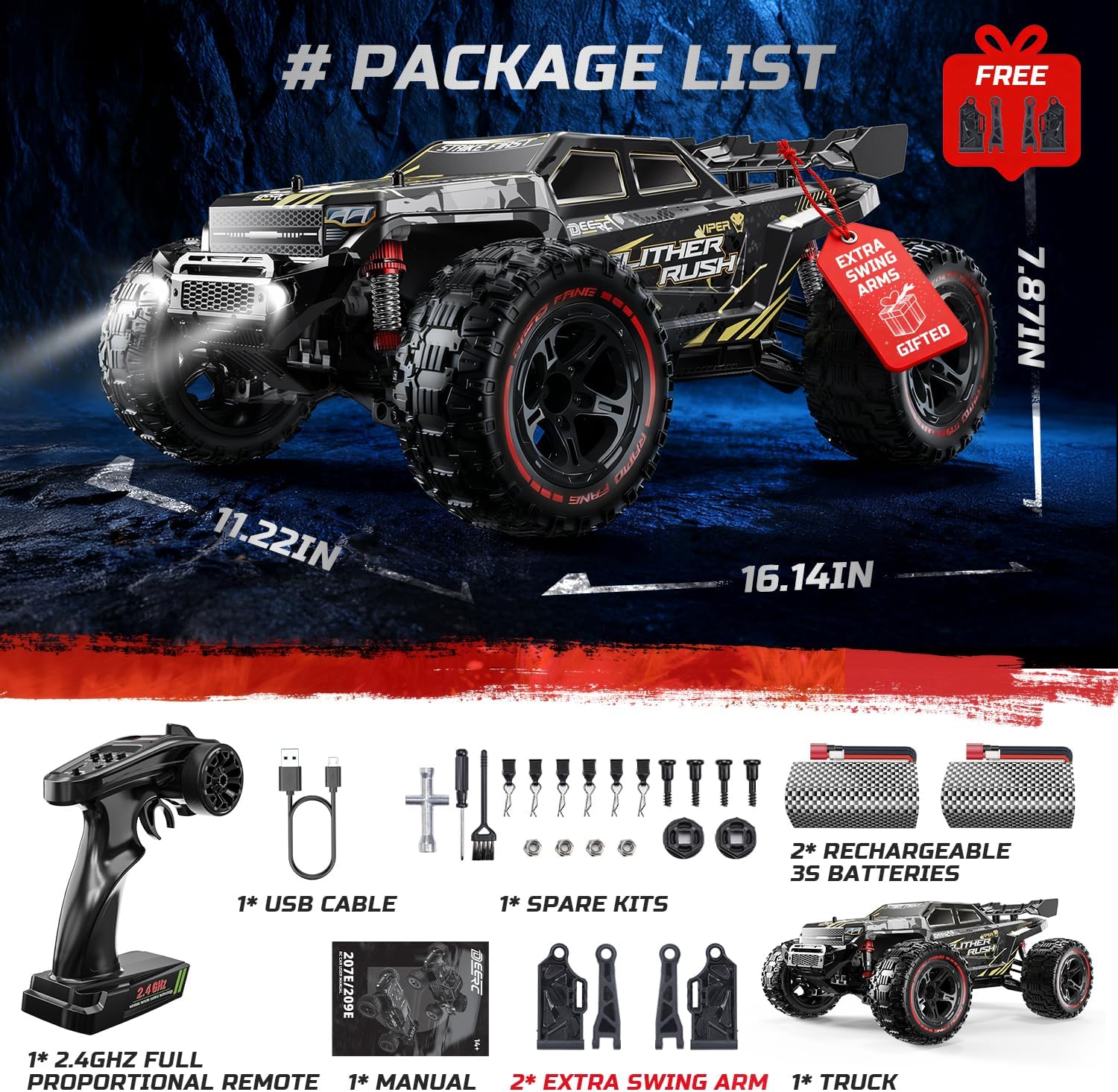
Figure 2: Contents of the DEERC 209E package.
2. Battery Installation and Charging
- Remote Control Batteries: Install 2 AA batteries (not included) into the remote control. Ensure correct polarity.
- Vehicle Batteries: The DEERC 209E comes with two 3S 11.1V 1500mAh batteries. To install, remove the body clips and lift the car body. Securely place one battery into the battery compartment and connect the red plug to the vehicle's power connector.
- Charging: Use the provided charging cable to charge the 3S batteries. Connect the white balance plug of the battery to the charging cable, then connect the USB end to a suitable USB power adapter (e.g., phone charger, computer USB port). The indicator light on the charger will show charging status.

Figure 3: The DEERC 209E utilizes dual 3S rechargeable batteries for extended playtime.
3. Initial Power-Up and Binding
- Turn on the remote control first.
- Turn on the vehicle using the red ON/OFF switch located on the chassis.
- The remote control and vehicle should automatically bind. If not, refer to the troubleshooting section.
Operating Your DEERC 209E
1. Basic Controls
- Steering Wheel: Turn left or right to steer the vehicle.
- Throttle Trigger: Pull to accelerate forward, push to brake or reverse.
- Speed Adjustment Dial: Located on the remote control, this dial allows you to adjust the maximum speed of the vehicle. Turn clockwise for faster speeds, counter-clockwise for slower speeds. This is useful for beginners or for operating in confined spaces.
- Steering Trim: Adjust if the vehicle pulls to one side when the steering wheel is centered.
2. All-Terrain Performance
The DEERC 209E is designed for all-terrain use, featuring 4WD and oil-filled shocks for superior handling on various surfaces including grass, dirt, gravel, and pavement. Its IPX4 waterproof ESC allows for operation in light wet conditions, but avoid full submersion.

Figure 4: Reinforced metal chassis and adjustable oil-filled shocks contribute to the vehicle's durability and performance.
3. Driving Tips
- Start with the speed adjustment dial set to a lower speed until you are comfortable with the controls.
- Practice steering and throttle control in an open area free of obstacles.
- Avoid sudden stops or turns at high speeds to prevent rollovers.
- Regularly check battery levels to avoid unexpected power loss during operation.
Video 1: DEERC 209E in action, demonstrating its speed and handling on various surfaces.
Maintenance
Regular maintenance ensures the longevity and optimal performance of your DEERC 209E RC Car.
- Cleaning: After each use, especially in dusty or muddy conditions, clean the vehicle using the provided brush or compressed air. Remove any debris from the chassis, wheels, and suspension components.
- Battery Care: Store batteries in a cool, dry place. Do not overcharge or over-discharge. Disconnect batteries from the vehicle when not in use.
- Component Check: Periodically inspect all screws, nuts, and moving parts for looseness or damage. Tighten as necessary. The included spare parts kit contains extra swing arms for replacement if needed.
- Oil-Filled Shocks: Check the oil-filled shocks for leaks or reduced damping performance. Refill or replace as necessary to maintain smooth suspension.

Figure 5: Reinforced metal chassis and adjustable oil-filled shocks contribute to the vehicle's durability and performance.
Troubleshooting
| Problem | Possible Cause | Solution |
|---|---|---|
| Vehicle does not respond to remote control. | Low battery in remote or vehicle; not bound correctly. | Replace remote batteries (AA). Charge vehicle battery. Re-bind remote and vehicle (turn on remote first, then vehicle). |
| Vehicle moves slowly or lacks power. | Low vehicle battery; speed adjustment dial set too low. | Charge vehicle battery. Adjust speed dial on remote control to a higher setting. |
| Vehicle pulls to one side. | Steering trim needs adjustment. | Adjust the steering trim dial on the remote control until the vehicle drives straight. |
| Unusual noise during operation. | Debris in drivetrain; loose components. | Inspect and clean the drivetrain. Check for loose screws or damaged parts. |
Specifications
| Feature | Detail |
|---|---|
| Model Number | 209E |
| Scale | 1:10 |
| Motor Type | Hobby-grade 2847 2300KV Brushless High-Torque Motor |
| ESC | Waterproof 45A ESC (IPX4) |
| Max Speed | 60+ KMH (37+ MPH) |
| Drive System | 4WD with Metal CVD |
| Differential | 38T Metal Gear Differential |
| Steering | Precision 3-Wire Metal Servo |
| Suspension | Adjustable 35-55 mm Oil-Filled Shocks |
| Batteries | 2 x 3S 11.1V 1500mAh (20C discharge rate) |
| Approx. Run Time | Up to 40 minutes (with two batteries) |
| Control Distance | Approximately 263 feet |
| Product Dimensions | 12.2 x 7.6 x 16.5 inches |
| Item Weight | 3.8 pounds |
| Recommended Age | 14 years and up |

Figure 6: Detailed technical specifications for the DEERC 209E.
Warranty & Support
For warranty information or technical support, please contact DEERC customer service. Many users have reported positive experiences with DEERC's customer service for parts and assistance.
You can often find contact information on the official DEERC website or through your purchase platform.

