
Important Safety Instructions
When using an electrical appliance, basic precautions should always be followed, including the following:
- Read all instructions before using this massage chair.
- DANGER: To reduce the risk of electric shock, always unplug this appliance from the electrical outlet immediately after using and before cleaning.
- WARNING: To reduce the risk of burns, fire, electric shock, or injury to persons:
- An appliance should never be left unattended when plugged in. Unplug from outlet when not in use, and before putting on or taking off parts.
- Do not operate under blanket or pillow. Excessive heating can occur and cause fire, electric shock, or injury to persons.
- Close supervision is necessary when this appliance is used by, on, or near children, invalids, or disabled persons.
- Use this appliance only for its intended use as described in this manual. Do not use attachments not recommended by the manufacturer.
- Never operate this appliance if it has a damaged cord or plug, if it is not working properly, if it has been dropped or damaged, or dropped into water. Return the appliance to a service center for examination and repair.
- Do not carry this appliance by supply cord or use cord as a handle.
- Keep the cord away from heated surfaces.
- Never operate the appliance with the air openings blocked. Keep the air openings free of lint, hair, and the like.
- Never drop or insert any object into any opening.
- Do not use outdoors.
- Do not operate where aerosol (spray) products are being used or where oxygen is being administered.
- To disconnect, turn all controls to the OFF position, then remove plug from outlet.
- Do not stand on or in the appliance. Use only while seated.
- Use heated surfaces carefully. May cause serious burns. Do not use over insensitive skin areas or in the presence of poor circulation. The unsupervised use of heat by children or incapacitated persons may be dangerous.
Product Overview
The Osaki 4D Orion Duo Mech is an advanced full-body massage chair designed to provide a comprehensive and personalized massage experience. It integrates cutting-edge technology to deliver therapeutic relief and relaxation.
Key Features:
- Smart Body Scan System: Meticulously follows body contours for precise pressure.
- 4D + 3D Dual Mechanism Technology: Provides deep tissue massage to both upper and lower back simultaneously.
- AI Health Detection: Tracks heart rate, blood oxygen, microcirculation, and fatigue to customize massage.
- Intelligent Voice Control: Hands-free operation for adjusting settings.
- Zero Gravity Reclining: Optimal relaxation position.
- Micro-Space Saving Technology: Allows placement close to a wall (2 inches).
- SL Flex Track System: Flexible track system covering neck to hamstrings.
- Auto Extension Footrest: Adjustable for users up to 6'3".
- 58-Cell Full Body Air Massage: Layered compression via strategically placed airbags.
- Heating Therapy: Targeted heat settings to ease muscle tension.
- 16 Auto Massage Programs & 7 Manual Massage Programs: Wide range of massage options.
Product Components:
The Osaki 4D Orion Duo Mech massage chair consists of the main chair unit, a digital control tablet, and a power cord. The chair features integrated airbags, rollers, and heating elements within its structure.
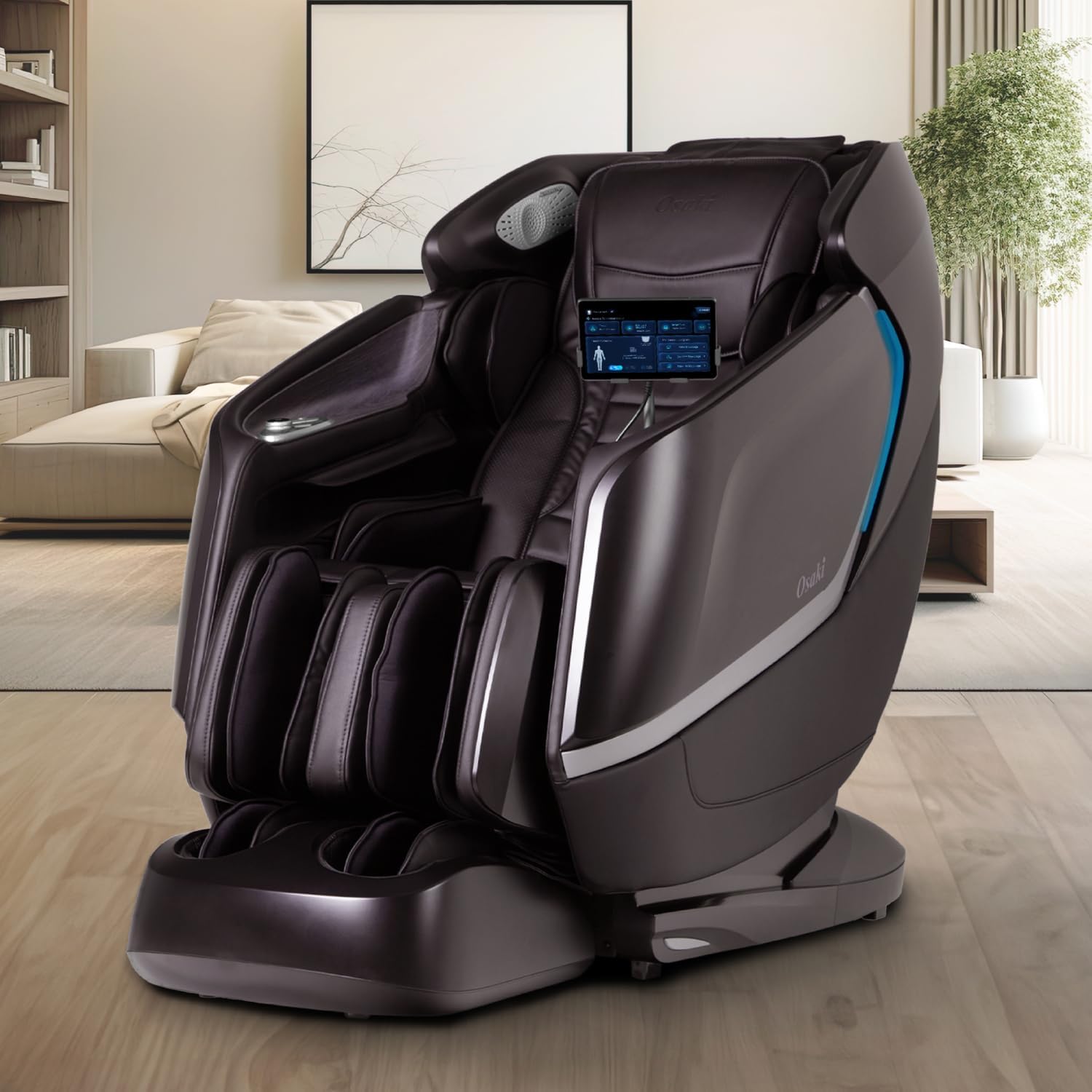
Image: The Osaki 4D Orion Duo Mech massage chair in a living room setting, showcasing its sleek design and integrated control tablet.
Setup and Installation
- Unboxing: Carefully remove all packaging materials. Ensure all components are present. It is recommended to have at least two people for assembly due to the chair's weight (260 pounds).
- Positioning the Chair: Place the massage chair on a flat, stable surface. Due to its Micro-Space Saving Technology, the chair can be positioned as close as 2 inches from a wall, allowing for full recline without needing extra space behind it.
- Connecting Power: Locate the power cord and plug it securely into the chair's power inlet. Then, plug the other end into a grounded electrical outlet. Ensure the power switch (usually located near the power inlet) is in the OFF position before plugging in.
- Attaching the Control Tablet: Secure the digital control tablet to its designated holder on the chair. Connect any necessary cables for power and data transfer to the chair's system.
- Initial Power On: Flip the main power switch to the ON position. The control tablet should power on, indicating the chair is ready for use.
Operating Instructions
1. Using the Digital Control Tablet
The Osaki Orion Duo features an intuitive digital control tablet for managing all massage functions and settings. The main screen provides access to various programs and customization options.

Image: A close-up of the Osaki Orion Duo's digital control tablet, displaying the main interface with options for personal information, recommended programs, and health detection.

Image: The control tablet showing options to customize massage experiences, including auto, custom, and manual massage programs, along with health records and detection status.
2. Intelligent Voice Control
The chair supports voice commands for hands-free operation. To activate, use the designated wake-up phrase (e.g., "Hi, Osaki"). A list of available commands can be found in the remote's menu.
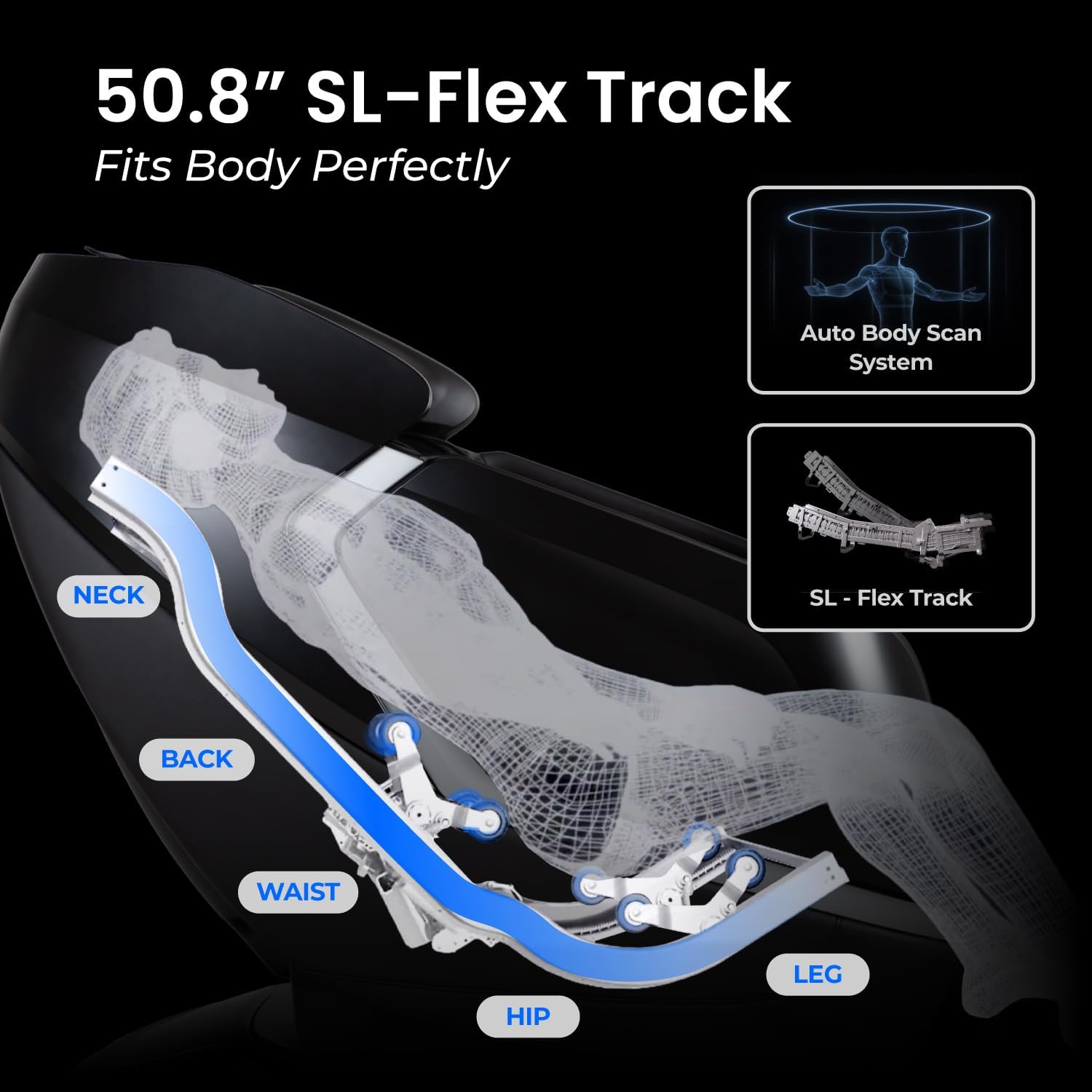
Image: An illustration demonstrating the voice control feature, with speech bubbles indicating "Hi, Osaki" and "I'm here" near the chair's headrest.
3. Massage Programs
The Orion Duo offers a variety of pre-programmed and customizable massage options:
- 16 Auto Massage Programs: These include programs like Demo, Smart Care, Neck & Shoulder, Thai Stretch, Body Circulation, Care, Deep Tissue, Gentle, Relax, Lumbar Care, Recover, Calm, Energetic Morning, Revitalize, Fatigue, and Sweet Dreams.
- 7 Manual Massage Programs: Choose from specific techniques such as Clapping, Scrapping, Rolling, Tapping, Thumping, Shiatsu, and Kneading.

Image: A visual representation of the 7 manual massage techniques and 16 auto massage programs available on the Osaki Orion Duo.
4. Intelligent AI Health Detection
The AI health sensor monitors your heart rate, blood oxygen levels, microcirculation, and fatigue. In AI mode, the chair uses this data to create a personalized massage tailored to your body's current needs.

Image: The control tablet displaying the AI Health Detection results, showing comprehensive health index, blood oxygen, heart rate, and microcirculation data, with a "Start" button for a customized massage.
5. Zero Gravity Reclining
Activate the Zero Gravity function for a reclined position that elevates your legs above your heart, distributing body weight evenly and reducing pressure on the spine for enhanced relaxation.
6. Auto Extension Footrest
The footrest automatically extends up to 7 inches, accommodating users of various heights. Adjustments can be made via the remote control to ensure comfortable leg positioning.
7. Heating Therapy
Targeted heating elements provide soothing warmth to help ease muscle tension and improve circulation, complementing the massage rollers and air compression.
8. 58-Cell Full Body Air Massage
The chair features 58 strategically placed airbags that deliver a full-body compression massage, targeting shoulders, waist, armrests, hips, calves, and feet.

Image: A diagram illustrating the 58 air cells for full-body massage, highlighting areas like shoulders, waist, armrests, hips, calves, and feet, along with calf kneading and dual foot rollers.
9. SL Flex Track System and Dual Mechanism
The innovative SL Flex Track system provides comprehensive massage coverage from your neck to your hamstrings. The 4D + 3D Dual Mechanism Technology allows for simultaneous deep tissue massage in both the upper and lower back, with adjustable intensity and width.
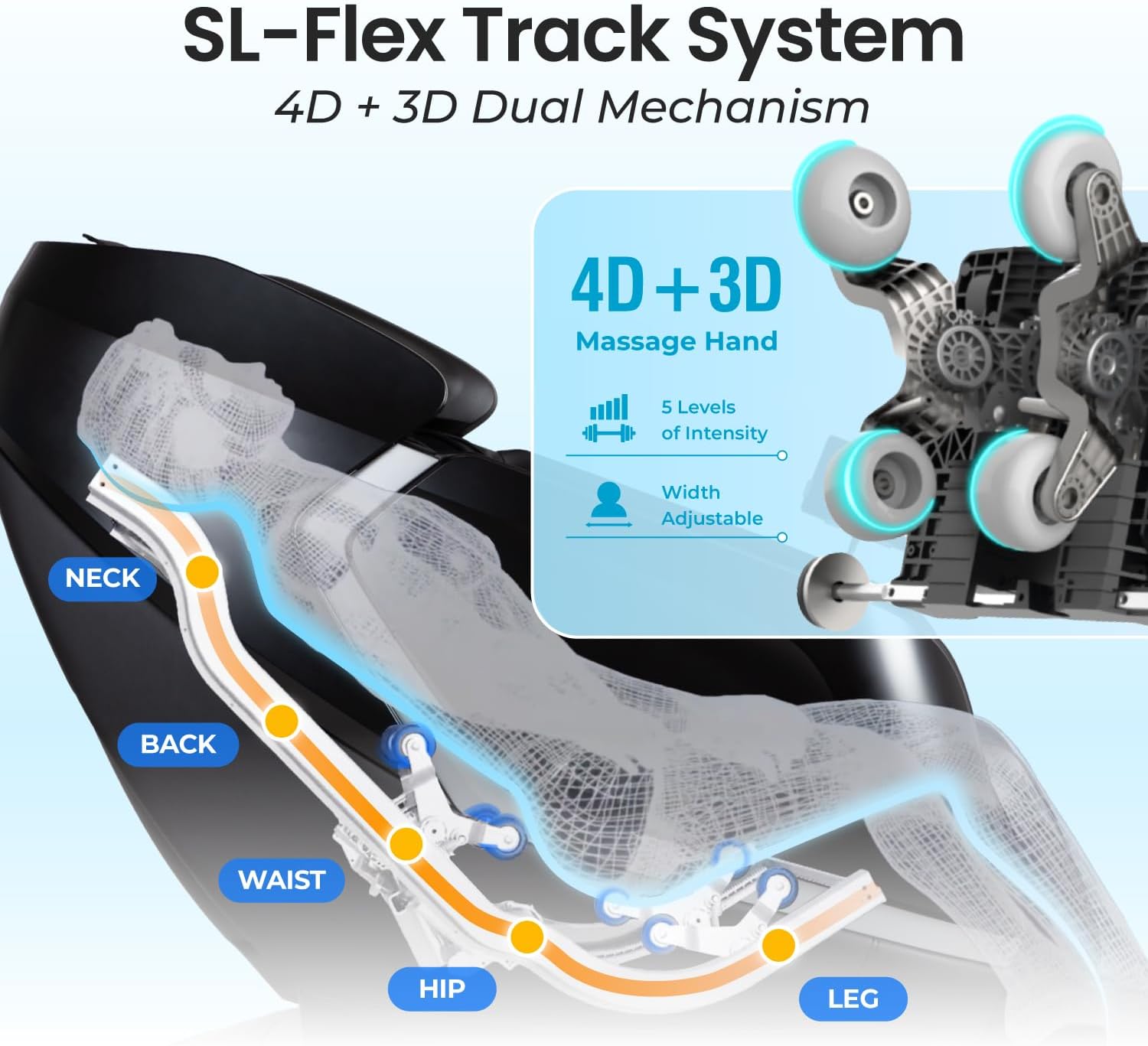
Image: A diagram showing the 50.8" SL-Flex Track system contouring to the body from neck to leg, illustrating the auto body scan system.

Image: An exploded view diagram of the 4D + 3D Dual Mechanism technology, showing the independent roller systems for comprehensive massage.
Maintenance and Care
- Cleaning: Unplug the chair before cleaning. Use a soft, dry cloth to wipe down the surfaces. For stubborn stains, a slightly damp cloth with mild soap can be used, followed by a dry cloth. Avoid harsh chemicals or abrasive cleaners.
- Storage: If the chair will not be used for an extended period, unplug it from the power outlet and store it in a cool, dry place away from direct sunlight.
- Regular Inspection: Periodically check the power cord for any damage. Ensure all connections are secure.
- Avoid Liquids: Do not spill liquids on the chair, especially near electrical components.
Troubleshooting
| Problem | Possible Cause | Solution |
|---|---|---|
| Chair does not power on. | Power cord not securely plugged in; main power switch is off; power outlet malfunction. | Ensure power cord is fully inserted. Check main power switch on the chair. Test the outlet with another device. |
| Massage rollers are not moving. | Program not selected; safety sensor activated; chair in standby mode. | Select an auto or manual massage program. Ensure no obstructions are present. Restart the chair. |
| Voice control not responding. | Microphone blocked; incorrect wake-up phrase; low volume. | Ensure microphone is clear. Use the correct wake-up phrase. Check volume settings on the tablet. |
| Airbags are not inflating. | Air massage function not activated; air pressure setting too low. | Activate the air massage function via the control tablet. Adjust air pressure settings to a higher level. |
If the problem persists after attempting these solutions, please contact Osaki customer support for further assistance.
Specifications
| Brand | Osaki |
| Model Name | 4D Orion Duo Mech |
| Item Model Number | Orion Duo |
| Product Dimensions | 50"D x 31"W x 50"H |
| Item Weight | 260 pounds |
| Color | Brown |
| UPC | 810081887243 |
| Seat Depth | 16.5 inches |
| Back Style | Solid Back |
| Shape | L-Shape |
| Included Components | Cushion |
Warranty and Support
For detailed warranty information, please refer to the warranty card included with your purchase or visit the official Osaki website. For technical support, service requests, or any questions regarding your Osaki 4D Orion Duo Mech massage chair, please contact Osaki customer service directly. Contact information can typically be found on the manufacturer's website or in your product packaging.
When contacting support, please have your model number ("Orion Duo") and purchase date available.


