
Introduction
This manual provides detailed instructions for the setup, operation, and maintenance of your mooov 477356 Progressive Mains Light Alarm Clock. This device is designed to facilitate a natural awakening experience through progressive light simulation and offers additional features such as a snooze function, adjustable lighting, and a USB charging port.

Image: Front view of the mooov 477356 Progressive Mains Light Alarm Clock.
Safety Information
- Ensure the device is placed on a stable, flat surface.
- Do not expose the device to water or excessive humidity. This product is not waterproof.
- Use only the provided USB-C cable and a compatible 5V 2A power adapter (not included) for power input.
- Keep out of reach of children.
- Do not attempt to disassemble or repair the device yourself. Contact qualified personnel for service.
Setup
- Unpacking: Carefully remove the alarm clock and all accessories from the packaging.
- Placement: Place the alarm clock on a bedside table or other suitable surface, ensuring it is within reach of a power outlet.
- Power Connection: Connect the provided USB-C cable to the "IN 5V 2A" port on the back of the alarm clock. Connect the other end of the cable to a compatible USB power adapter (not included) and plug it into a wall socket.
- Initial Power On: The display will illuminate, and the clock will be ready for time setting.

Image: Rear view showing control buttons and USB ports.
Operating Instructions
Setting Time and Date
- Press the SET button to enter time setting mode. The hour digits will flash.
- Use the UP and DOWN buttons to adjust the hour.
- Press SET again to move to minute setting. Adjust with UP and DOWN.
- Continue pressing SET to cycle through year, month, and day settings, adjusting each with UP and DOWN.
- Press SET one last time to confirm and exit setting mode.
Setting the Alarm
- Press and hold the SET button until the alarm time digits flash.
- Use UP and DOWN to set the desired alarm hour.
- Press SET to move to alarm minute setting. Adjust with UP and DOWN.
- Press SET again to confirm. The alarm icon will appear on the display, indicating the alarm is active.
- To deactivate the alarm, press and hold SET until the alarm icon disappears.
Progressive Dawn Simulation
The alarm clock features a progressive dawn simulation. Approximately 20 minutes before your set alarm time, the light will begin to gradually increase in intensity, mimicking a natural sunrise. This light will continue to intensify until the alarm sounds.
Snooze Function
When the alarm sounds, gently touch the top of the alarm clock or the designated touch button to activate the snooze function. The light will remain at full intensity, and the alarm will sound again after 5 minutes.
Adjusting Lighting
- White Light: Press the ON/OFF button to turn on the white light. Repeated presses will cycle through 3 different light intensities.
- Color Lighting: Press and hold the ON/OFF button to switch to color illumination mode. The light will cycle through various colors. Press again to fix a specific color.
- To turn off the light, cycle through all intensities/colors until the light turns off, or press and hold the ON/OFF button.
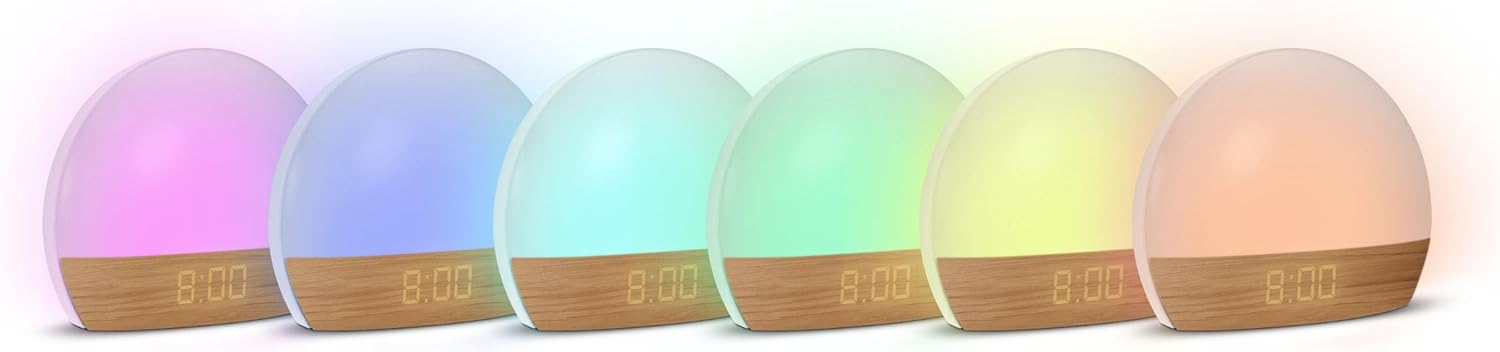
Image: The alarm clock displaying various color lighting options.
Smartphone Charging
The alarm clock includes a USB-A output port labeled "OUT 5V 1A" on the back. You can use this port to charge your smartphone or other small USB-powered devices. Connect your device's charging cable (not included) to this port.
Maintenance
- Cleaning: Disconnect the power before cleaning. Wipe the device with a soft, dry cloth. Do not use abrasive cleaners or solvents.
- Storage: If storing the device for an extended period, ensure it is clean and dry, and store it in a cool, dry place.
Troubleshooting
| Problem | Possible Cause | Solution |
|---|---|---|
| Device does not power on. | Power cable not connected properly or power adapter faulty. | Ensure the USB-C cable is securely connected to both the alarm clock and a working power adapter/outlet. Try a different power adapter if available. |
| Alarm does not sound. | Alarm not activated or set incorrectly. | Verify that the alarm time is set correctly and the alarm icon is visible on the display. |
| Light does not turn on/adjust. | Incorrect button press or device malfunction. | Ensure you are pressing the ON/OFF button correctly. Cycle through modes by pressing or holding the button. |
| Smartphone not charging. | Charging cable faulty or device requires more power than 5V 1A. | Check your smartphone's charging cable. Ensure your device is compatible with 5V 1A charging. |
| Time display is too bright at night. | Display brightness is not adjustable. | The display brightness is fixed. Consider placing the clock further away or adjusting its orientation if it causes disturbance. |
Technical Specifications
| Model Number | 477356 |
| Brand | mooov |
| Dimensions (D x W x H) | 6.5D x 18.2W x 14.4H centimetres |
| Item Weight | 265 Grams |
| Power Input | USB-C, 5V 2A |
| USB-A Output | 5V 1A (for charging external devices) |
| Light Source Type | LED (12 adjustable LEDs) |
| Light Intensities (White) | 3 levels |
| Color Illumination | Fixed or multi-coloured cycling |
| Snooze Duration | 5 minutes |
| Control Type | Touch, Buttons |
| Material Type | Plastic |
| Finish Type | Matte |
| Indoor/Outdoor Usage | Indoor |
Warranty and Support
Warranty information for the mooov 477356 Progressive Mains Light Alarm Clock is typically provided at the point of purchase or within separate documentation included with the product. Please refer to your purchase receipt or contact the retailer for specific warranty terms and conditions.
For technical support or further assistance, please refer to the contact information provided by your retailer or the manufacturer, METRONIC.

