
DICTAC LB-07pro
DICTAC Bunk Bed with Desk, LED Lights and Charging Station User Manual
Model: LB-07pro
1. Introduction
This manual provides detailed instructions for the assembly, operation, and maintenance of your DICTAC L-Shaped Twin Over Twin Bunk Bed. Please read this manual thoroughly before assembly and use to ensure safe and proper operation.
Important Safety Information
- Always follow assembly instructions carefully.
- Ensure all connections are secure before use.
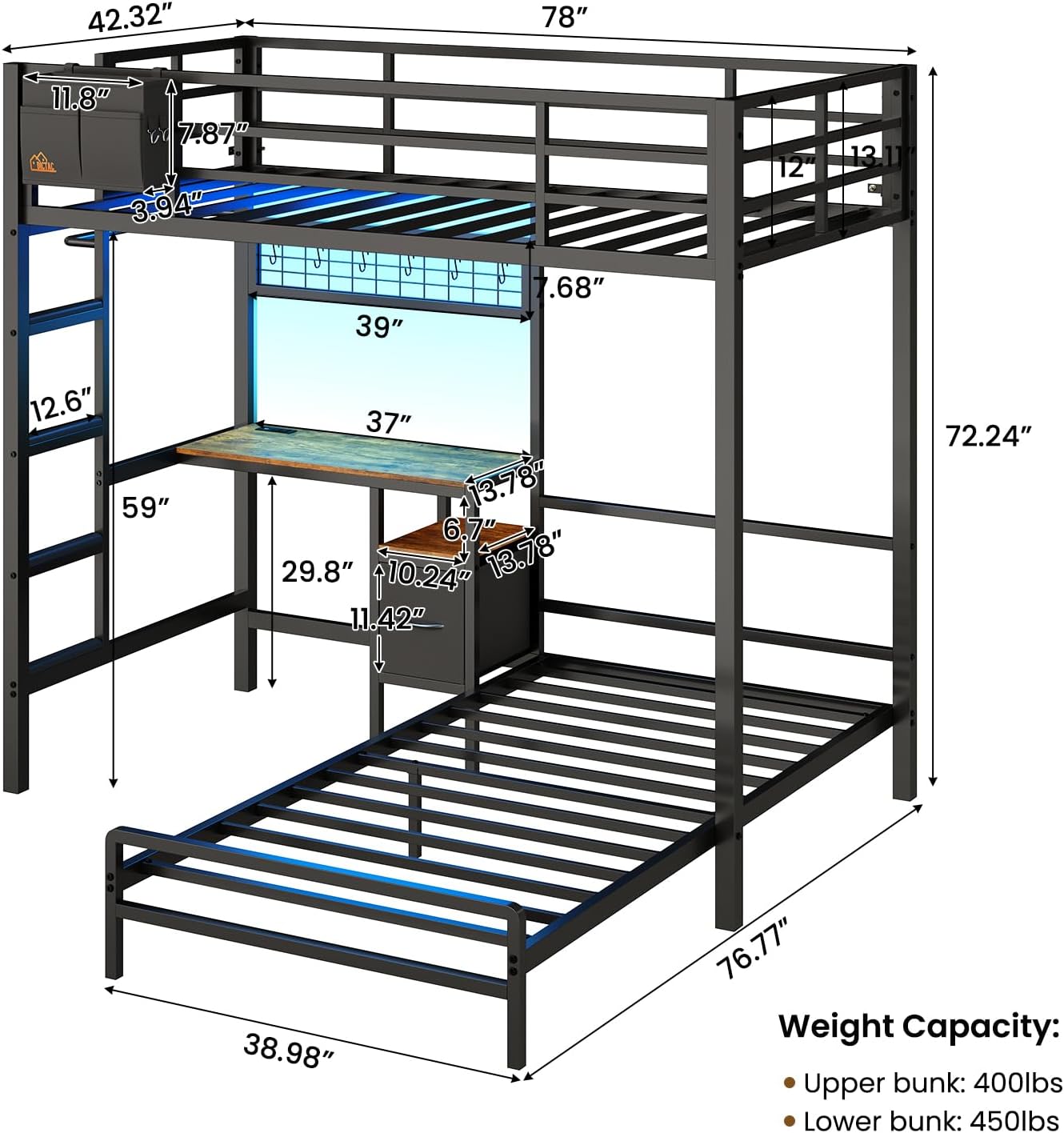
- The upper bunk is equipped with 13.11'' full-length and heightened guardrails.
- Use a mattress with a thickness of 4-6 inches for the upper bunk to maintain proper clearance from the guardrails.
- This bunk bed includes metal anti-tip nails. Fix the bed to the wall using the anti-tipping device for maximum stability and safety.
- Do not allow children under 6 years of age on the upper bunk.
- Periodically check and tighten all fasteners.


2. Package Contents
Before beginning assembly, verify that all parts listed below are present and undamaged. If any parts are missing or damaged, please contact customer support immediately.
- Bunk Bed Frame Components (Metal L-Shaped Twin Over Twin)
- Desk Unit
- Charging Station (2 outlets, 2 USB ports)
- RGB LED Light Kit
- 1 Removable Bedside Caddy
- 1 Fabric Drawer
- 1 Open Storage Shelf
- 1 Metal Decorative Mesh with 6 Hooks
- 1 Hanging Rail (Clothes Rail)
- Assembly Tools (Easy Assemble Tools)
- Installation Manual (this document)
- Anti-Tipping Device
3. Assembly Instructions (Setup)
Assembly is required for this bunk bed. It is recommended that two adults assemble the unit. Please follow the numbered steps provided in the included installation manual for detailed, step-by-step instructions. Ensure all parts are correctly oriented before tightening fasteners.
General Assembly Tips:
- Clear a spacious area for assembly.
- Lay out all components and hardware according to their labels.
- Do not fully tighten screws until all parts are loosely assembled, then tighten them securely.
- Refer to the specific diagrams for each step in the separate installation manual.
- Install the anti-tipping device as instructed to secure the bed to the wall.

4. Operating Instructions
Using the Study Desk and Charging Station
The integrated study desk provides a dedicated space for work or study. The built-in charging station is located on the desk for convenient access.
- Charging Station: Connect the charging station's power cord to a standard wall outlet. It features 2 AC outlets (125V/12A) and 2 USB ports (5V/2.1A) for charging electronic devices.
- Desk Usage: Utilize the desk for laptops, monitors, tablets, or other study/work essentials.

Controlling the RGB LED Lights
The bunk bed features vibrant RGB LED lights that can be controlled via a physical key controller or a smartphone application.
- Key Control: Use the provided key controller to cycle through colors, adjust brightness, and select various flashing modes.
- APP Control: Download the dedicated smartphone application (refer to the LED light kit instructions for app name and QR code). The app allows for advanced customization, including over 60,000 colors, music sync, microphone mode, timing functions, and custom styles.

Utilizing Storage Solutions
The bunk bed is designed with multiple storage options to help keep the room organized.
- Bedside Fabric Caddy: The removable caddy with 2 hooks can be hung on the upper bunk for convenient storage of small items like books, tablets, or glasses.
- Fabric Drawer: Use the fabric drawer for storing clothes, toys, or other personal belongings.
- Open Storage Shelf: The open shelf provides easy access storage for items like books or decorative pieces.
- Metal Decorative Mesh with Hooks: The mesh panel comes with 6 hooks, ideal for hanging headphones, keys, or small accessories.
- Handy Clothes Rail: Utilize the integrated rail for hanging clothes, keeping them wrinkle-free and accessible.

5. Maintenance
- Cleaning: Wipe down metal surfaces with a soft, damp cloth. Avoid abrasive cleaners or harsh chemicals that could damage the finish.
- Fasteners: Periodically check all bolts, screws, and connections to ensure they remain tight. Re-tighten as necessary to maintain stability and safety.
- LED Lights: Ensure the LED light strip and power connections are free from dust and debris. Do not attempt to repair the LED strip if damaged; contact customer support.
- Fabric Components: The fabric caddy and drawer can be spot cleaned with a mild detergent and water. Allow to air dry completely.
6. Troubleshooting
| Problem | Possible Cause | Solution |
|---|---|---|
| Bed feels wobbly or unstable. | Loose fasteners; Anti-tipping device not installed or secured. | Check and tighten all bolts and screws. Ensure the anti-tipping device is properly installed and secured to the wall. |
| LED lights not working. | Power connection issue; Remote control battery low; App not connected. | Check if the LED light power adapter is securely plugged into an outlet. Replace remote control batteries. Ensure Bluetooth is enabled on your device and the app is correctly paired with the lights. |
| Charging station not providing power. | Charging station not plugged in; Outlet issue. | Ensure the charging station's power cord is fully plugged into a working wall outlet. Test the outlet with another device. |
| Difficulty climbing the ladder. | Foot discomfort. | The ladder rungs are designed with pads for comfort. Ensure proper footing. |
7. Specifications
| Feature | Detail |
|---|---|
| Model Number | LB-07pro |
| Brand | DICTAC |
| Type | L-Shaped Twin Over Twin Bunk Bed with Desk |
| Product Dimensions (L x W x H) | 78"L x 76.77"W x 72.24"H |
| Item Weight | 104 pounds |
| Material | Heavy-duty Metal Frame (Powder Coated Finish) |
| Upper Bunk Weight Capacity | 400 lbs |
| Lower Bunk Weight Capacity | 450 lbs |
| Recommended Upper Bunk Mattress Thickness | 4-6 inches |
| Charging Station | 2 AC Outlets (125V/12A), 2 USB Ports (5V/2.1A), 5.2-Foot Power Cord |
| LED Lights | RGB, Key & APP Control, Over 60,000 Colors, Music Sync, Timing Function |
| Safety Features | 13.11" Full-length Guardrails, Metal Anti-tip Nails, Ladder Pads |
| Included Storage | 1 Removable Bedside Caddy, 1 Fabric Drawer, 1 Open Shelf, 1 Metal Decorative Mesh with 6 Hooks, 1 Hanging Rail |
8. Warranty and Customer Support
DICTAC is committed to providing quality products and customer satisfaction.
- Damaged or Missing Parts: If you receive a damaged, scratched, or missing part, please contact us within 24 hours of delivery. We will resolve the issue promptly.
- Returns: This product is eligible for 30-day easy returns. Please refer to your purchase platform's return policy for details.
- Contact: For any inquiries or support, please refer to the contact information provided with your purchase or visit the official DICTAC store page.
Ask a question about this manual
Ask about setup, troubleshooting, compatibility, parts, safety, or missing instructions. Manuals+ will review the question and use this page’s manual context to help answer it.