
1. Introduction
Welcome to the MEGAWHEELS Electric Scooter Model A1C user manual. This document provides essential information for the safe operation, assembly, maintenance, and troubleshooting of your new electric scooter. Please read this manual thoroughly before your first ride to ensure optimal performance and safety.
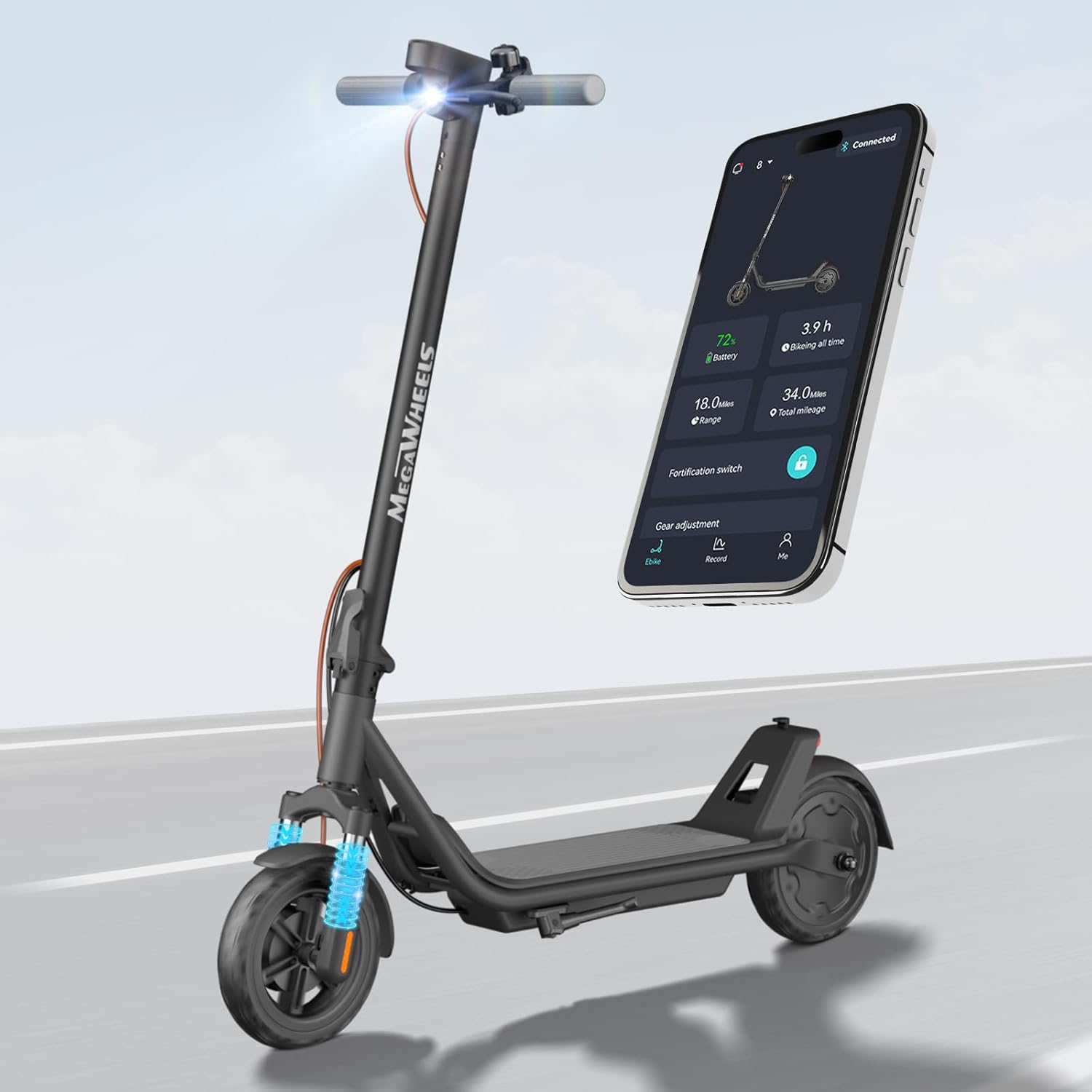
Image 1.1: The MEGAWHEELS Electric Scooter Model A1C, showcasing its sleek design and integrated smart app connectivity.
2. Safety Information
Your safety is paramount. Operating an electric scooter carries inherent risks. Adhere to all local laws and regulations regarding electric scooter use. Always wear a helmet and appropriate safety gear.
2.1 General Safety Guidelines
- Always wear a certified helmet and protective gear (knee pads, elbow pads).
- Do not ride under the influence of alcohol or drugs.
- Observe all traffic laws, signs, and regulations.
- Maintain a safe distance from other vehicles and pedestrians.
- Avoid riding in adverse weather conditions (rain, snow, ice) or on slippery surfaces.
- Ensure both brakes are functioning correctly before each ride.
- The maximum weight limit for this scooter is 220 pounds (100 kg). Exceeding this limit can compromise safety and performance.
- Recommended age range for riders is adult.
2.2 Battery Safety
- Use only the original charger provided with the scooter.
- Do not leave the scooter charging unattended for extended periods.
- Avoid exposing the battery to extreme temperatures or direct sunlight.
- If the battery is damaged or leaking, do not use the scooter and contact support immediately.
3. Setup and Initial Assembly
The MEGAWHEELS Electric Scooter Model A1C is largely pre-assembled. Follow these steps to complete the setup:
- Unboxing: Carefully remove the scooter and all components from the packaging.
- Handlebar Attachment: Unfold the handlebar stem and secure it in the upright position. Ensure the locking mechanism is fully engaged. Attach the handlebars to the stem, aligning any cables and tightening all screws firmly.
- Initial Charge: Before your first ride, fully charge the scooter's battery. Refer to the 'Charging' section for detailed instructions.
- Pre-Ride Check: Inspect the tires, brakes, and all fasteners to ensure they are secure and in good working order.
4. Operating Instructions
4.1 Power On/Off
To power on the scooter, press and hold the power button on the display. To power off, press and hold the power button again until the display turns off.
4.2 Riding the Scooter
- Place one foot firmly on the deck and push off with the other foot to gain initial momentum.
- Once moving, gently press the accelerator lever to engage the motor.
- Place your second foot on the deck.
- To slow down or stop, release the accelerator and apply the brakes.
4.3 Speed Settings
The scooter features multiple speed settings, allowing you to adjust your ride according to conditions and preference. The available speeds are approximately 3 MPH, 9 MPH, and 15 MPH. These can typically be adjusted via the display or the companion app.

Image 4.1: The 300W brushless DC motor and speed settings (4, 10, 15 MPH) for the MEGAWHEELS Electric Scooter.
4.4 Braking System
The scooter is equipped with a dual braking system for enhanced safety:
- Front Drum Brake: Controlled by a lever on the handlebar.
- Rear Electronic Brake: Provides additional stopping power.
Always apply brakes smoothly to avoid sudden stops, especially at higher speeds.

Image 4.2: The scooter's dual brake system, featuring a front drum brake and a rear electronic brake for reliable stopping.
4.5 Lighting System
The scooter features an automatic headlight and rear light. These lights are designed to turn on automatically in low-light conditions, improving visibility during nighttime rides.
4.6 Folding Mechanism
The scooter incorporates a 3-second folding design for easy storage and portability. To fold, locate the folding latch on the stem, release it, and fold the stem down until it locks into place. To unfold, reverse the process, ensuring the stem is securely locked upright before riding.

Image 4.3: The 3-second folding design of the MEGAWHEELS Electric Scooter, showing its folded and expanded dimensions and weight.
5. Smart App Control
Enhance your riding experience with the dedicated companion app. The app connects to your scooter via Bluetooth and offers several features:
- Electronic Lock: Secure your scooter remotely.
- Real-time Diagnostics: Monitor battery level, speed, and mileage.
- Speed Adjustment: Customize speed settings (3/9/15 MPH).
- Headlight Control: Turn the headlight on/off.
Download the app from your device's app store and follow the in-app instructions for pairing.

Image 5.1: The scooter's smart app support, illustrating Bluetooth connectivity, digital lock, 3-speed adjustment, and battery level display.
6. Charging
To charge your MEGAWHEELS Electric Scooter:
- Ensure the scooter is powered off.
- Locate the charging port, usually covered by a rubber flap, on the scooter's frame.
- Connect the charger to the charging port, then plug the charger into a standard wall outlet.
- The charging indicator on the charger will typically show red during charging and turn green when fully charged.
- A full charge takes approximately 4-8 hours.
- Once fully charged, disconnect the charger from the outlet and then from the scooter. Close the charging port cover to protect it from dust and moisture.

Image 6.1: Battery specifications, including 11 miles range, 7.5 Ah battery capacity, and 4-8 hours charging time.
7. Maintenance
Regular maintenance ensures the longevity and safe operation of your scooter.
- Cleaning: Wipe down the scooter with a damp cloth. Do not use high-pressure water or immerse the scooter in water.
- Tires: The scooter is equipped with 8.5-inch solid tires, which require minimal maintenance and eliminate puncture worries. Regularly inspect them for wear and tear.
- Brakes: Periodically check the brake levers and cables for proper tension and function. Ensure the brakes respond effectively.
- Fasteners: Regularly check all screws and bolts to ensure they are tight. Loose fasteners can affect stability and safety.
- Storage: Store the scooter in a cool, dry place away from direct sunlight and extreme temperatures. If storing for an extended period, ensure the battery is charged to about 50-70% and recharge it every 30-60 days to prevent deep discharge.

Image 7.1: The front dual suspension system, contributing to an enhanced smooth ride.
8. Troubleshooting
If you encounter issues with your scooter, refer to the following common problems and solutions:
| Problem | Possible Cause | Solution |
|---|---|---|
| Scooter does not power on | Low battery; Loose connections | Charge the battery fully; Check all visible connections. |
| Motor not engaging | Scooter not pushed off; Faulty accelerator | Ensure you push off to gain initial speed; Contact support if accelerator is unresponsive. |
| Brakes feel weak | Brake cable loose; Worn brake pads | Adjust brake cable tension; Inspect and replace brake pads if necessary. |
| App not connecting | Bluetooth off; App not updated | Ensure Bluetooth is enabled on your phone; Update the app to the latest version. |
If the problem persists after attempting these solutions, please contact customer support.
9. Specifications
Key technical specifications for the MEGAWHEELS Electric Scooter Model A1C:
| Feature | Specification |
|---|---|
| Brand | MEGAWHEELS |
| Model Name | A1C |
| Motor Power | 300W (rated) / 600W (peak) |
| Max Speed | 15.5 mph (25 km/h) |
| Max Distance Range | 11 Miles (17.7 km) |
| Battery Capacity | 7.5 Ah |
| Charging Time | 4-8 hours |
| Weight Limit | 220 Pounds (100 kg) |
| Product Dimensions (Expanded) | 43"L x 17"W x 45"H (109cm x 43cm x 114cm) |
| Wheel Size | 8.5 Inches (Solid Tires) |
| Suspension Type | Front Suspension |
| Brake Style | Front Drum Braking + Rear Electronic Braking |
| Special Features | Digital Display, Dual Braking System, Foldable, Lockable (via App) |
| Certifications | UL2272, FCC, RoHS |
10. Warranty and Support
The MEGAWHEELS Electric Scooter Model A1C comes with a 1-year limited warranty from the date of purchase. This warranty covers manufacturing defects under normal use. Please retain your proof of purchase for warranty claims.
For technical assistance, warranty inquiries, or any other support needs, please contact MEGAWHEELS customer service. We offer 24/7 technical assistance and have US maintenance locations to help resolve issues quickly.
Contact Information: Refer to the official MEGAWHEELS website or your purchase documentation for the most current contact details.


