
Product Overview
The VASAGLE ULSD184KD01 Electric Standing Desk is designed to enhance your workspace with its adjustable height, integrated storage, and convenient power strip. This desk allows you to effortlessly switch between sitting and standing positions, promoting a healthier and more dynamic work environment. Its rustic brown finish and sturdy construction make it a functional and stylish addition to any home office.
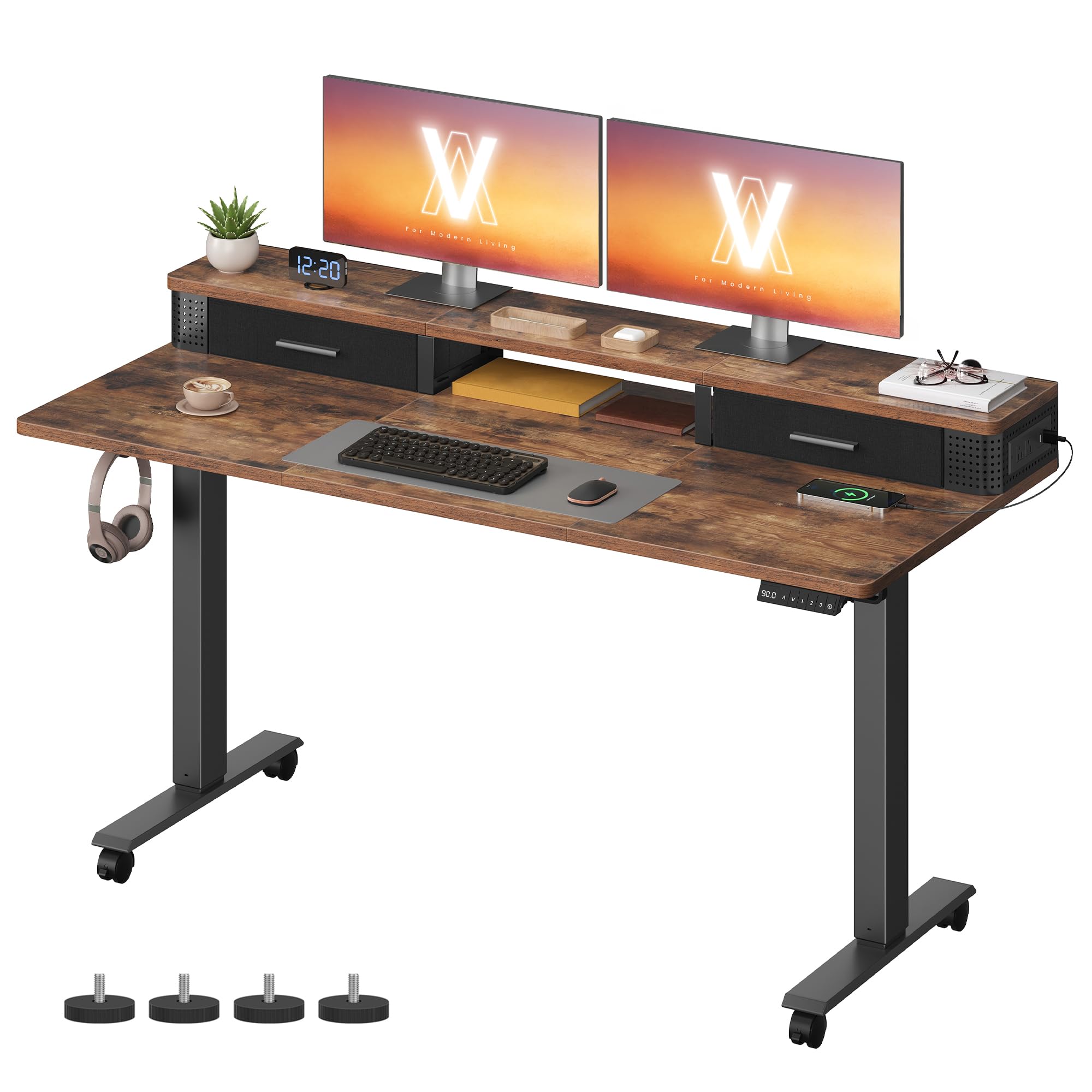
Image: The VASAGLE Electric Standing Desk in Rustic Brown, showcasing its spacious desktop, monitor stand, and integrated drawers, set up in a modern home office environment.
Safety Information
- Ensure all components are securely fastened before use.
- Do not overload the desk. The maximum static load capacity is 154 lb (70 kg).
- Keep children and pets away from the desk during height adjustment.
- Avoid placing liquids directly on the control panel or power strip.
- The anti-collision feature stops and retracts slightly when encountering obstacles during height adjustment. Do not force movement against an obstruction.
- Use only the provided adapter and power cord.
Package Contents
Please verify that all the following components are included in your package:
- 1 x Electric Standing Desk (Desktop sections, legs, crossbeams)
- 1 x Adapter
- 1 x Controller
- 2 x Hooks
- 1 x Accessory Kit (screws, tools, etc.)
- 1 x Instructions Manual
Setup Instructions
1. Unpacking and Preparation
- Carefully unpack all components and lay them out on a clean, soft surface to prevent scratches.
- Identify all parts against the provided parts list in the included instruction manual.
2. Assembling the Frame
- Attach the desk legs to the crossbeams using the provided screws and tools. Ensure all connections are tight and secure.
- Connect the motor and control unit to the frame as indicated in the detailed manual.
3. Attaching the Desktop
- Carefully place the desktop sections onto the assembled frame. Align the pre-drilled holes.
- Secure the desktop to the frame using the appropriate screws.
4. Installing Drawers and Accessories
- Insert the Oxford fabric drawers into their designated compartments.
- Attach the two hooks to the side of the desk for convenient storage of headphones or bags.
- Install the built-in power strip into the designated slot on the desktop. It can be mounted on the left or right side.

Image: A detailed view of the built-in power strip, featuring two AC outlets and two USB-A ports, designed for convenient device charging and cable management.
Operating Instructions
1. Powering On
- Connect the desk's power cord to a standard wall outlet.
- The LED display on the controller should light up, indicating power.
2. Adjusting Height
- Use the Up (↑) and Down (↓) arrow buttons on the controller to raise or lower the desk.
- The desk height can be adjusted between 28.3 inches (72 cm) and 47.2 inches (120 cm).
- The motor operates smoothly with a noise level below 50 dB.
3. Using Memory Presets
- To save a preferred height: Adjust the desk to your desired height, then press the "S" button followed by one of the number buttons (1, 2, or 3). The height is now saved to that preset.
- To recall a saved height: Simply press the corresponding number button (1, 2, or 3). The desk will automatically move to the saved position.

Image: A close-up of the desk's multifunctional controller, showing the LED height display, up/down arrows, memory preset buttons (1, 2, 3), and a USB-C charging port.
4. Using the Built-in Power Strip
- The power strip includes 2 AC outlets (125V/12A) and 2 USB-A ports (5V/2A).
- Plug in your devices directly to the outlets or USB ports for convenient charging.
- The perforated panels on the side of the power strip help organize cables for a tidy workspace.
5. Utilizing Storage and Hooks
- Use the two Oxford fabric drawers for storing small office items, keeping your desktop clutter-free.
- Hang headphones, bags, or other accessories on the two integrated hooks for easy access.

Image: An illustrative diagram highlighting the ample space and various features of the desk, including fabric drawers, an open compartment, a monitor stand, a spacious desktop, and practical hooks for organization.
Maintenance
- Regularly wipe the desktop and frame with a soft, damp cloth. Avoid harsh chemicals.
- Check all screws and connections periodically and tighten if necessary to maintain stability.
- Keep the motor and electrical components free from dust and moisture.
- Do not place hot items directly on the desktop without protection.
Troubleshooting
Desk Not Adjusting Height
- Check if the power cord is securely plugged into both the desk and the wall outlet.
- Ensure there are no obstructions preventing the desk from moving. The anti-collision system may be activated.
- If the issue persists, refer to the detailed troubleshooting section in the included manual or contact customer support.
Power Strip Not Working
- Verify the main power connection to the desk.
- Check if the devices plugged into the power strip are functioning correctly with other power sources.
Specifications
| Feature | Detail |
|---|---|
| Brand | VASAGLE |
| Model Number | ULSD184KD01 |
| Shape | Rectangular |
| Color | Rustic Brown |
| Product Dimensions (D x W x H) | 23.6"D x 55.1"W x 47.2"H (Max Height) |
| Adjustable Height Range | 28.3" - 47.2" (72 cm - 120 cm) |
| Maximum Static Load Capacity | 154 lb (70 kg) |
| Base Material | Particleboard, Steel, Oxford Fabric |
| Special Features | Adjustable Height, Memory Function, Built-in Power Strip (2 AC, 2 USB-A), 2 Hooks, Quiet Motor, Anti-collision System |
| Motor Noise Level | Below 50 dB |
| Assembly Required | Yes |

Image: A diagram illustrating the key dimensions of the desk, including width, depth, height range, and the maximum static load capacity of 154 lbs (70 kg).
Warranty and Support
For warranty information or technical support, please refer to the contact details provided in the original product packaging or visit the official VASAGLE website. Keep your purchase receipt for any warranty claims.


