Introduction
This manual provides detailed instructions for the TELESIN 40cm Mini Selfie Stick Tripod. This versatile accessory is designed for use with DJI Osmo Action 5 Pro, Action 4, and Action 3 cameras, offering an adjustable extension pole, integrated tripod, and magnetic quick-release system for enhanced usability.
Product Overview
The TELESIN 40cm Mini Selfie Stick Tripod combines a telescopic selfie stick with a stable tripod base. It features a magnetic quick-release mechanism and a 360° adjustable ball head for flexible camera positioning. Constructed from durable aluminum alloy and ABS plastic, it is lightweight and portable.
Key Features:
- Adjustable Extension: 4-section telescopic design, adjustable from 17cm to 40cm.
- Magnetic Quick Release: Secure and easy camera attachment/detachment.
- 360° Adjustable Ball Head: Allows for horizontal and vertical camera adjustments.
- Integrated Tripod: Umbrella-style design for stable tabletop or ground use.
- Durable Construction: Made from aluminum alloy and durable ABS plastic with a soft silicone handle.
- Lightweight & Portable: Weighs only 129g, compact for travel.

Figure 1: TELESIN 40cm Mini Selfie Stick Tripod with DJI Osmo Action camera attached, demonstrating its dual functionality as a selfie stick and a tripod.
Setup Instructions
1. Attaching Your Camera:
- For DJI Osmo Action Cameras (5 Pro/4/3):
The tripod features a magnetic quick-release mount specifically designed for DJI Osmo Action cameras. Align your camera with the mount and gently press until it clicks securely into place. The magnetic base and sturdy metal clamp provide double security.

Figure 2: Magnetic Quick-Release Mount. Press both latches to attach or detach the camera.
- For Cameras with 1/4"-20 Thread:
The selfie stick also includes a standard 1/4"-20 screw mount. If your camera or camera case has a compatible thread, simply screw it onto the top of the ball head. Ensure it is tightened securely.
2. Adjusting the Angle:
The integrated ball head allows for 360° horizontal rotation and 90° vertical adjustment. Loosen the knob on the side of the ball head, adjust your camera to the desired angle, and then tighten the knob firmly to lock it in position.
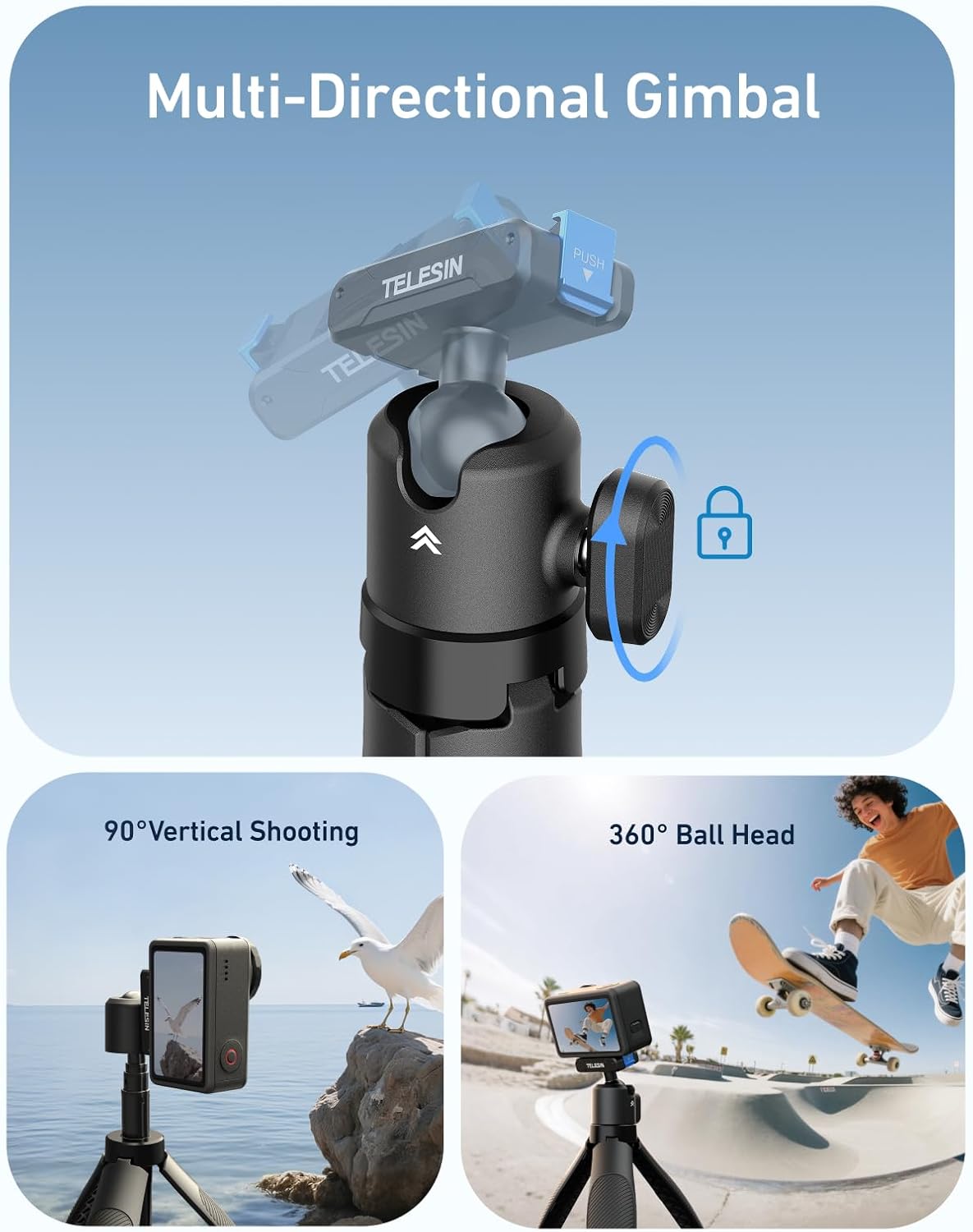
Figure 3: Multi-Directional Gimbal. Adjust the ball head for various shooting angles.
Operating Instructions
1. Using as a Selfie Stick:
To extend the selfie stick, firmly grasp the handle and pull the top section upwards. The 4-section telescopic design allows adjustment from 17cm (folded) to 40cm (fully extended). Ensure each section is securely extended before use.

Figure 4: Adjustable Telescopic Extension. The stick extends up to 40cm for wider shots.
2. Using as a Tripod:
The base of the handle features an integrated umbrella-style tripod. To deploy, simply pull the legs outwards from the handle. The legs will snap into place, providing a stable base for your camera on flat surfaces. To retract, push the legs back into the handle until they are flush.

Figure 5: Tripod Stabilization. The integrated tripod provides a stable platform for your camera.
3. Charging Your Camera (if applicable):
Some versions of this selfie stick may include a power bank function. If available, connect the short USB-C cable (included) from the charging port on the stick to your compatible DJI Osmo Action camera's charging port. This allows for extended shooting time.
Video 1: Demonstrates connecting the TELESIN Mini Selfie Stick Tripod to a DJI Action camera for charging while in use. This feature extends battery life during shoots.
Maintenance
- Keep the selfie stick clean by wiping it with a soft, dry cloth.
- Avoid exposing the product to extreme temperatures or harsh chemicals.
- Ensure the magnetic quick-release mechanism is free from debris to maintain secure attachment.
- Store in a dry place when not in use.
Troubleshooting
Camera Not Attaching Securely:
- Check for any obstructions on the magnetic quick-release plate or the camera's mounting base.
- Ensure the camera is correctly aligned with the mount before pressing down.
Telescopic Pole Not Extending/Retracting Smoothly:
- Inspect the pole sections for dirt or foreign objects. Clean if necessary.
- Avoid forcing the sections; they should slide smoothly.
Tripod Legs Not Stable:
- Ensure the tripod legs are fully extended and locked into position.
- Use on a flat, stable surface.
Specifications
| Feature | Detail |
|---|---|
| Brand | TELESIN |
| Model Number | GPL-US-S1-MNP-13-TD |
| Package Dimensions | 8.43 x 2.17 x 1.54 inches |
| Item Weight | 4.6 ounces (129g) |
| Main Structure Material | Aluminum Alloy, ABS Plastic |
| Adjustable Length | 17cm - 40cm (6.69" - 15.7") |
| Compatible Devices | DJI Osmo Action 5 Pro/4/3 action cameras |
| Mounting Type | Magnetic Quick Release, 1/4"-20 Thread |
| Special Features | 360° Adjustable Ball Head, Extension Pole, Lightweight Tripod, Non-slip Handle |

Figure 6: Product Specifications.
Warranty and Support
For warranty information and customer support, please refer to the official TELESIN website or contact your retailer. Keep your purchase receipt as proof of purchase.
Manufacturer: TELESIN
Date First Available: August 5, 2025


