
1. Introduction and Overview
The Icom IC-SAT100 PTT Satellite Radio is a robust communication device designed for reliable global communication, particularly in remote and emergency situations. It operates on the Iridium satellite network, providing worldwide coverage where traditional mobile services may not be available. This Push-to-Talk (PTT) radio facilitates immediate, one-to-many communication, making it suitable for field teams requiring instant coordination. The device ensures clear, low-latency voice transmission even in challenging environments.
Built for durability, the IC-SAT100 is IP67 waterproof, dust-tight, and compliant with MIL-STD 810G standards. It functions effectively in extreme temperatures ranging from -30°C to +60°C. Key features include a 1500mW audio output for clear sound in noisy areas, a long-lasting BP-300 battery offering up to 14.5 hours of operation, built-in Bluetooth, a GNSS receiver, and AES encryption for secure communications.
2. Package Contents
Verify that all items are present in the package:
- Icom IC-SAT100 PTT Satellite Radio Unit
- Antenna
- BP-300 Lithium-Ion Battery Pack
- Belt Clip
3. Key Features
- Global Coverage: Provides reliable communication in remote areas through worldwide satellite connectivity.
- Push-to-Talk (PTT) Function: Enables instant, one-touch communication for quick voice transmission and team coordination.
- Rugged and Durable Design: Constructed to withstand harsh environments, featuring water-resistant and impact-resistant properties.
- Easy Operation: Features a simple user interface with a large display and intuitive controls for straightforward use.
- Long Battery Life: The included Lithium-Ion battery provides up to 14.5 hours of operational time.
- Clear Audio: 1500mW audio output ensures loud and clear sound, even in noisy surroundings.
- Secure Communication: Supports AES encryption for enhanced privacy.
4. Setup
4.1. Installing the Battery Pack
- Ensure the radio is powered off.
- Align the BP-300 battery pack with the battery compartment on the back of the radio.
- Slide the battery pack into place until it clicks securely.
- Fasten any battery compartment latches or screws if present.
4.2. Attaching the Antenna
- Locate the antenna connector on the top of the radio.
- Screw the antenna clockwise onto the connector until it is finger-tight. Do not overtighten.
4.3. Initial Charging
Before first use, fully charge the battery pack using the provided charger. Refer to the charger's instructions for proper use. A full charge typically takes several hours.
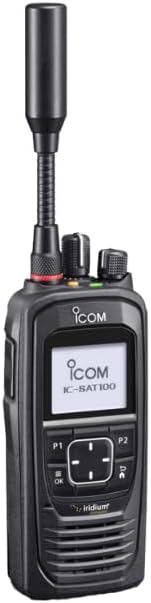
This image displays the Icom IC-SAT100 PTT Satellite Radio from the front. It features a black, rugged casing, a monochrome display showing 'ICOM IC-SAT100', and an extended antenna. Control buttons are visible below the screen, including P1, P2, OK, and navigation keys.
5. Operation
5.1. Power On/Off
- To Power On: Press and hold the Power button (usually located on the top or side) until the display illuminates.
- To Power Off: Press and hold the Power button until the display turns off.
5.2. Making a Call (Push-to-Talk)
- Ensure the radio has a clear view of the sky for satellite signal acquisition.
- Select the desired talkgroup or channel using the navigation buttons.
- Press and hold the PTT button (typically on the side of the radio) to transmit your voice. Speak clearly into the microphone.
- Release the PTT button to listen for a response.
5.3. Adjusting Volume
Use the dedicated volume control knob or buttons (usually on the top or side) to increase or decrease the audio output level.
5.4. Channel Selection
The IC-SAT100 supports 15 channels. Use the navigation buttons (P1, P2, or arrow keys) to cycle through available channels or talkgroups as configured for your service.
6. Maintenance
6.1. Cleaning the Device
Wipe the radio's exterior with a soft, damp cloth. Do not use harsh chemicals or abrasive cleaners. Ensure all port covers are securely closed before cleaning to maintain water and dust resistance.
6.2. Battery Care and Charging
- Always use the Icom-approved charger and battery pack.
- Avoid exposing the battery to extreme temperatures.
- Do not short-circuit the battery terminals.
- For long-term storage, charge the battery to approximately 50% and store it in a cool, dry place.
7. Troubleshooting
7.1. No Power
- Check if the battery is properly installed and charged.
- Ensure the Power button is pressed and held sufficiently long to turn on the device.
7.2. No Satellite Signal
- Ensure the radio has a clear, unobstructed view of the sky. Avoid operating indoors or under dense foliage.
- Verify the antenna is securely attached.
- Move to an open area if signal is consistently poor.
7.3. Audio Issues (No Sound/Distorted Sound)
- Adjust the volume level.
- Check for any obstructions on the speaker or microphone.
- Ensure the radio is receiving a clear signal.
8. Specifications
| Feature | Detail |
|---|---|
| Model Number | IC-SAT100 |
| Item Weight | 8 ounces |
| Package Dimensions | 10 x 8 x 5 inches |
| Batteries | 1 Lithium Ion battery (included) |
| Number of Channels | 15 |
| Special Feature | Weather Resistant |
| Talking Range Maximum | 10000 Kilometer |
| Water Resistance Level | Water Resistant (IP67) |
| Battery Life | 14.5 Hours |
| Included Components | Antenna, Battery, Belt Clip |
| Compatible Devices | Bluetooth devices, Antenna, Belt Clip |
9. Warranty Information
The Icom IC-SAT100 PTT Satellite Radio comes with a 1-Year Limited Warranty from the date of purchase. This warranty covers defects in materials and workmanship under normal use. For specific terms and conditions, please refer to the warranty card included with your product or contact Icom customer support.
10. Customer Support
For technical assistance, troubleshooting, or warranty claims, please contact Icom customer support. Icom provides experienced customer support to assist with any inquiries regarding your IC-SAT100 radio.
You can find contact information on the official Icom website or through your authorized dealer.


