Introduction
Thank you for choosing the T4TREAM 48-inch Fluted Makeup Vanity Desk. This manual provides essential information for the safe assembly, operation, and maintenance of your new vanity desk. Please read all instructions carefully before beginning assembly and retain this manual for future reference.

Image: The T4TREAM 48-inch Fluted Makeup Vanity Desk with its large LED lighted mirror and multiple drawers, showcasing its elegant design in a bedroom setting.
Safety Information
- Always assemble the product on a soft, clean surface to prevent scratches.
- Ensure all parts are securely fastened before use.
- Do not overload drawers or shelves.
- Keep small parts away from children during assembly.
- Use only the provided hardware or recommended replacements.
- If any parts are missing or damaged, do not proceed with assembly. Contact customer support.
Package Contents
Before beginning assembly, verify that all components are present and undamaged. Refer to the included parts list in your physical manual for detailed identification.

Image: An exploded diagram showing all individual components of the vanity desk, including the mirror, desk frame, drawers, and hardware, along with key dimensions.
Assembly Instructions
Assembly is required for this product. Please follow the steps carefully. It is recommended to have two people for certain steps, especially when handling the mirror.
General Assembly Overview
For a visual guide to the assembly process, please refer to the official assembly video below. This video demonstrates the general steps for unpacking, identifying parts, and constructing the vanity desk.
Video: A comprehensive assembly guide demonstrating the step-by-step process of putting together the T4TREAM vanity desk, from unpacking to final setup.
Detailed Steps
- Unpacking and Part Identification: Carefully unpack all components and lay them out on a soft, clean surface. Refer to the parts list in your physical manual to identify each piece.
- Assembling Drawer Sides: Attach the drawer side panels using the provided screws and a screwdriver. Ensure all connections are tight.
- Attaching Drawer Glides: Secure the drawer glides to the sides of the drawer boxes using the appropriate screws. Ensure they are aligned correctly for smooth operation.
- Constructing Drawer Dividers: Assemble the internal drawer dividers by interlocking the wooden pieces. These dividers are designed to fit into the larger drawers.
- Installing Drawer Handles: Attach the gold metallic handles to the front of each drawer using the provided screws.
- Assembling the Main Desk Frame: Connect the main desk panels, ensuring the pre-drilled holes align. Use the provided hardware to secure the frame.
- Attaching Desk Drawer Glides: Install the remaining drawer glides to the internal sections of the main desk frame where the drawers will slide in.
- Mounting the Power Strip and Hair Dryer Stand: Secure the built-in power strip and the hair dryer stand to the designated side panel of the desk using the provided screws.
- Attaching Mirror Supports: Fasten the wooden support bars to the back of the main desk frame, which will hold the LED lighted mirror.
- Securing the LED Lighted Mirror: Carefully place the LED lighted mirror onto the desk frame, aligning it with the support bars. Secure it in place with the provided fasteners. Connect the mirror's power cable to the built-in power strip.
- Inserting Drawers: Slide all assembled drawers into their respective compartments within the desk frame.
Operating Instructions
LED Lighted Mirror

Image: A detailed view of the 48-inch LED lighted mirror, highlighting the touch controls for adjusting brightness and switching between three color temperature settings.
- Power On/Off: Tap the touch button on the mirror to turn the LED lights on or off.
- Adjust Brightness: Long-press the touch button to seamlessly adjust the brightness level from 0% to 100%. Release the button when the desired brightness is reached.
- Change Color Temperature: Tap the touch button repeatedly to cycle through three color temperature settings: Cold Daylight (6000K), Natural Light (4000K), and Warm Light (3000K). Select the setting that best suits your needs.
Charging Station
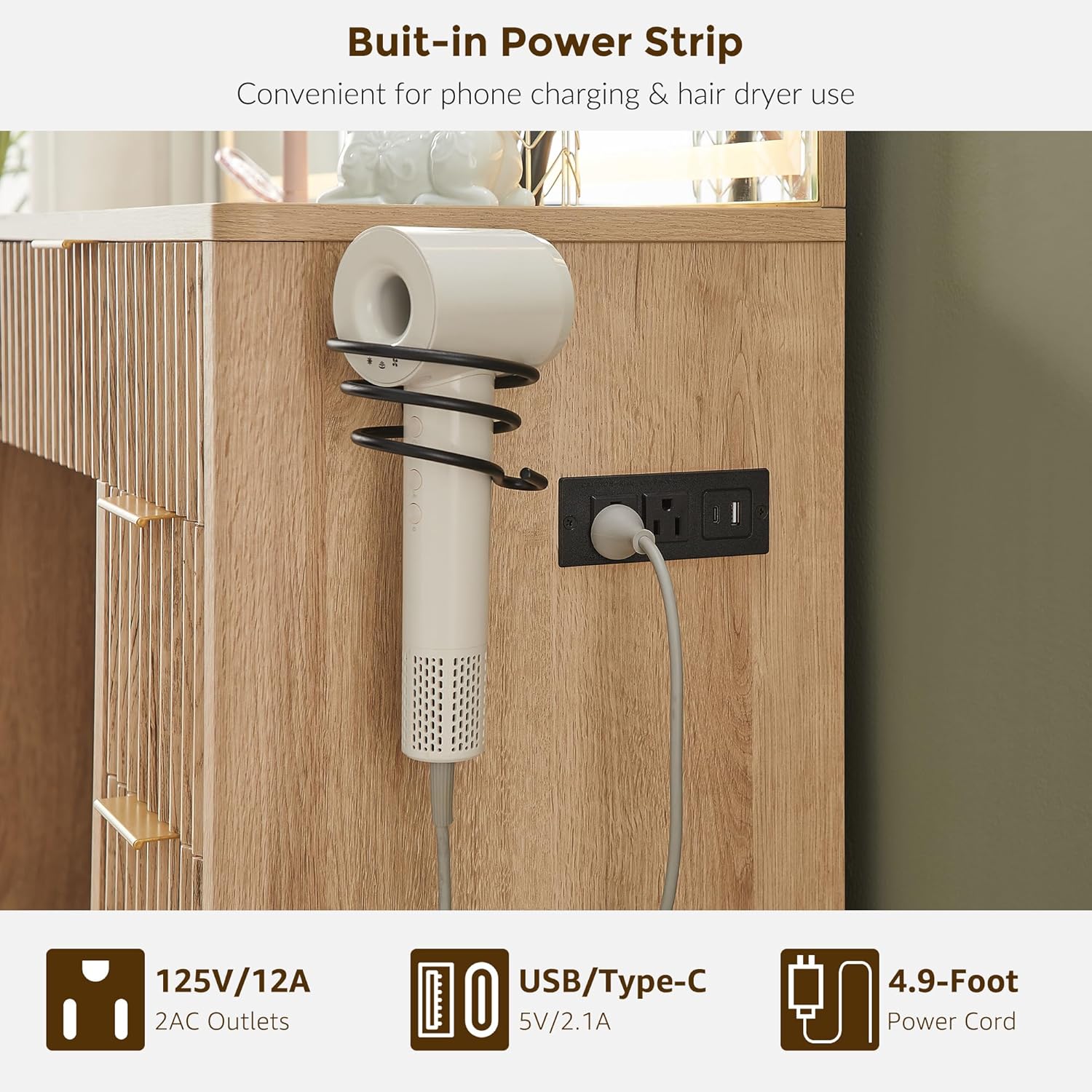
Image: A close-up of the built-in power strip integrated into the side of the vanity desk, featuring two AC outlets and USB/Type-C ports for convenient device charging.
- The vanity desk includes a built-in charging station with 2 AC outlets (125V/12A) and USB/Type-C ports (5V/2.1A).
- Plug the vanity's main power cord into a wall outlet.
- Connect your electronic devices (e.g., phone, tablet, hair dryer) to the available outlets or USB ports for convenient power access.
Maintenance
- Cleaning the Surface: Wipe the engineered wood surfaces with a soft, damp cloth. Avoid harsh chemicals or abrasive cleaners that may damage the finish.
- Cleaning the Mirror: Use a glass cleaner and a microfiber cloth to clean the mirror surface. Spray cleaner onto the cloth, not directly onto the mirror, to prevent liquid from seeping into the electrical components.
- Drawer Care: Periodically check drawer glides for smooth operation. If needed, clean any dust or debris from the tracks.
- Electrical Components: Ensure the power cord and charging station are free from damage. Do not attempt to repair electrical components yourself.
Troubleshooting
| Problem | Possible Cause | Solution |
|---|---|---|
| LED mirror lights do not turn on. | Power cord not plugged in; loose connection; power outage. | Ensure the power cord is securely plugged into a working outlet and the vanity's power strip. Check the connection between the mirror and the power strip. |
| Lights are dim or flickering. | Brightness setting is low; faulty connection. | Long-press the touch button to increase brightness. Check all electrical connections. |
| Drawers do not slide smoothly. | Obstruction in glides; glides not properly installed. | Remove drawers and check for any debris in the glides. Ensure glides are installed correctly and screws are tight. |
| Charging station not working. | Vanity not plugged in; device not properly connected. | Verify the vanity is plugged into a live outlet. Ensure devices are correctly inserted into the charging ports. |
Specifications
- Brand: T4TREAM
- Model Number: FPSC48VDW8
- Product Dimensions: 13.7"D x 48"W x 53.6"H
- Item Weight: 145 pounds
- Frame Material: Engineered Wood
- Furniture Finish: Engineered Wood
- Color: Natural Oak
- Assembly Required: Yes
- Mirror Type: LED Lighted Mirror with 3 Color Temperatures (Cold Daylight, Natural Light, Warm Light) and adjustable brightness.
- Storage: 2 Large Drawers with Dividers, 6 Smaller Drawers
- Charging Station: 2 AC Outlets (125V/12A), USB/Type-C Ports (5V/2.1A)
Warranty and Support
T4TREAM is committed to providing comprehensive after-sales support. If you encounter any issues with your product, including missing or damaged parts, or require assistance with assembly or operation, please contact our customer service team. We ensure each product undergoes strict quality checks before delivery. Our team is dedicated to providing a timely and satisfactory solution to ensure a worry-free experience.
For specific warranty details and to reach customer support, please refer to the contact information provided in your product packaging or visit the official T4TREAM website.