
Introduction
This manual provides detailed instructions for installing and operating your BrickBling LED Lighting Kit, designed specifically for the Lego 76304 Batman Forever Batmobile model. This kit enhances your building block model with vibrant LED lighting, bringing it to life. Please note that this product includes only the lighting kit; the Lego building block model is not included.
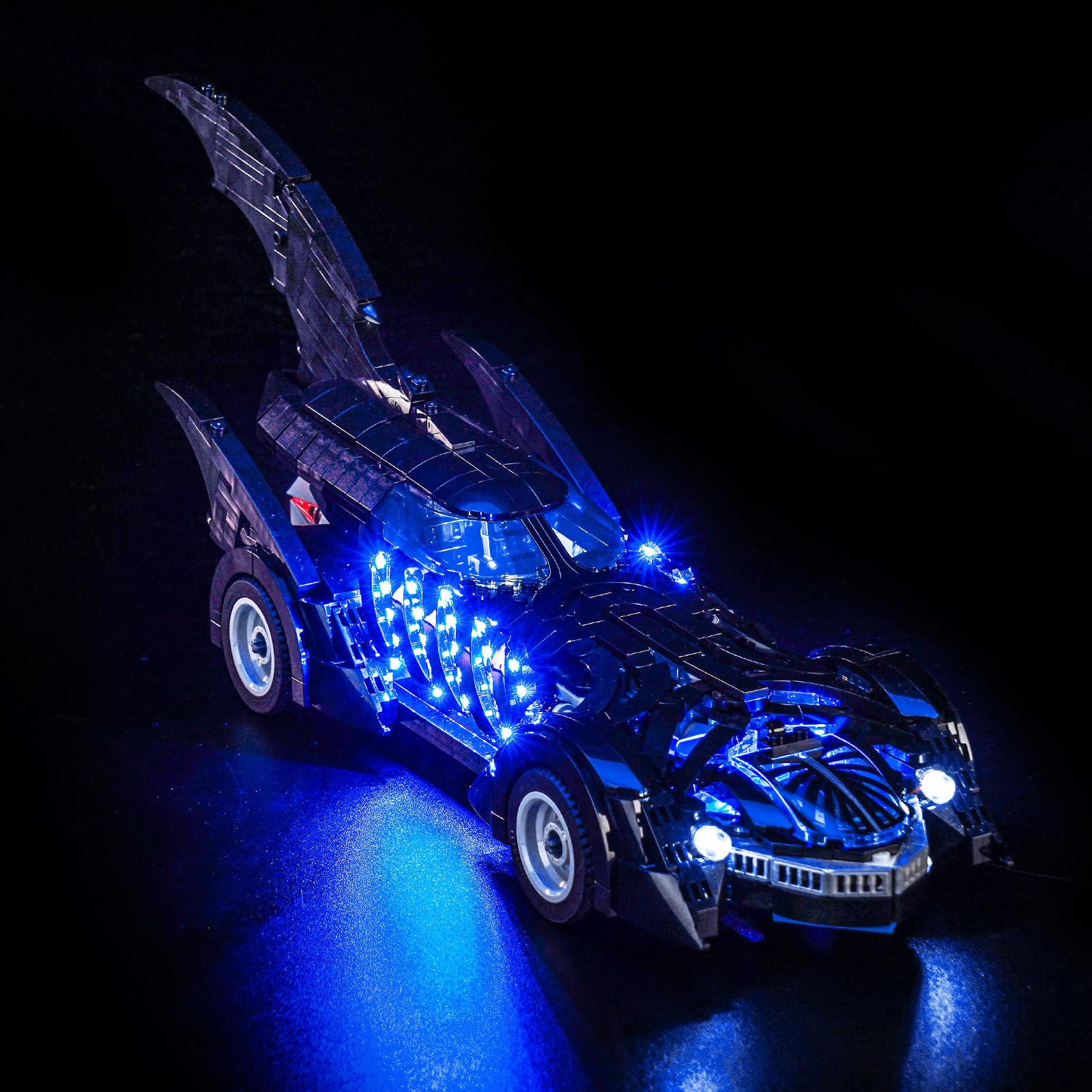
Image: The BrickBling LED Lighting Kit illuminates the Lego 76304 Batman Forever Batmobile model.
Package Contents
Before beginning installation, please verify that all components listed below are present in your package:
- LED Light Kits
- Instruction Manual (online PDF/video)
- USB Cable
- Battery Compartment (batteries not included)
- Various LED strips, connecting cables, and expansion boards as per the specific kit design.

Image: Detailed view of the components included in the BrickBling LED Lighting Kit.
Setup and Installation
The BrickBling LED Lighting Kit is designed for easy installation with your Lego 76304 Batmobile. Follow these general steps for assembly. For detailed, step-by-step video or PDF instructions, please refer to the official BrickBling website using the information provided on the back of your product packaging.
- Prepare Your Model: Ensure your Lego 76304 Batmobile model is fully assembled and stable.
- Identify Connection Points: The LED components are designed to integrate seamlessly. Identify the specific areas on your model where lights will be placed, such as headlights, taillights, and interior sections.
- Connect LED Strips: Carefully attach the LED strips and individual lights to the designated areas. All LEDs feature a uniform light pattern, and cable connectors are designed for a secure fit.
- Route Cables: Neatly route the connecting cables to avoid interference with the model's structure or appearance. Use the provided expansion boards if necessary to manage multiple connections.
- Power Connection: Connect the main power cable to either the USB cable or the battery compartment.
- Test Functionality: Before finalizing the installation, connect the power source and test all lights to ensure they are functioning correctly.

Image: Front view of the Batmobile with installed LED lights.

Image: Rear view of the Batmobile with installed LED lights.
Operating Instructions
Once the BrickBling LED Lighting Kit is installed, operating it is straightforward:
- Power On/Off: Connect the USB cable to a power source (power bank, wall charger, USB outlet, laptop, or other USB device) or ensure batteries are correctly inserted into the battery compartment. The lights will illuminate automatically. Disconnect the power source to turn off the lights.
- Dimmer Function: This kit features a dimmer function. Refer to your specific online instructions for details on how to adjust the light intensity, typically via a touch variator or integrated switch.
- Display: Position your illuminated Batmobile model in your display case, shelf, or table to showcase its enhanced appearance.

Image: The illuminated Batmobile model displayed in a room.
Maintenance and Safety
To ensure the longevity and safe operation of your BrickBling LED Lighting Kit, please observe the following:
- Cable Care: The decorative lighting kit is constructed with high-quality copper wires, offering heat and burn resistance. Handle cables gently to prevent damage. Avoid sharp bends or excessive pulling.
- Cleaning: Use a soft, dry cloth to gently wipe dust from the LED components and cables. Do not use liquid cleaners directly on the electrical components.
- Power Source: Always use appropriate power sources (5V USB or compatible batteries) to prevent damage to the lighting kit.
- Storage: When not in use for extended periods, disconnect the power source and store the model in a cool, dry place away from direct sunlight.
- Safety: This product contains small parts and is recommended for ages 15-80 years. Keep out of reach of small children to prevent choking hazards.

Image: Interior lighting details of the Batmobile.
Troubleshooting
If you encounter any issues with your BrickBling LED Lighting Kit, please refer to the following common troubleshooting steps:
- Lights Not Turning On:
- Check the power source: Ensure the USB cable is securely connected to a functional power supply or that batteries are correctly inserted and charged.
- Verify all cable connections: Make sure all LED strips and connecting cables are firmly plugged into the expansion board and power source.
- Inspect for damage: Look for any visible damage to wires or LED components.
- Flickering Lights:
- Ensure stable power: An unstable power supply can cause flickering. Try a different USB port or fresh batteries.
- Check connections: Loose connections can also cause flickering. Re-seat all connectors.
- Dim or Uneven Lighting:
- Adjust dimmer: If your kit has a dimmer, ensure it is set to the desired brightness level.
- Power supply capacity: Ensure your power source provides sufficient power for all LEDs.
If these steps do not resolve the issue, please contact BrickBling customer support for further assistance.
Specifications
| Feature | Detail |
|---|---|
| Product Dimensions | 15.5 x 10.5 x 3 cm; 100 grams |
| Recommended Age | 15 - 80 years |
| Model Number | DE02-76304-P95001 |
| Country of Origin | China |
| Color | Warm White (LEDs may emit various colors as per design, e.g., blue, red) |
| Material | Copper (for wiring) |
| Light Source Type | Light Emitting Diode (LED) |
| Power Source | USB and Battery |
| Special Features | Dimmable (Touch Variator) |
| Batteries Included | No |
Warranty and Support
BrickBling is committed to providing high-quality products. For any warranty-related inquiries or technical support, please contact BrickBling customer service. Detailed contact information and support resources can typically be found on the official BrickBling website or on the product packaging.
As indicated, this product does not include a paper manual. For comprehensive installation guides, including PDF and video instructions, please visit the BrickBling website. You will need to enter the label characters from the back of your packaging to access these resources.

Image: Information regarding online instructions and support.


