
1. Introduction
This manual provides essential information for the proper setup, operation, and maintenance of your Dino-Lite AF4535ZTE Digital USB Microscope. Please read this manual thoroughly before using the device to ensure safe and efficient operation. The Dino-Lite AF4535ZTE is designed for detailed observation and analysis across various applications, including electronics inspection, laboratory work, and educational purposes.
2. Safety Information
- Do not expose the microscope to extreme temperatures, humidity, or direct sunlight.
- Avoid dropping or subjecting the device to strong impacts.
- Do not attempt to disassemble or modify the microscope. Refer all servicing to qualified personnel.
- Keep the lens clean. Use only approved cleaning methods and materials.
- Ensure the USB connection is secure and free from damage before connecting to a computer.
- This device is not intended for medical diagnostic use.
3. Package Contents
Verify that all items are present in the package:
- Dino-Lite AF4535ZTE Digital USB Microscope
- USB Cable (integrated)
- Software CD or download instructions (software required for operation)
- User Manual (this document)
Note: Accessories such as stands or the WF-20 wireless module are sold separately.
4. Product Overview
The Dino-Lite AF4535ZTE features a robust design with advanced optical and digital capabilities. Key components include the objective lens, magnification dial, polarizer control, LED lighting, and USB connector.

Figure 4.1: Dino-Lite AF4535ZTE Digital USB Microscope showing its main body and approximate dimensions. The image illustrates the microscope's length and diameter, with an arrow indicating a detachable end cap. The text "Accessories sold separately" is visible at the bottom left.

Figure 4.2: Dino-Lite AF4535ZTE Digital USB Microscope mounted on a compatible stand. This image demonstrates how the microscope can be positioned for stable observation, highlighting its use with external accessories.
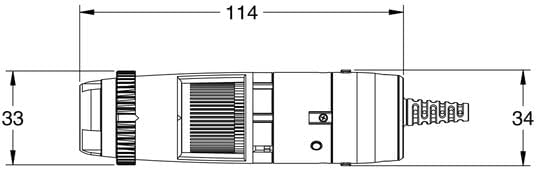
Figure 4.3: Technical drawing of the Dino-Lite AF4535ZTE microscope, providing precise measurements in millimeters (114mm length, 33-34mm diameter). This diagram offers detailed dimensional information for integration and setup.
Key Features:
- Expanded Magnification: 10x–330x range for versatile observation.
- AMR (Automatic Magnification Reading): Displays real-time magnification on-screen.
- Adjustable Polarizer: Reduces glare on reflective surfaces.
- FLC (Flexible LED Control): Allows fine adjustment of the built-in LED lighting.
- USB 2.0 Connectivity: Ensures stable connection to Windows 10 and 11 computers.
- Wi-Fi Ready: Compatible with the optional WF-20 wireless module for wireless streaming.
5. Setup
5.1 Software Installation
- Insert the provided software CD into your computer's optical drive, or download the latest software from the official Dino-Lite website.
- Follow the on-screen instructions to install the Dino-Lite software. Ensure your operating system (Windows 10 or 11) meets the minimum requirements.
- Restart your computer if prompted after installation.
5.2 Connecting the Microscope
- Connect the USB cable of the Dino-Lite AF4535ZTE microscope to an available USB 2.0 port on your computer.
- The computer should automatically detect the device. If prompted, allow the driver installation to complete.
5.3 Initial Placement
Place the microscope on a stable surface or mount it onto a compatible stand (sold separately). Ensure the object to be viewed is positioned directly beneath the objective lens.
6. Operating Instructions
6.1 Starting the Software
Launch the Dino-Lite software application on your computer. The live image from the microscope should appear on your screen.
6.2 Adjusting Magnification and Focus
- Rotate the magnification dial on the microscope body to adjust the desired magnification level (10x to 330x).
- Adjust the distance between the objective lens and the object, or use the focus wheel (if available on your stand) to bring the image into sharp focus.
- The AMR feature will display the current magnification directly within the software interface.
6.3 Using the Polarizer
The adjustable polarizer helps reduce glare from reflective surfaces. Rotate the polarizer ring located near the objective lens until the glare is minimized and the image clarity improves.
6.4 Flexible LED Control (FLC)
The FLC feature allows you to adjust the intensity of the built-in LED lights. Access the FLC settings within the Dino-Lite software to fine-tune the illumination for optimal viewing conditions.
6.5 Capturing Images and Videos
Refer to the Dino-Lite software's help documentation for detailed instructions on how to capture still images and record videos. Typically, dedicated buttons or menu options within the software control these functions.
6.6 Wi-Fi Connectivity (Optional)
If using the optional WF-20 wireless module, refer to its separate instruction manual for setup and operation. Once connected, the WF-20 allows wireless streaming of the microscope feed to compatible devices.
7. Maintenance
7.1 Cleaning the Lens
Gently wipe the objective lens with a soft, lint-free cloth specifically designed for optical surfaces. For stubborn smudges, use a small amount of lens cleaning solution applied to the cloth, not directly to the lens.
7.2 Cleaning the Body
Wipe the microscope body with a soft, dry cloth. Do not use abrasive cleaners or solvents.
7.3 Storage
When not in use, store the microscope in a clean, dry, and dust-free environment, preferably in its original packaging or a protective case.
8. Troubleshooting
| Problem | Possible Cause | Solution |
|---|---|---|
| No image on screen | USB cable not connected properly; Software not launched or incorrect device selected; Driver issue. | Ensure USB cable is securely connected. Launch Dino-Lite software and select the correct device. Reinstall drivers if necessary. |
| Image is blurry | Incorrect focus; Wrong working distance; Dirty lens. | Adjust focus dial and working distance. Clean the objective lens. |
| Image is too dark/bright | LED illumination settings incorrect. | Adjust LED brightness using FLC in the software. |
| Excessive glare | Polarizer not adjusted. | Rotate the polarizer ring to reduce glare. |
9. Specifications
| Model Name | AF4535ZTE |
| Magnification Range | 10x - 330x |
| Light Source | LED (Flexible LED Control) |
| Polarizer | Adjustable |
| Connectivity | USB 2.0 |
| Compatibility | Windows 10, Windows 11 |
| Special Features | AMR (Automatic Magnification Reading), Wi-Fi Ready (with optional WF-20) |
| Material | Glass, Metal |
| Item Weight | 226.8 g (0.5 Pounds) |
10. Warranty and Support
For warranty information and technical support, please refer to the documentation provided with your purchase or visit the official Dino-Lite website. Keep your proof of purchase for warranty claims.
For further assistance, contact Dino-Lite customer service through their official channels.
