
Introduction
This manual provides comprehensive instructions for the proper installation, operation, and maintenance of your Neuronmart Universal Remote Control, Model F-1961. This remote is designed to control various ceiling and wall fans. Please read this manual thoroughly before using the product to ensure safe and efficient operation.
Safety Information
- Keep the remote control away from water and excessive moisture.
- Do not expose the remote to direct sunlight or high temperatures.
- Avoid dropping the remote control.
- Do not attempt to open or repair the remote control yourself. Refer to qualified service personnel.
- Dispose of used batteries responsibly according to local regulations.
Package Contents
Please check the package for the following items:
- 1 x Neuronmart Universal Remote Control (Model F-1961)
- 1 x Instruction Manual (This document)
Note: Batteries are not included and must be purchased separately.
Product Overview
The Neuronmart Universal Remote Control (Model F-1961) is designed for ease of use with an ergonomic form factor. It features dedicated buttons for various fan functions.
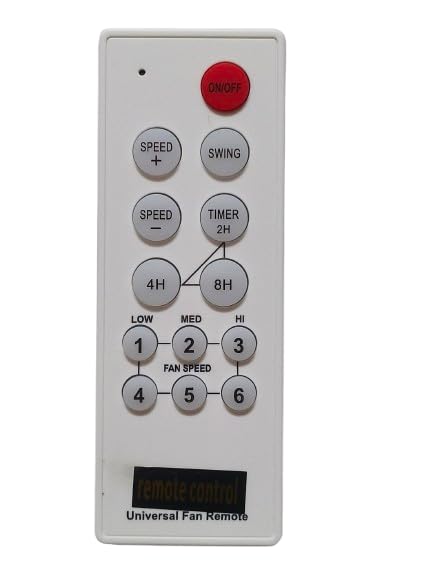
Figure 1: Front View of Remote Control. This image displays the front of the Neuronmart Universal Remote Control, Model F-1961, showing all the buttons for power, speed adjustment, swing function, and timer settings. The buttons are clearly labeled for intuitive use.
Button Functions:
- ON/OFF: Powers the fan on or off.
- SPEED + / SPEED -: Increases or decreases the fan speed.
- SWING: Activates or deactivates the fan's oscillation/swing function.
- TIMER (2H, 4H, 8H): Sets the fan to automatically turn off after 2, 4, or 8 hours.
- FAN SPEED (1-6): Direct selection of fan speed levels.
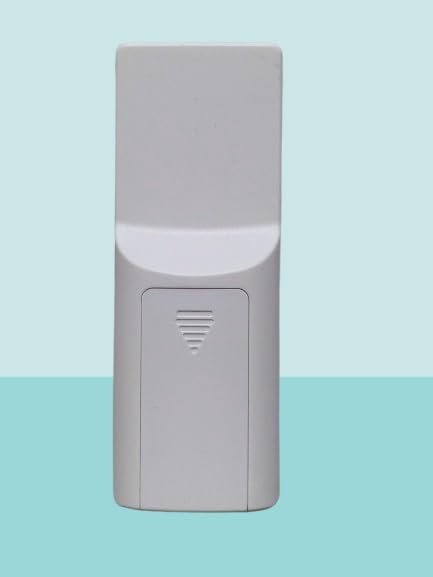
Figure 2: Back View of Remote Control. This image shows the rear of the Neuronmart Universal Remote Control, Model F-1961, highlighting the battery compartment cover. The design is ergonomic for comfortable handling.
Setup
Battery Installation:
- Locate the battery compartment on the back of the remote control (refer to Figure 2).
- Slide the battery compartment cover downwards to open it.
- Insert two AAA alkaline batteries (not included), ensuring the positive (+) and negative (-) terminals match the markings inside the compartment.
- Slide the battery compartment cover back into place until it clicks securely.
Important: Always use new batteries of the same type. Do not mix old and new batteries or different types of batteries.
Operating Instructions
This universal remote is designed to be compatible with a wide range of ceiling and wall fans. No programming is typically required for basic functions if your fan is compatible with standard infrared fan remotes.
Basic Operation:
- Power On/Off: Point the remote towards the fan's receiver and press the ON/OFF button.
- Adjust Fan Speed: Use the SPEED + or SPEED - buttons to cycle through speed settings, or press the numbered buttons (1-6) for direct speed selection.
- Activate Swing Function: Press the SWING button to start or stop the fan's oscillation.
- Set Timer: Press the TIMER 2H, 4H, or 8H buttons to set the fan to turn off automatically after the selected duration.
Note: The effective range of the remote control is typically up to 8 meters (26 feet) without obstructions. Ensure a clear line of sight between the remote and the fan's receiver.
Maintenance
Cleaning:
Wipe the remote control with a soft, dry cloth. Do not use liquid cleaners or abrasive materials, as they may damage the surface or internal components.
Battery Replacement:
Replace batteries when the remote's range decreases or it stops responding. Follow the battery installation steps in the "Setup" section. Always replace both batteries simultaneously.
Troubleshooting
| Problem | Possible Cause | Solution |
|---|---|---|
| Remote not working. | Dead or incorrectly inserted batteries. | Replace batteries with new ones, ensuring correct polarity. |
| Remote range is poor. | Weak batteries or obstruction. | Replace batteries. Ensure a clear line of sight to the fan's receiver. |
| Fan does not respond to commands. | Incompatibility with the fan model. | Verify the remote's compatibility with your specific fan model. This remote is designed for universal compatibility but some specific fan models may not be supported. |
Specifications
- Model: F-1961
- Brand: Neuronmart
- Compatible Devices: Ceiling Fans & Wall Fans
- Power Source: 2 x AAA Alkaline Batteries (not included)
- Connector Type: Infrared
- Special Features: Ergonomic design
- Dimensions: Approximately 6 x 6.5 x 10 cm
- Weight: Approximately 150 g (without batteries)
- Country of Origin: China
Warranty and Support
This product is covered by a standard manufacturer's warranty against defects in materials and workmanship. For specific warranty terms and conditions, please refer to the documentation provided with your purchase or contact Neuronmart customer support.
For technical assistance or support, please contact your retailer or the manufacturer directly. Keep your purchase receipt as proof of purchase for warranty claims.
Note: The product description mentions "1 Year Extended Warranty Plan by Onsitego" as an optional protection plan. This is separate from the standard manufacturer's warranty.