
Introduction
This manual provides comprehensive instructions for the Motorola Moto Edge 60 Pro 5G Ai smartphone. Please read this guide thoroughly to ensure proper use and to maximize your device's capabilities. Keep this manual for future reference.
1. Setup
1.1 Unboxing and Initial Inspection
Upon opening the package, verify that all components are present and undamaged. The standard package contents include:
- Motorola Moto Edge 60 Pro 5G Ai Smartphone
- Power Adapter
- USB Cable
- Phone Case
1.2 SIM Card Installation
The Motorola Moto Edge 60 Pro 5G Ai supports Dual Nano SIM cards. Follow these steps to install your SIM card(s):
- Locate the SIM tray on the side of your device.
- Insert the SIM ejector tool (not included, use a thin pin) into the small hole on the SIM tray to open it.
- Carefully pull out the SIM tray.
- Place your Nano SIM card(s) into the designated slots on the tray. Ensure the gold contacts face downwards and the notched corner aligns correctly.
- Gently push the SIM tray back into the device until it clicks into place.
Note: This device does not support MicroSD cards.
1.3 Network Compatibility
This phone is GSM Unlocked and is compatible with GSM carriers. It is not compatible with CDMA carriers. For USA buyers, it works with T-Mobile, Metro PCS, Mint Mobile, Tello, and Ultra. It is also compatible with other carriers that use T-Mobile towers and works worldwide with GSM networks.

Image: A chart illustrating compatible (T-Mobile, Metro, Mint Mobile, Ultra, Rest of World) and incompatible (Verizon, AT&T, Sprint, Boost, Virgin Mobile, Visible, Cricket, Other CDMA Network) GSM networks.
1.4 Powering On and Initial Configuration
Press and hold the Power button until the Motorola logo appears. Follow the on-screen prompts to complete the initial setup, including language selection, Wi-Fi connection, Google account setup, and security settings.
2. Operating Your Device
2.1 Device Overview

Image: Front view of the Motorola Moto Edge 60 Pro, highlighting its curved display and key features like the 50MP+50MP+50X AI Camera, Moto AI, and 1.5K True Colours Quad-Curved Display.
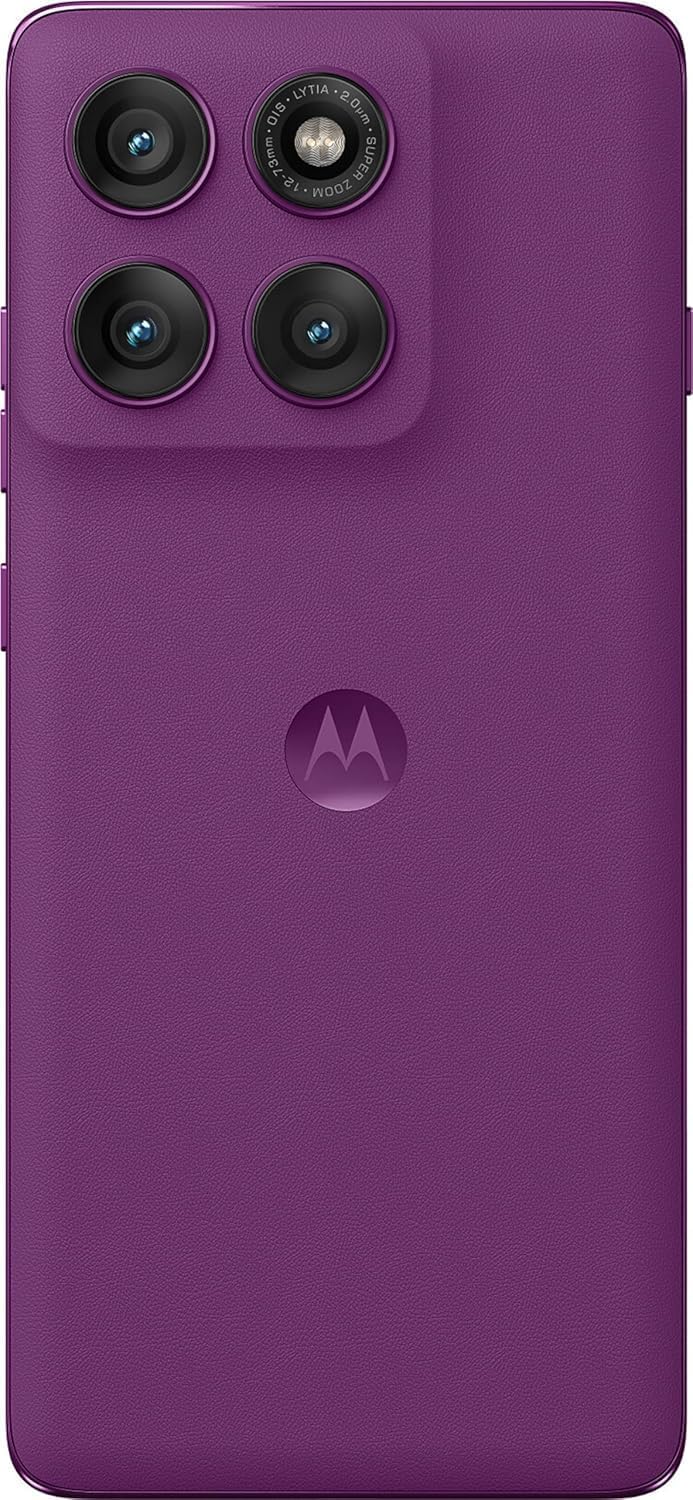
Image: Rear view of the Motorola Moto Edge 60 Pro in Pantone Sparkling Grape, showcasing the triple camera system and Motorola logo.

Image: Side view of the Motorola Moto Edge 60 Pro, emphasizing the curved display and slim profile.
2.2 Display Features
The device features a 6.7-inch Super HD pOLED display with a 120 Hz refresh rate and 4500 nits peak brightness. It supports HDR10+ and displays over a billion shades of color with 100% DCI-P3 color space. The display is Pantone Validated for accurate color reproduction and Pantone Skintone Validated for natural skin tones. It also includes SGS Low Blue Light and SGS Low Motion Blur certifications for eye comfort.

Image: A visual representation of the Motorola Moto Edge 60 Pro's display features, including 1.5K True Quad-Curved Display, 4500 nits peak brightness, HDR10+, 100% DCI-P3, Pantone Validation, and SGS Eye Care Protection.
2.3 Camera System
The Motorola Moto Edge 60 Pro is equipped with a versatile triple camera system and a high-resolution front camera:
- Main Camera: 50 MP with 1/1.55" optical format, f/1.4 aperture, 1.0 µm pixel size (2.0 µm with Quad Pixel Technology), Omni-directional PDAF, and Optical Image Stabilization.
- Ultrawide/Macro Camera: 13 MP (120° FOV) with Macro Vision, f/2.2 aperture, 1.12 µm pixel size, and autofocus.
- Telephoto Camera: 10 MP with 3x Optical Zoom, f/2.0 aperture, 1.0 µm pixel size, autofocus, and Optical Image Stabilization.
- Front Camera: 50 MP with f/1.9 aperture, 0.64 µm pixel size (1.28 µm with Quad Pixel Technology), and autofocus.
The camera system also features a Laser autofocus (time-of-flight) and a 3-in-1 Sensor for exposure, auto white balance, and flicker detection.
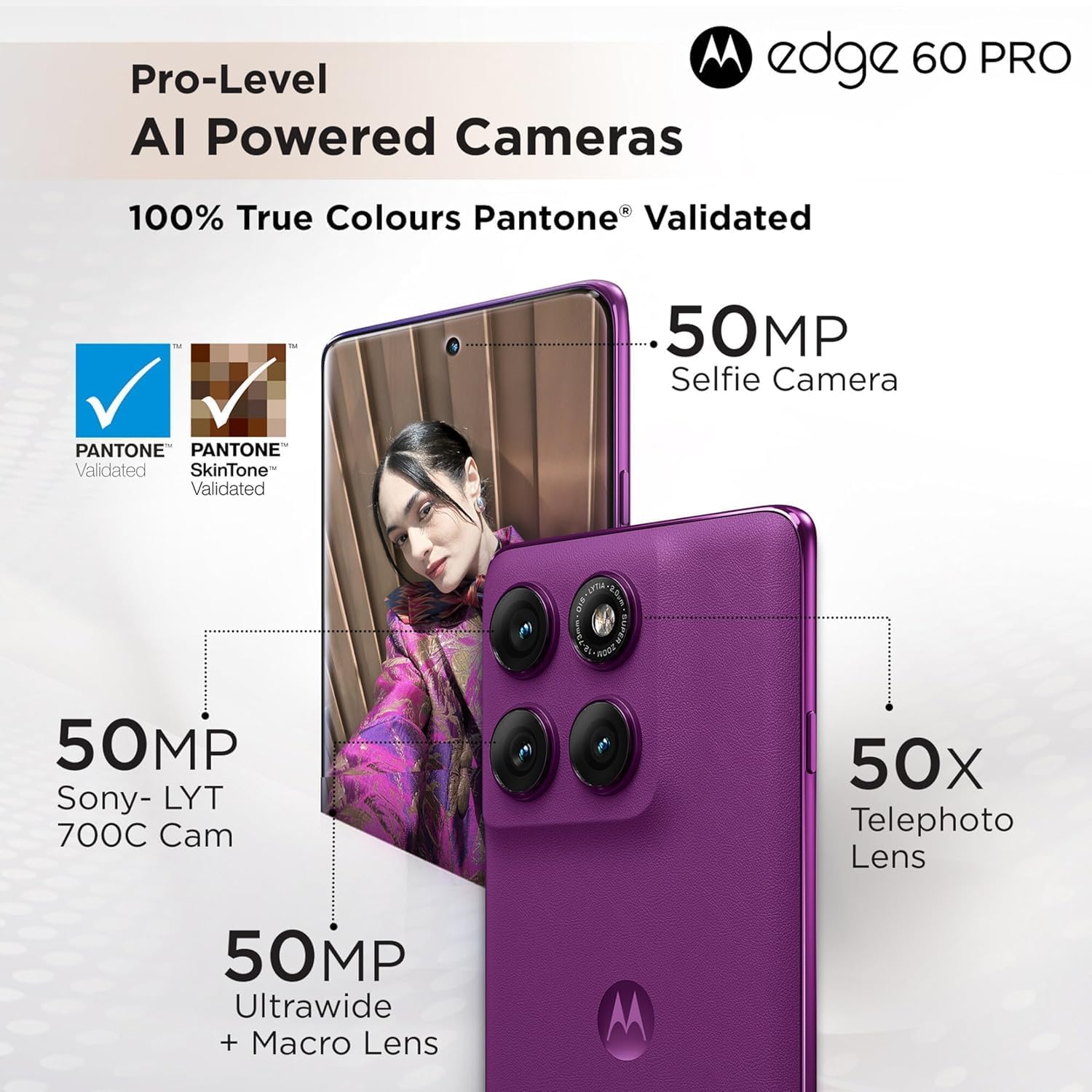
Image: Detailed breakdown of the Motorola Moto Edge 60 Pro's camera system, showing the 50MP Sony-LYT 700C Cam, 50MP Ultrawide + Macro Lens, 50X Telephoto Lens, and 50MP Selfie Camera, all with Pantone Validated True Colours.
2.4 AI Camera Features
Leverage the device's AI capabilities for enhanced photography:
- AI Action Shot: Keeps your shots smooth and steady, ideal for capturing fast-moving subjects.
- AI Adaptive Stabilisation: Stabilizes moving objects within your photos and videos.
- AI Group Shot: Ensures everyone in a group photo is in focus.
- AI Signature Style: Automatically tunes colors, contrast, and lighting for a professional look.

Image: Visual examples of AI camera features on the Motorola Moto Edge 60 Pro, including AI Action Shot, AI Adaptive Stabilisation, AI Group Shot, and AI Signature Style.
2.5 Performance and Connectivity
The Motorola Moto Edge 60 Pro is powered by the MediaTek Dimensity 8350 Extreme chipset, an ultra-efficient 4nm-class chip with an Octa-core CPU (4 x Arm Cortex-A715 cores up to 3.35 GHz) and an Arm Mali-G615 MC6 GPU. It includes a MediaTek NPU 780 for AI processing. The device comes with 12GB of RAM and 512GB of UFS 4.0 storage.
Connectivity options include 5G, 4G, 3G, and 2G network bands, Bluetooth, NFC, USB, Wi-Fi, and GPS.
2.6 Security Features
Your device includes multiple security features to protect your data:
- On-screen fingerprint reader
- Face unlock
- ThinkShield security platform
- Moto Secure
2.7 Smart Connect and Moto AI
The device integrates with Moto AI and Smart Connect for enhanced functionality:
- Cross Control: Seamlessly operate your tablet with a PC.
- Swipe to Stream: Transfer app activities to a bigger screen in seconds.
- File Transfer: Share files across your devices seamlessly.

Image: An illustration demonstrating Smart Connect features like Cross Control (tablet with PC), Swipe to Stream (phone to larger screen), and File Transfer between devices, powered by Moto AI.
3. Maintenance
3.1 Water and Dust Protection
The Motorola Moto Edge 60 Pro is designed with IP68 and IP69 dust and water protection, meaning it is resistant to dust ingress and can withstand immersion in water up to 1.5 meters for 30 minutes. It is also Military-grade certified (MIL-STD-810H) for durability against harsh conditions. While durable, avoid intentional submersion and exposure to high-pressure water jets.
3.2 Battery and Charging
The device is equipped with a 6000 Milliamp Hours (mAh) battery. Use the provided Power Adapter and USB Cable for optimal charging. The device supports fast charging. To prolong battery life, avoid extreme temperatures and fully discharging the battery frequently.
3.3 Cleaning Your Device
To clean your phone, use a soft, lint-free cloth. Avoid abrasive materials, solvents, or aerosol sprays. For stubborn smudges, slightly dampen the cloth with water. Ensure all ports are dry before charging.
4. Troubleshooting
If you encounter issues with your device, try the following common troubleshooting steps:
- Device Unresponsive: Press and hold the Power button for about 10-15 seconds to force a restart.
- Network Connectivity Issues:
- Ensure your SIM card is correctly inserted.
- Check if Airplane Mode is off.
- Verify that your carrier is supported by the device (GSM networks only).
- Restart your device.
- Battery Draining Quickly:
- Reduce screen brightness.
- Close unused apps running in the background.
- Disable Wi-Fi, Bluetooth, or GPS when not in use.
- Check for app updates, as outdated apps can consume more power.
- App Not Responding: Force close the app through Settings > Apps, then reopen it. If the issue persists, clear the app's cache or reinstall it.
- Fingerprint Sensor/Face Unlock Issues: Ensure your fingers are clean and dry for the fingerprint sensor. For face unlock, ensure adequate lighting and that your face is clearly visible to the front camera. Re-register your fingerprint or face if problems persist.
For more complex issues, refer to the official Motorola support website or contact customer service.
5. Specifications
| Feature | Detail |
|---|---|
| Model Number | XT2507-1 |
| Operating System | Android 15 |
| Processor | MediaTek Dimensity 8350 Extreme (Octa-core, up to 3.35 GHz) |
| GPU | Arm Mali-G615 MC6 |
| RAM | 12 GB |
| Storage | 512 GB (UFS 4.0) |
| Display Size | 6.7 Inches |
| Display Type | pOLED Super HD |
| Resolution | 2340 x 1080 |
| Refresh Rate | 120 Hz |
| Peak Brightness | 4500 nits |
| Main Camera | 50 MP (OIS, PDAF) |
| Ultrawide/Macro Camera | 13 MP (120° FOV) |
| Telephoto Camera | 10 MP (3x Optical Zoom, OIS) |
| Front Camera | 50 MP (Autofocus) |
| Battery Capacity | 6000 mAh |
| Connectivity | 5G, 4G, 3G, 2G, Bluetooth, NFC, USB, Wi-Fi, GPS |
| Water & Dust Protection | IP68 & IP69, MIL-STD-810H Certified |
| Dimensions (Package) | 7 x 4 x 2 inches |
| Item Weight | 14 ounces |
6. Warranty and Support
6.1 Product Warranty
Your Motorola Moto Edge 60 Pro 5G Ai is covered by a limited manufacturer's warranty. Please refer to the warranty card included in your product packaging or visit the official Motorola website for detailed terms and conditions, including warranty duration and coverage specifics.
Optional protection plans may be available for purchase separately to extend coverage beyond the standard warranty period.
6.2 Customer Support
For technical assistance, troubleshooting, or service inquiries, please visit the official Motorola support website or contact their customer service department. You can find contact information and support resources on the Motorola website:
Official Motorola Website: www.motorola.com
Please have your device model number (XT2507-1) and purchase information ready when contacting support.


