
1. Introduction
This manual provides detailed instructions for the installation, operation, and maintenance of your GENERIC Intelligent Salt Chlorine Generator, Model LC300A. This device is designed to efficiently produce chlorine for swimming pools ranging from 10,000 to 60,000 gallons, ensuring clean and sanitized water through an automated process. It features built-in Wi-Fi and app control for convenient management.
Please read this manual thoroughly before installation and operation to ensure proper use and to prevent damage to the unit or injury.
2. Important Safety Information
WARNING: Failure to follow these instructions can result in serious injury or death.
- Always disconnect power to the unit before performing any service or maintenance.
- Installation must comply with all local electrical and plumbing codes.
- Ensure proper grounding of the unit.
- Keep children away from the equipment.
- Do not operate the unit if the water temperature is below 50°F (10°C).
- Maintain proper pool chemistry, especially salt levels, as specified in this manual.
- Wear appropriate personal protective equipment (PPE) when handling pool chemicals.
3. Package Contents
Verify that all components are present and undamaged upon unpacking:
- Intelligent Salt Chlorine Generator Cell (Main Unit)
- Power Supply Unit
- Union Connectors and Gaskets (typically 2 sets)
- User Manual (this document)
4. Product Overview
The GENERIC Intelligent Salt Chlorine Generator converts dissolved salt in your pool water into chlorine, providing a continuous supply of sanitizer. The unit features a control panel for manual adjustments and Wi-Fi connectivity for remote management via a dedicated app.

Figure 4.1: Main unit of the Intelligent Salt Chlorine Generator, showing the control panel and cell body.
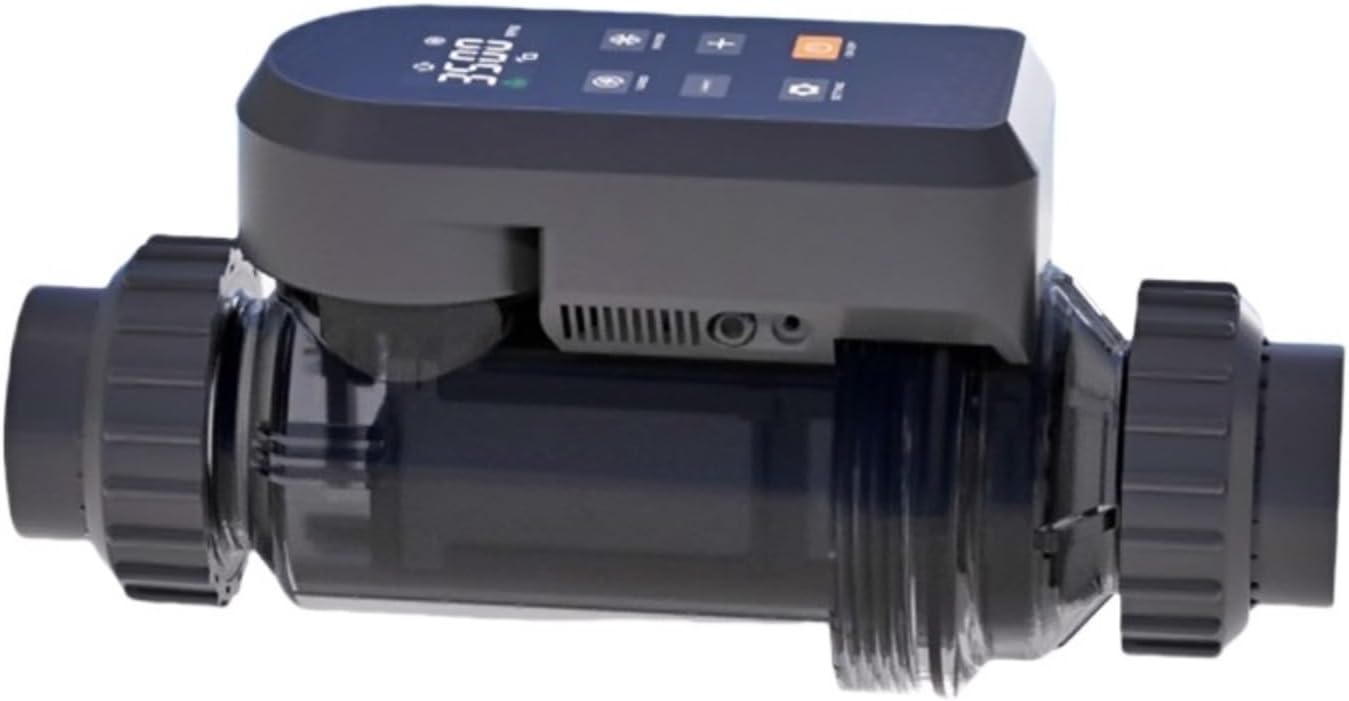
Figure 4.2: Side view of the generator, illustrating the plumbing inlet and outlet connections.

Figure 4.3: Technical drawing displaying the dimensions of the salt chlorine generator unit.

Figure 4.4: The external power supply unit that connects to the main generator cell.

Figure 4.5: Plumbing union connectors and associated gaskets for securing the generator into the pool's circulation system.
5. Setup and Installation
5.1 Pre-Installation Checks
- Pool Volume: Ensure your pool volume is within the recommended range for the LC300A (10,000-60,000 gallons).
- Salt Level: The ideal salt concentration for optimal operation is 3000-3500 ppm (parts per million). Test your pool water and adjust salt levels if necessary before installation.
- Water Chemistry: Balance your pool's pH (7.4-7.6), alkalinity (80-120 ppm), and stabilizer (cyanuric acid, 30-50 ppm) before starting the generator.
5.2 Physical Installation
- Location: Install the generator cell in the return line after the filter and heater (if applicable). Ensure there is sufficient space for maintenance and air circulation.
- Plumbing: Cut a section of the return pipe and install the generator cell using the provided union connectors. Ensure the flow direction arrow on the cell matches the water flow. Use PVC cement and primer for secure, leak-free connections.
- Electrical Connection: Connect the power supply unit to the generator cell. Plug the power supply into a GFCI-protected outlet. Ensure the power supply is protected from direct sunlight and moisture.
- Initial Startup: After plumbing and electrical connections are complete, turn on the pool pump. Check for leaks. Once water is flowing through the cell, turn on the power to the generator.
6. Operating Instructions
6.1 Control Panel Functions
The control panel on the generator unit allows for direct control and monitoring. Refer to the display for current status and settings.
- Power Button: Turns the unit ON/OFF.
- Output Adjustment Buttons (+/-): Increases or decreases the chlorine output percentage.
- Mode Button: Cycles through different operating modes or settings.
- Display Screen: Shows current salt level, chlorine output percentage, error codes, and other operational information.
6.2 Setting Chlorine Output
The optimal chlorine output percentage depends on your pool size, bather load, and environmental factors. Start with a moderate setting (e.g., 50-70%) and adjust as needed to maintain a free chlorine residual of 1-3 ppm.
- Ensure the pool pump is running.
- Press the Power button to turn on the generator.
- Use the '+' and '-' buttons to set the desired chlorine output percentage.
- Monitor your pool's free chlorine levels daily for the first week and adjust the output as necessary.
7. Wi-Fi and App Control
The GENERIC Intelligent Salt Chlorine Generator can be controlled and monitored remotely via a smartphone app. This feature requires a stable Wi-Fi connection.
7.1 App Download and Installation
Download the official GENERIC pool control app from your device's app store (iOS App Store or Google Play Store).
7.2 Connecting to Wi-Fi
- Ensure your generator is powered on and within range of your home Wi-Fi network (2.4 GHz only).
- Open the GENERIC app and follow the on-screen instructions to add a new device.
- The app will guide you through the process of connecting the generator to your Wi-Fi network. This typically involves putting the generator into pairing mode (refer to the app or generator display for specific instructions) and entering your Wi-Fi credentials.
7.3 App Features
Once connected, the app allows you to:
- Monitor current salt levels and water temperature.
- Adjust chlorine output percentage remotely.
- View operational status and error notifications.
- Set timers or schedules for chlorine production.
8. Maintenance
Regular maintenance ensures the longevity and efficient operation of your salt chlorine generator.
8.1 Cell Cleaning
The generator cell may accumulate scale deposits over time, especially in hard water areas. The unit's display or app may indicate when cleaning is required.
- Disconnect Power: Always turn off the pool pump and disconnect power to the generator before cleaning.
- Remove Cell: Unscrew the union connectors and carefully remove the generator cell from the plumbing.
- Inspect: Visually inspect the cell plates for scale buildup.
- Acid Wash (if necessary): If significant scale is present, prepare a solution of 1 part muriatic acid to 4 parts water in a plastic bucket. Submerge the cell plates (avoiding the electrical connections) in the solution until the bubbling stops. This typically takes 10-15 minutes.
- Rinse and Reinstall: Thoroughly rinse the cell with fresh water. Reinstall the cell, ensuring gaskets are properly seated, and tighten union nuts. Restore power and check for leaks.
CAUTION: Always add acid to water, never water to acid. Wear appropriate safety gear (gloves, eye protection) when handling muriatic acid.
8.2 Winterization
In regions with freezing temperatures, the generator cell must be drained and stored indoors during the off-season to prevent freeze damage.
- Disconnect power to the unit.
- Remove the generator cell from the plumbing.
- Drain all water from the cell.
- Store the cell in a dry, temperature-controlled environment.
9. Troubleshooting
This section addresses common issues you might encounter with your salt chlorine generator.
| Problem | Possible Cause | Solution |
|---|---|---|
| No chlorine production | Low salt level Dirty cell Low water flow Incorrect output setting | Test and adjust salt to 3000-3500 ppm Clean the generator cell (see Section 8.1) Check pool pump and filter for proper operation Increase chlorine output percentage |
| "Low Salt" indicator | Actual low salt Sensor issue | Test pool water and add salt as needed Clean the cell; if issue persists, contact support |
| "Flow" or "No Flow" indicator | Insufficient water flow Flow sensor obstruction | Ensure pool pump is running and filter is clean Check for blockages in plumbing or cell |
| Unit not powering on | No power to outlet Faulty power supply | Check GFCI outlet and circuit breaker Test power supply; contact support if faulty |
| App not connecting to generator | Incorrect Wi-Fi password Generator out of Wi-Fi range Router issues | Verify Wi-Fi password Move generator closer to router or use a Wi-Fi extender Restart router and generator; ensure 2.4 GHz network is used |
10. Specifications
- Model: LC300A
- Chlorine Output: 30 grams/hour (30g/h)
- Suitable Pool Volume: 10,000 - 60,000 Gallons
- Optimal Salt Level: 3000 - 3500 ppm
- Power Input: 100-240V AC, 50/60Hz
- Power Output: DC24V, 5A
- Power Consumption: 120W
- Connectivity: Wi-Fi (2.4 GHz)
- Application: Swimming Pools
11. Warranty and Customer Support
For any questions, technical assistance, or if you are not satisfied with your purchase, please contact our customer support directly. Refer to your purchase documentation for specific warranty terms and contact information.
Our support team is available to assist you with installation, operation, troubleshooting, and parts replacement.