
Introduction
Thank you for choosing the BLNAN Flat LED Ceiling Light. This manual provides essential information for the safe installation, operation, and maintenance of your new lighting fixture. Please read it thoroughly before use and retain it for future reference.
Safety Information
- Always disconnect the power supply at the main circuit breaker before attempting any installation, maintenance, or cleaning.
- Installation should be performed by a qualified electrician if you are unsure about electrical wiring.
- Ensure the voltage supply matches the requirements specified for this product (230V).
- This product is designed for indoor use only. Do not expose it to water or high humidity.
- Do not attempt to modify or disassemble the light fixture. There are no user-serviceable parts inside.
- Keep packaging materials out of reach of children.
Package Contents
Please check that all components are present and undamaged:
- 1 x BLNAN Flat LED Ceiling Light
- 1 x Instruction Manual (This document)
- Mounting hardware (screws, wall anchors, wire connectors)
Product Specifications
| Brand | BLNAN |
| Model Number | LS-CL-I4-24W--CCT/N |
| Power | 24 Watts |
| Lumen Output | 2400 Lumens |
| Color Temperature | 2000K (Night Light), 3000K (Warm White), 4000K (Neutral White), 5000K (Cool White) |
| Voltage | 230 Volts |
| Material | Polycarbonate |
| Product Dimensions (LxWxH) | 30 cm x 30 cm x 2.5 cm |
| Lifespan | Over 30,000 hours |
| Mounting Type | Flush Mount, Ceiling Mount |
| Special Features | Adjustable Color Temperature, Night Light Function, Memory Function, Over-voltage, short-circuit, and overheat protection |
| Recommended Room Use | Balcony, Bedroom, Kitchen, Office, Basement, Bathroom, Living Room, Hallway |
Installation Instructions
Before beginning installation, ensure the power supply is turned off at the circuit breaker.
- Prepare the Light Fixture: Rotate the light fixture counterclockwise to detach the mounting base from the main lamp body.
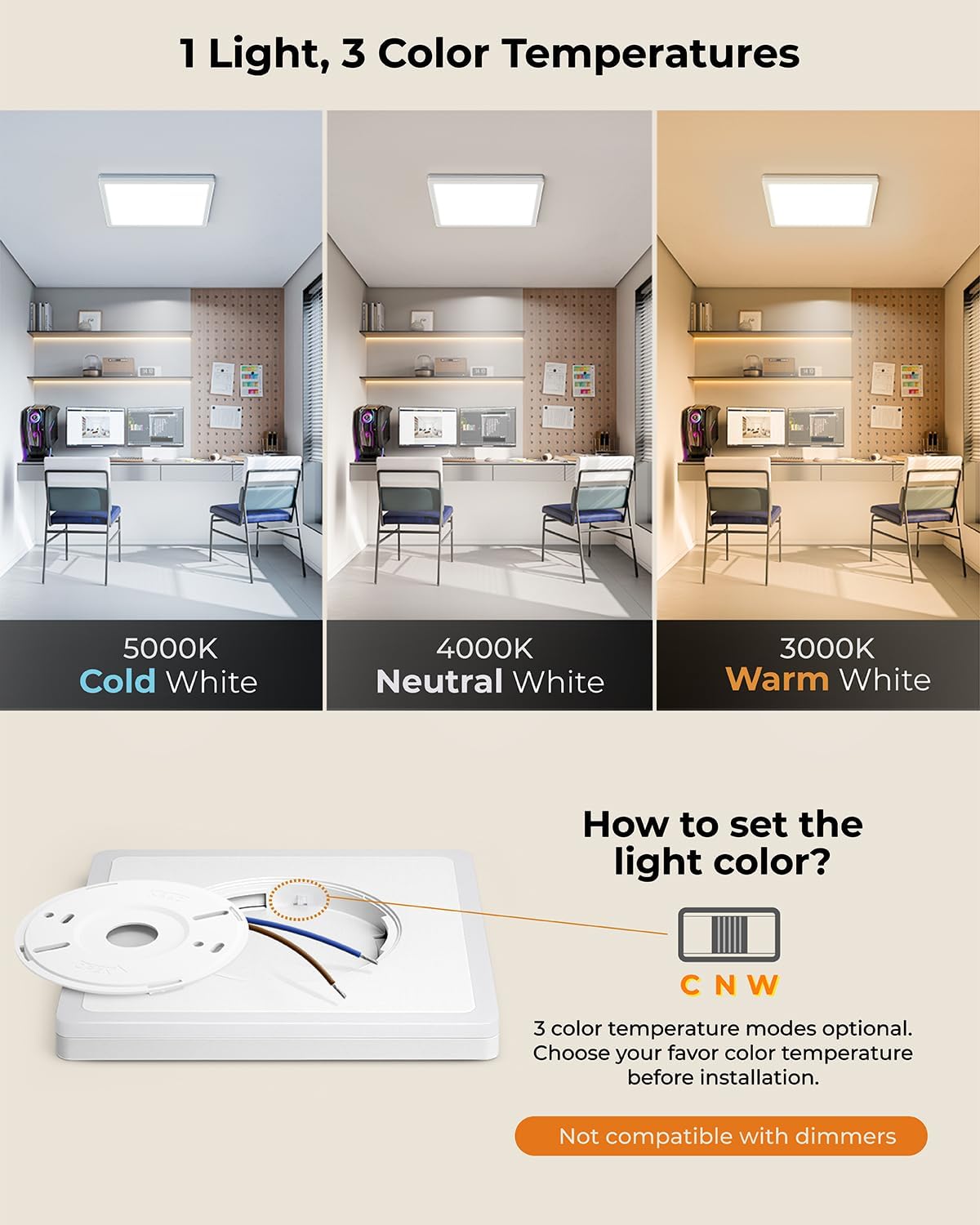
- Select Color Temperature: Before mounting, locate the small switch on the back of the lamp body. Use this switch to select your desired main light color temperature: 3000K (Warm White), 4000K (Neutral White), or 5000K (Cool White). This setting is fixed after installation.
- Fix the Mounting Base: Position the mounting base on the ceiling where you intend to install the light. Mark the screw holes. Drill pilot holes if necessary and secure the mounting base to the ceiling using the provided screws and wall anchors. Ensure the screw distance is approximately 7cm-9cm.
- Connect the Wires: Carefully connect the electrical wires from your ceiling to the corresponding terminals on the mounting base. Typically, this involves connecting the Live (L), Neutral (N), and Ground (E) wires. Ensure all connections are secure.
- Attach the Lamp Body: Align the main lamp body with the installed mounting base. Push the lamp body upwards and rotate it clockwise until it locks securely into place.

Operating Instructions
Main Light and Night Light Function
This ceiling light features a main light mode (24W, 2400LM) and a unique 2000K amber night light mode (5W).
- To activate Main Light: Turn your wall switch ON. The light will illuminate in the previously selected main color temperature (3000K/4000K/5000K).
- To activate Night Light: Quickly toggle your wall switch OFF and then ON again (ON-OFF-ON sequence). The light will switch to the soft 2000K amber night light mode.
- To return to Main Light: Toggle your wall switch OFF and then ON again from the night light mode.


Memory Function
The light features a memory function that recalls the last selected lighting mode (main light or night light).
- Turn on the ceiling light and select your desired lighting mode.
- Keep the light in this mode for at least 30 seconds.
- Turn off the light for at least 10 seconds.
- The next time you turn on the light, it will automatically restore the previously selected mode.
Maintenance
- Cleaning: Ensure the power is off before cleaning. Use a soft, dry, or slightly damp cloth to wipe the surface of the light fixture. Do not use abrasive cleaners, solvents, or harsh chemicals, as these can damage the finish.
- Bulb Replacement: This LED ceiling light uses integrated LED chips that are designed for long-term use (over 30,000 hours) and are not user-replaceable.
- Inspection: Periodically check the light fixture for any signs of damage or loose connections. If any issues are found, disconnect power and consult a qualified electrician.
Troubleshooting
| Problem | Possible Cause | Solution |
|---|---|---|
| Light does not turn on. | No power supply. Loose wiring connection. Faulty wall switch. | Check the circuit breaker. Ensure all wires are securely connected (power off first). Test the wall switch with another device. |
| Light flickers. | Unstable power supply. Loose wiring connection. | Ensure stable power. Check wiring connections (power off first). |
| Night light mode does not activate. | Incorrect switch sequence. | Ensure a quick ON-OFF-ON sequence on the wall switch. |
| Main light color temperature cannot be changed. | Color temperature is set during installation. | The main light color temperature (3000K/4000K/5000K) is selected via a switch on the back of the lamp before installation and cannot be changed during normal operation. |
Warranty Information
This BLNAN product comes with a standard manufacturer's warranty. Please refer to your purchase documentation or contact your retailer for specific terms, conditions, and duration of the warranty.
Customer Support
For technical assistance, troubleshooting not covered in this manual, or any other inquiries, please contact your retailer or visit the official BLNAN website for support.


